.svg)

A vendor sends over a PDF labeled "SOC 2 Report" and moves on like the security review is done. You open it. It's 60 pages, written by an auditor for other auditors, and somewhere in there is the actual answer to whether this vendor is safe to hand your data to.
Reviewing a vendor's SOC 2 report means checking four things: the report type, the auditor's opinion, the scope of what was actually tested, and any noted exceptions. Together, those four tell you whether the report backs up the vendor's security claims or just gestures at them.
This is a different question than "how do I get my own SOC 2 report." That's the vendor's job. This guide is for the other side of the table: you've been handed someone else's report and need to decide what it actually tells you.
By the end of this, you'll have a real review process, a red-flags checklist, and a sense of how often to look again after the first review.
Here's what's ahead:
- What reviewing a vendor's report actually involves, and how it's different from getting your own
- Why skipping this step costs more than the ten minutes it takes to do it
- A step-by-step review process, including the two steps most people skip
- A red-flags checklist to catch the reports worth pushing back on
- Why an exception isn't automatically a dealbreaker
- What to do when a vendor doesn't have a SOC 2 report at all
- How often to look again after the first review
- What to do with bridge letters, and which report to prioritize if a vendor hands you both a SOC 1 and a SOC 2
How to Review a SOC 2 Report From a Vendor: What It Actually Involves
Reviewing a vendor's SOC 2 report is not the same job as getting your own. If your team is the one being audited, you're building a system and proving it works. If you're on the receiving end of someone else's report, the job is smaller and more specific: read what an independent auditor already concluded, and decide whether it answers the questions you actually have.
That distinction matters because most of what gets written about SOC 2 online is aimed at the first group. This guide is for the second one: procurement, security, or whoever at your company owns vendor risk, usually without a dedicated team behind them yet.
Learning how to review vendor SOC 2 report submissions properly is a skill, not a one-time checklist item you memorize and forget. The reports look similar enough across vendors that the process generalizes well once you've done it a handful of times, which is the whole point of walking through it step by step below rather than treating each new vendor as a fresh puzzle.
Type I vs. Type II: How to Read a SOC 2 Report in Two Formats
Before anything else, confirm which type of report you're actually holding. A Type I report is a snapshot: it says the vendor's controls were designed properly on one specific date. A Type II report covers a window, usually 6 to 12 months, and says those controls actually operated effectively the whole time.
The difference matters more than it sounds like it should. A Type I only proves the vendor built the right controls. A Type II proves those controls held up under real conditions for months, not just on the day someone checked. If a vendor hands you a Type I when you were expecting ongoing assurance, that's worth a direct question, not a shrug.
This is also the first place people learning how to read a SOC 2 report get tripped up, since both types use similar-looking cover pages and it's easy to skim past the one line that actually says which type you're holding.
Side by side, the practical difference looks like this:
| Type I | Type II | |
|---|---|---|
| What it proves | Controls existed and were designed properly, on one specific date | Controls operated effectively over the full observation window |
| Observation window | A single point in time | Typically 6 to 12 months |
| What it doesn't tell you | Whether the controls held up under real, ongoing conditions | Anything about the period before the observation window started |
| When it's normal to see one | A vendor's first report, before enough history exists for a Type II | Any renewal cycle, and generally what you should expect going forward |
Getting comfortable with this distinction is worth the five minutes it takes, since it's the single most common point of confusion in every report you'll review after this one too.
How to Review Vendor SOC 2 Report Submissions: Why It Matters
A SOC 2 report that gets filed away unread doesn't protect anyone. It just creates the appearance of due diligence without the substance of it, and that gap tends to surface at the worst possible time: after a breach, during an audit, or in a contract dispute where someone asks "did we actually check this."
The risk isn't abstract. If a vendor's report shows repeated control failures and nobody caught it, that vendor's security problem becomes your security problem the moment their system touches your data. Your own compliance program inherits whatever gaps the vendor's report already disclosed and nobody acted on.
Picture the actual sequence: a vendor's SOC 2 report shows a repeated exception on access-review controls, procurement signs the contract anyway because the cover letter said "unqualified," and eight months later that same gap shows up as the root cause in an incident review. Nobody lied. Nobody hid anything. The information was sitting in a section nobody opened.
Most vendor reviews don't fail because the report was hiding something. They fail because nobody actually opened it past the cover page. The information is usually right there. — Varun Jain, CEO at ComplyJet
Ten minutes spent reading the auditor's opinion and scanning for exceptions is cheap. Explaining to your own auditor, or your own customers, why you signed a contract with a vendor whose report had a qualified opinion sitting in plain sight is not.
This is also where a company's own compliance posture gets tested in a way that has nothing to do with its own controls. An auditor reviewing your vendor-management process doesn't just want to see that you collected SOC 2 reports.
They want evidence that someone actually read them, decided something based on what was in there, and can point to that decision later. A folder full of unopened PDFs doesn't produce that evidence, no matter how many vendors are in it.
How to Review a SOC 2 Report: The Core Steps
Here's the actual process, in order. Most of it takes less time than reading this section. Knowing how to review SOC 2 report scope specifically, covered in its own step below, is what separates a real review from a skim, since it's the step that determines whether the rest of the report even applies to what you're buying.
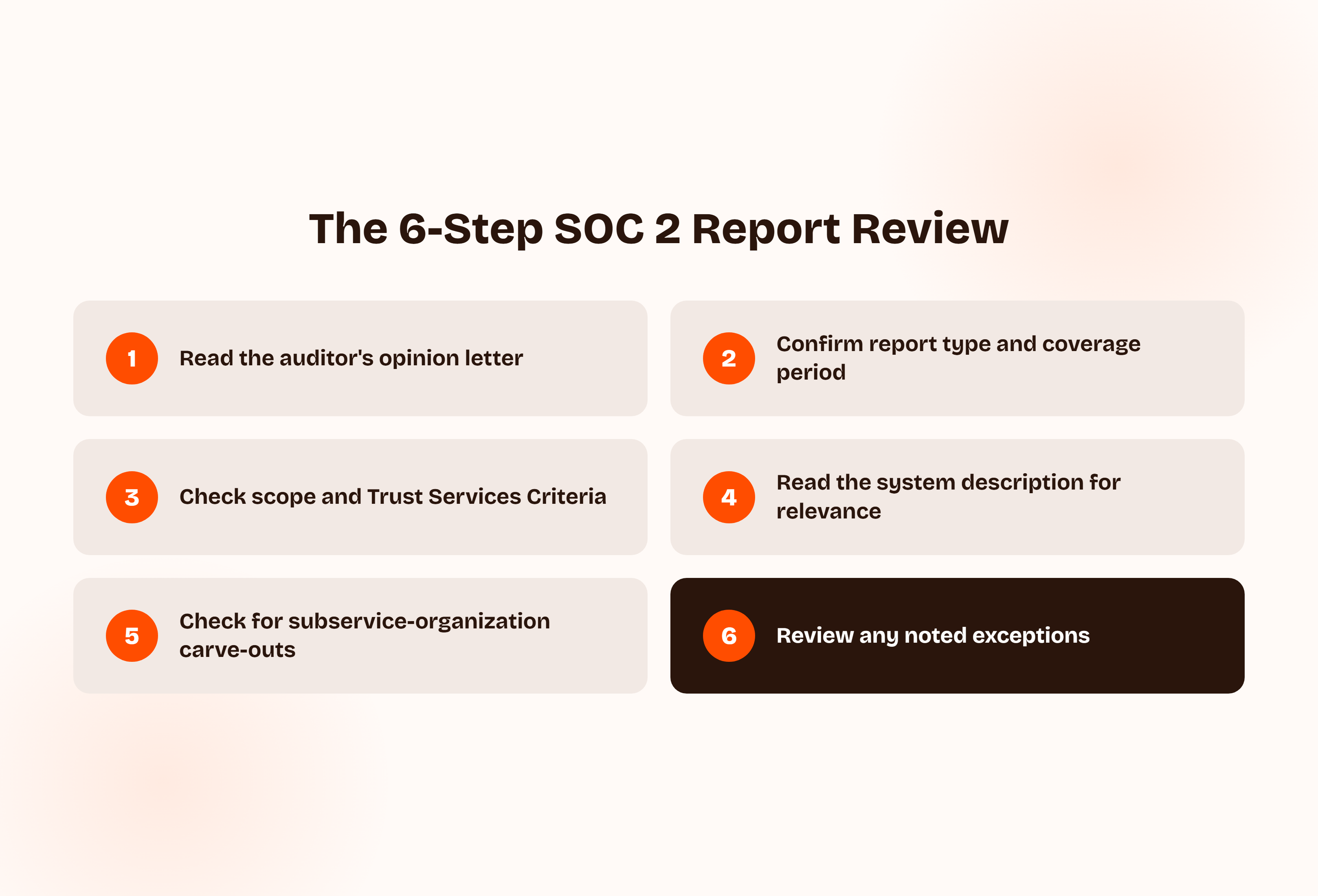
- Start with the auditor's opinion letter. It's near the front, and it's the single most important page in the report. Look for an unqualified opinion. "Qualified," "adverse," or "disclaimer of opinion" means the auditor found something significant enough to say so upfront, and everything after this page should be read in light of what it says.
- Confirm the report type and coverage period. A Type II covering the last 6 to 12 months is what you generally want. Check the actual dates against the report's actual validity window, not just the type. A report that expired four months ago is not current evidence, no matter how clean the opinion was when it was issued.
- Check the scope and Trust Services Criteria. Covered in detail in the next section, since it's the step most people skip. A report can be technically clean and still not answer the question you actually care about, if the criteria examined don't match what you're buying.
- Read the system description for relevance. Confirm the systems, data flows, and locations described actually match what you're buying, not a different product line or a legacy environment the vendor no longer sells. Vendors with multiple products sometimes scope the audit around one that isn't the one in your contract.
- Check for subservice-organization carve-outs. If the vendor relies on other vendors (cloud hosting, a payment processor, a support tool) to deliver their service, confirm whether those third parties are included in the audit ("inclusive") or excluded ("carved out"). A carved-out subservice organization that touches your data is a real gap, not a technicality, since it means nobody's auditor actually looked at that piece.
- Review any noted exceptions. Covered in its own section below, since not every exception is a red flag. Skipping straight past this section, which is exactly what most unread reports have in common, is where the real information usually gets missed.
Laid out visually, the whole process looks like this:
The next two steps deserve more depth than a one-line bullet gives them, since they're the two most commonly skipped in practice.
How to Review SOC 2 Report Scope Before Anything Else
Every SOC 2 report covers the Security criterion at minimum. Beyond that, a vendor's auditor may have also tested Availability, Confidentiality, Processing Integrity, or Privacy, depending on what the vendor asked to be scoped in.
Security alone is the floor, not the ceiling. If you're buying a service where uptime matters and the report only covers Security, you don't have audited evidence of availability controls at all, regardless of what the vendor's marketing page claims. Check the "Scope" paragraph in the auditor's report to see exactly which criteria were actually examined.
How to Review a SOC 2 Report's Auditor Credentials
A SOC 2 report is only as credible as the firm that issued it. It has to come from a licensed CPA firm, and it's worth actually confirming that rather than taking the letterhead at face value.
Two concrete ways to check: NASBA's CPAVerify tool confirms whether a CPA license is active, and the AICPA's Peer Review program confirms whether the firm itself has passed its own quality review. Most reviewers skip this entirely and just glance at whether the letter "looks official." It takes under five minutes to actually verify.
SOC 2 Report Review Checklist: Red Flags to Watch For
Some findings in a SOC 2 report deserve more scrutiny than others. Here's a soc 2 report review checklist of what should actually slow you down:
- An adverse or qualified opinion, or a disclaimer of opinion, on the cover letter. This is the single clearest signal in the whole report, and it's the one people skip past most often.
- A Type I report when the vendor implied ongoing assurance. Ask directly why there's no Type II yet, and whether one is already in progress.
- A report that's aging toward or past its coverage window, with no bridge letter offered to cover the gap. A vendor that has one ready when asked is usually a good sign about how seriously they treat the audit itself.
- An undisclosed subservice organization that clearly touches your data but isn't listed as included in scope. This is easy to miss on a skim and worth a specific, direct question.
- The same control exception repeated across multiple periods, rather than a one-off. A single exception can be a fluke. The same one twice is a pattern.
- A vague or boilerplate system description that reads like a template rather than a description of the actual product you're buying.
- No mention of Complementary User Entity Controls (CUECs) at all, since nearly every real SOC 2 report's controls section has them. Their absence usually means something was cut for length, not that none apply.
- No clearly identified auditor firm, or one you can't verify through NASBA or the AICPA.
None of these automatically or immediately disqualify a vendor. They're the signals worth asking a direct follow-up question about before you sign anything, and a vendor with a genuinely strong security program will usually have a straightforward answer ready for any of them.
Reading a checklist like this from the other side is worth a moment too. If your own company is the one that gets reviewed against a list like this, it's worth knowing in advance whether your own report would raise any of these same flags.
Exceptions Aren't Automatically a Red Flag
An "exception noted" in a SOC 2 report means the auditor found an instance where a control didn't operate exactly as designed. That's not the same as a "deficiency," which signals a more serious, structural failure. Treating every exception as a dealbreaker misreads how these reports actually work.
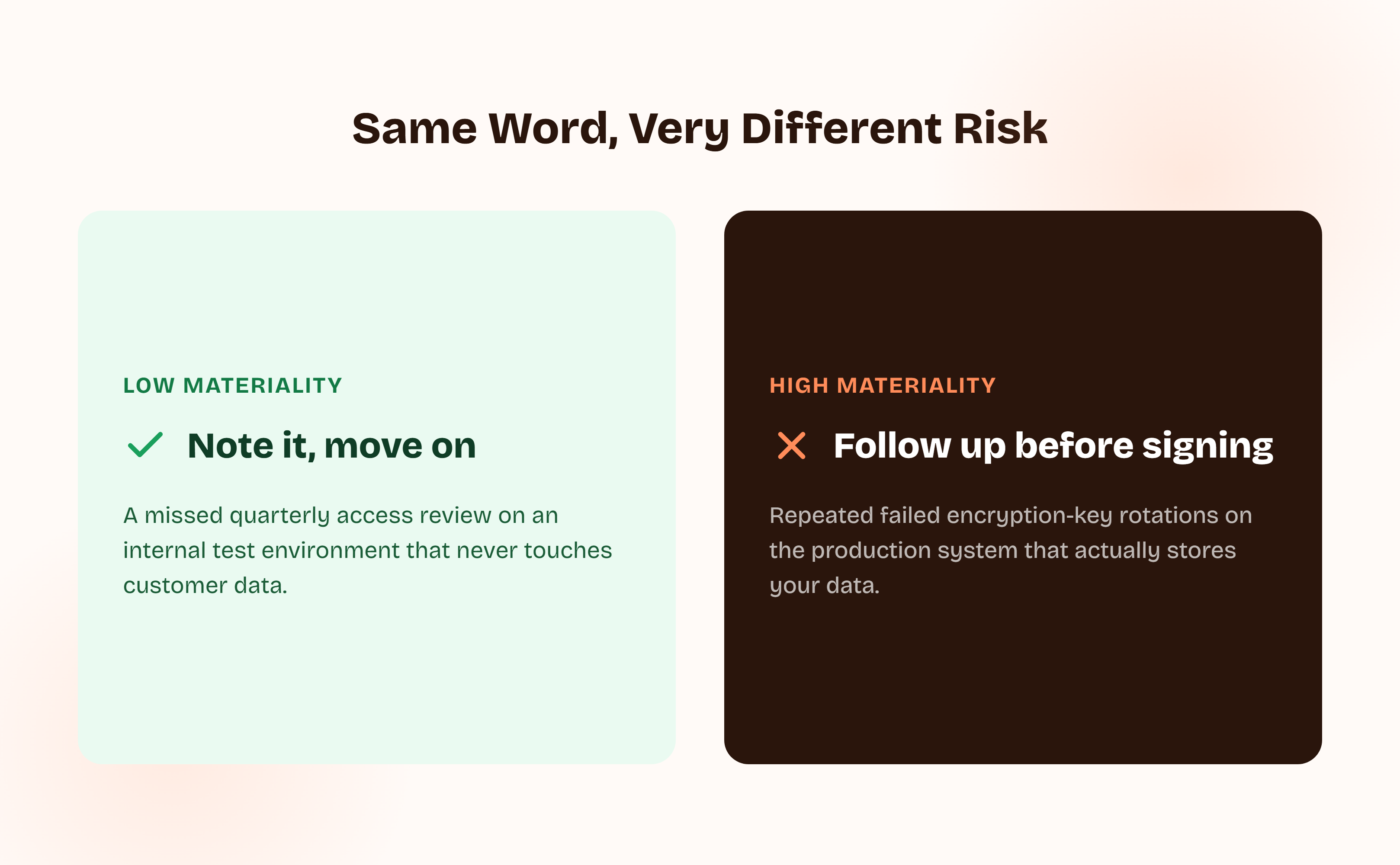
The real test is materiality: does this exception affect the service you're actually using? A single missed quarterly access review on an internal test environment that never touches customer data at any point is a low-materiality exception worth noting and moving past. A pattern of failed encryption-key rotations on the production system that actually stores your data is not, and deserves real follow-up before you sign anything. Same word on the page, very different risk entirely.
Asking two follow-up questions gets you most of the way to a real answer: which specific system or control did this exception affect, and has the vendor already remediated it. A vendor that can answer both clearly and specifically is usually in better shape than the exception alone suggests. One that gets vague or defensive about either question is a different signal entirely, regardless of how minor the exception looked on paper.
What If the Vendor Doesn't Have a SOC 2 Report?
This comes up more than the "how to review one" question suggests. Smaller or newer vendors, especially early-stage startups, often haven't completed a SOC 2 audit yet, even if their security posture is genuinely solid.
A missing SOC 2 report isn't automatically a dealbreaker. A few reasonable substitutes, each with real limits:
| Substitute | What it shows | What it doesn't cover |
|---|---|---|
| ISO 27001 certificate | An accredited body certified an information security management system | Different criteria than SOC 2's Trust Services framework; not the same evidence |
| Recent third-party penetration-test report | Testers actively tried to break in and documented what they found | A point-in-time technical test, not an audited management system over time |
| Completed security questionnaire | The vendor's own detailed, written answers to your specific questions | Self-reported, not independently verified by an auditor |
None of these fully substitutes for a SOC 2 report. Together, they're a reasonable basis for a smaller or earlier-stage vendor, especially paired with a commitment to a specific timeline for getting a real audit done. Document whichever combination you accepted and why, so the decision is visible later rather than living only in someone's memory of a sales call.
How much weight to give that combination depends on how much access the vendor actually needs. A tool that only touches non-sensitive internal data can reasonably move forward on a strong questionnaire and a recent pentest. A vendor about to handle regulated customer data with no SOC 2 report and no committed timeline is a different, harder conversation.
Ask the vendor directly where they are in the process rather than treating the absence of a report as a flat no. A vendor actively working with an auditor and six weeks from a Type I is a very different risk than one that's never started and has no plan to. The timeline itself is real information, not just a placeholder answer to make the gap feel less urgent.
How to Review a SOC 2 Report on an Ongoing Basis: Cadence and Triggers
A SOC 2 report reviewed once at onboarding and never looked at again isn't a review program, it's a one-time gate. Reports expire, vendors change infrastructure, and a clean report from eighteen months ago tells you nothing about today.
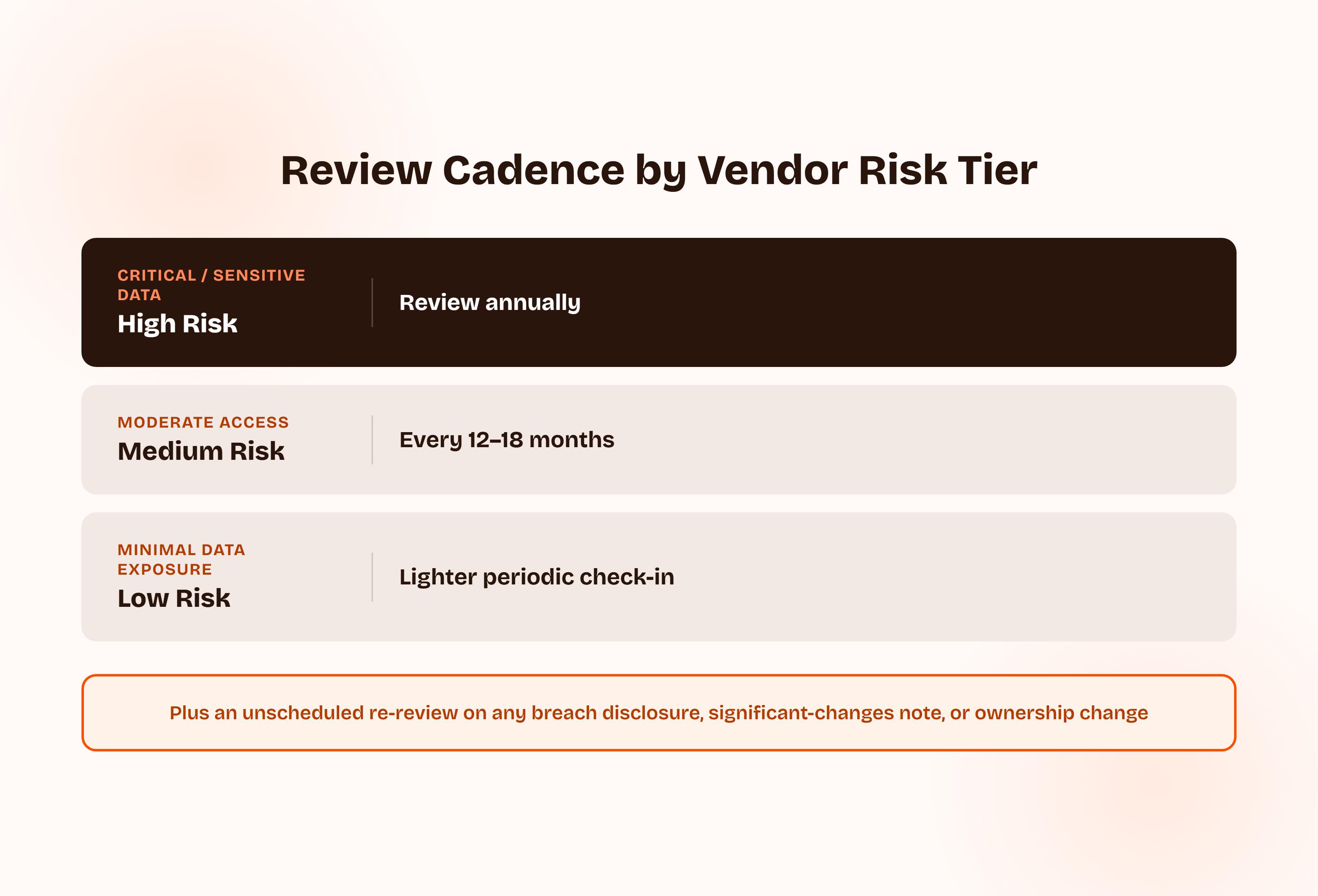
A reasonable cadence scales with how much access the vendor actually has: annually for vendors handling sensitive or regulated data, every 12 to 18 months for moderate-access vendors, and a lighter check-in for anything with minimal data exposure.
On top of that schedule, a few events should trigger an unscheduled re-review regardless of when the last one happened: a public breach disclosure involving the vendor, a "significant changes" note in a new report, or a vendor's acquisition, ownership change, or infrastructure migration.
How to Review a SOC 2 Report Between Renewal Periods: Bridge Letters
If a vendor's SOC 2 report period has ended and the next one isn't ready yet, ask for a bridge letter. It's a short statement from the vendor's auditor confirming there have been no material changes since the last report, and it's a normal, standard request, not an unusual demand.
A vendor that pushes back on providing one, or can't get their auditor to issue one, is worth a direct question about why. For the full mechanics of how bridge letters work and how long they're good for, see ComplyJet's guide to what a bridge letter actually is.
A bridge letter is not a substitute for the next full report. It's a stopgap, usually covering a matter of weeks or a couple of months, meant to keep you covered while the next audit period closes out and the new report gets issued.
If a vendor is still leaning on a bridge letter well past a reasonable renewal window, that's a sign the next audit is running later than it should. That's worth asking about directly rather than assuming it's routine.
If a Vendor Hands You Both a SOC 1 and a SOC 2 Report
Occasionally a vendor provides both a SOC 1 and a SOC 2 report, and it's not always obvious which one to actually read closely. SOC 1 covers controls relevant to financial reporting. SOC 2 covers security, availability, and the other Trust Services Criteria.
For most vendor-security reviews, prioritize the SOC 2 report. It's the one that actually addresses whether your data is handled securely, which is almost always the question you're trying to answer. The SOC 1 matters more if the vendor's service touches your financial statements directly, like a payroll or billing processor. For the fuller breakdown of scope and audience, see ComplyJet's SOC 1 vs. SOC 2 comparison.
It's worth reading both if you have the time, especially for a vendor that touches both your data and your financial reporting. But if you can only review one closely before a deadline, the security-focused report is almost always the one that answers the question a security or procurement review actually exists to answer.
How to Review a SOC 2 Report Without Making These Mistakes
- Treating any SOC 2 report as automatically good enough. A report that doesn't cover the right Trust Services Criteria for what you're buying isn't reassuring just because it exists.
- Skipping the exceptions section entirely. It's usually near the back, and it's where the actual substance of the audit lives.
- Not noticing a Type I when you needed a Type II. The difference between "designed properly" and "operated effectively for months" is significant, not a minor technicality to wave away.
- Missing an undisclosed subservice-organization carve-out. If the vendor outsources part of their service, confirm whether that part was actually in scope.
- Filing the report away with no re-review date. A review that happens once and never again isn't a program, it's a formality.
- Assuming "SOC 2 compliant" language on a vendor's website is the same as having read their actual report. Marketing copy and the report itself are not the same evidence.
- Letting the vendor's sales team summarize the report instead of reading it yourself. A verbal summary from someone whose job is to close the deal is not a substitute for the auditor's own opinion.
- Treating this as a one-person, one-time task with no record of what was checked. If nobody else can see why a vendor passed review, the next person who reviews that same vendor starts from zero.
FAQs
How to Review a SOC 2 Report From a Vendor?
Check four things in order: the report type (Type I or Type II), the auditor's opinion on the cover letter, the scope and which Trust Services Criteria were tested, and any noted exceptions. Together they tell you whether the report actually backs up the vendor's security claims.
How Do I Read a SOC 2 Report If I'm Not a Security Expert?
Start with the auditor's opinion letter near the front. It's written in plain enough language to tell you whether the auditor found something significant. From there, check the scope paragraph and the exceptions section; those two sections carry most of the practical information, even if the rest of the report is dense.
What Should I Look for in a Vendor's SOC 2 Report?
The auditor's opinion type, the report period and whether it's still current, which Trust Services Criteria were actually examined, whether any subservice organizations are carved out of scope, and any noted exceptions. Those five things cover almost everything that matters for a vendor-security decision, and in roughly that order of importance if you're triaging a stack of reports against a deadline.
How Often Should I Review a Vendor's SOC 2 Report?
At minimum, whenever their current report expires, typically annually. Higher-risk vendors handling sensitive data are worth reviewing on a stricter schedule, and a public breach disclosure or a significant-changes note in a new report should trigger a re-review regardless of schedule. Treat the schedule as a floor, not a ceiling; nothing stops a re-review earlier if something about the vendor changes.
What if a Vendor Doesn't Have a SOC 2 Report?
It's common for smaller or newer vendors. Reasonable substitutes include an ISO 27001 certificate, a recent third-party penetration-test report, or a detailed completed security questionnaire, though none of these fully replaces independently audited evidence over time.
Should I Request a SOC 1 or SOC 2 Report From a Vendor?
For most vendor-security reviews, SOC 2 is the more relevant report, since it covers security and availability rather than financial-reporting controls. Request SOC 1 specifically if the vendor's service touches your financial statements directly.
How to Review a SOC 2 Report in Under 15 Minutes?
Start with the opinion letter, about 2 minutes, then check the report type and dates, another 2 minutes. Read the scope paragraph for the Trust Services Criteria examined, roughly 3 minutes, then skim the system description for relevance, another 3 minutes.
Spend the remaining 5 minutes reading the exceptions section in full. That covers the highest-value information in the report. A deeper review, including subservice-organization carve-outs and auditor verification, is worth the extra time for higher-risk vendors, but this gets you a real answer, not a guess, in about the length of a coffee break.
How to Read a SOC 2 Report Quickly Without Missing Anything Important?
Read in this order: opinion letter, scope paragraph, exceptions section, system description. That sequence front-loads the parts most likely to change your decision and pushes the denser background material, the full Trust Services Criteria descriptions and the detailed control-testing tables, to later, optional reading. Most of what actually matters for a go/no-go decision is in the first three sections.
Related Reading
- What Is a Bridge Letter?, for the full mechanics of covering the gap between a vendor's report periods.
- SOC 2 Unqualified Opinion, for a deeper look at what the cleanest possible auditor's opinion actually means.
- SOC 2 Report Validity, on how long a SOC 2 report stays current before it needs renewing.
- SOC 1 vs SOC 2: Key Differences, Compliance, and Which You Need, the fuller breakdown for readers who received both report types from a vendor.
- SOC 2 Controls, for a closer look at the controls (including CUECs) a SOC 2 report actually tests.
- AWS SOC 2 Report, a worked example of reviewing one specific major vendor's own report.
- Best Vendor Risk Management Software, for readers managing this review process across more than a handful of vendors.