.svg)

A pull request merges, the pipeline runs, and three weeks later an auditor asks for proof that change went through review before it hit production. Nobody took a screenshot. Nobody wrote it down. It happened, but there's no clean way to show it happened.
Compliance as code is the fix for that gap: enforcing and evidencing compliance controls, like the ones SOC 2 asks for, as automated checks inside your CI/CD pipeline and infrastructure config, instead of manual screenshots and spreadsheets assembled after the fact. Passing a control becomes a byproduct of how code already ships, not a separate task someone has to remember to do.
We work with early-stage engineering teams heading into their first SOC 2 audit constantly, and the ones who get this right are almost always the ones already running a disciplined CI/CD pipeline before they ever think about compliance.
By the end of this, you'll know exactly what compliance as code means, how it's different from policy as code, which SOC 2 controls it can actually automate, which ones it can't, and where to start if you're a small team with one cloud account and one CI tool. Here's what's ahead:
- What compliance as code actually means, in plain terms
- How it's different from policy as code
- Why manual evidence collection breaks down as a team ships faster
- How SOC 2 criteria map to specific pipeline controls, with real AWS and GitHub examples
- The tools that make this work, organized by layer
- What still doesn't automate, and won't
- How to start on a small team without a platform-engineering budget
What Is Compliance as Code?
Compliance as code means expressing a compliance control as a rule your systems enforce automatically, rather than a policy a person is supposed to remember and follow. A pull request that can't merge without a passing security scan is compliance as code, whether or not anyone on the team calls it that.
This is different from ComplyJet's own guide to what compliance automation is, which covers compliance software and platforms broadly. This article is specifically about the engineering practice: encoding controls directly into CI/CD pipelines and infrastructure configuration, not about picking a GRC tool.
This exists because manual evidence collection was never built for how modern teams ship software. A quarterly access review made sense when deploys happened quarterly too. It doesn't hold up against a team merging code multiple times a day.
Policy as Code Compliance vs. Compliance as Code: What's the Difference?
These two terms get used almost interchangeably, and that's a real problem, because they're not the same thing.
Policy as code is the mechanism: a rule written in a format a machine can evaluate and enforce, using tools like Open Policy Agent (OPA) and its Rego language, or a scanner's custom-check syntax. It answers one question: does this specific thing violate this specific rule, right now?
Compliance as code is the broader practice built on top of that mechanism: policy as code, plus continuous evidence collection, plus ongoing monitoring, all aimed at satisfying a specific framework's requirements over time, not just at one instant.
| Policy as Code | Compliance as Code |
|---|---|
| A single enforceable rule (e.g. "no public S3 buckets") | The full practice of proving a framework's controls are met, continuously |
| Answers: does this violate the rule right now? | Answers: can we prove this control has held over the whole audit period? |
| Lives in tools like OPA/Rego, scanner custom checks | Spans policy-as-code rules, evidence logging, and monitoring together |
Put simply: policy as code is the tool. Compliance as code is what you're using the tool for.
That's why a policy as code compliance program still isn't the same thing as a compliance-as-code program on its own. Enforcing the rule is only half of what an auditor needs. The other half is the evidence trail showing the rule was actually enforced, consistently, across the whole audit period, not just at the moment someone happened to check.
Why DevOps Compliance as Code Beats Manual Evidence Collection
Here's the scenario that breaks manual compliance every time: a team deploys twenty times a week, and an auditor asks for evidence that every production change over the last six to twelve months went through review and approval before it shipped.
Screenshots don't survive that math. Neither does a spreadsheet someone updates "when they remember."
Devops compliance as code solves this by making the evidence a side effect of the pipeline that was going to run anyway. The pull request record, the required-reviewer approval, the CI status check, the deployment log: none of that has to be manually captured, because the systems that already run the deploy are the same systems generating the proof.
How Does Compliance as Code Work in a CI/CD Pipeline?
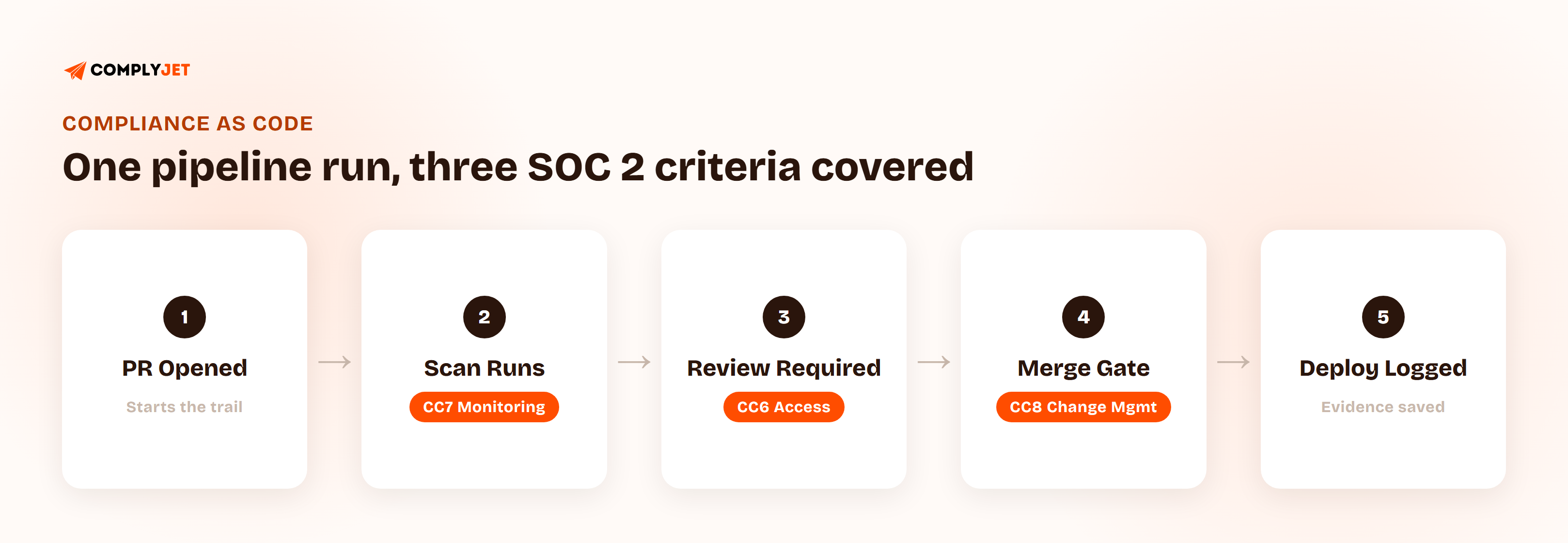
The clearest way to understand compliance as code in practice is to map specific SOC 2 criteria to specific points in a pipeline, rather than talking about it in the abstract.
Which SOC 2 Criteria Map to Which Pipeline Controls
| SOC 2 Criterion | What It Requires | Pipeline Control | Evidence Artifact |
|---|---|---|---|
| CC6 (access control) | Access is restricted to what's needed | Branch protection, required reviewers, least-privilege deploy credentials | Repo settings + IAM role logs |
| CC7 (monitoring) | Systems are monitored for issues | Pipeline and deploy logging, alerts on failed or skipped checks | CI logs, alerting history |
| CC8 (change management) | Changes are authorized, reviewed, and tested before release | PR review, approval, and CI status checks required before merge | Full commit-to-deploy trail |
Most competitor write-ups on this topic name one of these criteria, usually CC8, and stop there. All three matter, and mapping just one leaves the other two looking unaddressed to an auditor who asks about them directly.
Infrastructure as Code Compliance: Where IaC Fits In
Infrastructure as code compliance means scanning the configuration itself, Terraform, CloudFormation, Kubernetes manifests, before it ever deploys. A misconfigured storage bucket or an overly permissive security group gets caught in the pull request, not discovered by an auditor (or an attacker) after the fact.
A Compliance as Code AWS Example: What a Real Pipeline Looks Like
A concrete walkthrough on an AWS-backed stack:
- An engineer opens a pull request changing a Terraform file that provisions a new S3 bucket.
- An IaC scan runs automatically and flags that the bucket isn't set to block public access by default.
- The pipeline fails the check. The PR can't merge until the misconfiguration is fixed.
- The engineer corrects it, the scan passes, a required reviewer approves, and the change merges.
- The scan result, the reviewer's approval, and the merge timestamp are all logged automatically, no one had to write any of it down.
This same compliance as code AWS pattern generalizes to any cloud provider with an equivalent IaC scanner wired into the pipeline. GCP and Azure teams run the identical flow, just against their own provider's config format.
A Compliance as Code GitHub Example: Gating Merges on Compliance Checks
The same idea, seen through GitHub Actions instead of infrastructure config:
- A pull request triggers a static-analysis scan as a required GitHub Actions check.
- The scan produces a structured (SARIF-format) result tied directly to the specific lines changed in that PR.
- GitHub's branch protection rules block the merge button until the check passes and a required reviewer signs off.
- Once merged, the deploy step runs, and the full chain, PR, scan result, reviewer, merge, deploy, is sitting in one place if anyone ever needs to pull it up.
This compliance as code GitHub example works the same way on GitLab CI or Jenkins, provided the platform supports required status checks before a merge is allowed. The tool changes; the underlying pattern, block the merge until the check passes, doesn't.
Compliance as Code Tools: What You Actually Need at Each Layer
Compliance as code tools are easier to reason about once you see they stack in layers, rather than compete with each other. Most write-ups on this topic list tool logos without ever explaining how they fit together.
| Layer | What It Does | Example Tools |
|---|---|---|
| IaC / config scanning | Catches misconfigurations in infrastructure code before it deploys | Checkov-class scanners, cloud-native config checkers |
| Policy enforcement | Enforces custom rules programmatically, at the point a change is made | Open Policy Agent (OPA) and Rego-based policies |
| Evidence / GRC layer | Collects and organizes the evidence these layers produce into an audit-ready format | Compliance automation platforms, including ComplyJet |
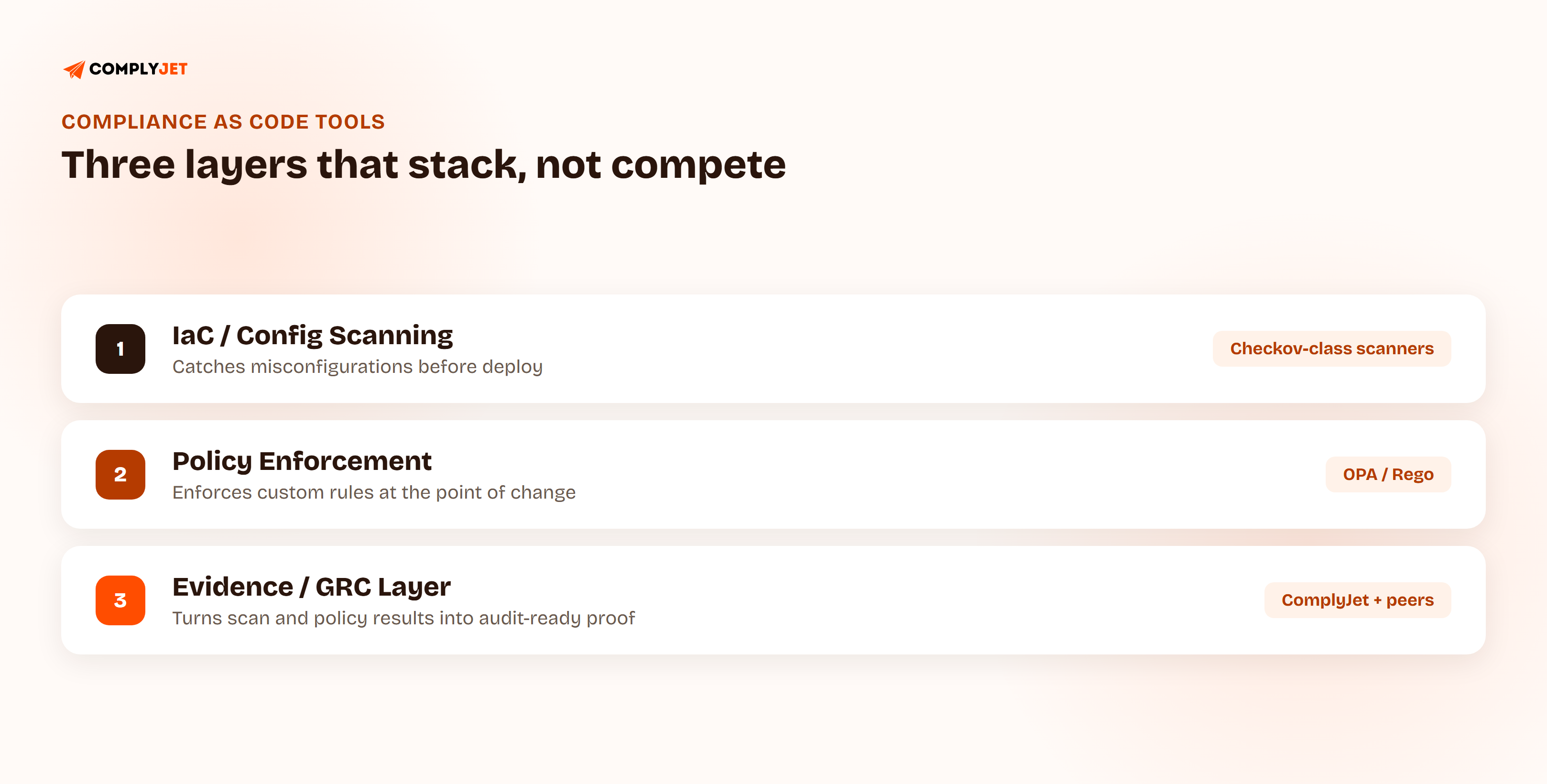
None of these layers replaces the others. A scanner catches a misconfiguration; a policy engine enforces a custom rule your scanner doesn't know about; the evidence layer turns what both of them produce into something an auditor can actually review.
The scanning layer alone can be broader than most teams expect. Checkov, one of the more widely used open-source IaC scanners, ships with over 750 built-in checks mapped to CIS benchmarks, NIST, HIPAA, PCI DSS, and SOC 2 (source: CloudRPS). That's most of the framework-mapping work already done before a team writes a single custom policy.
For the vulnerability-scanning piece of this specifically, including how GitHub's own Dependabot output feeds into the evidence layer, ComplyJet's help center has a dedicated walkthrough:
What Doesn't Automate
This practice has real limits, and being upfront about them matters more than the pitch usually lets on.
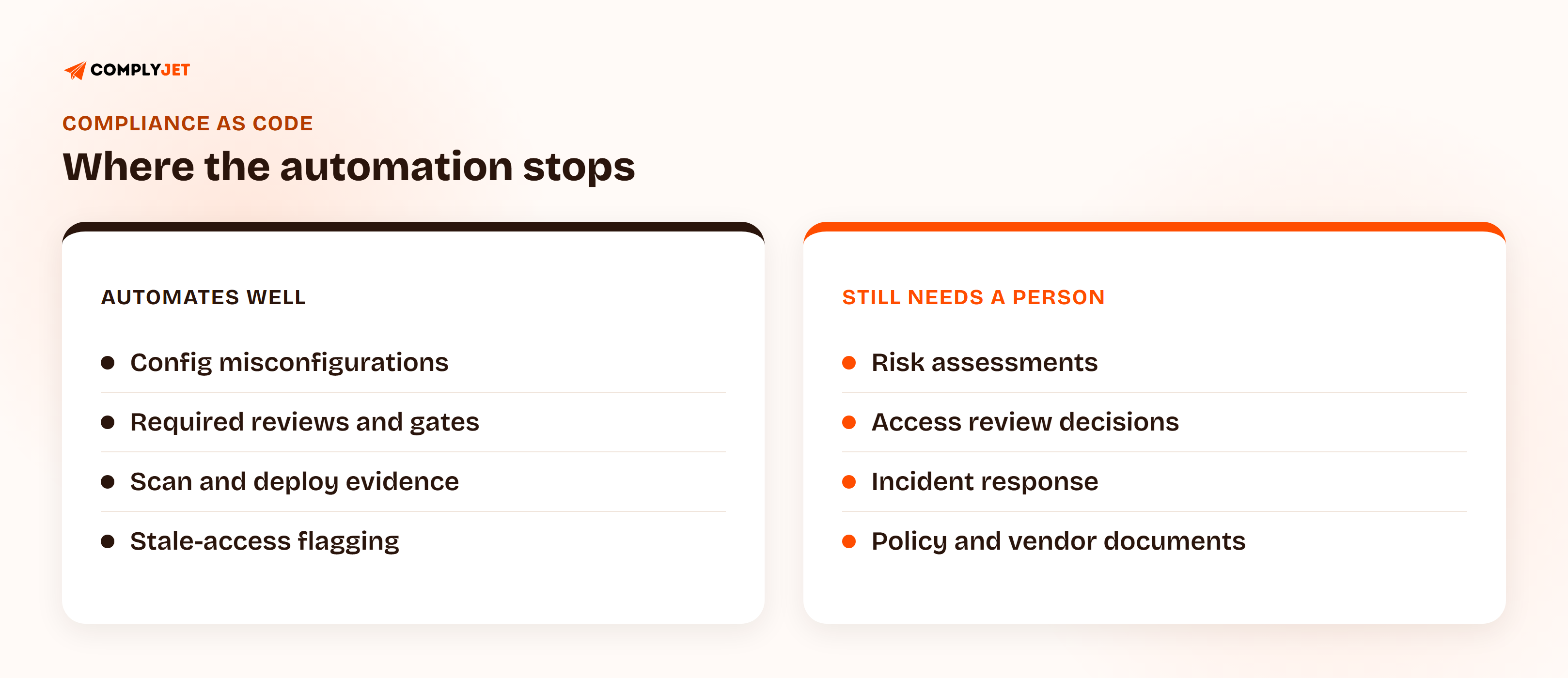
- Risk assessments. A scan can tell you a bucket is misconfigured. It can't tell you whether a new vendor relationship introduces business risk worth accepting. That judgment call stays human.
- Access reviews. Automation can flag an account that hasn't been used in 90 days. It can't decide whether that person still needs access for a reason the system doesn't know about.
- Incident response. The response itself, deciding what happened, who to notify, how to contain it, is a human process. Automation helps with detection and with building the paper trail afterward, not with the decision-making in the middle.
- Policy and vendor documents. Someone still has to write the access control policy and review a vendor's BAA. No pipeline generates those.
None of this is a reason to skip automating the rest. It's a reason to be honest about where the line actually sits.
The teams that get compliance as code wrong treat it as a replacement for judgment. It isn't. It's what frees up the judgment calls that actually need a person, by taking the repetitive ones off the table entirely. — Editor's Note
How Do You Implement Compliance-as-Code Practices on a Small Team?
Every write-up on this topic assumes a platform-engineering team already running multi-cloud infrastructure with a dedicated security budget. Most early-stage teams don't have that, and don't need it to start.
- Start with what your pipeline already half-enforces. Turn on branch protection and required reviewers properly before adding any new tooling. Most teams have this available and aren't using it fully.
- Add one IaC or config scanner before adding a dedicated GRC platform. Catching misconfigurations in your existing infrastructure code is higher-leverage early than a full evidence-automation build-out.
- Wire up evidence collection once the checks themselves are reliable. Automating proof of a flaky, inconsistently-enforced check just automates the wrong signal.
- Revisit the setup every quarter. What's manual today, a review, a check, a report, becomes automatable as the team and the stack grow. Don't try to automate everything on day one.
Should You Use Compliance as Code?
Yes, if you're already running CI/CD and heading into (or maintaining) a framework like SOC 2. The pipeline you already have is doing most of the work; compliance as code just makes it prove that work happened.
It's less urgent if you're pre-CI/CD, or a small enough team that manual evidence collection genuinely isn't breaking yet. There's no benefit to automating a process you haven't built the discipline around first.
How ComplyJet Fits In
ComplyJet's platform pulls evidence automatically from GitHub, your cloud provider, and your CI tools through 350+ integrations, which covers the evidence-collection half of compliance as code without requiring a dedicated platform-engineering build-out to get there. That sits alongside the scanning and policy-as-code layer covered above, not in place of it. ComplyJet doesn't replace your IaC scanner or policy engine. It turns what they already produce into audit-ready evidence.
Here's what that looked like for a small engineering team that had none of this in place a few weeks earlier:
FAQs
What is compliance as code?
It's the practice of enforcing and evidencing compliance controls through automated checks in your CI/CD pipeline and infrastructure configuration, instead of manual screenshots and spreadsheets. A control that a pipeline can check automatically is a control someone doesn't have to remember to document by hand.
How do you implement compliance-as-code practices?
Start with what your CI/CD pipeline already half-enforces, like branch protection and required reviewers, and turn it on properly. Add one infrastructure or config scanner next. Only wire up automated evidence collection once the underlying checks are reliable, then revisit the setup quarterly as the team grows.
Should you use compliance as code?
If you already run CI/CD and are heading into or maintaining a framework like SOC 2, yes. It turns work your pipeline is already doing into evidence you can hand an auditor. It's less urgent for a pre-CI/CD team or one small enough that manual tracking isn't breaking down yet.
What's the difference between compliance as code and policy as code?
Policy as code is the mechanism: a rule written so a machine can enforce it, using tools like Open Policy Agent. Compliance as code is the broader practice built on top of that mechanism, combining policy enforcement with continuous evidence collection to satisfy a specific framework over time.
What tools are used for compliance as code?
They stack in three layers: IaC/config scanners that catch misconfigurations before deploy, policy engines like Open Policy Agent that enforce custom rules, and an evidence/GRC layer, including platforms like ComplyJet, that turns what the other two layers produce into audit-ready evidence.
How does compliance as code work in a CI/CD pipeline?
Specific SOC 2 criteria map to specific pipeline controls: access control (CC6) maps to branch protection and required reviewers, monitoring (CC7) maps to pipeline and deploy logging, and change management (CC8) maps to the PR-review-to-deploy trail. Each of those controls generates its own evidence automatically as the pipeline runs.
Related Reading
- SOC 2 Audit Process, Start to Finish, for how this pipeline evidence fits into the full audit.
- What to Do After SOC 2: Choosing Your Next Framework, for teams past their first audit deciding what to automate for next.
- SOC 2 Auditor Independence: Why It Matters and How to Check It, for the auditor-facing side of the same audit process.