.svg)

Your contractor's laptop gets phished on a Tuesday. There's no MFA on the admin panel, no device check, and no segmentation between staging and production, so that one stolen login reaches everything: the codebase, the customer database, the cloud console. That's the failure mode zero trust exists to close, and it's a worse failure mode at 15 people than at 500, because there's nothing standing between one compromised credential and the whole company.
Zero trust for startups means treating every access request as unverified by default, whether it comes from inside your network or outside it, and confirming it explicitly before granting access. For a team this size, that isn't a multi-year enterprise program. It's three concrete moves, done in order: lock down identity first, then devices, then network access.
We work with early-stage teams building toward their first SOC 2 audit constantly, and the ones who already have identity and access basics locked down are always further ahead than the ones treating it as a separate project. This zero trust startup guide covers exactly that sequence.
By the end of this, you'll know exactly what to do first, what it costs at 15 people, what to explicitly skip for now, and how the same work becomes SOC 2 evidence later. Here's what's ahead:
- What zero trust actually means at this size, and what it isn't
- Why skipping it costs more on a small team than a large one
- The roadmap: identity, then devices, then network
- Real costs at 15 people, not vague "budget-friendly" claims
- What to explicitly defer until you're past 50 people
- How this doubles as SOC 2 evidence
- Common mistakes in the rollout
What Zero Trust for Startups Actually Means at 15 People
Zero trust assumes no user, device, or request is trustworthy by default, whether it originates inside your network or outside it, and verifies every one of them explicitly before granting access.
That distinction matters more than it sounds. A stolen credential inside a perimeter-trust network can move sideways, reaching whatever else that network trusts. A stolen credential inside a zero trust setup still has to clear a check at every new thing it tries to touch.
At 15 people, this isn't a product you buy off a shelf. It's a sequence of specific, concrete changes to how identity, devices, and network access work, most of which use tools you already have.
Why Zero Trust for a Small Business Isn't Optional, Even at 15 People
A 15-person startup looks like a soft target precisely because it looks too small to matter. That's backwards. A small team usually has less segmentation, not more, so one compromised credential with standing access to everything does more damage here than it would inside a larger org with layers already in place to contain it.
Picture the scenario from the top of this article again: a contractor's laptop gets phished. No device posture check catches the malware. No network segmentation stops the login from reaching production once it's authenticated. That's not a hypothetical; it's the default state of most startups before anyone deliberately closes it.
There's a second payoff that most teams don't realize up front. The same identity, device, and network work that closes this gap is also, almost exactly, the evidence a SOC 2 auditor asks for later. Doing it now isn't wasted effort even if a framework like SOC 2 isn't on the roadmap yet, and it becomes directly reusable the moment it is.
The Zero Trust for Startups Roadmap: Identity Comes First
The sequence matters as much as the individual steps: identity first, then devices, then network. Identity is the highest-leverage move for the lowest cost, which is exactly why it goes first when there's no dedicated security hire to spread the work across. This is the zero trust roadmap for small companies that don't have the headcount to design one from scratch.
| Phase | What It Covers | First Concrete Action | Rough Timeline |
|---|---|---|---|
| Identity & Access | Who can get in, and how they prove it | Enforce MFA everywhere, roll out SSO to top 5-10 tools | 1-2 weeks |
| Device Posture | What condition a device has to be in to connect | Turn on disk encryption, patch, and screen-lock checks | 2-4 weeks |
| Network Segmentation | What can reach production, and from where | Separate access path for production from everything else | 4-8 weeks |
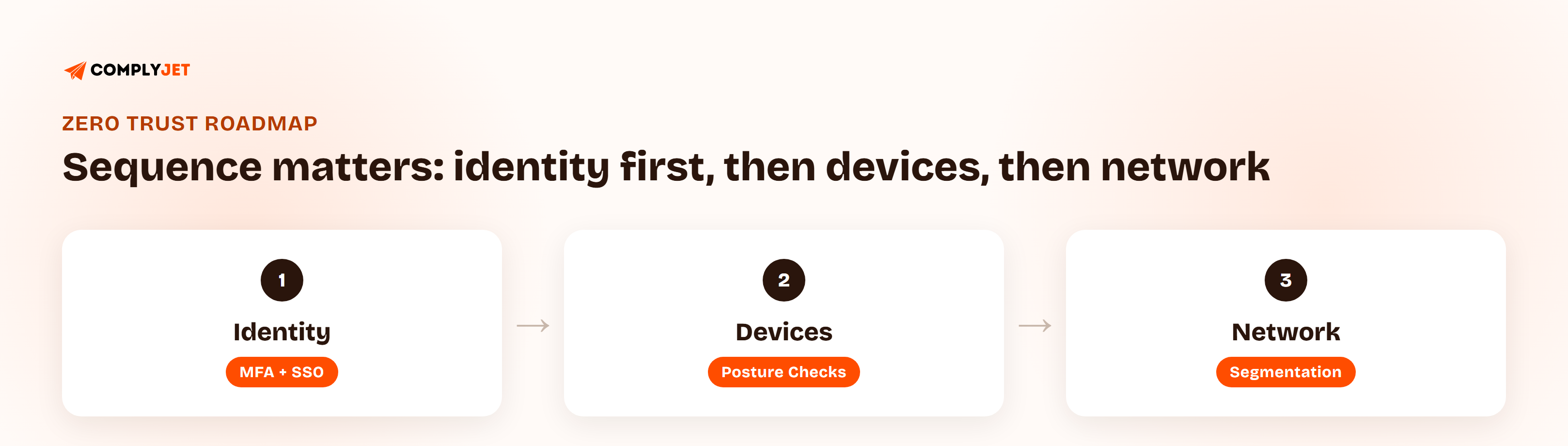
Identity and access management for startups starts with MFA, enforced everywhere, with no "internal only" exceptions. That exception is exactly the assumption zero trust removes. A tool being internal-only is not a reason to skip verification; it's the reason zero trust exists at all.
MFA and SSO for startups is the highest-leverage first move you can make, and the fastest place to apply it is your 5-10 highest-traffic tools: source control, your cloud provider console, email, and CI/CD. That's where a stolen password actually does damage, so that's where verification pays off first.
Teams without a security hire keep waiting for the "right" starting point, as if there's a wrong one. There isn't. Turn on MFA everywhere and move SSO onto your highest-traffic tools this week, and you've already closed the gap that causes most of the damage in a small-team breach. — Upendra Varma, CTO at ComplyJet
Devices in a Zero Trust Architecture for Startups: Skip the Enterprise MDM Budget
Device trust at this size doesn't mean a full enterprise MDM (mobile device management) rollout. It means answering three questions before a device connects to anything: is the disk encrypted, is the OS patched, and is a screen lock enforced.
Most identity providers a 15-person team already uses for SSO, Google Workspace, Microsoft 365, or JumpCloud, include basic device posture checks in the plan you're already paying for. This is usually a settings change, not a new purchase.
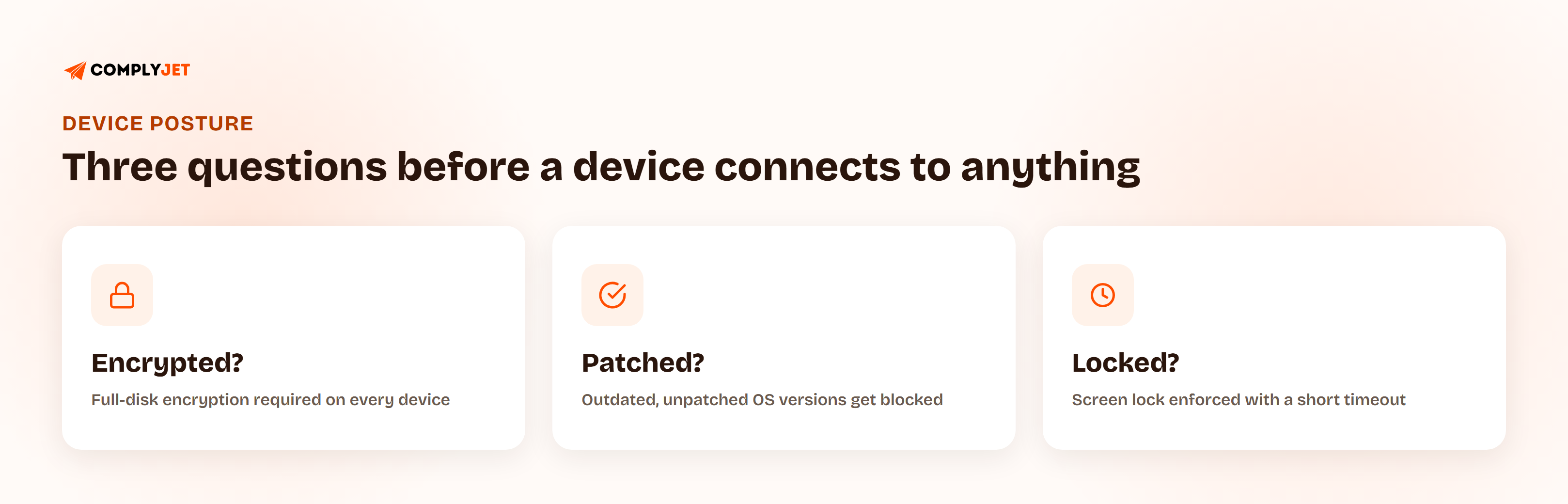
Turn these on this week:
- Require full-disk encryption on every device that touches company systems
- Block connections from devices running an outdated, unpatched OS version
- Enforce a screen lock with a short timeout
- Flag (and block, where possible) unmanaged personal devices from reaching production systems
- Require a device check as part of SSO, not as a separate, skippable step
Network Segmentation for Small Businesses That Don't Have a NetOps Team
Segmentation at 15 people doesn't mean VLANs and a dedicated NetOps team. It means a hard separation between production and everything else, staging, internal tools, and every laptop on the team, enforced through your cloud provider's native security groups rather than physical network hardware.
The first concrete step: production access should require a separate login path, a bastion host or your provider's native access-management tool, from the path used for everything else. That way a compromised laptop credential authenticates into general company systems, not directly into production.
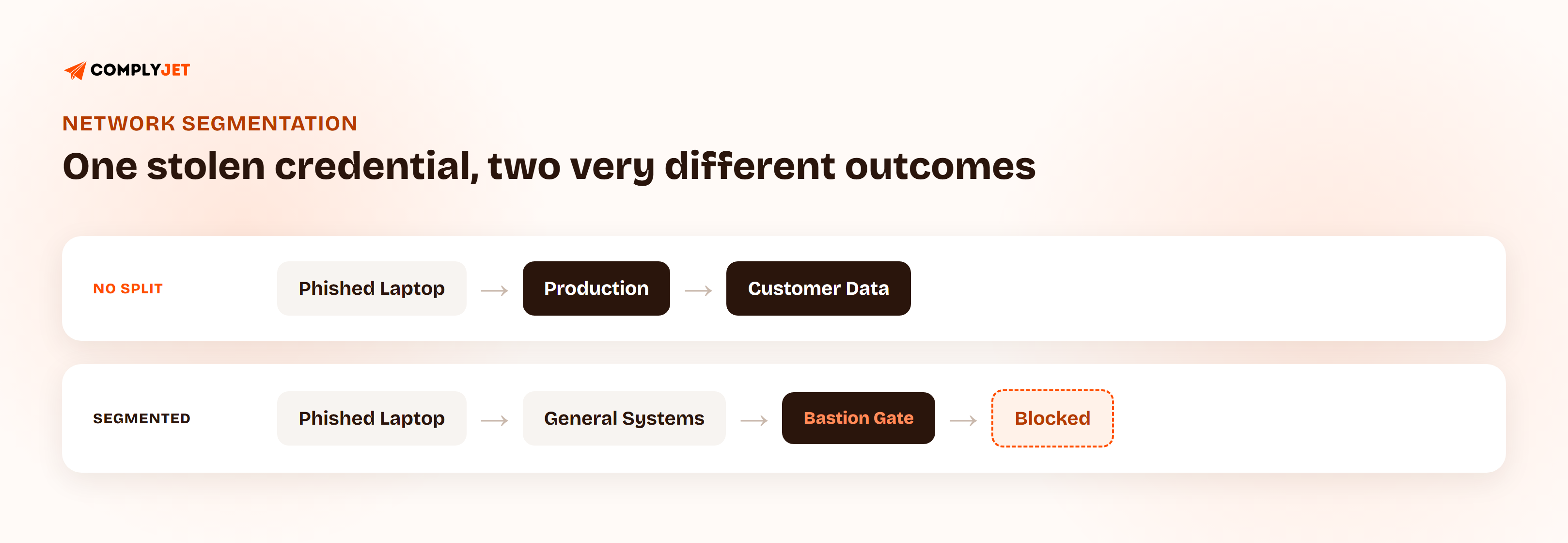
That separation is the entire point: the same compromised credential now dead-ends at general company systems instead of walking straight into production.
What Zero Trust for Startups Actually Costs at 15 People
Real numbers beat a vague "budget-friendly" claim. Google Workspace and Microsoft 365 already include basic MFA and SSO in plans most 15-person teams are already paying for. Cloudflare Zero Trust is free for up to 50 users. JumpCloud is free for up to 10 users and low-cost past that.
| Tool | What It Covers | Cost at 15 People |
|---|---|---|
| Google Workspace / Microsoft 365 | MFA, SSO, basic device posture | Included in plans most teams already have |
| Cloudflare Zero Trust | Identity-aware access, network-level policy | Free up to 50 users |
| JumpCloud | Directory, SSO, device management | Free up to 10 users, low-cost past that |
For most teams this size, the real cost isn't the tooling. It's the hours spent enforcing MFA everywhere it currently isn't, and cleaning up the access sprawl that's already accumulated from a year of "just add them to everything, we'll sort it out later."
Source: Cloudflare's Zero Trust free plan covers up to 50 users, and JumpCloud's free tier covers up to 10 users and 10 devices, both current as of this writing.
What to Skip in a Zero Trust Implementation Checklist Until 50 People
Every full zero trust architecture description includes items that don't belong on a 15-person team's list yet. The point of a zero trust startup guide is knowing what to skip, not just what to add. Deferring these is correct sequencing, not cutting corners:
- Full microsegmentation. Isolating every workload individually is valuable at scale; at 15 people, the production/everything-else split above covers most of the real risk.
- Continuous behavioral risk scoring. Useful once you have enough users and enough historical access data for a baseline to mean anything. Fifteen people doesn't generate that baseline yet.
- A dedicated identity governance platform. Your identity provider's existing access reviews cover this need at this size.
- A formal zero trust maturity assessment. These are built for organizations tracking progress across dozens of teams, not one.
- A SOC/SIEM build-out. Centralized security monitoring earns its cost once there's enough signal volume to justify a dedicated analyst reviewing it. Revisit each of these as headcount, customer requirements, or a specific incident changes the calculation.
How Zero Trust for Startups Doubles as SOC 2 Compliance Evidence
The identity, device, and network work covered above maps directly onto specific SOC 2 criteria. A team that does this work now isn't starting from zero on evidence if SOC 2 shows up on the roadmap later. This is the real, concrete link between zero trust and SOC 2 compliance, stated in specific criteria rather than a vague "supports compliance" gesture.
| Zero Trust Control | SOC 2 Criterion It Supports |
|---|---|
| MFA enforcement everywhere | CC6.1 (logical access controls) |
| Device posture checks (encryption, patching, lock screen) | CC6.1 / CC6.8 |
| Production/network segmentation | CC6.6 |
| Periodic access reviews | CC6.2 / CC6.3 |
That mapping is the reason to treat this work as a compliance starting point, not an afterthought bolted on once an auditor asks for evidence.
Zero Trust Without a Security Team: What Actually Changes
None of the work described above requires hiring a security engineer first. Identity enforcement, device posture checks, and basic network segmentation are configuration changes inside tools your team is already using, not a new discipline that needs a dedicated hire to exist.
What does change is ownership. Someone, usually the founder or a lead engineer, needs to own enforcement and a periodic review, even if that's a few hours a month rather than a full-time role. Zero trust without a security team doesn't mean zero trust without an owner.
"We don't have security headcount" is a reason to start smaller, not a reason to skip this entirely. Every step in this roadmap is something a founder or a lead engineer can turn on directly, in an afternoon, inside tools the team already pays for. — Upendra Varma, CTO at ComplyJet
Zero Trust for Startups: Common Mistakes in the Rollout
- Enforcing MFA for employees but not contractors. Contractors often have the least oversight and the most standing access; that combination is exactly backwards.
- Treating SSO as "done" without turning on device posture checks. SSO controls who logs in, not what condition the device is in when they do.
- Building a network segmentation plan before locking down identity. Segmentation without identity controls just adds complexity without closing the actual gap.
- Chasing a full maturity framework before the basics are live. A formal assessment doesn't help if MFA still isn't enforced everywhere.
- No periodic access review after the initial rollout. Zero trust is a standing practice, not a one-time project; access that made sense on day one accumulates and goes stale.
- Exempting "internal only" admin tools from any of the above. These tools usually carry the most damaging access and the least oversight, which makes them the worst place to make an exception.
How ComplyJet Fits In
ComplyJet isn't a zero trust platform, and it doesn't replace an identity provider, an MDM tool, or your cloud provider's network controls. It's the layer that turns the identity, device, and access work described above into organized, audit-ready evidence.
Concretely, ComplyJet pulls access logs, MFA enforcement status, and device posture data directly from the providers already in place, Google Workspace, Microsoft 365, JumpCloud, and your cloud provider, and maps them to the SOC 2 (or other framework) criteria they satisfy. Nothing from this zero trust startup guide has to be re-collected by hand for an audit that comes later.
Here's what that looked like for a team that had exactly the identity-and-device foundation this guide describes, and nothing more, before they started:
FAQs
What is zero trust for a small company?
It's an approach that treats every access request as unverified by default, whether it comes from inside the network or outside it, and verifies each one explicitly. At a small company, this usually comes down to three moves: identity (MFA and SSO), device posture, and network segmentation between production and everything else.
How do I start implementing zero trust as a startup?
Start with identity: enforce MFA everywhere with no exceptions, then roll SSO out to your 5-10 highest-traffic tools. That single move closes most of the risk a stolen credential creates, and it's usually a configuration change inside tools you already have, not a new purchase.
Does zero trust help with SOC 2 compliance?
Yes, directly. MFA enforcement, device posture checks, and network segmentation map onto specific SOC 2 criteria (CC6.1, CC6.6, CC6.2/CC6.3 among others), so the same work that reduces breach risk also becomes evidence an auditor asks for later.
How much does zero trust cost for a small team?
Often close to nothing extra. Google Workspace and Microsoft 365 already include MFA and SSO in plans most teams already pay for, Cloudflare Zero Trust is free up to 50 users, and JumpCloud is free up to 10. The real cost is usually the hours spent enforcing MFA everywhere and cleaning up existing access sprawl.
What's the first step in zero trust security?
Enforce MFA on every account with no "internal only" exceptions, then move SSO onto your highest-traffic tools: source control, your cloud console, email, and CI/CD. Identity is the highest-leverage first move because that's where a stolen credential does the most damage.
Do I need a security engineer to do zero trust?
No. Identity enforcement, device posture checks, and basic network segmentation are configuration changes inside tools a founder or lead engineer can turn on directly. What's needed is an owner for enforcement and periodic review, not necessarily a dedicated hire.
Is zero trust overkill for an early-stage startup?
The full enterprise version, continuous risk scoring, a formal maturity assessment, a SOC/SIEM build-out, is overkill at 15 people. The core version, MFA everywhere, device posture checks, and basic network segmentation, isn't. That part is appropriately scoped to any team size.
Related Reading
- SOC 2 Audit Process, Start to Finish, for what an audit looks like once this evidence exists.
- Is SOC 2 a Certification? Attestation vs. Certification, Explained, for the attestation-vs-certification distinction referenced in the SOC 2 section.
- Compliance as Code: Baking SOC 2 Controls Into Your CI/CD Pipeline, for the adjacent engineering-side control automation angle in the CI/CD pipeline specifically.