.svg)

An auditor asks for proof that a departed contractor's access was revoked and reviewed. CloudTrail shows the account was deactivated. Nobody can show anyone actually looked at it. That gap, not a missing log, is what shows up in the findings.
A logging stack that holds up under a SOC 2 auditor's testing does three things: captures the right events, keeps them long enough, and proves nobody quietly edited them afterward. The right events break into five categories: authentication, privilege and role changes, configuration changes, data access, and API or admin activity, each mapped to a specific SOC 2 criterion (CC6.1, CC6.3, CC7.2, CC8.1).
Retention runs roughly 12 months, tied directly to the Type II observation window, not an arbitrary number. And tamper-evidence means logs live somewhere separate from the systems generating them, with restricted write access and a way to prove after the fact that nothing was altered.
By the end of this, you'll know exactly what to turn on, how long to keep it, what "tamper-evident" actually means in practice, and which logging setup fits a team too small for a dedicated security budget.
Here's what's ahead:
- What SOC 2 logging requirements actually mean, and how this differs from a written logging policy
- The five event categories a logging stack SOC 2 auditor has to capture
- Retention rules, and the real reason behind the "12 months" number
- What tamper-evident actually means, in plain terms
- Picking a log platform that fits a small team's budget
- Turning stored logs into evidence an auditor will accept
- The mistakes that most often turn into findings
What a Logging Stack SOC 2 Auditor Actually Checks Comes Down To
SOC 2 logging requirements come from a handful of Trust Services Criteria: CC7.2 covers system monitoring, CC7.3 covers evaluating what monitoring detects, and CC6.1 and CC8.1 pull logs in as evidence wherever access or change-management controls need to be proven, not just described.
This article is about the technical stack: what to turn on, where the evidence lives, how long to keep it. If what's needed instead is the written policy document itself, ComplyJet's logging and monitoring policy guide covers the template and the documentation side. This piece assumes logs already exist somewhere, CloudTrail, application logs, a hosting provider's activity log, and answers what an auditor actually wants to see once they do.
That distinction matters more than it sounds like it should. A team can have every event technically captured and still fail this part of an audit, because the auditor isn't grading the logging tool. They're grading whether the five categories below are actually present, retained long enough, and provably untouched, which is a different bar than "logs exist somewhere."
Why a Thin Logging Stack SOC 2 Auditor Turns Into an Audit Finding
"We have logging enabled" is one of the most common answers that still produces a finding. Enabled isn't the same as captured, retained, reviewed, and provably intact. An auditor testing CC7.3 isn't just checking that an event exists in a log somewhere, they're checking that someone reviewed it and responded.
Take the departed-contractor example from the top of this piece. CloudTrail correctly logs the deactivation event. That satisfies the logging half of the control. But if nobody can produce a record that the deactivation was reviewed, confirmed, and tied to an offboarding checklist, the control still fails, because the test isn't "did this happen," it's "can you prove someone was watching."
That distinction, logging versus provable review, is the single biggest gap between a stack that technically works and a logging stack SOC 2 auditor that actually holds up under testing.
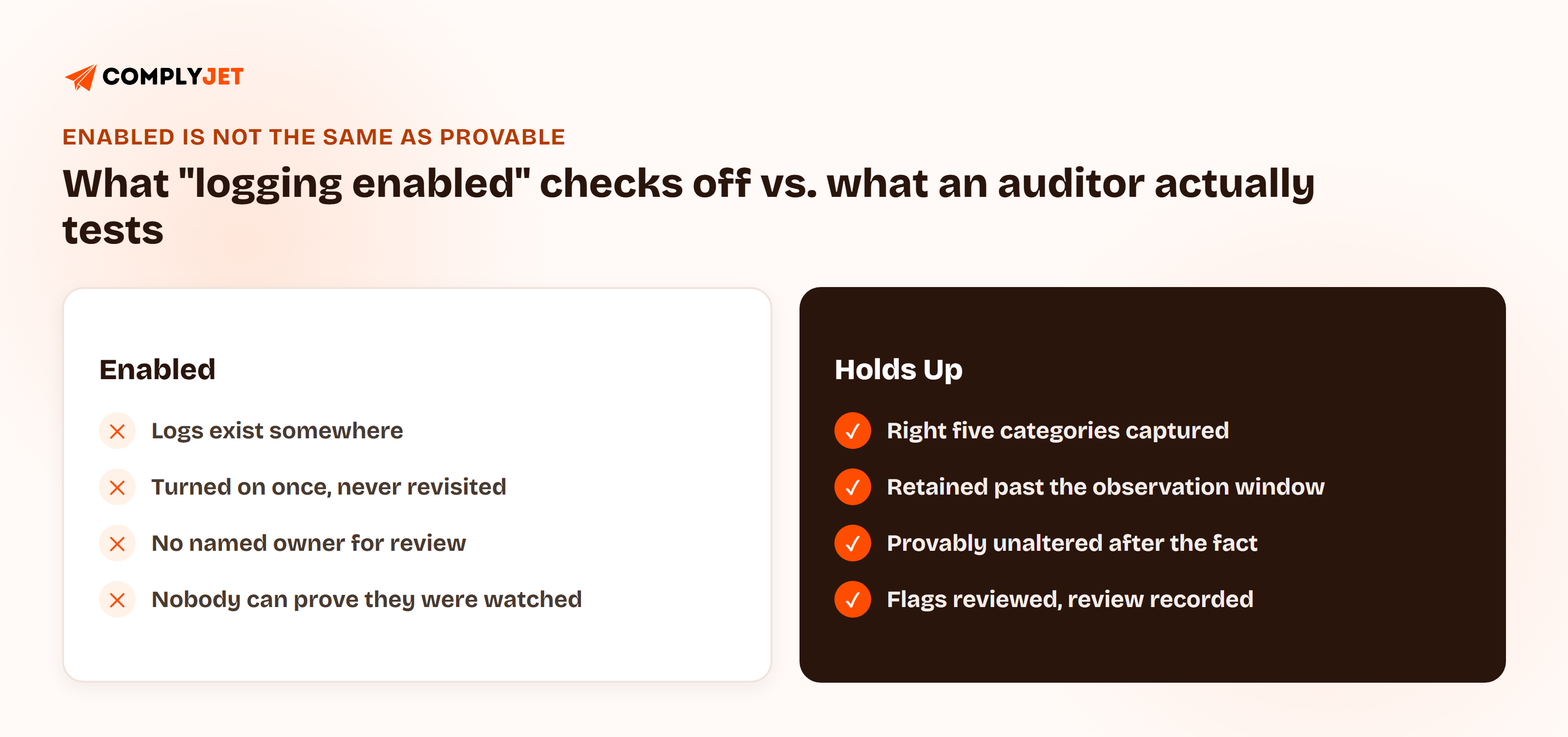
Most teams don't discover which side of that line they're actually on until an auditor's sample lands on the wrong date.
SOC 2 Audit Log Requirements: What a Logging Stack SOC 2 Auditor Must Capture
SOC 2 audit log requirements come down to five event categories. Miss one, and it's the specific gap an auditor's sample is most likely to land on, since these five map directly onto the criteria most commonly tested.
| Event Category | What It Covers | SOC 2 Criterion |
|---|---|---|
| Authentication | Login success and failure, MFA challenges, session start and expiry | CC6.1 |
| Privilege and role changes | Access grants, role changes, permission edits | CC6.1 / CC6.3 |
| Configuration changes | Infrastructure, security-group, and IAM changes | CC8.1 |
| Data access | Reads and exports of sensitive or customer data | CC6.1 / CC6.7 |
| API and admin activity | Cloud-provider API calls, admin console actions | CC7.2 |
Capturing the category isn't enough on its own. Each entry needs five fields to actually function as evidence: who did it, what they did, when, from where, and whether it succeeded or failed. An event missing actor identity or source IP is present in the log but close to useless as a sample an auditor can act on.
Log Retention SOC 2 Auditors Expect: How Long and Where to Keep It
The "12 months" number that shows up everywhere isn't arbitrary. It's tied directly to the SOC 2 Type II observation window, which typically runs 6 to 12 months, plus enough lookback that an auditor's sample can land anywhere in that period and still find intact evidence. Set retention shorter than the observation window, and a legitimate sample date can come back empty through no fault of the control itself.
| Log Type | Typical Retention | Where It Lives |
|---|---|---|
| Security-relevant (auth, access, config changes) | 12+ months | ~90 days hot storage, remainder cold/archive |
| Application and infrastructure logs | 6-12 months | Centralized log platform |
| Debug and verbose application logs | Weeks to a few months | Hot storage only, not audit-relevant |
This is log management for a SOC 2 audit in practice: tiered storage, hot for active investigation, cold or archived for everything past the first few months, not one flat bucket that either keeps everything forever or ages everything out on the same schedule.
Tamper Evident Logs SOC 2 Auditors Require, Explained
Tamper-evident doesn't mean tampering is impossible. It means tampering would be detectable. That distinction matters, because a logging setup that's merely hard to edit isn't the same as one that proves, after the fact, that nothing was edited.
Two mechanisms do the actual work:
- Write-once, restricted-access storage. Logs live somewhere separate from the systems generating them, with write access restricted so even an admin on the source system can't quietly edit history. Object-lock or immutable storage buckets are the common way to do this.
- Integrity verification. A hash-chaining or checksum mechanism where each event's hash depends on the one before it, so altering any entry breaks the chain in a way that's independently checkable, not just trusted on faith.
Neither of these is exotic infrastructure. Most major cloud providers offer an immutable storage option already, and the second mechanism is often a feature of the logging platform itself rather than something built from scratch. NIST's Guide to Computer Security Log Management (SP 800-92) recommends this same separation-plus-integrity approach for the same reason an auditor cares about it: a log an admin can quietly edit isn't reliable evidence of anything.
The same properties that make a log good audit evidence, separation from the source system, restricted write access, provable integrity, are exactly what make it useful during an actual security incident. This isn't a compliance-only cost.
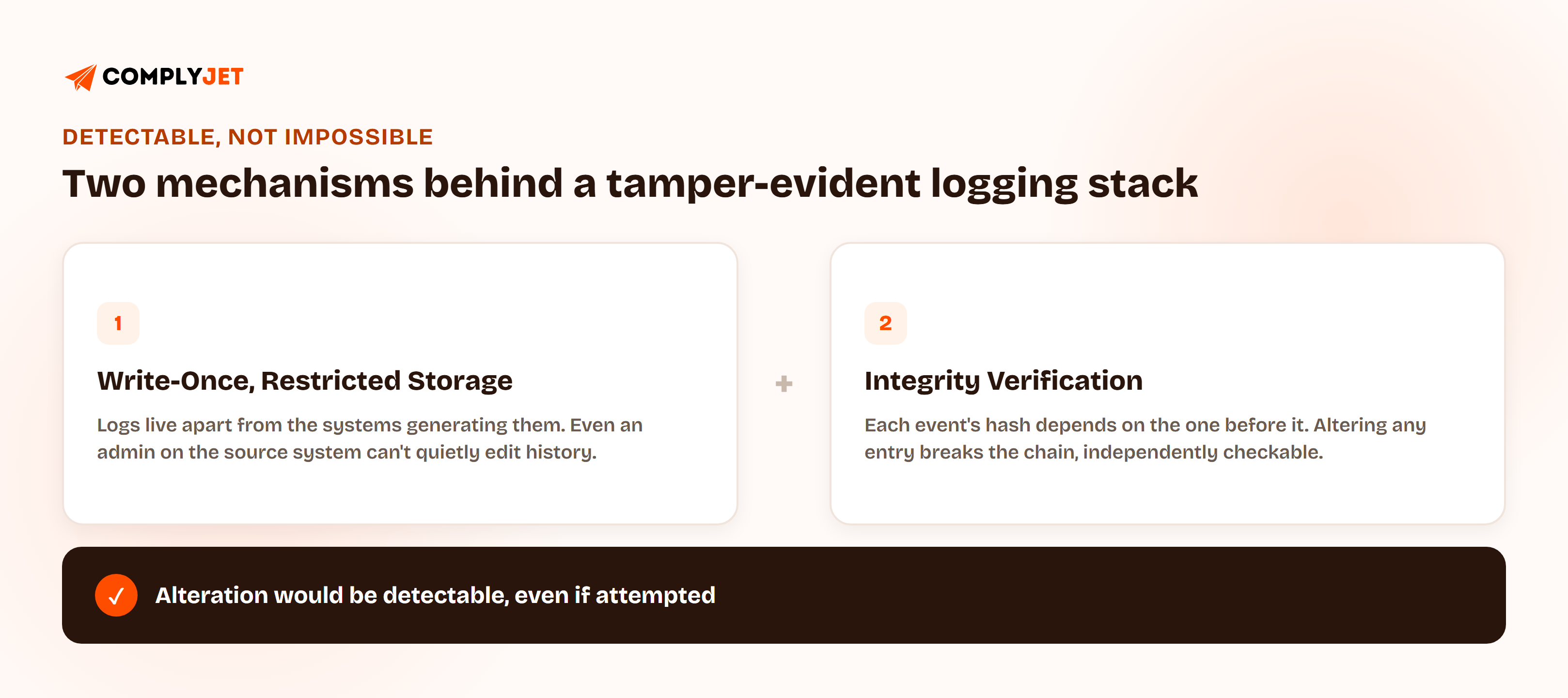
Both mechanisms are things an auditor can independently ask to see, not just take on faith. A quick way to check either one is actually working: try to edit a log entry with the same admin credentials used to manage the underlying system, and see what stops it. If nothing does, the setup isn't tamper-evident yet, no matter what the vendor's product page claims about it.
SOC 2 SIEM Requirements: Picking a Log Platform for a Logging Stack SOC 2 Auditor
Most SOC 2 SIEM requirements guides break tooling out by company size, startup, growth-stage, enterprise, but "startup" in most of those breakdowns still assumes a dedicated security budget most 10 to 30 person teams don't have. The realistic path starts with what's already available and adds complexity only when volume or a specific requirement demands it.
| Stage | What's Enough | When to Add More |
|---|---|---|
| Cloud-native only | CloudTrail / Cloud Audit Logs / Azure Activity Log, centralized and actually reviewed | Fine pre-audit and early-stage if someone is actually looking at it |
| Managed logging platform | Application logs joined with infrastructure logs in one searchable place | Once app-level events need to sit alongside infra events for a single review |
| Dedicated SIEM | Correlation across multiple sources, built-in alerting rules | Once alert volume or a specific framework requirement demands cross-source correlation |
The reference set most guides converge on: AWS CloudTrail and Config, Datadog, Elastic, and Splunk, roughly in order of where they fit as a team scales past cloud-native logging alone. Confirm current pricing and plan tiers directly before committing, since free-tier terms shift.
For a 10-person engineering team heading into a first SOC 2 Type II, the realistic starting point is almost never a dedicated SIEM. It's turning on CloudTrail across every region, centralizing it alongside application logs in whatever the team already uses for debugging, and actually assigning someone to look at what gets flagged.
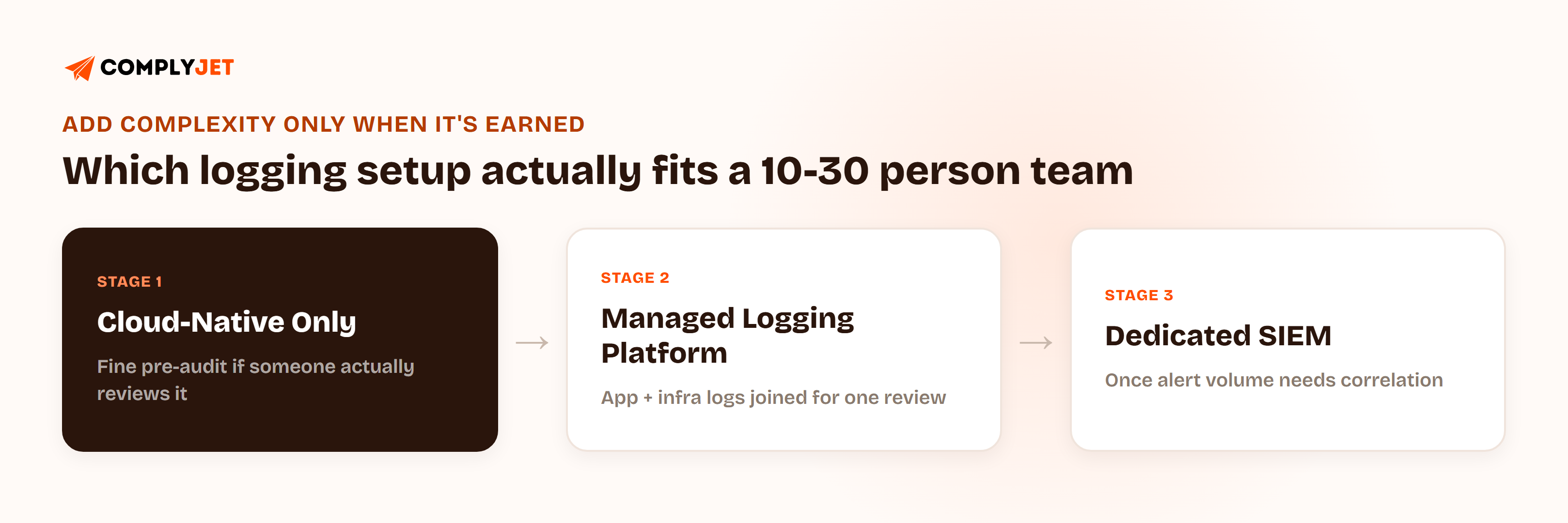
Skipping straight to Stage 3 doesn't buy a team anything if Stage 1 was never done properly first. A SIEM purchase before that first step is done tends to add a new tool to configure correctly rather than close the gap an auditor will actually test. Buying correlation before the underlying logs are even centralized just adds a second thing that can be misconfigured.
Turning Logs Into Audit Log Evidence SOC 2 Auditors Actually Accept
Logs that exist but nobody reviews aren't a control. They're a filing cabinet nobody opens, and an auditor testing CC7.3 will ask for evidence of review, not just confirmation that logging is technically on.
The concrete minimum: a defined alert threshold (a common starting point is five or more failed logins inside a ten-minute window), a named owner responsible for reviewing what gets flagged, and a record, even a simple one, that the review actually happened. Without that third piece, the first two don't matter to an auditor.
SOC 2 Logging and Monitoring Controls Auditors Actually Test
An auditor doesn't review every log entry generated across the observation period. They sample a handful of dates spread across it, then check three things for each: that logs exist for that date, that any flagged event has a documented response, and that retention wasn't quietly shortened somewhere in the middle of the period.
"Teams get this backwards constantly. Logging gets treated as something to tighten up right before the audit. The observation window means the logs already have to cover the period being tested, so by the time the audit starts, it's too late to fix six months of gaps." — Upendra Varma, CTO at ComplyJet
The specific SOC 2 monitoring controls being tested here are CC7.2 (is the system actually being monitored) and CC7.3 (is what gets detected actually evaluated and acted on), not "logging" treated as one generic category.
Common Mistakes That Break a Logging Stack SOC 2 Auditor
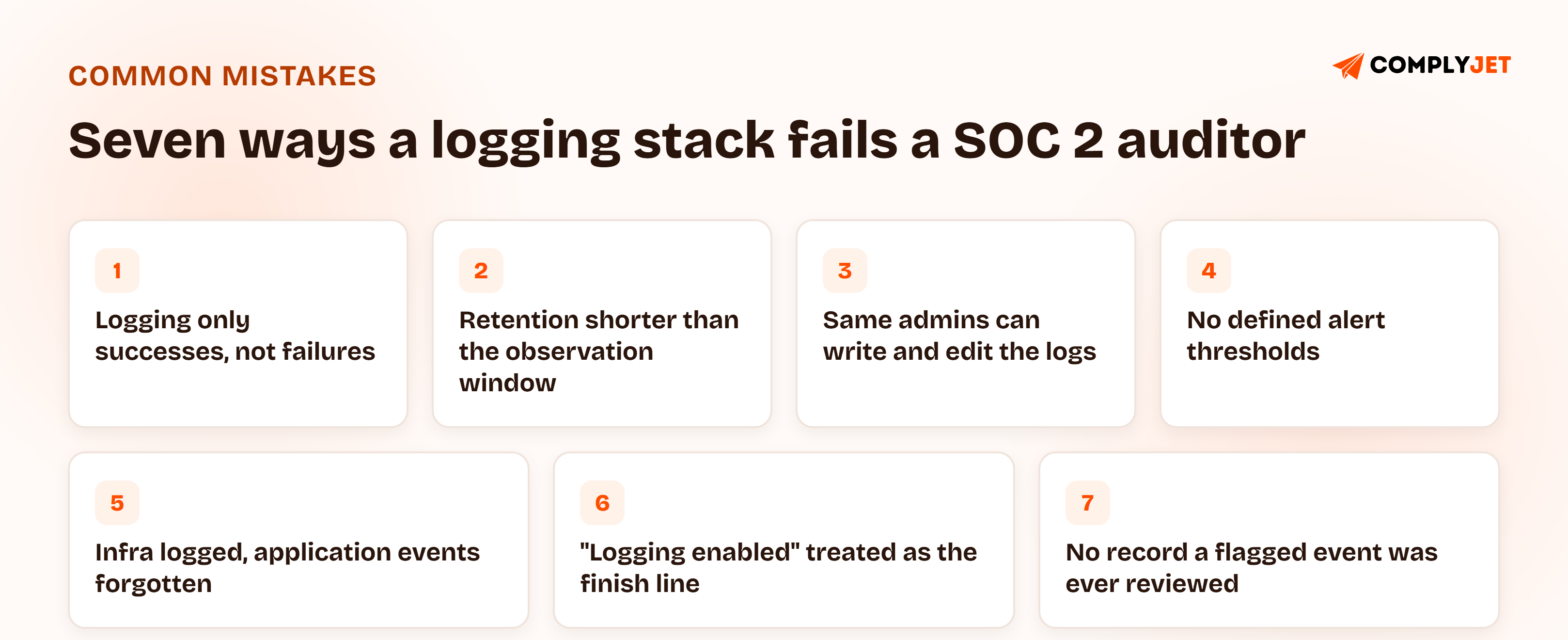
- Logging only successes, not failures. Failed logins and denied access attempts are the signal that shows monitoring works, and their absence is a specific, easy-to-spot gap.
- Retention set shorter than the observation window. A sample date can fall inside the audit period and come back empty, even if the control itself was fine.
- Write access to logs open to the same admins being monitored. If the people the logs are meant to watch can edit them, the logs stop being evidence.
- No defined alert thresholds. Either everything gets flagged and nobody reads any of it, or nothing does and a real event slips through.
- Infrastructure logs centralized, application-level events forgotten. CloudTrail alone doesn't cover what happens inside the application itself.
- Treating "logging enabled" as the finish line. It's the starting point. Retention, review, and integrity are what turn it into a control.
- No record that a flagged event was ever reviewed. The single most common gap between logs that exist and logs that pass a CC7.3 test.
None of these require exotic tooling to fix, just someone deciding the logging stack is a control to maintain, not a box to check once.
How ComplyJet Fits Into Your Logging Stack SOC 2 Auditor
ComplyJet isn't a SIEM or a logging platform, and it doesn't replace CloudTrail, Datadog, or whatever's already centralizing an environment's logs. It continuously verifies the controls those tools are supposed to be providing and turns that verification into timestamped evidence, instead of leaving it as something someone confirms manually right before an audit.
Concretely, ComplyJet's AWS integration confirms the audit trail stays active across every region with integrity verification enabled, polls infrastructure configuration around the clock, and flags a gap, a disabled setting, an overly permissive change, in real time rather than after an auditor finds it. The Datadog integration works the same way on the access-review side: continuously confirming that access is controlled and that every account belongs to one identified person, with each check stored as evidence automatically.
Here's what that looks like for a team that already had its logging basics in place before its first audit.
FAQs
What does SOC 2 require you to log?
Five categories, at minimum: authentication events, privilege and role changes, configuration changes, data access, and API or admin activity. Each maps to a specific criterion, mainly CC6.1, CC6.3, CC7.2, and CC8.1, and each log entry needs actor identity, action, timestamp, source, and outcome to actually function as evidence.
How long do you have to keep logs for SOC 2?
Roughly 12 months for security-relevant logs, tied directly to the Type II observation window (typically 6 to 12 months) plus enough lookback to cover it fully. A common pattern is about 90 days in hot storage for active investigation, with the remainder in cold or archived storage.
What logging tool do you need for SOC 2?
It depends on scale, not a fixed requirement. A small team can build a logging stack for a SOC 2 auditor out of centralized, actually-reviewed cloud-native logs (CloudTrail, Cloud Audit Logs, Azure Activity Log). A dedicated SIEM like Datadog, Elastic, or Splunk becomes worth adding once alert volume or a specific requirement demands correlation across multiple sources.
Does AWS CloudTrail satisfy SOC 2 logging requirements on its own?
It covers API and admin activity, one of the five required categories, but not application-level or database-level events on its own. Most teams centralize CloudTrail alongside application logs rather than treating it as the whole logging stack.
What counts as tamper-evident logging?
Logs stored separately from the systems that generate them, with restricted write access, plus a way to independently verify nothing was altered after the fact, commonly write-once storage combined with hash-chaining or another integrity-checking mechanism. Tamper-evident means alteration would be detectable, not that it's impossible.
How do auditors test logging and monitoring controls?
They sample specific dates across the observation period and check that logs exist for those dates, that any flagged event has a documented response, and that retention wasn't shortened mid-period. This tests CC7.2 (is monitoring happening) and CC7.3 (is what's detected actually evaluated).
Do you need a SIEM for SOC 2 compliance?
Not necessarily, especially early on. Centralized, reviewed cloud-native logging can satisfy the requirement for a small team. A SIEM becomes the right call once log volume, multiple data sources, or a specific compliance requirement makes manual correlation impractical.
Related Reading
- Compliance as Code: Baking SOC 2 Controls Into Your CI/CD Pipeline, for how logging fits into the broader pipeline control set alongside access and change management.
- SOC 2 Audit Process, Start to Finish, for how logging evidence fits into the audit from readiness through report delivery.
- Logging and Monitoring Policy, for the written policy and documentation side of this same control area.