.svg)

The question that trips up most founders before their first SOC 2 audit is how long a password needs to be. If you answered “8 characters with a mix of uppercase and symbols,” you are working from a rulebook that was officially retired in 2025.
That answer will not satisfy a modern auditor.
SOC 2 is the Trust Services Criteria framework managed by the AICPA. It gives you a principle and then lets auditors decide whether your controls are reasonable.
NIST SP 800-63B Rev 4 was finalised in July 2025, and it changed the rules in ways that most compliance teams have not caught up with yet.
Verizon’s 2024 Data Breach Investigations Report states that credential-related attacks remain one of the leading causes of confirmed breaches.
Weak and misconfigured password policies are the actual pathway attackers use. And they are among the most frequently cited audit findings in SOC 2 assessments.
We will cover what NIST actually changed, what SOC 2 auditors look for in 2026, and how to build a password policy that makes sense when you are being audited closely. New to SOC 2 entirely? Start with our SOC 2 compliance guide.
If you want to see how we help companies get audit-ready faster, book a demo, and we will walk you through it.
Quick Summary
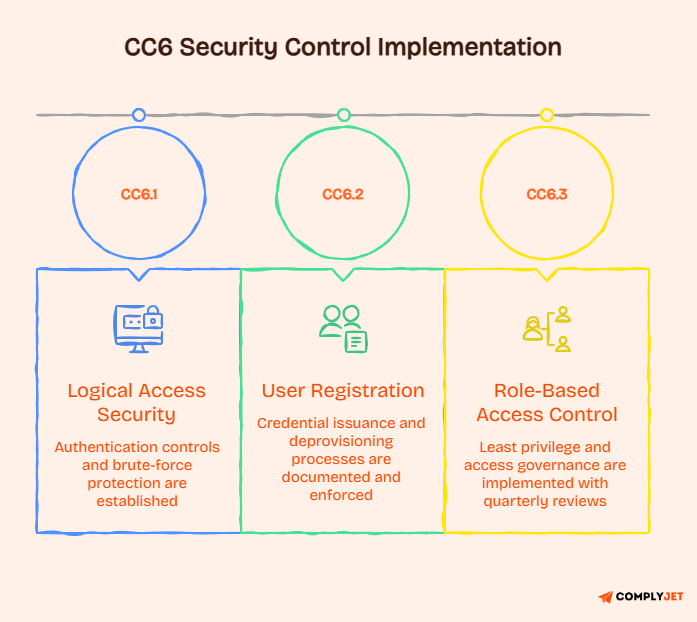
- SOC 2 outlines requirements for password management under CC6.1, CC6.2, and CC6.3, which address logical access security, user registration and authorisation, and role-based access control.
- Auditors assess password controls according to NIST SP 800-63B, which has become the standard benchmark for what reasonable password security means under SOC 2.
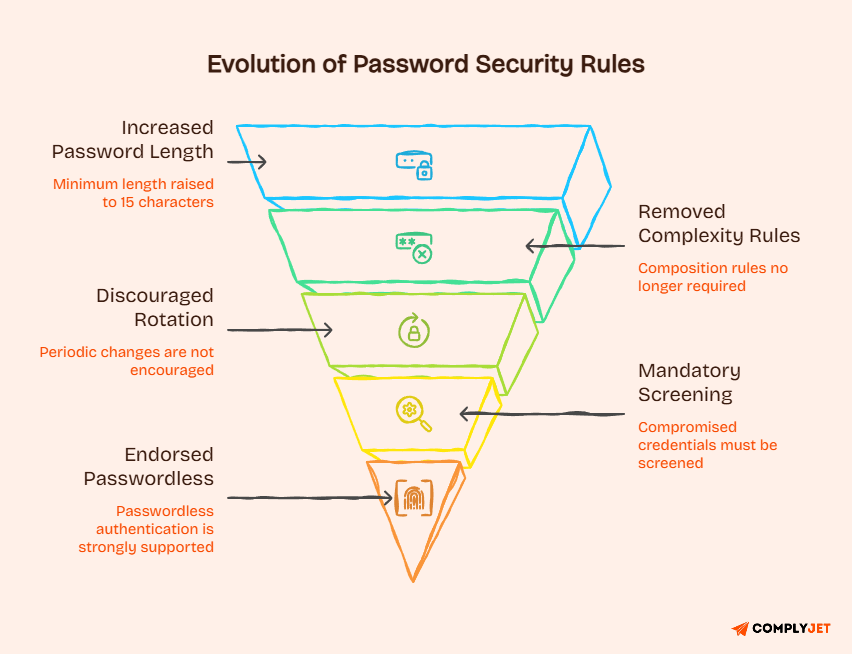
- NIST SP 800-63B Rev 4, finalised in July 2025, officially rendered mandatory periodic password rotation and complexity requirements obsolete.
- According to the updated NIST guidance, the minimum password length for single-factor authentication has increased to 15 characters. This change emphasises longer, more secure passphrases instead of focusing solely on complexity.
- Compromised credential screening is now mandatory, not optional. Organisations are expected to check passwords against known breach databases during account creation and password changes.
- MFA is not explicitly specified in SOC 2, but auditors now effectively expect it for privileged accounts, remote access, production systems, cloud consoles, and any environment that handles sensitive data.
- Auditors expect three things simultaneously: documented policy, technically enforced controls, and monitoring logs that prove those controls are actively working.
Now that you've a basic idea, let's get into the details.
What Are SOC 2 Password Requirements?
SOC 2 is often described as flexible. That is accurate but also misleading. Flexible here means auditors have discretion to evaluate your controls against what a reasonable, security-conscious organisation should be doing in that year.
In 2026, that bar is higher than most people expect.
Password controls sit at the centre of SOC 2 access control requirements. They are not a secondary concern. If your authentication is weak, your broader security posture is weak, and auditors will flag it.
Understanding where SOC 2 password requirements actually come from inside the SOC 2 framework is the first step.
What SOC 2 Actually Requires
SOC 2 is built on five Trust Services Criteria categories:
- Security
- Availability
- Processing Integrity
- Confidentiality
- Privacy.
Security is the only mandatory category in SOC 2. Everything else is optional, depending on what your organisation commits to in its service description.
Within the Security category, the Common Criteria (CC) controls govern how you manage access. CC6 is the section that covers logical access security, user registration, and role-based controls. Your SOC 2 password requirements and password policy are here.
Why SOC 2 Has No Fixed Password Rules?
The AICPA designed SOC 2 as a principles-based framework on purpose. They did not want to prescribe exact configurations that would become outdated as technology evolved.
They define what outcome you must achieve and leave the method open.
The practical effect of no explicit rules does not mean you can do anything you want. It means the standard for what is acceptable shifts with industry norms.
Right now, those norms are anchored to NIST guidance, and it has just raised the floor significantly.
How Auditors Use NIST as the Benchmark?
When an auditor assesses your password controls under CC6.1, they do not follow a SOC 2 rulebook. They are using their professional judgment to determine what the current best practices are.
In practice, most experienced auditors treat NIST SP 800-63B as the reference standard for authentication requirements.
This means that if your password policy contradicts it, you have an issue. This is not simply because SOC 2 mentions NIST, but because an auditor will require you to justify any deviations. If you are unable to do so, it will result in a finding.
Understanding how it relates to SOC 2 is a critical context before you touch your password policy. These two frameworks do not operate independently in a real audit.
You can read more about building a strong foundation here: SOC 2 compliance requirements
The SOC 2 Controls That Govern Passwords
SOC 2 access controls are spread across three criteria within CC6.
Each one covers a different dimension of how you manage identity and authentication. SOC 2 password requirements touch all three, though CC6.1 carries the most weight.
Treating these as three separate boxes to check independently is a mistake many teams make. They are interconnected.
A gap in CC6.2 (like leaving terminated accounts active) creates a CC6.1 weakness even if your password length settings are correct.
CC6.1 Logical Access Security
CC6.1 is a SOC 2 control that requires logical access security measures to be implemented to protect against threats. This means you need to control who can get into your systems and prove that you have done so consistently.
For passwords specifically, CC6.1 covers unique user accounts, authentication strength, encryption of credentials in transit and at rest, and brute-force protection. Shared accounts are an automatic finding here. So is sending passwords over unencrypted channels.
Why this matters: MFA enforcement falls under CC6.1. If your systems allow users to bypass MFA, auditors will cite this even if MFA is technically enabled.
CC6.2 User Registration and Authorization
CC6.2 governs how user accounts are created and removed. It requires that credential issuance follow a documented, approved workflow. It also requires that access be removed promptly when someone leaves.
The 24-hour offboarding expectation is real. If you cannot show that terminated employee accounts were disabled within one business day, that is a finding under CC6.2. Contractor accounts also fall here, and they are frequently overlooked.
Tip: Contractor access scopes should be documented at provisioning time, not retroactively. Auditors will ask for both the approval record and the scope definition.
CC6.3 Role-Based Access Control and Least Privilege
CC6.3 requires that access be limited to what users actually need for their role. This is the principle of least privilege. It also requires periodic reviews to confirm that existing access is still appropriate.
Quarterly access reviews are the standard cadence. Most auditors prefer monthly reviews for privileged accounts. Shared admin accounts are a finding under CC6.3, even if those accounts have strong passwords.
CC6.3 is where many companies discover they have been quietly accumulating access debt for years. People change roles, leave teams, or get promoted, and their old access permissions never get cleaned up.
With the controls clear, it is time to understand what guidelines changed in 2025 and why that determines how your auditor reads your policy.
How NIST Changed in 2025?
NIST SP 800-63B is the Digital Identity Guidelines document published by the National Institute of Standards and Technology. It governs how organisations authenticate users digitally. Rev 4 was finalised in July 2025 and changed several things that compliance teams had treated as settled.
This revision did not make minor adjustments. It reversed guidance that organisations had been following for over a decade.
Note: If your SOC 2 password policy was written before mid-2025, it almost certainly contains at least one element that is now officially wrong.
Why SOC 2 Auditors Care About NIST?
SOC 2 auditors do not cite it by name in their findings. But when an auditor evaluates whether your SOC 2 controls meet current industry best practices, it serves as the benchmark. This is not a secret in the compliance world.
If your written policy requires a 90-day rotation, an auditor familiar with NIST Rev. 4 will ask why you are still doing that. The burden is on you to explain the deviation with a documented risk rationale. Most companies cannot do that.
Old vs New NIST Password Standards
Here is what changed between Rev 3 and Rev 4:
- Minimum length for single-factor authentication: raised from 8 characters to 15 characters
- Composition rules (uppercase, lowercase, numbers, symbols): previously discouraged, now SHALL NOT be imposed
- Periodic rotation: previously strongly discouraged, now SHALL NOT be required
- Compromised credential screening: previously encouraged, now mandatory
- Password-less authentication: previously mentioned, now strongly endorsed
- SMS one-time passwords: now prohibited for federal systems
- Security questions: eliminated entirely
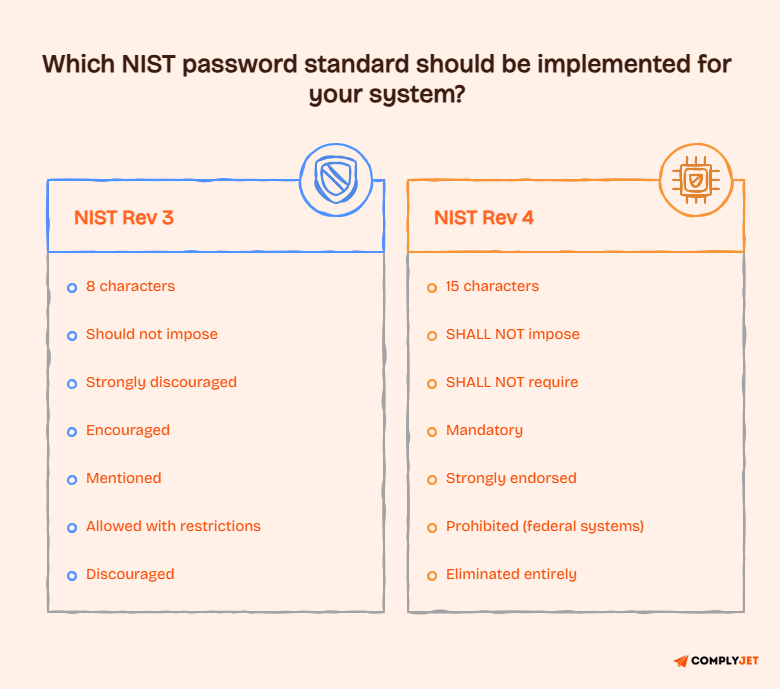
Note: The language shift from “should not” to “SHALL NOT” is significant. It reflects a firmer technical consensus that these practices do not improve security and, in some cases, actively weaken it.
Practical Implications for Existing Password Policies
You are not aligned with Rev 4, if your:
- Policy requires users to change their passwords every 90 days
- Policy requires a capital letter, a number, and a symbol
- Password’s minimum length is 8 characters
None of these is a catastrophic failure on its own. But collectively, they signal to an auditor that your policy was last updated years ago and has not kept pace with current standards.
That is a credibility problem during an audit, even if none of your systems has been breached.
Revisiting your SOC 2 compliance checklist and your SOC 2 Password policy in light of these changes is no longer optional.
Now that the regulatory backdrop is clear, let us walk through each specific standard your policy needs to address in 2026.
SOC 2 Password Requirements: The Specific Standards in 2026
This section covers the actual SOC 2 Password requirements that auditors evaluate. Each subsection targets a specific dimension of password security. They are what you need to have in place, documented, and technically enforced before your audit window opens.
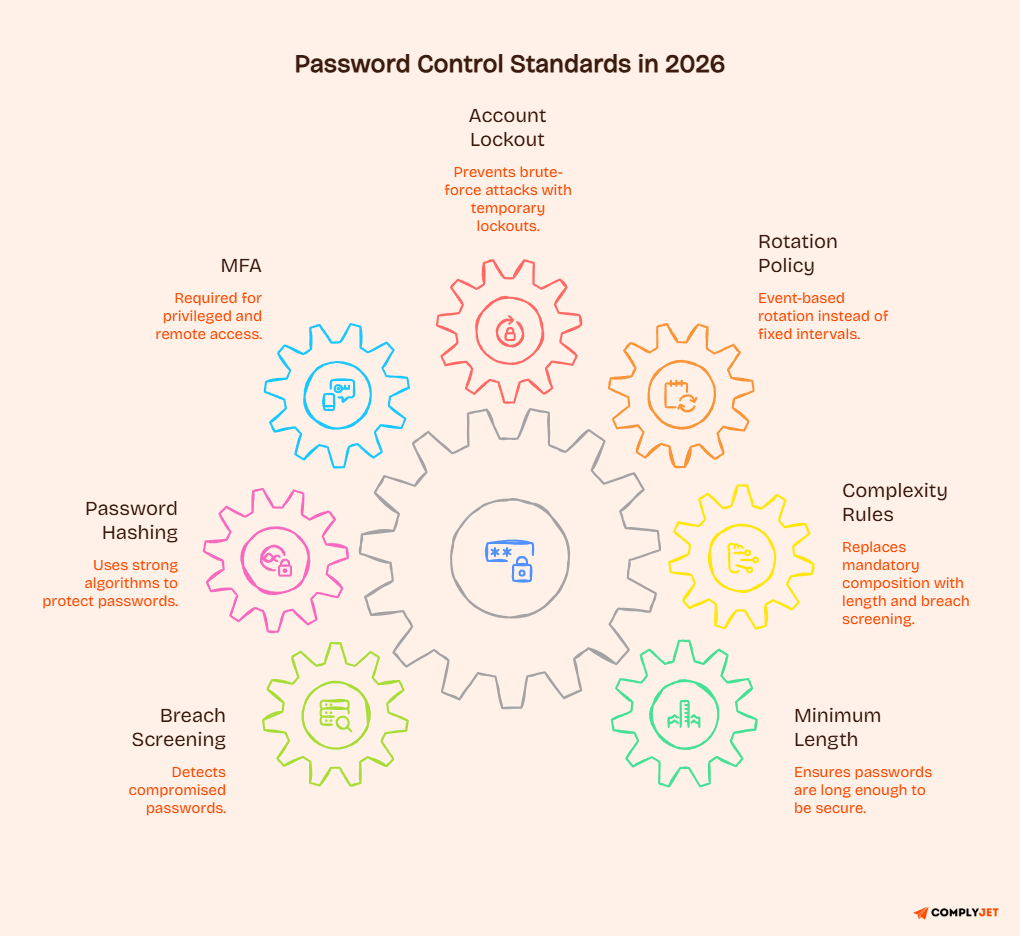
What connects all of these is enforcement.
A written policy that is not reflected in your system configuration is not in compliance. It is just documented. Auditors will test both.
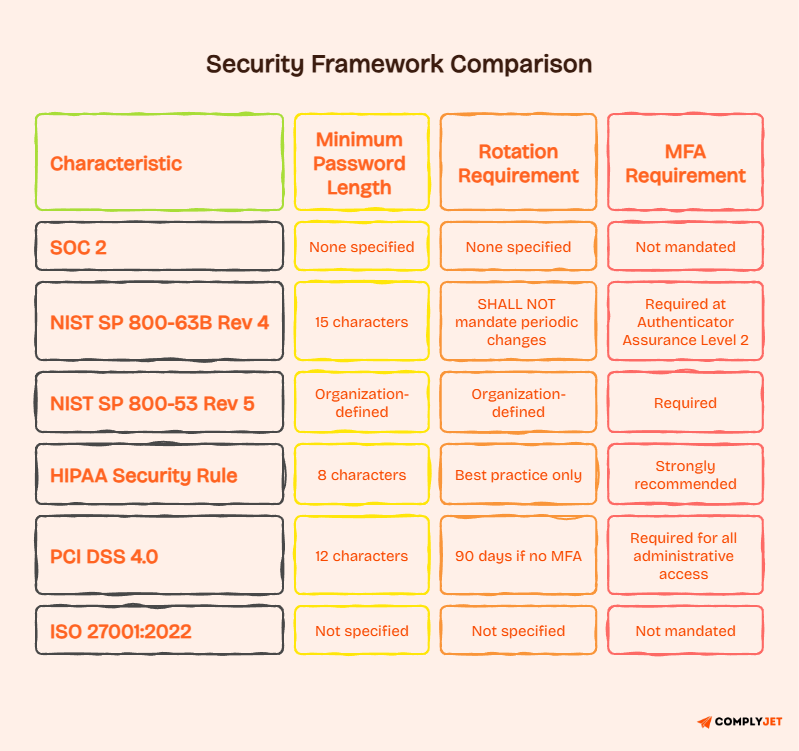
1. Minimum Password Length
For standard user accounts, 12 to 16 characters is the current auditor expectation. Fifteen or more characters align with NIST for single-factor authentication.
If you enforce MFA on every login, 8 characters is still technically defensible, but it requires a justification that must be documented.
For service accounts, the standard is different. Service accounts should use 32 or more characters, be cryptographically generated, and be stored in a secrets manager rather than a human-readable configuration file.
Did you know? A 15-character passphrase made of random words is significantly harder to crack than a 9-character complex password, even though the passphrase feels easier to remember.
2. Password Complexity Rules
The 8-4 rule, which required one uppercase letter, one lowercase letter, one number, and one special character, was officially eliminated. It was introduced in 2003 guidance and has persisted far longer than it should have.
The problem with forced complexity is that it produces predictable patterns. Users pick Password1! because it satisfies every rule in exactly the way they would game it.
NIST now explicitly states that verifiers shall not impose composition requirements.
What actually improves security is length combined with breach screening.
A 15-character passphrase with no forced complexity beats an 8-character forced-complex password as discussed already.
Note: Removing complexity rules is not an excuse to lower your standards. You are trading an ineffective control for a more effective one. Length requirements and compromised credential screening must replace it.
3. Password Expiration and Rotation Requirements
NIST Rev 4 states that verifiers SHALL NOT require periodic password changes. This is now the official position of the primary technical body auditors’ reference.
Forced rotation causes users to make minimal, predictable changes. Password1 becomes Password2. That is not a security improvement.
Password changes should be triggered by specific events: confirmed compromise, suspected breach, employee offboarding, or user request. Not by a calendar.
If you currently run 90-day rotation cycles, you do not need to remove that policy immediately, but you do need a documented risk rationale for it.
For password history, blocking the reuse of the last 10 to 24 previous passwords is the accepted control. Ten is the practical minimum most auditors accept.
4. Account Lockout Policy
SOC 2 password requirements do not specify a lockout threshold in their written criteria. But brute-force protection is required under CC6.1, and an absence of any lockout configuration is an automatic finding. The industry consensus is a lockout after 3 to 6 failed attempts, with 5 being the most commonly accepted threshold.
Lockout duration should be 30 to 60 minutes at a minimum. Progressive exponential delay, where each failed attempt increases the wait time, is accepted by auditors as an equivalent control.
All failed login events must be logged, and those logs must be reviewable. A lockout policy that generates no alert is half a control.
5. Multi-Factor Authentication Requirements
MFA is not required under the SOC 2 password requirements criteria. But in practice, auditors expect it for privileged accounts, remote access, cloud management consoles, production environments, and any system storing sensitive customer data.
The gap between technically optional and practically mandatory is where most companies get surprised.
Microsoft’s Security Intelligence team reported that MFA blocks 99.9% of automated account compromise attacks. That data point has aged well, and auditors know it.
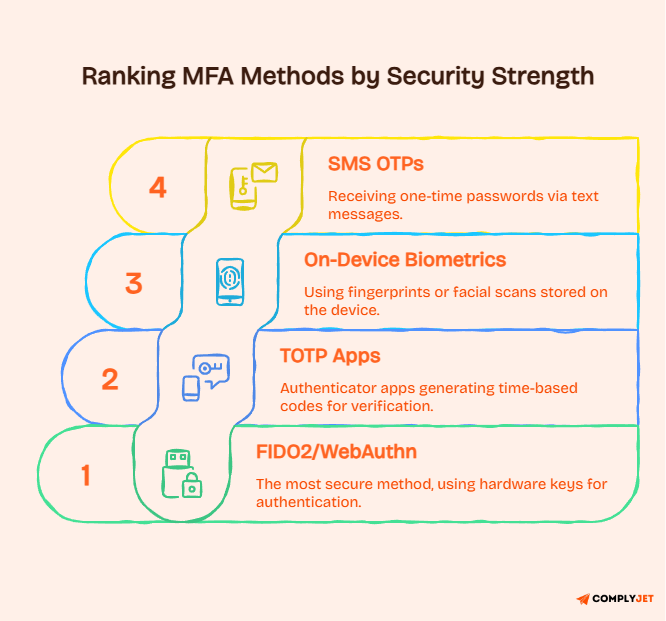
SMS is prohibited in federal systems and should be avoided when alternatives exist.
6. Password Storage Requirements
This is one of the most commonly misunderstood technical requirements in SOC 2 audits. How your system stores passwords matters as much as what passwords users set. SHA-256 and MD5 are designed for speed, which makes them completely inappropriate for password storage.
A modern GPU can compute billions of SHA-256 hashes per second, making brute-force attacks trivial against poorly hashed password databases.
The OWASP Password Storage Cheat Sheet recommends the correct alternatives:
- Argon2id: the OWASP 2024+ default, resistant to both GPU and side-channel attacks
- bcrypt: widely supported, use a cost factor of 12 or higher
- PBKDF2: acceptable with at least 600,000 iterations using SHA-256
Every stored password must use a unique, randomly generated salt of at least 32 bits. This prevents precomputed rainbow table attacks. If your engineering team is still using SHA-256 for passwords, this needs to change before your next audit.
Founder’s tip: If your engineering team is still using bcrypt with a cost factor below 10, or if you cannot answer what hashing algorithm your auth layer uses, that is worth fixing before an auditor asks.
7. Compromised Password Screening
Compromised-credential screening is mandatory. When a user sets a new password, you must check it against a database of known breached passwords. If it appears in the breach database, you must reject it regardless of whether it meets your other requirements.
Have I Been Pwned (HIBP) maintains a database of over 900 million compromised passwords as of 2025. Their API uses k-anonymity, meaning only the first five characters of the SHA-1 hash are transmitted to the API, protecting the full password value.
This is the most widely used implementation approach.
Screening should happen at account creation and at every password change. Organisations that cannot demonstrate this control have a gap that competitors with more mature implementations do not.
With the specific technical standards established, the next logical question is how SOC 2 compares to the other frameworks your buyers and partners may require.
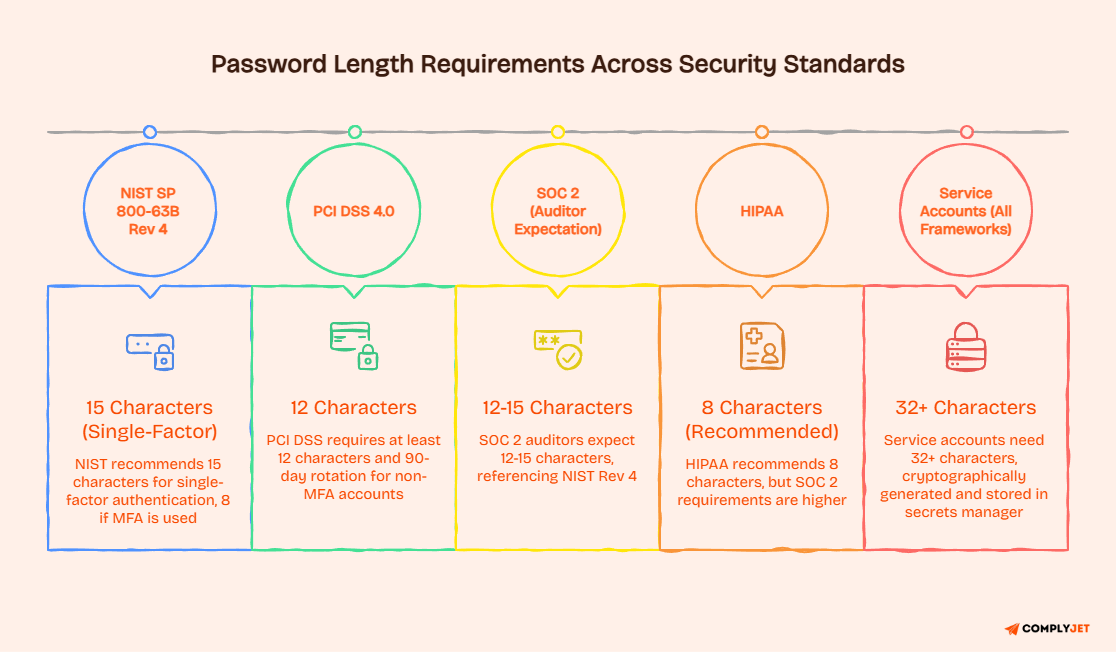
SOC 2 Password Requirements vs Other Compliance Frameworks
If you operate under multiple compliance frameworks, you need to understand where the requirements align and where they diverge.
Treating SOC 2, HIPAA, and PCI DSS as identical in their password requirements will create problems in both directions: over-engineering controls for one framework while under-engineering them for another.
SOC 2 sets the principle. NIST SP 800-63B supplies the technical standard auditors use to evaluate it. They are complementary. If you align your password policy with NIST Rev. 4, you will satisfy SOC 2’s authentication access control requirements.
The main distinction is that it applies directly to authentication systems, while SOC 2 evaluates the broader organisational security program.
Passing it does not automatically mean passing SOC 2, but failing alignment makes passing SOC 2 much harder.
SOC 2 vs NIST 800-53
NIST SP 800-53 is designed for federal information systems. It is more prescriptive than SOC 2 but leaves specific thresholds to the organisation’s risk assessment. For password controls, IA-5 (Authenticator Management) governs and requires documented minimum length, complexity, position, and rotation requirements.
Private companies pursuing SOC 2 are not required to comply with it.
However, organisations that serve federal clients or hold FedRAMP aspirations will need to satisfy both, and aligning SOC 2 controls with its requirements now saves significant rework later.
SOC 2 vs HIPAA
HIPAA’s Security Rule is principles-based, like SOC 2. It recommends 8-character minimum passwords in its guidance, but that recommendation has not been updated to reflect current standards. Most HIPAA-covered entities are now expected to exceed that minimum in practice.
If you are a healthcare technology company pursuing both HIPAA compliance and SOC 2, your SOC 2 password policy will almost certainly satisfy HIPAA’s requirements, since SOC 2 auditors set higher expectations. Go the other direction, and you may satisfy HIPAA while leaving SOC 2 gaps.
SOC 2 vs PCI DSS 4.0
PCI DSS 4.0, effective March 2025, increased its minimum password requirement from 7 to 12 characters and maintained a 90-day rotation cycle for systems that MFA does not protect. It explicitly mandates MFA for all administrative access.
PCI DSS is significantly more prescriptive than SOC 2. Organisations already compliant with PCI DSS 4.0 can use their PCI controls as supporting evidence for SOC 2 CC6.1, though auditors will still evaluate the full control environment.
SOC 2 vs ISO 27001
ISO 27001:2022 does not prescribe specific password parameters. Like SOC 2, it requires that appropriate access controls be implemented and documented. The standard references Annex A controls for access management but leaves implementation specifics to organisational risk assessment.
Companies pursuing both ISO 27001 and SOC 2 will find significant overlap in their access control requirements. A well-designed control environment for one framework typically satisfies the requirements of the other with only minor documentation adjustments.
How SOC 2 and NIST Work Together
NIST SP 800-63B functions as the technical specification that gives SOC 2’s principles their measurable content. When auditors evaluate CC6.1, they are asking: Does this organisation’s authentication approach meet current professional standards? NIST Rev 4 is how they answer that question internally.
Aligning your password policy with NIST Rev. 4 is not just about passing a single test. It signals to auditors that your organisation tracks current security standards and updates controls accordingly.
That posture matters across all of SOC 2.
Does HIPAA Require SOC 2 Compliance?
HIPAA and SOC 2 are entirely separate frameworks with different governing bodies and different legal statuses and hence it is not a requirement.
HIPAA is a federal regulation enforced by the HHS Office for Civil Rights. SOC 2 is a voluntary attestation framework governed by the AICPA.
Organisations handling protected health information (PHI) may choose to pursue SOC 2 because their customers require it. But HIPAA itself does not mandate SOC 2, and SOC 2 certification does not satisfy HIPAA compliance requirements.
They must be addressed independently.
Understanding what the frameworks require is one layer. The harder question is what auditors actually look for on the ground, and that is where most companies have the biggest gaps.
What Auditors Actually Check in 2026?
The most common misconception about SOC 2 password audits is that having a written SOC 2 Password policy is enough. It is not.
Auditors verify that controls are designed, implemented, and operating effectively. That requires three different types of evidence, and most companies are strong on one and weak on the other two.
If you want to see what SOC 2 evidence collection looks like in practice before your audit window opens, booking a demo to explore how a structured SOC 2 audit readiness process works will save you significant time under pressure.
Policy Documents Auditors Request
Auditors will ask for your written SOC 2 password policy, access control policy, MFA policy, and user provisioning and deprovisioning procedures. These documents must exist, be current, and be version-controlled with a documented review history.
A policy last updated in 2022 that still references a mandatory 90-day rotation will not reflect well in a 2026 audit. Policy currency is a signal auditors use to assess whether your compliance program is active or performative.
Technical Configuration Evidence
This is where most companies struggle. Auditors want to see screenshots of your identity provider (IdP) configuration, MFA enforcement reports, lockout threshold settings, and encryption configuration documentation.
A SOC 2 password policy that is not reflected in technical controls is not in compliance.
If your written policy says “MFA is required”, but your IdP allows users to bypass it, that discrepancy will be flagged.
Screenshots taken at configuration time, stored and timestamped, are the clearest evidence. Retroactive documentation is always weaker.
Monitoring and Logging Evidence
Auditors want to see that you are actively monitoring authentication events, not just configuring controls and hoping nothing goes wrong. This means SIEM or log management evidence showing failed login alerts, anomalous login detection, and regular log review.
Understanding how a SOC 2 security monitoring program works will help you structure logging that satisfies auditor expectations without generating alert fatigue.
Evidence Mapping by CC Criteria
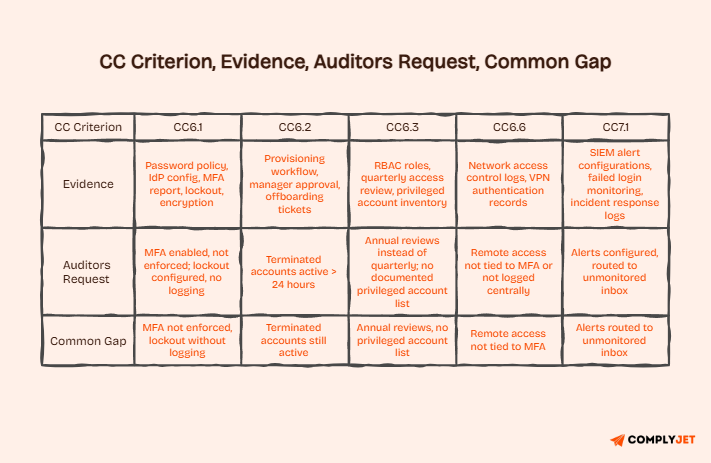
Here is what auditors typically request per CC criterion:
- CC6.1: Password policy document, IdP configuration screenshots, MFA enforcement report, lockout settings, encryption configuration
- CC6.2: Provisioning workflow records, manager approval logs, and offboarding tickets with timestamps showing same-day or next-day action
- CC6.3: RBAC role definitions, quarterly access review records signed by system owners, privileged account documentation
- CC6.6: Network access control logs, VPN authentication records
- CC7.1: SIEM alert configurations, failed login monitoring reports, and incident response logs
Most Common Password-Related Audit Findings
Based on typical SOC 2 audit patterns, these are the findings that appear most frequently in access control reviews:
- MFA is enabled but not enforced; users can opt out or bypass it
- Access reviews are conducted once a year rather than quarterly
- Terminated employee accounts remain active for more than 24 hours after offboarding.
- Written password policy does not match the actual IdP configuration.
- Service account passwords are unchanged after personnel transitions.
- The password policy scope does not cover SSH keys and API tokens
Founder’s tip: Run a mock evidence collection drill 60 to 90 days before your audit window opens. You will find gaps you did not know existed.
Record Retention Requirements
- Password policy documents and revision history: minimum 1 year
- Security incidents and response records: 2 to 3 years
- Access review records: audit period plus 1 year
- User provisioning and deprovisioning logs: audit period plus 1 year
Proper evidence organisation is what separates a smooth audit from a chaotic one.
Our guide on SOC 2 compliance cost explains how evidence management directly affects your total audit spend.
With evidence requirements clear, let us look at the tools most teams use to meet them, starting with password managers.
Do You Need a Password Manager to Meet SOC 2 Requirements?
A password manager is not explicitly required by SOC 2. But that is a bit like saying you are not required to use a spreadsheet for your finances.
Technically true. But practically, most organisations with more than a handful of employees find that managing credentials without dedicated tooling produces exactly the kind of access control gaps auditors find.
If your team is reusing passwords across systems, storing credentials in a shared document, or struggling to audit who has access to what.
A password manager is a convenience and a foundational control for your SOC 2 compliance program.
Why Password Managers Matter in Practice?
Password managers generate unique, high-entropy credentials for every system. They eliminate the reuse problem at scale. They also create an auditable record of which credentials exist and who has access to them, directly supporting the CC6.1 and CC6.3 evidence requirements.
Without a password manager, proving that every system account uses a unique password is extremely difficult. That proof is exactly what auditors want.
How Password Managers Support CC6 Controls?
A password manager addresses CC6.1 by enforcing unique credentials per system. It supports CC6.2 by providing an access record for provisioning and deprovisioning. It helps CC6.3 by creating a structured vault structure tied to roles, making access reviews more tractable.
None of this replaces your IdP configuration. A password manager and an IdP serve different purposes. The IdP enforces the authentication policy. The password manager stores and generates credentials. You need both.
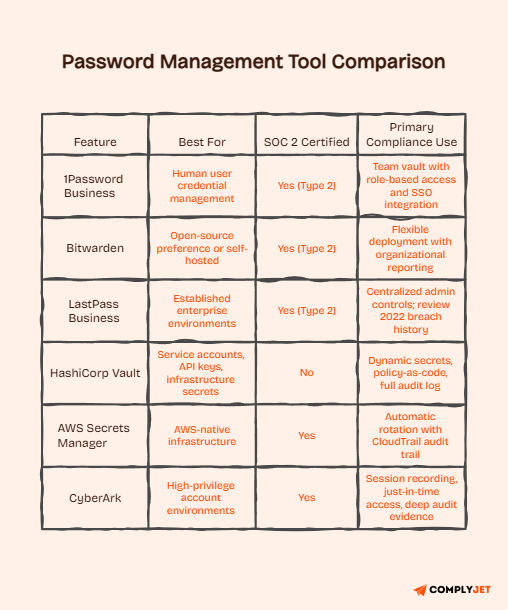
1Password Business
1Password Business is SOC 2 Type 2 certified and supports SSO integration. It offers team vaults with role-based access control, making it practical for organisations that need to audit who has access to which credential sets. Admin reporting supports the evidence collection process.
Bitwarden
Bitwarden is open-source and SOC 2 Type 2 certified. Its self-hosted option is valuable for organisations with data residency requirements. It provides organisational reporting and integrates with most major SSO providers.
LastPass Business
LastPass Business is SOC 2 Type 2 certified and offers centralised admin controls and MFA enforcement. It is worth noting that LastPass experienced significant security incidents in 2022, which are part of its public record. Organisations evaluating it should review the incident history and assess whether it meets their risk appetite.
HashiCorp Vault
HashiCorp Vault is a secrets management platform designed for programmatic access rather than human user credential storage. It generates dynamic secrets, provides a detailed audit log of every secret access event, and supports policy-as-code. It is the tool of choice for managing service account credentials and API tokens at scale.
AWS Secrets Manager
AWS Secrets Manager provides automatic rotation for supported AWS services and integrates natively with IAM for access control. If you are running your infrastructure on AWS, Secrets Manager offers the most frictionless path to credential rotation with a full audit trail.
CyberArk
CyberArk is an enterprise Privileged Access Management (PAM) platform. It includes privileged session recording, just-in-time access provisioning, and comprehensive audit logging. For organisations with significant privileged account risk, CyberArk provides audit evidence depth that lighter-weight tools cannot match.
Already have the tools, but not sure if your configuration is audit-ready? Start a free trial with ComplyJet and get automated evidence collection working across your existing stack within days.
How to Build a SOC 2-Compliant Password Policy
Building a password policy that holds up in a SOC 2 audit is not about writing the right document. It is about creating a system where the document, the technical controls, and the monitoring evidence all say the same thing. Gaps between any two of those layers are where findings come from.
What follows is a practical sequence for aligning all three layers, in the order that reduces risk the fastest.
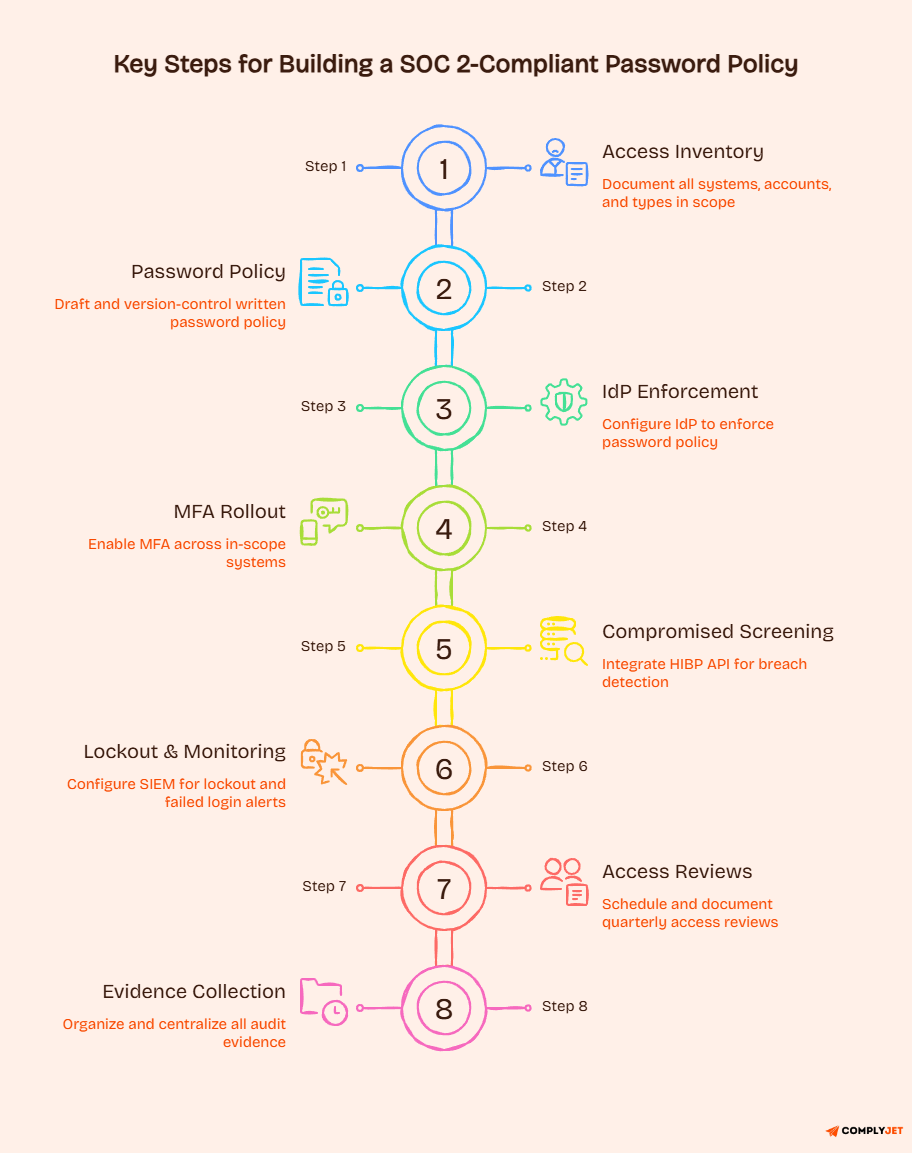
Step 1: Conduct an Access Inventory
Before you write a single policy requirement, you need to know what you are protecting. Map every system, application, and data store that falls within your SOC 2 scope.
Identify every user type:
- Full-time employees
- Contractors
- Service accounts
- Privileged accounts
- Third-party integrations
This inventory becomes the foundation for every CC6 control. You cannot enforce a SOC 2 password policy on systems you have not documented.
Step 2: Draft the Written Password Policy
Your policy document must cover:
- A minimum length by account type
- Your position on complexity (NIST-aligned, no forced composition)
- Rotation triggers (event-based, not calendar-based)
- Lockout thresholds and duration
- MFA requirements by system tier
- Credential storage requirements, including hashing algorithm expectations.
The document should be version-controlled, dated, reviewed at a minimum annually, and approved by a named owner. A policy with no ownership is a policy no one will maintain.
Step 3: Enforce Requirements Through Your IdP
Every requirement in your written policy must be technically enforced in your identity provider. If you use Okta, Azure AD, or Google Workspace, configure the password settings to match your policy exactly. Then screenshot those configurations with timestamps.
Tip: Do not rely on memory or periodic screenshots. Export configuration records when you make changes and store them with your audit evidence.
Step 4: Add MFA Across In-Scope Systems
Enable MFA for all privileged accounts, production systems, remote access, cloud management consoles, and any application handling sensitive customer data. Enforcement is the word that matters. “Available but optional” is not a control.
Run an MFA enrollment report showing which accounts are enrolled versus which are exempt. Document the justification for any exemptions.
Step 5: Enable Compromised Credential Screening
Integrate the HIBP API or an equivalent service into your authentication flow. The implementation should check every new password at creation and at every change event. Log the screening activity.
Note: This is now a mandatory requirement under NIST Rev 4. If your current auth system does not support it natively, that is a gap to resolve before your audit window.
Step 6: Configure Lockout and Monitoring
Set your IdP to lock accounts after 5 failed attempts, with a minimum lockout duration of 30 minutes. Connect authentication logs to your SIEM or centralised logging system. Configure alerts for failed login anomalies, off-hours access attempts, and geographic outliers.
The alerts need to reach someone who will act on them. An alert that fires to an unmonitored inbox is not a control.
Step 7: Schedule Quarterly Access Reviews
Assign a named system owner for every in-scope system. Build recurring calendar events for quarterly reviews. Each review should produce a signed record confirming which accounts were reviewed, retained, and removed.
Getting SOC 2 access reviews right requires more structure than most teams realise. Building the process before the audit is much easier than reconstructing records after.
Step 8: Document, Test, and Collect Audit Evidence
Run a mock evidence collection exercise 60 to 90 days before your audit window opens. Collect your policy documents, IdP configuration screenshots, MFA enrollment reports, lockout settings exports, access review records, and offboarding ticket histories. Store everything in a centralised, auditor-accessible location.
If you find gaps during this exercise, you have time to fix them. If you find them during the real audit, you do not.
The policy and the tools are foundational. But the most forward-looking organisations are also thinking about what comes after traditional password-based authentication.
Beyond Passwords: The Future of SOC 2 Authentication
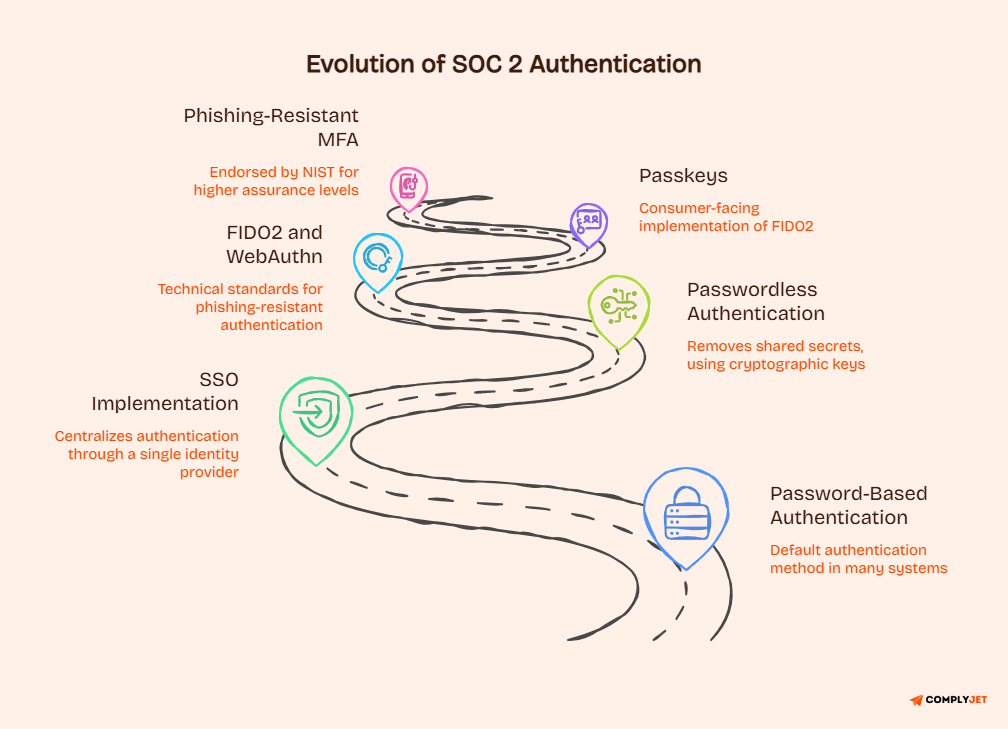
The SOC 2 password policy is not the destination. It is where most organisations are right now because password-based authentication remains the default in many systems.
Modern authentication approaches do not improve password security. They replace passwords entirely, and in doing so, they remove entire categories of risk.
Understanding where authentication is heading helps you make infrastructure decisions today that reduce audit burden tomorrow.
The guidance on FIDO2 and passwordless authentication is the clearest signal yet that the industry is moving away from shared secrets as the primary authentication method.
SSO as a Centralised Authentication Layer
Single Sign-On (SSO) centralises authentication through a single identity provider. Instead of managing password configurations across dozens of individual applications, you manage them all in one place.
This dramatically simplifies evidence collection for CC6.1, CC6.2, and CC6.3 because all authentication events flow through one auditable system.
SSO does not eliminate the need for a strong password policy. It focuses on where that policy is enforced, making consistent enforcement significantly more achievable.
Passwordless Authentication
Passwordless authentication removes the shared secret entirely. Instead of a password that can be stolen, phished, or reused, the user authenticates with a cryptographic key pair stored on their device. There is no password to breach because there is no password.
NIST Rev 4 strongly endorses passwordless approaches at higher assurance levels.
SOC 2 auditors are increasingly familiar with these implementations and can evaluate them appropriately under CC6.1.
FIDO2 and WebAuthn
FIDO2 is the technical standard underlying most modern passwordless implementations. WebAuthn is its browser component. Together, they enable hardware-key and device-based authentication that is phishing-resistant by design.
Phishing resistance comes from the fact that FIDO2 credentials are cryptographically bound to the specific origin domain.
A phishing site cannot capture and replay a FIDO2 credential the way it can capture a password.
Passkeys
Passkeys are the consumer-facing implementation of FIDO2. They are now supported natively by Apple, Google, and Microsoft. For workforce authentication, passkeys enable users to authenticate with a biometric or device PIN, with the cryptographic key material stored on-device and never transmitted.
The audit trail for passkey authentication is clean and complete.
Every authentication event is logged with device, time, and method, giving CC6.1 evidence without the complexity of managing password configurations.
Phishing-Resistant MFA
NIST Rev 4 explicitly endorses phishing-resistant authenticators for AAL2 and AAL3 (Authenticator Assurance Levels).
FIDO2-compliant devices and passkeys qualify. TOTP authenticator apps do not, because TOTP codes can be captured in real-time phishing attacks. SMS codes definitely do not.
For high-value systems, the move toward phishing-resistant MFA is not optional in the long run. Auditors will increasingly expect it for privileged access.
How Modern Authentication Simplifies Audit Evidence
One of the underrated benefits of passwordless and SSO-based authentication is how much it simplifies evidence collection. When all authentication flows through a single IdP with FIDO2 enforcement, your CC6.1 evidence consists of a single configuration export and a log report. Compare that to managing password policies across 15 different applications.
Modern authentication is not just a security improvement. It is an operational simplification for teams that must repeatedly prove compliance across Type 2 audit periods.
Learn how modern tooling integrates with your evidence workflow in our best compliance management software guide.
FAQs
Does SOC 2 require a specific password length?
No specific length is mandated. Auditors generally expect 12 to 15 characters for standard accounts. NIST SP 800-63B Rev 4 sets 15 characters as the minimum for single-factor authentication. Service accounts should use 32 or more cryptographically generated characters.
Is MFA required for SOC 2?
MFA is not required under SOC 2’s criteria. However, auditors expect it for privileged accounts, remote access, production systems, and cloud consoles. Organisations that cannot demonstrate MFA enforcement on sensitive systems frequently receive findings under CC6.1.
How often should passwords be changed for SOC 2?
NIST SP 800-63B Rev 4 states that periodic rotation SHALL NOT be required. Passwords should be changed upon offboarding, upon suspected compromise, or upon confirmed security incidents. Calendar-based rotation is no longer aligned with current standards and must be justified if maintained.
Is a password manager required for SOC 2?
No password manager is explicitly required. However, most organisations with more than 20 employees find them necessary for practical compliance. Password managers help enforce unique credentials, support evidence collection, and reduce the risk of credential reuse across systems.
What is SOC 2 CC6.1?
CC6.1 is the Common Criteria control for Logical Access Security within the AICPA Trust Services Criteria. It governs how organisations prevent unauthorised access through unique user accounts, authentication strength, encryption, and access monitoring. Most password requirements live under CC6.1.
What is the 8-4 rule for passwords?
The 8-4 rule required at least one uppercase letter, one lowercase letter, one number, and one special character, with a minimum of 8 characters. NIST SP 800-63B Rev 4 officially eliminated this rule because forced complexity produces predictable patterns rather than genuine security.
Should I use SHA-256 for passwords?
No. SHA-256 is designed for speed, which makes it unsuitable for password storage. Modern hardware can compute billions of SHA-256 hashes per second. Use Argon2id as the first choice, followed by bcrypt with a cost factor of 12 or higher, or PBKDF2 with at least 600,000 iterations.
Is SHA-256 outdated for passwords?
SHA-256 was never appropriate for password hashing. Its speed is a liability in password storage contexts. This applies regardless of its broader cryptographic validity. The OWASP Password Storage Cheat Sheet provides current recommendations for appropriate algorithms.
What is the NIST password policy for 2026?
Under NIST SP 800-63B Rev 4 (July 2025): minimum 15 characters for single-factor authentication, no mandatory complexity rules, no mandatory periodic rotation, mandatory compromised credential screening, and strong endorsement of FIDO2 passwordless authentication.
Does NIST no longer recommend password changes?
Correct. NIST Rev 4 states that verifiers SHALL NOT require periodic password changes. Changes should be triggered only by evidence of compromise, a suspected breach, or a user request, not by a calendar schedule.
What are the NIST 800-53 password requirements?
NIST SP 800-53 Rev 5 governs authenticator management via control IA-5 for federal systems. It requires organisation-defined minimum length, complexity position, and rotation triggers. Specific thresholds are left to the organisation’s risk assessment rather than being prescribed exactly.
What are the five criteria for SOC 2?
The five Trust Services Criteria categories are Security, Availability, Processing Integrity, Confidentiality, and Privacy. Security is the only mandatory category. The others are included based on the commitments an organisation makes to customers in its service description.
What are the five golden rules of passwords?
Under current NIST Rev 4 guidance: use a passphrase of 15 or more characters, never reuse passwords across systems, enable MFA everywhere possible, screen passwords against known breach databases at creation and change, and store credentials only in a reputable password manager.
Is NIST 800-53 mandatory?
NIST 800-53 is mandatory for U.S. federal agencies and federal contractors under FISMA. For private sector organisations, it is voluntary but widely adopted. SOC 2 auditors may reference it alongside NIST 800-63B when evaluating access controls.
What is the 3-word password rule?
The three-word password approach was popularised by the UK National Cyber Security Centre as a memorable framework for creating strong passphrases. Combining three random unrelated words creates a longer, more resistant credential than a short, complex password, because length matters more than character variety under current NIST standards.
Conclusion
NIST SP 800-63B Rev. 4 fundamentally changed auditors’ expectations for SOC 2 password controls. The shift from advisory “should not” language to binding “SHALL NOT” requirements for rotation and composition rules means that many policies written before July 2025 now need revision.
If yours has not been updated, that is the first action item.
The gap between policy and enforcement is where most audits find their findings.
A 15-character minimum requirement in a document, but set to 8 characters in your identity provider, is not a control. It is a discrepancy. The SOC 2 password compliance work is closing every gap between your policy and your systems.
Modern authentication is the direction the entire industry is moving, and NIST Rev 4 makes that clear. FIDO2, passkeys, and passwordless flows are not future-state considerations. They are available today and simplify your CC6.1 evidence collection while eliminating entire categories of risk.
Your next step depends on where you are. If you have not mapped your current password controls to CC6.1, CC6.2, and CC6.3, start there. If your policy predates July 2025, update it. If your evidence collection is manual, it does not have to be.