.svg)

According to IBM's 2026 Cost of a Data Breach Report, as summarized by the law firm Baker Donelson, incidents involving shadow AI by employees more than doubled to 43% of those studied, up from 20% the year before. They also cost more: $5.39 million on average, against $4.63 million.
The tool is rarely the problem. The problem is the tool nobody reviewed, and that is the heart of shadow AI risk.
Shadow AI risk is the exposure created when employees use AI tools your company has not reviewed or approved: company data leaves your control, vendor and privacy obligations go unmet, and you cannot show an auditor or a customer which tools were in use. You cannot ban your way out of it. You find it, approve a short list, write the rules down, train people, and keep the evidence.
Quick take
For a team under 50 people, the fix is a month of part-time work, not a security program: one discovery pass, one approved-tool list, one policy, one training round and a quarterly re-check. The timeline is my own estimate, laid out in the 30-day plan below.
Note
This guide covers shadow AI as a risk and a program across frameworks. For the SOC 2 audit view of the same problem, see our guide on whether SOC 2 covers AI. For the rules text itself, see the acceptable use policy guide and the AI governance policy guide. For scoring an individual AI system, see the AI risk assessment guide.
By the end of this guide, you will be able to run a discovery in 30 minutes, map what you find to the controls it touches, and have an approved-tool list and a policy in place within a month.
Here's what I'll cover:
- What shadow AI is, how it differs from shadow IT, and where it hides
- Why employees reach for unapproved AI tools
- The four risks that matter most, with the IBM 2026 numbers
- What SOC 2, ISO 27001, ISO 42001, GDPR, HIPAA and the EU AI Act each expect
- How to detect shadow AI without a security team
- A 30-day plan, an approved-tool matrix and a five-question intake for new tools
- A worked example, the mistakes to avoid and a closing checklist
What Is Shadow AI? Defining Shadow AI Risk Without the Jargon
The UK's National Cyber Security Centre defines it in one line: shadow AI is "the use of AI technology which isn't captured in an organisation's approved systems and processes" (NCSC blog, 7 September 2026).
In plain terms, it is any AI your organization has not reviewed, approved or cannot see. That covers a personal chatbot account, an AI feature someone switched on inside a tool you already pay for, a browser extension, a meeting notetaker, and a coding agent running on a laptop.
The word "shadow" is about visibility, not intent. Most people using these tools think they are being efficient, not breaking a rule.
Shadow AI vs Shadow IT: Where the Shadow AI Risk Differs
Shadow IT is the older problem: someone signs up for a file-sharing app nobody approved. The shadow AI vs shadow IT distinction matters in practice, because shadow AI looks similar and behaves differently.
| Shadow IT | Shadow AI | |
|---|---|---|
| What the tool does with your data | Stores it or moves it | Ingests it, may retain it, and depending on the plan and terms may use it to improve the model |
| How it gets in | An install or a sign-up | A browser tab, an extension, a toggle inside an approved tool |
| How visible it is | An app, a login, often an invoice | A paste into a text box leaves almost no trace |
| What else can go wrong | Data loss, unpatched software | Data loss plus unreviewed outputs entering real work: code, contracts, customer replies |
| What fixes it | Block or approve the app | Approve the tool and set rules for what data goes into it |
The last row is the important one. With shadow IT, the app is the unit of control. With shadow AI, the unit of control is the combination of tool, plan and data, and that is why a simple blocklist falls short.
Shadow AI Examples: Where Unapproved AI Tools Hide
These shadow AI examples account for most of what small teams find. Check each one before you assume you know your exposure.
| Where it hides | What can leave the company | Why it is hard to see |
|---|---|---|
| Personal chatbot accounts | Customer emails, contract text, support tickets, internal strategy | The account is personal, the browser tab closes, nothing is logged centrally |
| AI features inside tools you already approved | Whatever the host tool already holds, such as CRM notes or ticket history | The vendor is on your list, the new feature is not |
| Browser extensions and AI notetakers | Every page the extension reads, every call a bot joins | Installed by one person in one click, running in the background |
| Coding assistants and agents | Source code, configuration, credentials in a repo | Personal subscriptions and local tools do not appear in procurement |
| Spreadsheet add-ons and automations | Exported customer data sent to a language model by a script or add-on | The workflow looks like a normal spreadsheet |
| Free-tier writing and design tools | Product plans, unreleased copy, customer names | No contract, no invoice, no owner |

The case everyone cites is still the clearest. In April 2023, a Samsung engineer uploaded internal source code to ChatGPT, and the company then banned generative AI tools in a memo, as Forbes reported on 2 May 2023. Nobody set out to leak anything. Someone wanted help debugging.
Why Employees Use Unapproved AI Tools, and Why It Keeps Growing
The adoption is not a fringe habit. Microsoft and LinkedIn's 2024 Work Trend Index, a survey of 31,000 knowledge workers, found that 78% of AI users were bringing their own AI tools to work. That is a 2024 figure, and the tools have only become easier to reach since.
The reason is usually a gap between what people need and what the official path offers. One Hacker News commenter, writing in July 2026 about a vendor copilot that could not connect to the tools staff actually use, predicted shadow AI "with ugly consequences for security and data exfiltration" when the sanctioned option falls short.
Four patterns repeat:
- The approved tool is slower or weaker. A free chatbot answers in seconds. An access request takes a week.
- Nobody said no, and nobody said yes. Silence reads as permission.
- The feature just appeared. An existing vendor adds an AI button, and a person clicks it.
- The deadline is today. People optimize for the task in front of them.
Pro tip
Treat every unapproved tool you find as a requirements document. If five people use a free notetaker, you have learned that meeting notes are a real need. The goal is to give that need an approved home, not to punish it.
ISO 42001
Give every AI tool an owner, a record and a review
ComplyJet's ISO 42001 workspace includes AI supply chain management that documents model providers, datasets and third-party AI components, plus employee training and awareness with acknowledgement tracking.
The Shadow AI Risk Stack: What Goes Wrong When AI Is Unapproved
Start with what IBM's 2026 report found, again as summarized by Baker Donelson. Shadow AI was involved in 43% of the incidents studied, up from 20% in 2025, and those incidents cost $5.39 million against $4.63 million. Among organizations that suffered an AI-related breach, 92% lacked proper AI access controls and 68% lacked AI governance policies, up from 63% the year before. The sample was 602 organizations, between March 2025 and February 2026.
The numbers describe the outcome. The four risks below describe how you get there.
Shadow AI Risk 1: Data Exposure and Confidentiality Breaches
A paste into a chatbot is a data transfer to a third party. Customer records, source code, credentials and unreleased plans all go through the same text box.
What happens next depends on the plan and the vendor's terms: how long inputs are retained, who can read them, and whether they can be used for training. On a personal account, you did not read those terms and you cannot change them.
Your own customer contracts add a second layer. Most enterprise agreements include confidentiality clauses and data processing terms, and an unreviewed AI tool sits outside both.
Shadow AI Risk 2: Contract, Privacy and Regulatory Breaches
Privacy law cares about who touches personal data, not how convenient the tool was.
- GDPR: a vendor that processes personal data for you is a processor, and Article 28 requires a contract with specific terms. An unapproved AI tool has none. If personal data leaks through one, Article 33 starts a 72-hour clock for notifying the regulator, and you cannot start it if you never knew the tool existed.
- HIPAA: a vendor that handles protected health information needs a business associate agreement before it touches any. A free chatbot does not sign one.
Watch out
A deletion setting inside the tool does not replace a contract. The agreement is what makes the vendor accountable. The setting only changes what the product does by default.
Shadow AI Risk 3: Missing Evidence When an Auditor or Customer Asks
Auditors sample your vendor list and your approvals. An AI tool in daily use that appears on neither is a gap you cannot explain away.
Customers increasingly ask the same thing in security questionnaires: which AI tools touch our data, and where do the prompts go? If the honest answer is "we are not sure," the deal slows down. The same pattern shows up in our guide on whether SOC 2 covers AI tools like ChatGPT and Claude.
Shadow AI Risk 4: Unreviewed Outputs in Customer-Facing Work
Inputs are half the risk. Outputs are the other half. A wrong answer drafted by an unapproved tool and sent to a customer under your name is your error. Code generated by an unreviewed assistant can carry licensing and security problems into production.
Output risk is the reason a good policy includes a human-review rule, not only a data rule.
Shadow AI Compliance: What Each Framework Expects
No major framework mentions shadow AI by name. Shadow AI compliance comes down to controls you already have, and an auditor will find the gaps whether or not the term appears in the standard.
SOC 2 and ISO 27001: Vendor, Acceptable Use and Leakage Controls
SOC 2 has no AI-specific criterion, and the point is not that it requires an AI program. Unreviewed AI vendors fall under criteria you already test: vendor and business-partner risk (CC9.2) and risk assessment (CC3). ISO 27001:2022 is more explicit, because its Annex A already names the relevant controls.
| Control | How shadow AI breaks it | Evidence to keep |
|---|---|---|
| SOC 2 CC9.2, vendor and business-partner risk | AI vendors in daily use were never assessed | Vendor list with AI tools, review dates, vendor SOC 2 or ISO reports |
| SOC 2 CC3, risk assessment | AI tool use is missing from the risk register | Risk register entry for AI tool use, with an owner |
| ISO 27001 A.5.9, inventory of information and other associated assets | Tools holding company data are not on the inventory | Inventory that includes AI tools and what data they hold |
| ISO 27001 A.5.10, acceptable use | Rules do not say which tools or data are allowed | Acceptable use policy with AI clauses and signed acknowledgements |
| ISO 27001 A.5.19 to A.5.23, suppliers and cloud services | AI suppliers onboarded without review | Supplier assessments, contracts, cloud-service approvals |
| ISO 27001 A.6.3, awareness and training | Staff were never told what is allowed | Training records and acknowledgement logs |
| ISO 27001 A.8.12, data leakage prevention | Nothing stops sensitive data going into AI tools | Technical or procedural controls, with the data classes they cover |
For the ISO side of the stack, our guide on ISO 27001 and AI compliance covers how the 2022 controls extend to AI.
ISO 42001, GDPR, HIPAA and the EU AI Act: The AI-Specific Layer
If you pursue ISO 42001, the AI management system standard, shadow AI cuts directly against the AI policy, supplier and use controls. For the full control list, see our ISO 42001 explainer.
| Framework | What shadow AI breaks | Reference |
|---|---|---|
| ISO 42001 | No approved AI policy applied in practice; tooling not documented; use not governed; AI suppliers not assessed | Annex A: A.2.2 AI policy, A.4.4 tooling resources, A.9.2 processes for responsible use, A.10.3 suppliers |
| GDPR | No processor contract, weak security of personal data, no way to meet the breach-notification clock | Articles 28, 32 and 33 |
| HIPAA | PHI shared with a vendor with no business associate agreement | Business associate agreement requirement |
| EU AI Act | Staff using AI without any training or guidance | Article 4, AI literacy |
Important
Article 4 of the EU AI Act has applied to providers and deployers since 2 February 2025. The Digital Omnibus on AI, Regulation (EU) 2026/1744, in force from 27 July 2026, softened it from ensuring a sufficient level of AI literacy to taking measures that support it, and national authorities gain enforcement powers from 2 August 2026, per a ki-campus summary of the change. Training staff on approved tools is the practical way to meet it.
How to Detect Shadow AI Risk in a Company With No Security Team
You do not need a CASB or a network sensor to start. Seven sources, most of them already in your hands, will show you more than you expect.
| Source | What it shows | Effort (my estimate) |
|---|---|---|
| Anonymous survey with an amnesty promise | What people use and why, including personal accounts | An hour to write, a week to collect |
| SSO and OAuth app grants | Which AI apps hold access to company accounts, mail or drives | About an hour in your identity provider's admin console |
| Expense and procurement lines | Paid subscriptions, personal ones included, reimbursed as expenses | An hour with a finance export |
| Browser-extension inventory | AI extensions installed on work browsers | Depends on your device management; minutes if it exports a list |
| Admin consoles of approved SaaS | AI features switched on inside tools you already approved | An hour per major tool |
| DNS, proxy or CASB logs, if you have them | Traffic to known AI services | Hours, and only if the logs already exist |
| Device or endpoint inventory | Locally installed AI apps and coding tools | Minutes to hours, depending on the tooling |
Try this yourself
Spend 30 minutes on two of these. Open your identity provider's list of connected third-party apps and sort by most recent grant. Then search last quarter's expense export for the names of the major AI products. You will almost certainly find something nobody on the leadership team could name.
One caution before you go further. Monitoring has an employee-privacy side. Tell people what you will look at and why, keep the amnesty promise in the survey, and aim the exercise at tools and data, not at individuals.
How to Prevent Shadow AI Risk in 30 Days: A Playbook for Small Teams
This is how to prevent shadow AI without a blanket ban, in the sequence I would run at a company under 50 people. The week labels and effort are my estimates, not benchmarks, and a team with a busy audit calendar should stretch them.
- Discover, with amnesty (week 1). Run the survey and the two quick checks above. Promise that nobody is in trouble for what they report.
- Classify the data (weeks 1 to 2). Decide which data classes exist and which AI tools may ever see each one. Our data classification policy guide gives you the tiers.
- Decide on each tool you found (week 2). Approve, approve with limits, replace, or block. Publish a one-page approved list.
- Write the rules and the request path (week 3). Put them in your policy, with a named owner and a response-time target for new tool requests.
- Train and collect acknowledgements (weeks 3 to 4). Short, specific, tied to the approved list.
- Set the review rhythm (week 4). A quarterly re-scan and an exceptions log.

Why a Ban Alone Fails
The instinct after a scare is to block everything. Samsung did exactly that in 2023, and was reported at the time to be developing its own internal AI tools for the same jobs, which suggests the need did not go away.
A Hacker News commenter put the failure mode plainly in February 2026: trying to ban this outright "will only push your most effective employees" toward places where they can work freely. That matches how I would expect people to behave. If the blocked tool saves two hours a day, it moves to a personal phone, and now you have the same risk with less visibility.
A ban is still the right answer for one thing: the most sensitive data. Keep the hard block for regulated and confidential data, and give people an approved route for everything else.
The Approved-Tool Matrix: Data Class by Tool Status
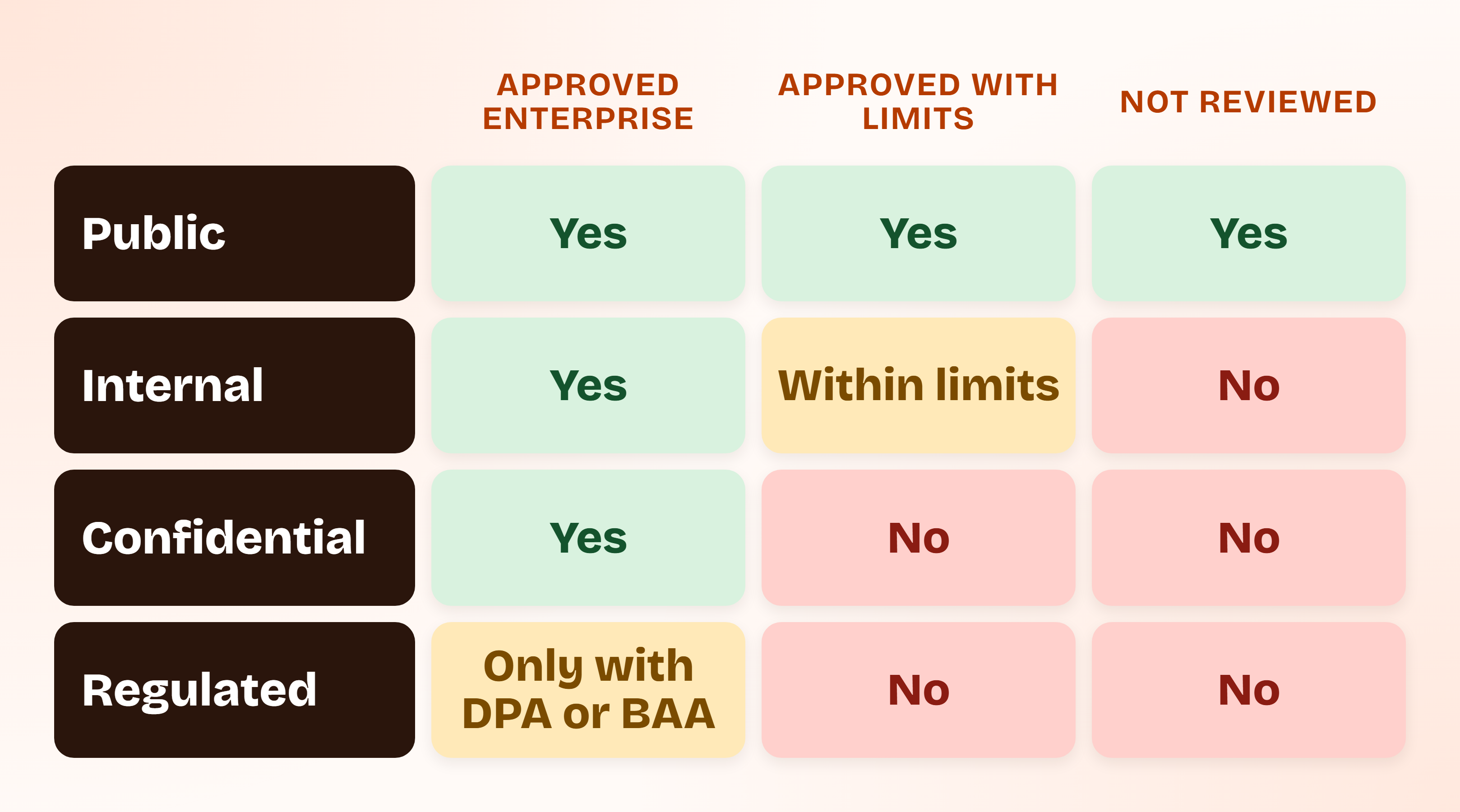
The matrix answers the question employees actually ask: can I put this in that?
| Data class | Approved enterprise tool | Approved with limits | Not reviewed |
|---|---|---|---|
| Public (published content, marketing copy) | Yes | Yes | Yes |
| Internal (non-sensitive notes, drafts, plans) | Yes | Yes, within the stated limits | No |
| Confidential (customer data, source code, credentials) | Yes | No | No |
| Regulated (personal data under GDPR, PHI, payment data) | Only with a processor contract or business associate agreement in place | No | No |
An "approved enterprise tool" here means a company account on a business plan with reviewed terms, not a personal login. The same product can sit in different columns depending on the plan you use.
Shadow AI Policy: What to Put in It
A shadow AI policy is usually a section of your acceptable use policy, not a separate document. The rules text lives in the acceptable use policy guide, which has an AI section covering an approved-tools list, a ban on confidential data in public AI models and human review of AI content, and in the AI governance policy guide, which includes approved-tool and prohibited-use clauses.
Whatever the wording, cover these eight points:
- The approved tool list and who maintains it
- What data may go into which tool (the matrix above)
- How to request a new tool, and how fast you will answer
- Whether personal AI accounts may ever be used for work
- Rules for AI features inside approved tools
- Human review before AI-written content reaches a customer
- How to report a mistake without fear, such as pasting the wrong file
- The consequence for knowingly ignoring the policy
A policy nobody has acknowledged is hard to defend. We offer a pre-built acceptable use template, and the platform logs each employee's acknowledgement with a timestamp and tracks version history. Pair it with the short training described in our security awareness training policy guide.
Vetting a New AI Tool Request: Five Questions
The request path only works if the review is quick. Five questions cover most of it.
| Question | What a good answer looks like |
|---|---|
| Is our data used to train the vendor's models? | A written commitment that business-plan data is not used for training, found in the terms or the data processing addendum, not only on a settings page |
| How long are inputs retained, and can we delete them? | A stated retention period and a deletion route |
| Will the vendor sign a data processing agreement, or a business associate agreement if PHI is involved? | Yes, with a standard document |
| What independent assurance does the vendor hold? | A current SOC 2 report or ISO 27001 certificate that covers the product |
| Can we control access? | SSO, role-based access and admin visibility into usage |
Anything that fails the first or third question stays out of the confidential and regulated rows of the matrix. For the longer version of this review, see our vendor management policy guide.
Shadow AI Governance Example: One 25-Person Company's First Month
Shadow AI governance is easier to see in a worked case, so the following example is hypothetical. Larkspur is an invented 25-person B2B SaaS company preparing for SOC 2 Type 1. Every tool and decision below is illustrative, not a benchmark.
After the survey and the two quick checks, Larkspur's lead finds eight tools in use:
| What was found | Decision | Why |
|---|---|---|
| Support and sales using free personal chatbot accounts | Replace | Move to company accounts on a business plan; personal accounts barred for customer data |
| Developers on personal coding-assistant subscriptions | Approve with limits | One company-managed assistant; no credentials or customer data in prompts |
| AI notetaker bot joining customer calls | Block for now | Customers have not consented, and retention terms are unreviewed |
| AI feature switched on in the CRM | Approve with limits | Vendor was already approved; admin reviews terms before use on customer records |
| Browser extension that summarizes every page | Block | Reads everything in the browser, including internal tools |
| Free image generator for marketing | Approve | Public data only |
| Spreadsheet add-on sending customer exports to a language model | Block | Confidential data with no review |
| A founder's personal agent holding an OAuth grant to the company drive | Revoke and re-request | Re-approve through the request path with narrower access |
Three things stand out in the result.
Most decisions were not blocks. Three of eight were blocks. The rest were approvals, limits or replacements, which is why the plan survived contact with the team.
The riskiest finding was the quietest. The OAuth grant had no invoice and no user complaint. It only appeared because someone read the identity provider's connected-app list.
The evidence is now the deliverable. Larkspur ends the month with an approved list, a matrix, signed acknowledgements and an exceptions log, which is exactly what an auditor will ask for.
ComplyJet customers
How a small AI team got compliance moving fast
Nitin Pande, CTO at Vink AI, an AI go-to-market platform, says "as a small team, we needed a partner who could move quickly and handle the heavy lifting." Read how they earned SOC 2 Type 1 in under a month.
Shadow AI Risk Mistakes That Leave the Gap Open
Each of these is easy to make, and each leaves the exposure in place.
- Running a one-time scan. Tools change monthly. A discovery done once in spring is stale by autumn, so schedule the re-scan.
- Blocking without an alternative. If there is no approved way to summarize a call or draft a reply, people will find their own.
- Writing a policy and skipping the acknowledgement. An unsigned policy is a suggestion, and an auditor will treat it as one.
- Ignoring AI features inside approved tools. The vendor is on the list, but the new AI button was never reviewed.
- Treating all data the same. "No AI with company data" is unworkable, so people ignore it. The matrix is easier to follow.
- Forgetting personal accounts. The same product can be fine on a company plan and a problem on a personal login.
- Having no owner. If nobody maintains the approved list and answers requests within days, the process quietly dies.
Shadow AI Risk Checklist
Answer yes or no to each. Every no is a task.
- Have we surveyed staff about AI use, with an amnesty promise?
- Have we checked SSO and OAuth grants for AI apps?
- Have we searched expense and procurement lines for AI subscriptions?
- Have we reviewed AI features inside our approved SaaS tools?
- Do we have a one-page approved AI tool list with an owner?
- Do we have a data-class matrix that says what may go into which tool?
- Is there a named request path for new tools, with a response-time target?
- Does our acceptable use policy cover AI, and has every employee acknowledged it?
- Have we trained staff on the approved tools and the rules?
- Is a quarterly re-scan on the calendar, with an exceptions log?
FAQs
What Is Shadow AI Risk?
Shadow AI risk is the exposure created when employees use AI tools the company has not reviewed or approved. Data can leave your control, contract and privacy obligations can be breached, and you cannot evidence what was in use. The tool itself may be perfectly good. The gap is the missing review.
Is Using ChatGPT at Work a Compliance Violation?
Not automatically. It depends on the plan, the data and your policy. A company account on a business plan with reviewed terms, used for public or internal data, is usually fine. A personal account used to paste customer records or source code is the situation that breaches contracts, privacy duties and your own acceptable use rules.
What Is the Difference Between Shadow AI and Shadow IT?
Shadow IT is any technology used without approval. Shadow AI is the subset where the tool ingests your data, may retain or learn from it, and produces outputs that enter real work. That is why a blocklist handles shadow IT better than it handles shadow AI.
How Do You Detect Shadow AI in Your Company?
Start with an anonymous survey, your identity provider's connected-app list, and an export of expenses. Add a review of AI features inside the SaaS tools you already approved. Network or CASB logs help if you already have them, but you do not need them to begin.
Should You Ban ChatGPT at Work to Control Shadow AI Risk?
A blanket ban tends to push use onto personal devices, where you have less visibility. Ban the most sensitive data classes, and give people an approved tool and a fast request path for everything else. That removes the reason to work around you.
How Do You Stop Employees Using Unapproved AI Tools?
You reduce the reasons to use them. Publish an approved list, answer requests within days, train people on what data goes where, and keep a quarterly re-scan. Enforcement matters, but the quickest improvement usually comes from making the approved path faster than the unapproved one.
Does Shadow AI Risk Affect SOC 2 or ISO 27001?
Yes, indirectly. SOC 2 has no AI-specific criterion, but unreviewed AI vendors fall under vendor and business-partner risk (CC9.2) and risk assessment (CC3). ISO 27001:2022 has controls for inventory, acceptable use, suppliers, awareness and data leakage that unapproved AI tools commonly breach.
What Should a Shadow AI Policy Include?
An approved tool list with an owner, rules for which data goes into which tool, a request path for new tools, a position on personal accounts, rules for AI features in approved tools, human review of AI content, a no-blame way to report mistakes, and a stated consequence for knowingly ignoring the rules.
Book a demo
Turn an AI policy into evidence an auditor can read
Talk through your AI tool use, where policies, acknowledgements and vendor reviews would live, and which frameworks your team needs, from SOC 2 to ISO 42001.
Related Reading
- Acceptable use policy: the policy template, including the AI section
- AI governance policy: the program-level policy with approved-tool and prohibited-use clauses
- Does SOC 2 cover AI?: the SOC 2 audit view of AI tools
- AI risk assessment: how to score the risk of one AI system
- AI governance framework: the program the controls above sit inside
- What is ISO 42001?: the AI management system standard
- ISO 27001 and AI compliance: how the 2022 controls extend to AI