.svg)

A message lands in your finance lead's inbox at 4:40 on a Friday. It looks like it is from the CEO. It says a vendor has changed banks, the next invoice must go to the new account today, and please keep it quiet until the deal closes. Nothing in writing tells your finance lead what to do next.
That gap is what an email security policy template exists to close. You need one you can turn into a real document this week, before a customer or an auditor asks for it.
An email security policy is a written rule set for how company email is protected and used: who may use it, which technical controls are mandatory, how sensitive data and payment requests are handled, how phishing is reported, and what records prove it all works. A good email security policy template covers each of those and maps to SOC 2, ISO 27001, HIPAA, and PCI DSS.
Quick answer
An email security policy has eight parts: purpose and scope, roles, account and access rules, technical controls, data handling, phishing and payment requests, retention and monitoring, and evidence with review. Almost no framework sets a number for any of it. PCI DSS requires anti-phishing mechanisms, and Google sets sender thresholds, but SOC 2, ISO 27001, and HIPAA leave the details to you, so the rule you write is the rule you are audited against.
By the end of this guide, you will have a free, ungated template with real sample clauses, a technical baseline you can defend, and the evidence list auditors actually sample.
Here's what I'll cover:
- What an email security policy is, and where it stops and your acceptable use policy starts
- What an email security policy template must include, section by section
- SPF, DKIM, DMARC, and the other technical controls worth writing down
- Rules for sensitive data, phishing reports, and payment-change requests
- What SOC 2, ISO 27001, HIPAA, and PCI DSS actually require
- How a startup on Google Workspace or Microsoft 365 applies all this
- A free downloadable template, a retention rule, and the audit evidence to keep
What Is an Email Security Policy Template, and What Does It Not Cover?
An email security policy template is a ready-to-adapt document that defines how your organization protects its email and messaging, what people may send and receive, and how problems get reported. The policy sets the rules. It does not tell an admin which toggle to flip in the console, because that belongs in your runbook.
The distinction matters in an audit. The policy says external forwarding is blocked and names who owns that. The admin settings and the tickets show it happening.
Email Security Policy vs Email Usage Policy and the Acceptable Use Policy
Several of your policies already touch email, so it helps to know who owns what. ComplyJet's acceptable use policy guide covers what people may and may not do with company systems, including a short email clause. The security awareness training policy covers how you teach people to spot phishing. The BYOD policy covers personal phones and laptops.
This article covers the controls and handling rules for the channel itself: authentication, access, encryption, phishing reports, payment requests, and retention. An email usage policy is usually the acceptable-use slice of that. If you only need the "what employees may do" rules, start with the acceptable use guide. If you need the technical baseline and the proof, you are in the right place.
| Acceptable use policy | Awareness training policy | Email security policy | |
|---|---|---|---|
| The question it answers | What may people do with company systems? | How do people learn to spot threats? | How is email protected, and what happens when it goes wrong? |
| Typical contents | Permitted and prohibited use, personal use | Topics, frequency, completion tracking | SPF, DKIM, DMARC, MFA, data handling, phishing, payment rules |
| What an auditor samples | Signed acknowledgements | Training completion records | Admin settings, DNS records, report tickets |
Note
Adopt these together and reference one from another. The sensitivity labels that decide what can be emailed come from your data classification policy, and the encryption standards come from your data encryption policy. The email policy should point to both instead of repeating them.
Why You Need an Email Security Policy Template Before Your Next Audit
The FBI's Internet Crime Complaint Center logged 24,768 business email compromise complaints in 2025, with $3,046,598,558 in reported losses, according to its 2025 Internet Crime Report. That is about $123,000 per complaint, and it makes BEC the second-costliest cyber-enabled fraud type in the report, behind only investment fraud.
None of those losses required malware. They required a believable message and a missing rule.
Three groups ask for the written policy:
- Auditors. SOC 2 and ISO 27001 reviewers expect a documented approach to protecting information in transit, then sample your records against it.
- Customers. Security questionnaires ask whether you have an email security policy and whether you enforce DMARC.
- Whoever inherits the job. Mail settings drift as people leave and tools change. A written baseline lets a new IT lead check what is true against what was intended.
Watch out
SOC 2, ISO 27001, and HIPAA set no email-specific deadlines or settings, so the controls you write down become the standard you are tested against. A policy that promises DMARC enforcement and delivers a "none" record is worse than a policy that promises monitoring and does exactly that.
SOC 2
Preparing for SOC 2?
Auditors sample your policies, your settings, and your records. See how ComplyJet takes a startup from first policy to SOC 2 audit.
What an Email Security Policy Template Must Include
A working email security policy template has eight sections. Each answers a question an auditor or a new admin will eventually ask, and the quickest route is to start from an email security policy example and cut it to fit.
| Section | What it should say |
|---|---|
| Purpose and scope | Which channels, accounts, and people the policy covers |
| Roles | Who owns the policy, who administers mail, who triages reports |
| Account and access rules | Ownership, MFA, shared mailboxes, offboarding |
| Technical controls | SPF, DKIM, DMARC, TLS, filtering, forwarding limits |
| Data handling and encryption | What may be emailed by data class, and how |
| Phishing and payment requests | Reporting steps, verification rules for money movement |
| Retention and monitoring | How long mail is kept, what is monitored, legal holds |
| Evidence and review | Which records are kept, reporting, review cadence |
Email Policy Template Scope: Which Channels and Accounts Count
Scope is where email policies quietly fail. A document that says "company email" and means "the main inbox" leaves shared mailboxes, aliases, and system-generated mail unowned.
List the channels explicitly:
- Company mailboxes for every employee and contractor
- Shared mailboxes and aliases such as support@ and billing@
- Mail sent by tools as your domain, including marketing, support, billing, and product notifications
- Chat and messaging such as Slack, Teams, and SMS, which carry the same sensitive content
- Personal email, which is out of bounds for company data
The last item deserves a flat rule. Company data does not go to personal email accounts, and the policy says so in one sentence. Your asset inventory should list the mail platform and every tool allowed to send as the company.
Corporate Email Policy Rules: Ownership, Monitoring, and Personal Accounts
A corporate email policy settles three questions people otherwise guess at. Who owns the mail? Is it monitored? What about personal use?
The usual answers are these. The company owns the mailbox and its contents. Messages may be reviewed for security and legal purposes, and people are told so in writing. Incidental personal use is tolerated, but personal messages in a work mailbox are not private. Automatic forwarding to personal accounts is blocked, because it is the quiet route by which company data walks out the door.
Note
Monitoring and employee privacy rules vary by country and state. Have counsel review the monitoring clause before you publish, especially if you employ people in the EU or California.
Email Security Policy Template Controls: SPF DKIM DMARC and More
This is the section most templates leave out, and the one a customer's security team reads first. Three DNS-based standards work together to stop other people sending mail as your domain:
- SPF (Sender Policy Framework) lists which servers may send mail for your domain.
- DKIM (DomainKeys Identified Mail) adds a cryptographic signature that proves a message came from your domain and was not altered.
- DMARC (Domain-based Message Authentication, Reporting and Conformance) tells receiving servers what to do when SPF and DKIM checks fail: nothing, quarantine, or reject.

Write the baseline into the policy so it is a commitment instead of an accident:
- DMARC is published for every domain you own, and moves from monitoring to quarantine to reject on a schedule.
- MFA is required on every mailbox, with phishing-resistant methods for administrators.
- Legacy authentication is disabled, because old protocols skip MFA entirely.
- TLS is required for mail in transit.
- External auto-forwarding is blocked by default, with exceptions approved by the policy owner.
- Inbound filtering and attachment scanning stay on, and nobody may disable them.
One practitioner on Security Stack Exchange, writing in January 2025 after setting up Google Workspace, asked what use SPF is in the modern internet when so much mail comes from shared infrastructure. The top answer's practical point is the one your rollout needs: signed mail from shared providers should pass, but you should "verify that before enabling a DMARC p=reject policy."
Pro tip
Do not jump straight to reject. Publish DMARC at none, read the reports for a few weeks, fix every legitimate sender that fails alignment, then move to quarantine and finally reject. Skipping the middle steps is how a company blocks its own invoices.
NIST SP 800-177 Rev. 1, "Trustworthy Email," published in February 2019, is the best neutral reference for all of this. It covers SPF, DKIM, DMARC, TLS, and S/MIME in one document.
Email Encryption Policy: Handling Sensitive Data in Email
An email encryption policy answers a simple question: what may be sent by email, and under what protection? The answer depends on what the data is, which is why the rule hangs off your data classification scheme.
| Data class | Email rule |
|---|---|
| Public | May be sent freely |
| Internal | Company accounts only, never to personal addresses |
| Confidential | Encrypted transmission, verified recipient, no forwarding outside the intended group |
| Restricted | Do not email. Use an approved secure share with access controls and expiry |
Two rules belong in every version. Passwords, API keys, and recovery codes are never sent by email. And customer data, health data, and card data go through approved secure channels instead of attachments.
Even a plain-text rule needs a mechanism. TLS protects mail in transit between servers, but it does not protect a message once it sits in someone's mailbox. For restricted content, use a secure share link or an encrypted message service your admin configures, and say which one in the policy.
Email Security Policy Template Rules for Misdirected Messages and Attachments
Most email data leaks are not attacks. They are an autocomplete suggestion that picks the wrong "Alex."
Write down the small habits that prevent them:
- Check the recipient list before sending anything classified confidential or higher.
- Turn on external-recipient warnings so a message to an outside address shows a banner.
- Block risky attachment types such as executables and macro-enabled documents.
- Report a misdirected message immediately as a security event, not a private embarrassment. Your incident management policy defines what happens next.
ISO/IEC 27002:2022 guidance on electronic messaging lines up with this list: protect messages and attachments, make sure they reach the intended recipient, and restrict automatic forwarding.
Phishing and Business Email Compromise: Rules for the Costliest Mistakes
Phishing and business email compromise are different problems that need different rules. Phishing is broad and cheap: one message, many targets, a link or an attachment. BEC is narrow and expensive: one believable request, one person, a wire or a bank-detail change. A policy needs a reporting procedure for the first and a verification rule for the second.
Phishing Reporting Procedure for Your Email Security Policy Template
A phishing reporting procedure has three parts: where to report, what happens next, and the promise that nobody is blamed. Without all three, people stay quiet.
- One channel. A report-phishing button in the mail client or one named alias, not "tell IT."
- An acknowledgement time. The security owner confirms receipt within [1 business day] and tells the reporter what to do with the message.
- A no-blame rule. If someone clicked, they report immediately and the response is credential reset and review, not discipline.
- A close-out. The owner records the report, removes the message from other mailboxes, and notes whether anyone else interacted with it.
This maps to ISO 27001 Annex A control 6.8, which asks organizations to give personnel a way to report information security events promptly and consistently.
Quick tip
Measure how fast people report, not how many click. A team that reports a suspicious message within minutes has a working control, even if a few people clicked first.
Business Email Compromise Policy: The Payment-Change Rule
A business email compromise policy is one rule, applied without exceptions: no change to payment details is accepted on the strength of an email alone.
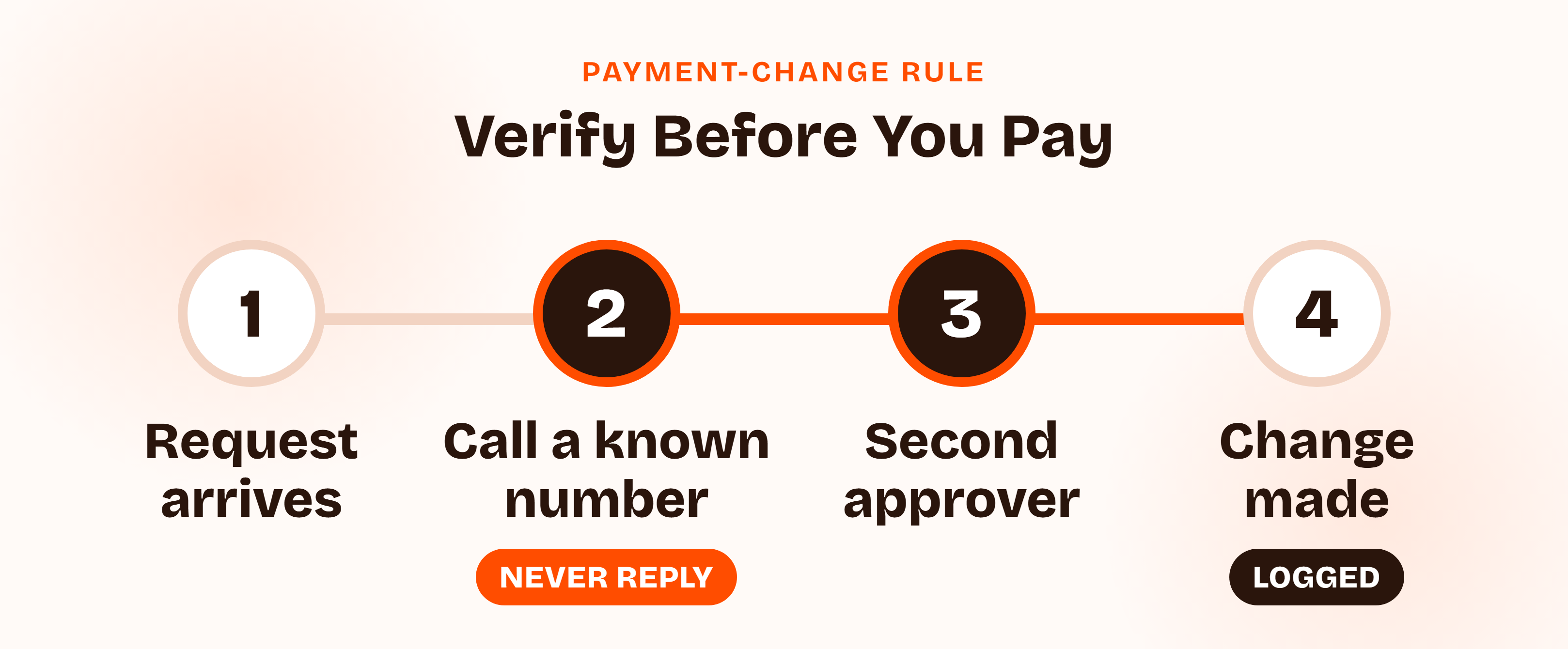
Spell out the steps:
- Treat every bank-detail change as unverified, whoever it appears to come from.
- Call back on a number you already hold, not one in the message.
- Require a second approver for any change and for any payment above [a set threshold].
- Never confirm by replying to the same thread, because the attacker may be reading it.
- Log the verification in the payment ticket, with the name of the person you spoke to.
The same rule covers requests that appear to come from executives for gift cards, urgent transfers, or confidential purchases. The sender's title is not a verification step.
Try this yourself
Ask your finance lead, today, what they would do if an invoice arrived with new bank details. If the answer is "reply and ask," you have found the gap. Then ask whether anyone has ever been told they may not pay when the CEO asks.
Email Security Policy Requirements by Framework: SOC 2, ISO 27001, HIPAA, and PCI DSS
Each framework touches email from a different angle. None has a control called "email security policy," and only a few supply any numbers.
| Framework | Where it lives | What it says | How it is tested |
|---|---|---|---|
| SOC 2 | CC6.7 and CC6.8 | No email-specific setting named | Policy, configuration, and records against your own rules |
| ISO 27001:2022 | Annex A 5.14, 6.8, 8.12 | Information transfer, event reporting, data leakage prevention | Policy, evidence of operation, Statement of Applicability |
| HIPAA | 45 CFR 164.312(e) | Transmission security required, encryption addressable | Risk analysis and safeguards documentation |
| PCI DSS 4.0.1 | Requirement 5.4.1 | Automated mechanisms to detect and protect against phishing | Configuration and evidence for in-scope personnel |
| CIS Controls v8 | Safeguard 9.5 | Implement DMARC (IG2 and IG3) | DNS records and DMARC reports |
Email Security Policy SOC 2: CC6.7 and CC6.8
No SOC 2 criterion mentions email by name. CC6.7 covers restricting and protecting information while it is transmitted, moved, or removed. CC6.8 covers preventing or detecting malicious software. Email controls are evidence under both.
In a Type II audit, the reviewer reads your policy, then asks for the settings and the records that prove they were in force across the period. Our SOC 2 compliance checklist shows where this evidence fits in the wider program.
Quick take
SOC 2 does not ask whether you run DMARC at reject. It asks whether you did what your own policy says. A modest baseline you can show every month beats an ambitious one you cannot.
Email Security Policy ISO 27001: Annex A 5.14, 6.8, and 8.12
Three Annex A controls apply. Control 5.14 covers information transfer, with specific guidance on electronic messaging. Control 6.8 covers reporting information security events. Control 8.12 covers data leakage prevention, and the supporting guidance names email as a high-use channel to watch.
The ISO/IEC 27002:2022 messaging guidance is practical:
- Protect against malware in messages and attachments.
- Protect confidential information in attachments.
- Address messages correctly so they reach the intended recipient.
- Get approval before using public messaging services.
- Restrict automatic forwarding.
- Keep sensitive data out of SMS and instant messaging unless it is protected.
As with every Annex A control, you select these through your Statement of Applicability. Our ISO 27001 checklist covers the rest of the controls.
Email Security Policy HIPAA: Transmission Security
HIPAA does not ban email. The Security Rule at 45 CFR 164.312(e)(1) requires technical measures to guard against unauthorized access to electronic protected health information sent over a network. That standard is required.
Two implementation specifications sit beneath it, both addressable: integrity controls, and a mechanism to encrypt ePHI "whenever deemed appropriate." Addressable does not mean optional. It means you assess it, then implement it or document why an alternative is reasonable. For most startups handling PHI, the documented answer is encryption.
PCI DSS, CIS Controls, and Google's Sender Rules
Three sources carry the nearest thing to hard requirements.
- PCI DSS 4.0.1 Requirement 5.4.1. It calls for processes and automated mechanisms to detect and protect personnel against phishing. It was a best practice until March 31, 2025, and became mandatory after that date. The requirement does not name DMARC, but assessors look for anti-spoofing controls, and training alone does not satisfy it.
- CIS Controls v8 Safeguard 9.5. Implement DMARC, in implementation groups 2 and 3.
- Google's email sender guidelines. Since February 1, 2024, anyone sending mail to personal Gmail accounts needs SPF or DKIM, TLS, and a spam rate below 0.3%. Senders of 5,000 or more messages a day also need SPF, DKIM, and DMARC, and one-click unsubscribe on marketing mail.
Watch out
If you send product emails, invoices, or outreach at volume, Google's thresholds apply to you whether or not an auditor ever asks. Missing authentication hurts deliverability long before it hurts a compliance report.
Email Security Policy for Startups: Google Workspace, Microsoft 365, and Sending Tools
Most templates assume a mail server and an IT department. A startup has a hosted mailbox, a domain registrar, and half a dozen SaaS tools that send mail as the company. The policy has to speak to that.
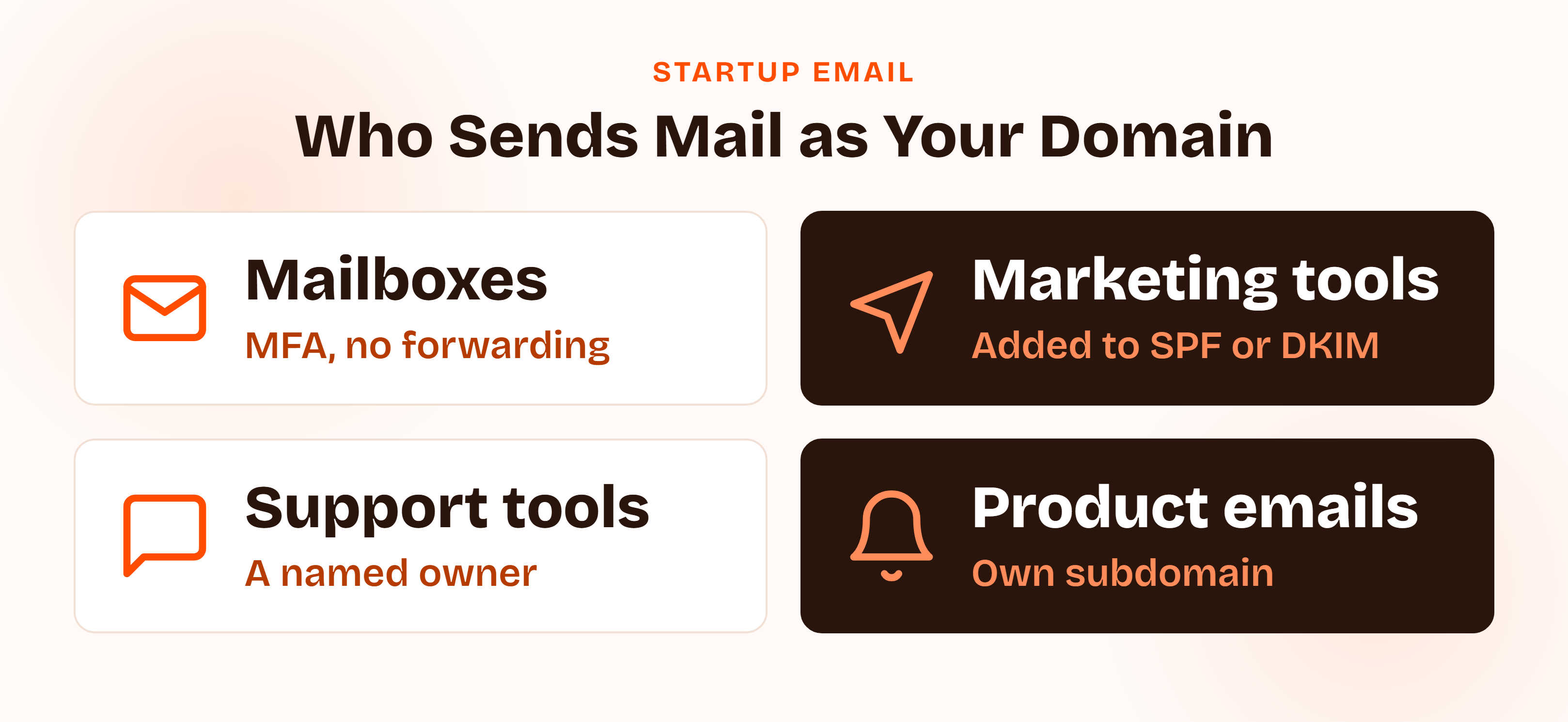
Write one rule per source of mail:
- Employee mailboxes. MFA, no legacy authentication, no external auto-forwarding, set in the admin console and reviewed [quarterly].
- Marketing and sales tools. Each one is added to SPF or signs with DKIM before it sends, and is approved by the policy owner.
- Support and billing tools. Same rule, plus a named owner for each sending domain or subdomain.
- Product notification services. Use a dedicated subdomain so a problem there cannot damage the main domain's reputation.
- Offboarding. When someone leaves, the mailbox is suspended, forwarding is checked, and delegated access is removed on the day they go.
Pro tip
Keep a short list of every tool allowed to send as your domain, with an owner for each. When DMARC reports show an unknown sender, the list tells you in seconds whether it is a forgotten tool or an attacker.
Customer Story
"It made SOC 2 and ISO 27001 readiness clear and manageable with automated workflows, evidence collection, and expert support."
David Orr, COO, Romina Day
Email Security Policy Template: A Free Example You Can Download
Here is what an email security policy example looks like as clauses you can adapt. Brackets mark the values to set for your own company.
Email Security Policy Example: Sample Clauses You Can Adapt
Sample clause: Technical controls
All domains owned by [Company] must publish SPF, DKIM, and DMARC records. DMARC enforcement must progress from monitoring to quarantine to reject within [6] months of adoption. Multi-factor authentication is required on every mailbox. Legacy authentication is disabled. Automatic forwarding to external addresses is blocked unless the [Security Lead] approves an exception in writing.
Sample clause: Sensitive data
Information classified Confidential or Restricted must not be sent to personal email accounts. Confidential information may be emailed only with encryption and after the sender has verified the recipient. Restricted information must be shared through [approved secure sharing tool]. Passwords, API keys, and recovery codes must never be sent by email.
Sample clause: Payment changes
A request to change payment details received by email, chat, or phone is not accepted until verified by a call to a number already on file. Changes require approval by a second authorized person. The verification is recorded in the payment ticket. No payment change is confirmed by replying to the original message.
Free Template
Download the Free Email Security Policy Template (PDF)
All eight sections, a technical controls table, phishing and payment-change rules, a retention clause, an evidence checklist, and framework notes for SOC 2, ISO 27001, HIPAA, and PCI DSS.
Email Retention Policy: What to Write and What No Framework Sets
An email retention policy decides how long messages are kept before they are deleted. Two competitor templates use 36 months as an example. That is a sample number, not a standard: no framework in this guide sets an email retention period.
Pick the number from your real obligations. Contracts, tax and employment rules, and customer commitments set the minimum. Privacy law pushes you to delete what you no longer need. Then write the number into your data retention policy and let the email policy point to it.
Three clauses prevent most problems:
- A default period, for example [36] months, applied by a mail platform setting rather than by hand.
- A legal hold, so deletion stops automatically when litigation or an investigation is likely.
- An archive rule, saying who may search or export mail and how that access is logged.
Rolling Out Your Email Security Policy Template and Proving It Works
Writing the policy takes an afternoon. Rollout is where the rules become settings, and the settings become records.
- Assign an owner, usually the IT or security lead.
- Inventory every sender of mail as your domain.
- Publish DMARC at monitoring, and read the reports weekly.
- Set the admin console rules: MFA, legacy authentication off, external forwarding blocked, filtering on.
- Enable the report-phishing path and tell people where it is.
- Publish the payment-change rule to finance and anyone who approves vendors.
- Distribute the policy and collect acknowledgements, then review it annually and after any change in your mail platform.
Email Security Policy Template Evidence: What Auditors Sample
The policy is the small part. The records turn it into evidence.
| Evidence | What it shows |
|---|---|
| Approved policy with version history | The rules exist and someone with authority signed off |
| DNS records for SPF, DKIM, and DMARC | Authentication is published and enforced |
| DMARC aggregate reports | Unauthorized senders are being watched |
| MFA enforcement report | Every mailbox is covered |
| Admin console settings | Forwarding and legacy authentication are off |
| Phishing report tickets | Reports are triaged and closed |
| Payment-change verification records | The callback rule was followed |
| Policy acknowledgements | People were told the rules |
Quick tip
Before an audit, screenshot the admin console settings with the date visible and export the MFA report. Then repeat the same check each quarter. A single snapshot proves one day. A series proves the period.
Answering Customer Questionnaires About Your Email Security Policy Template
Security questionnaires ask about email in predictable ways: do you have a written email security policy, do you enforce DMARC, is mail encrypted in transit, how do you handle phishing. Answer with what is true, and attach the policy.
Sample answer: adapt to what is true for you
We maintain a documented email security policy. All company domains publish SPF, DKIM, and DMARC, with DMARC at [quarantine] and moving to reject. MFA is enforced on every mailbox, legacy authentication is disabled, and mail is protected with TLS in transit. Employees report suspected phishing through a single channel. Payment-detail changes require callback verification and a second approver. The policy and supporting records are available on request.
Measure what you promise with a few numbers that mean something: the share of mailboxes with MFA, the time from phishing report to acknowledgement, and the count of unknown senders in your DMARC reports.
Email Security Policy Template Mistakes to Avoid
- A policy that is only acceptable-use language. It says what employees may send and says nothing about authentication, MFA, or forwarding.
- DMARC published at none and never moved. The record exists, so everyone assumes you are protected.
- Forgotten senders. A marketing tool sends as your domain, fails alignment, and nobody notices until reject blocks it.
- No payment-change rule. Finance acts on the CEO's name, and the first control is a reply.
- External auto-forwarding left on. A former employee's mailbox keeps copying new mail to a personal address.
- Retention copied from a template. A number nobody checked against contracts or privacy rules, applied to nothing in the mail platform.
How ComplyJet Helps With Email Security Policy Evidence
An email security policy is quick to write and tedious to prove. The rules fit on three pages. The proof is a year of consistent behavior.
ComplyJet's policy management drafts policies with AI, lets you edit them before publishing, distributes them to your team, and tracks acknowledgements with a timestamp and policy version. Our security awareness training assigns courses covering phishing and data handling when a new hire is added through your HR integration, and keeps per-person completion records mapped to SOC 2, ISO 27001, HIPAA, and PCI DSS. ComplyJet also integrates with Google Workspace and Office 365.
We are not an email security gateway. We do not publish your DNS records or filter your mail, and that stays with your mail platform and your registrar. ComplyJet holds the policy, the acknowledgements, and the training evidence beside everything else an auditor asks for.
Compliance Automation
Turn your email policy into audit-ready evidence
See how ComplyJet distributes policies, tracks acknowledgements, and records phishing training for SOC 2, ISO 27001, HIPAA, and PCI DSS.
FAQs
What Should an Email Security Policy Template Include?
Eight sections: purpose and scope, roles, account and access rules, technical controls, data handling and encryption, phishing and payment requests, retention and monitoring, and evidence with review. Add a technical baseline (SPF, DKIM, DMARC, MFA, TLS) and a payment-change rule so the policy covers more than acceptable use.
Is an Email Security Policy Required for SOC 2 or ISO 27001?
In practice, yes. SOC 2 has no email-specific criterion, but CC6.7 and CC6.8 are where auditors look for transmission and malware controls. ISO 27001 Annex A 5.14, 6.8, and 8.12 are selected through your Statement of Applicability, and any organization using email will include them. A written policy is the standard evidence.
Does PCI DSS Require Anti-Phishing Controls?
Yes. Requirement 5.4.1 in PCI DSS 4.0.1 calls for processes and automated mechanisms to detect and protect personnel against phishing. It became mandatory after March 31, 2025. The requirement does not name DMARC, and security awareness training alone does not meet it.
Should an Email Security Policy Cover SPF, DKIM, and DMARC?
Yes. They are the baseline for stopping others from sending mail as your domain, and customers ask about them in questionnaires. State that all three are published, how DMARC progresses from monitoring to reject, and who reviews the reports. CIS Controls v8 Safeguard 9.5 recommends DMARC.
Can Employees Use Personal Email for Work?
No, not for company data. The policy should say that Internal, Confidential, and Restricted information must not be sent to personal accounts, and that automatic forwarding to personal addresses is blocked. If someone must use a personal device, your BYOD policy governs the device and the mail app.
How Long Should Company Emails Be Retained?
No framework in this guide sets a number. Your contracts, employment and tax rules, and privacy obligations decide it. Some templates use 36 months as an example. Set the period in your data retention policy, apply it through a mail platform setting, and add a legal hold.
Is There a Free Email Security Policy Template?
Yes. The PDF above is free and ungated: eight sections, sample clauses, a technical controls table, an evidence checklist, and framework notes. Adapt the bracketed values to your company and route it through your normal approval process.
Related Reading
- Acceptable Use Policy, for what people may and may not do with company systems.
- Security Awareness Training Policy, for teaching people to spot phishing.
- Data Classification Policy, the labels that decide what can be emailed.
- Data Encryption Policy, for encryption standards in transit and at rest.
- Data Retention Policy, where the retention period for email belongs.
- Incident Management Policy, for what happens after a phishing click or misdirected message.
Sources: FBI IC3, 2025 Internet Crime Report; Google, Email sender guidelines; NIST SP 800-177 Rev. 1, Trustworthy Email; ISMS.online on Annex A 5.14, Information transfer; ISMS.online on Annex A 8.12, Data leakage prevention; ISMS.online on Annex A 6.8, Information security event reporting; 45 CFR 164.312, HIPAA Security Rule technical safeguards; CIS Controls v8 Safeguard 9.5; Security Stack Exchange, What use is SPF for email security in a cloud / SAAS world.