.svg)

According to IBM's 2026 Cost of a Data Breach Report, as summarized by the law firm Baker Donelson, AI-related breaches represented 21% of all breaches, up from 13% a year earlier. Incidents involving shadow AI, meaning employees using AI tools nobody approved, more than doubled from 20% to 43%.
The question that follows a breach, or a customer's security questionnaire, is always the same: when did you last run an AI risk assessment on this system?
An AI risk assessment is a structured review of one AI system that identifies what could go wrong, scores each risk for likelihood and impact against criteria you set in advance, decides what to do about it, and records the result in a risk register. You can run one in seven steps, in a fixed order, because each step produces the input for the next.
Quick take
The output is small. For one system, expect a scoped use case, a data-flow sketch, a register of roughly six to twelve risks (my estimate, not a benchmark), a treatment and a named owner for each, and a date for the next review. One person can do the first pass in about a day.
Note
This guide is the method for assessing one AI system. To assign a system to the EU AI Act's risk tiers, see our EU AI Act risk classification guide. For the four NIST functions, see the NIST AI RMF guide. For the program around the assessment, see the AI governance framework guide, and for the policy document, the AI governance policy guide.
By the end of this guide, you will be able to run an AI risk assessment on your first system yourself, with scoring scales to copy and a completed example to check your work against.
Here's what I'll cover:
- What an AI risk assessment covers, and how it differs from an AI impact assessment and a DPIA
- When you need one, and how deep to go
- The seven steps, from scoping to reassessment
- The register columns to copy, and a worked example with six scored risks
- How the output maps to ISO 42001, the NIST AI RMF and the EU AI Act
- The mistakes that make an assessment worthless, and a pre-launch checklist
What an AI Risk Assessment Is and What It Covers
An AI risk assessment is a structured review of an AI system that identifies what could go wrong across its data, model, security, suppliers and use, rates each risk, decides what to do about it and records the outcome. It covers AI you build, AI you buy, AI embedded in tools you already pay for, and AI your employees use on their own.
For a ten-person company, most of the exposure sits in vendor models and everyday tools, not in a model it trained. The assessment is how you find out which of those matter.
It also differs from a generic IT risk assessment in three ways:
- Behavior can change without a code change. A vendor updates its model, you edit a prompt, or the retrieval data shifts, and the system acts differently overnight.
- Outputs are probabilistic. The same input can produce a different answer, so "it passed testing once" is weak evidence.
- Harm can land on people outside your company. Customers' end users, job applicants and members of the public can be affected by a system they never signed up to.
That third point is why a second assessment exists alongside the first.
AI Risk Assessment vs AI Impact Assessment vs DPIA
These three get mixed up constantly. They answer different questions, and one does not replace another.
| AI risk assessment | AI impact assessment | DPIA | |
|---|---|---|---|
| Question it answers | What could go wrong for us? | What could this system do to people and society? | What does this processing do to people's personal data rights? |
| Looks at | Your objectives: security, legal, financial, reputational, operational | Individuals, groups and society affected by the system | Personal data processing likely to be high risk |
| Where it comes from | ISO 42001 clauses 6.1.2 and 8.2; EU AI Act Article 9 for providers of high-risk systems | ISO 42001 clauses 6.1.4 and 8.4 and Annex A.5; ISO/IEC 42005:2025 guidance; EU AI Act Article 27 for certain deployers | GDPR Article 35 |
| Output | A risk register with scores and treatments | Documented impacts and mitigations for each system | A DPIA record |
The risk assessment looks inward and the impact assessment looks outward. ISO 42001 lets you use an impact assessment to inform how you score consequences in the risk assessment, but it does not let you skip the risk assessment. A DPIA is a third document with its own legal trigger, and the EU AI Act allows a fundamental rights impact assessment to cross-reference one rather than repeat it.
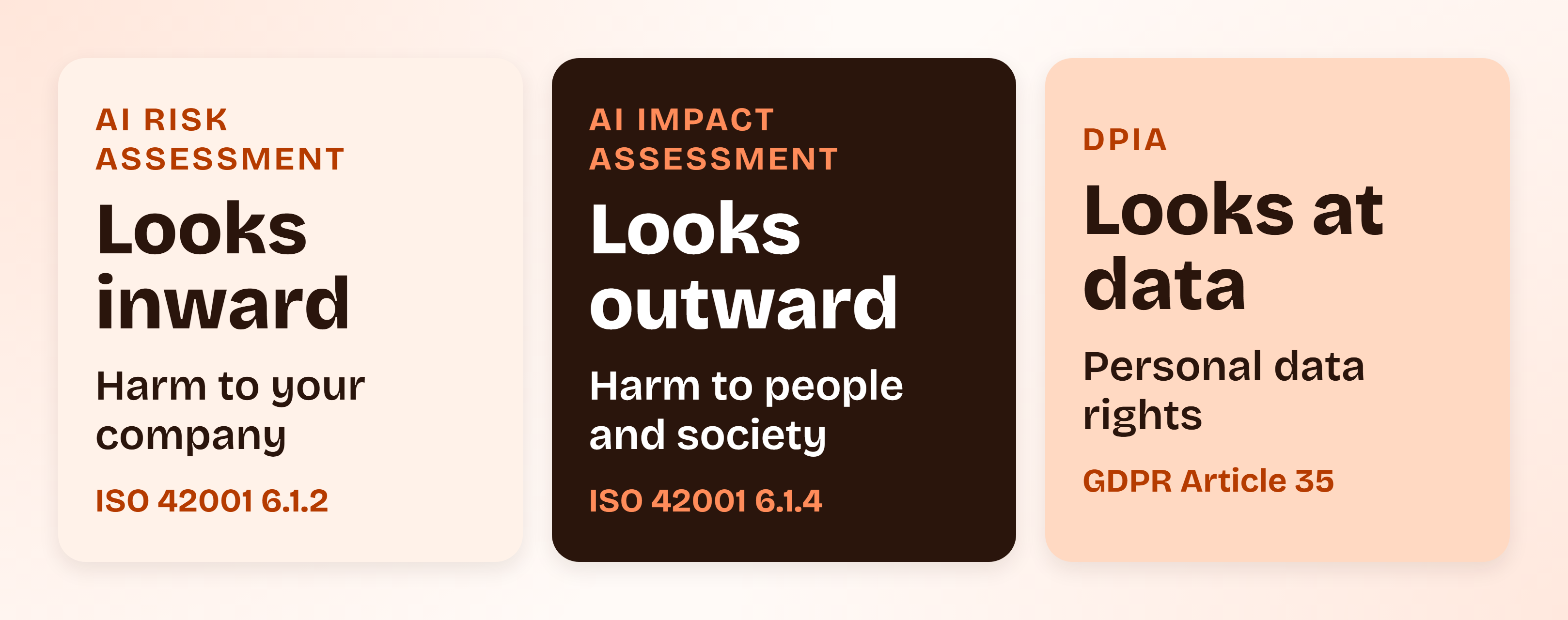
In practice, one working session on a system can feed all three. You gather the facts once and write them up for each audience.
ISO 42001
Run the assessment inside the workflow ISO 42001 expects
ComplyJet's ISO 42001 workspace includes a structured AI risk assessment workflow covering the harms, impacts and mitigations the standard requires, plus templates and workflows for AI impact assessments.
Why Run an AI Risk Assessment Before Something Breaks
The cheapest time for an AI risk assessment is before launch. After an incident or a questionnaire, you are reconstructing decisions under a deadline. Before, you are writing down choices you are already making.
Three pressures make it worth doing now:
- Customer diligence. Enterprise buyers add AI questions beside the SOC 2 ones: which models you use, where prompts go, who approved the feature, and when it was last reviewed.
- A gap your audit report leaves open. SOC 2 was not designed to test fairness, safety or model behavior, as our guide to whether SOC 2 covers AI explains.
- Rules with dates attached. ISO 42001 requires an AI risk assessment from certified organizations, and the EU AI Act requires a risk management system from providers of high-risk systems.
On the EU dates, quote the current ones. Under Regulation (EU) 2026/1744, the Digital Omnibus on AI, in force since 27 July 2026, Annex III high-risk obligations apply from 2 December 2027 and AI embedded in regulated products from 2 August 2028. The European Commission's AI Act Service Desk timeline lists them all.
Watch out
The Omnibus moved the high-risk dates only. Prohibited practices have applied since 2 February 2025, and the Article 50 transparency rules start on 2 August 2026. The full picture is in our EU AI Act compliance guide.
None of that needs a large program. It needs a method you can repeat, starting with a decision about which systems deserve one.
When an AI Risk Assessment Is Needed, and How Deep to Go
Run a full AI risk assessment whenever one of these happens:
- You are about to launch a new AI system, or adopt a vendor model or AI feature
- Customer data or personal data will appear in prompts, training data or retrieval sources
- The system's output affects decisions about people, such as hiring, credit, pricing or support priority
- The system can take actions: send messages, change records, call other systems
- A model, prompt, data source or permission changes materially
- An incident or near miss involves the system
- You enter a market with its own rules, such as the EU
Not every system needs a day of work. Match the depth to the stakes.
| Depth | When it fits | What you produce | Typical time (my estimate) |
|---|---|---|---|
| Light screen | Internal tool, no personal or customer data, no decisions about people, vendor handles everything | A one-page screen: system, data, owner, three yes/no questions, and an entry in your AI inventory | 30 to 60 minutes |
| Standard | Customer or personal data in prompts, customer-facing output, or a vendor model inside your product | All seven steps below and a register of about six to twelve rows | About a day |
| Deep | Decisions about people, agentic actions with real side effects, or an EU high-risk category | Standard, plus a written AI impact assessment and executive sign-off | Several days |
The rule that assigns systems to these depths is a tiering rule, and the AI governance framework guide shows how to write one. If you have no tiers yet, treat anything that touches customer data as Standard.
Pro tip
Start with the one system that touches customer data and is closest to launch. A single finished assessment teaches your team more than a plan to assess everything.
How to Conduct an AI Risk Assessment in Seven Steps
Here is how to conduct an AI risk assessment without it turning into a quarter-long project. Follow the seven steps in order and let each one leave behind an artifact.
- Scope the assessment around one use case, and write your criteria down.
- Inventory the system and map its data flows.
- Identify risks by walking six sources.
- Score likelihood and impact on anchored scales.
- Evaluate against your criteria and choose a treatment.
- Document every risk in a register.
- Monitor and reassess on triggers.
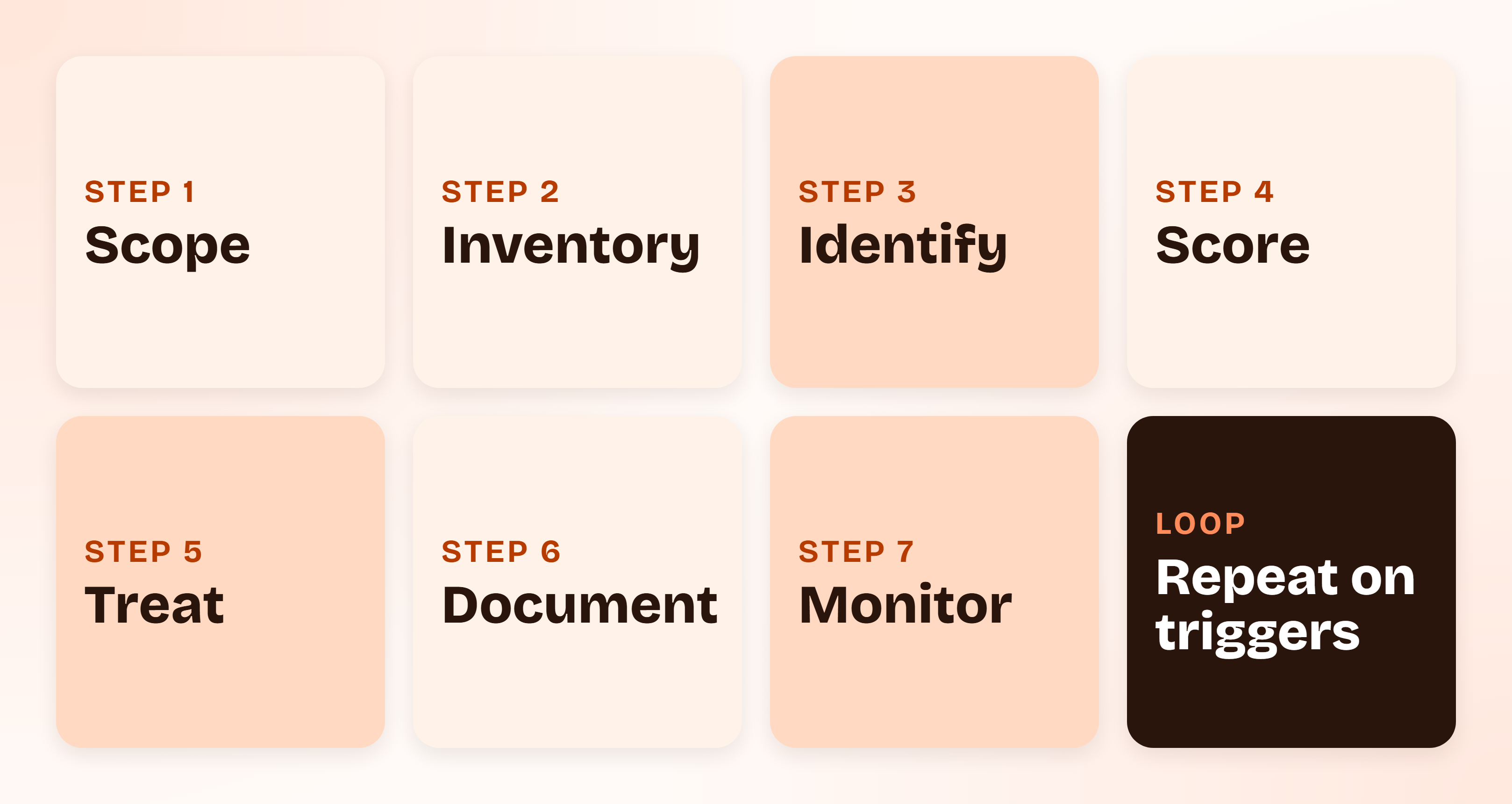
The time column below is my own estimate for one Standard-depth system and a team of 50 or fewer. It excludes the work of building the controls you decide on.
| Step | What you leave behind | Effort for one system |
|---|---|---|
| 1. Scope | A use-case statement and written criteria | About 1 hour |
| 2. Inventory | A one-page system card with data flows | 1 to 2 hours |
| 3. Identify | A raw list of risks across six sources | About 2 hours with two or three people |
| 4. Score | Likelihood, impact and inherent score per risk | About 1 hour |
| 5. Evaluate and treat | A treatment decision and owner per risk | 1 to 2 hours |
| 6. Document | A complete register | About 1 hour |
| 7. Monitor | Triggers, signals and a review date | About 1 hour to set up |
Step 1: Scope the AI Risk Assessment Around One Use Case
Name the use case, not "AI". "Our support copilot drafts replies from a customer's ticket history" can be assessed. "Our use of LLMs" cannot, because the risks differ for every system hiding inside it.
Write four things down: the system's boundary, its intended use, its foreseeable misuse, and who it affects. ISO 42001 expects the assessment to consider foreseeable misuse as well as intended use, and it is where many real risks live.
Then write your criteria before you look at a single risk.
Action step
Write three lines before scoring anything: which outcome would stop the launch, which score needs a treatment plan, and who is allowed to accept a risk. Criteria written after the scores turn the assessment into a justification for a decision already made.
Step 2: Inventory the System and Map Its Data Flows
A system card is a half-page record of what the system actually is. For each system, capture:
- Purpose and owner: what it is for, and one named person accountable for it
- Model and vendor: which model, which supplier, which version or plan
- Data in: categories, including any personal or customer data, and where it comes from
- Data out: where outputs go and who sees them
- Permissions: read-only, or able to send, change or delete things
- Vendor terms: retention, training use, sub-processors, region
- People affected: customers, their end users, employees, applicants
Include AI that arrived inside tools you already buy. A feature a vendor switched on last quarter is still processing your data.
Try this yourself
Open your SaaS admin pages and your card statements, and look for tools that added an AI assistant in the last 12 months. Every one that can read customer data belongs in the inventory, even if you never chose to turn it on.
Step 3: Identify Risks From Six Sources
A blank-page brainstorm returns the risks the room already worries about. Walking a fixed list of sources finds the ones it does not.
| Source | Prompt question | Example risk |
|---|---|---|
| Data | What goes in, how good is it, and who else can see it? | Customer personal data retained by a vendor or used to train its model |
| Model | What happens when it is wrong, drifts, or is changed by the vendor? | A confident wrong answer, or quality shifting after a silent model update |
| Security | How could someone attack or misuse it? | Prompt injection through content the system reads, leaked keys, excessive permissions |
| Third party | Who else is in the chain, and what do their terms allow? | A sub-processor change, a vendor outage or a vendor breach |
| People and process | Who uses it, and what if they over-trust it or bypass it? | Staff paste data into an unapproved tool; reviewers approve drafts without reading |
| Legal and regulatory | Which rules attach to this use? | Personal data processed without a lawful basis; an EU high-risk category; a missing disclosure |
If the system can act, add one more question to the Security row: what is the worst thing it could do with the permissions it has?
Write each risk as one sentence with a cause, an event and a consequence: "Because ticket text is passed to the model, an injected instruction could cause a draft that reveals another customer's data." Vague risks cannot be scored.
Step 4: Score Likelihood and Impact With an AI Risk Assessment Matrix
An AI risk assessment matrix is only as useful as its scales. "Rate likelihood from 1 to 5" gives two reviewers two different answers. Anchor every level with a written description, so the same risk lands on the same number.
| Score | Likelihood (next 12 months) | Impact |
|---|---|---|
| 1 | Rare: no realistic path without several controls failing at once | Minor: internal inconvenience, no customer or personal data involved |
| 2 | Unlikely: possible, but needs unusual conditions | Moderate: contained quality or availability problem, fixed within a day, no data exposed |
| 3 | Possible: a plausible path exists and could occur within a year | Significant: customers notice, or personal data of a few people is affected, raising a contractual or regulatory question |
| 4 | Likely: expected at least once a year, or already seen in testing | Major: customer data exposed, or wrong outputs materially harm customers; breach notification or a contract breach is likely |
| 5 | Almost certain: happening now, or routine | Severe: widespread harm to people, regulatory action, or loss of key customers |
Multiply the two numbers for a score from 1 to 25, then read it against four bands:
| Score | Rating | What it triggers |
|---|---|---|
| 1 to 4 | Low | Record it and move on |
| 5 to 9 | Medium | Treat or accept, with an owner |
| 10 to 15 | High | A treatment plan is required before launch |
| 16 to 25 | Critical | Launch is blocked until the control is in place and tested |
These bands are one workable setup, not a standard. What matters is that you write yours down in Step 1 and apply them the same way to every risk.
Note
Score every risk twice. Inherent risk is the score before the treatment you are about to apply. Residual risk is the score after the control exists and you have seen evidence that it works. Recording both shows what the treatment actually bought you.
Step 5: Evaluate Against Your Criteria and Choose a Treatment
Compare each score with the criteria you wrote in Step 1, then choose one of four treatments:
- Mitigate: add a control that lowers likelihood or impact, such as human review, input filtering or tighter permissions.
- Avoid: remove the feature, data source or permission that creates the risk.
- Transfer: shift part of the exposure through a contract term or insurance. This moves cost, not your accountability to customers.
- Accept: knowingly live with it, with a named acceptor, a reason and a review date.
ISO 42001 expects you to compare your treatment decisions with the Annex A controls and record the result in a Statement of Applicability (the document listing which controls apply, which do not, and why). Our ISO 42001 checklist walks through all 38 controls.
Watch out
A treatment you have not verified is a plan, not a control. Only score residual risk after the control exists and you have evidence it works, such as a test result, a configuration screenshot or a review log.
Step 6: Document Everything in an AI Risk Register
The AI risk register is the deliverable. It is what you hand a customer, an auditor or a board member, and it is the record that proves the assessment happened. One row per risk, with both scores, a treatment, a named owner and a review date.
Keep it in whatever your team will actually update. A spreadsheet works. The columns are in the next section.
Step 7: Monitor and Reassess on Triggers, Not Just on a Calendar
ISO 42001 clause 8.2 asks for assessments at planned intervals and when significant changes are proposed or occur. That means two clocks: a calendar floor, and event triggers that override it. I recommend a quarterly floor for Standard systems, with these events forcing a reassessment sooner:
- The vendor changes the model, its terms or its sub-processors
- You change the prompt, the retrieval data or the permissions
- The system gains a new capability, such as acting instead of drafting
- A new data category or customer segment is added
- An incident or near miss occurs
- A relevant rule changes or comes into force
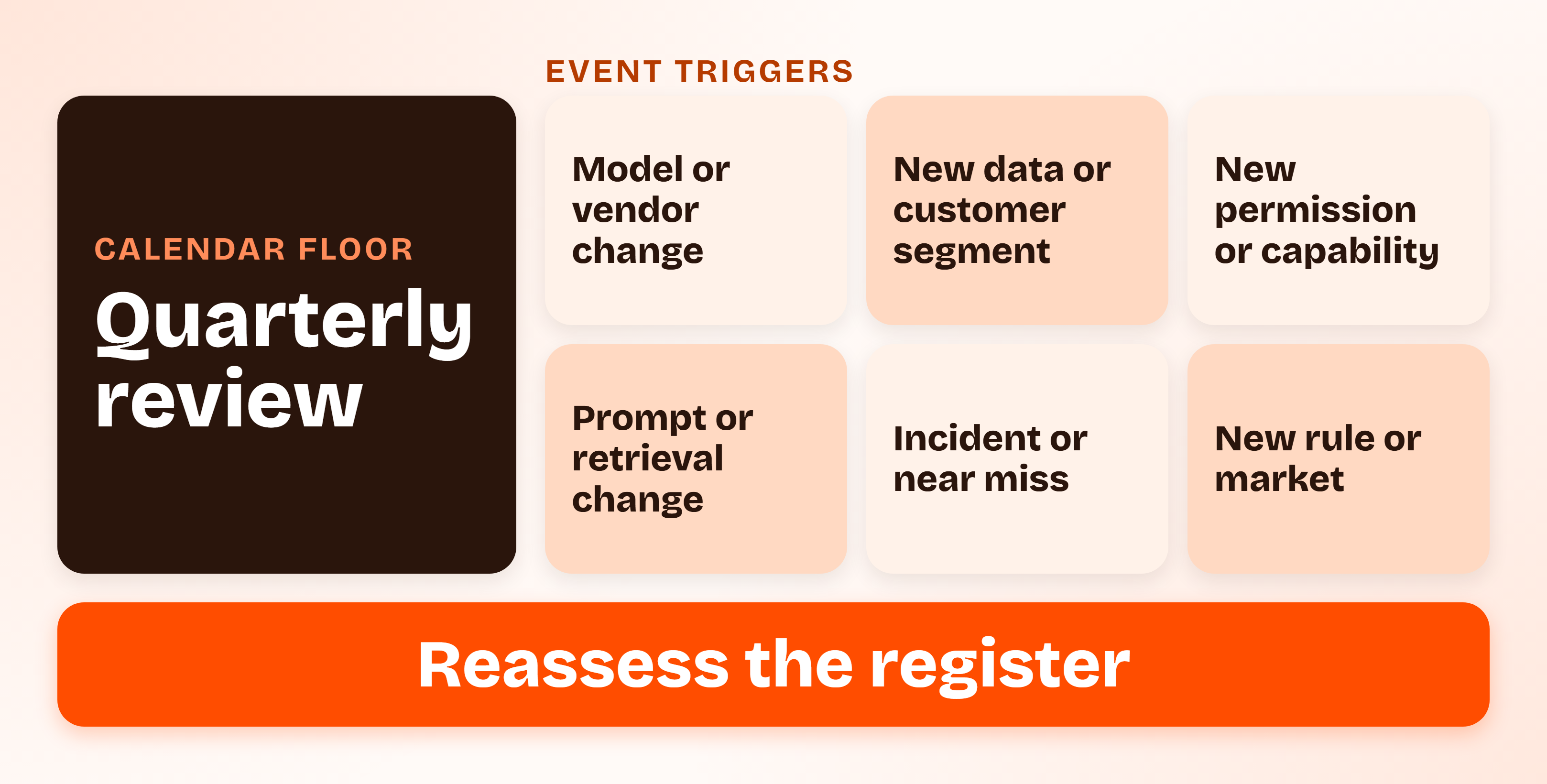
Keep a few signals running between reviews: a sample of outputs checked each week, a count of incidents and overrides, and a note whenever the vendor publishes a change. Save dated versions of the register and the notes from each review as your evidence.
Myth debunking
"An AI risk assessment is a one-time document." NO. A model update or a new permission can change the risk profile the week after sign-off, and an assessment that does not move with the system is out of date by design.
AI Risk Assessment Template: The Register Columns
An AI risk assessment template does not need to be elaborate. These columns are enough to start in a spreadsheet and hold up when someone reads it.
| Column | What goes in it |
|---|---|
| ID | A short identifier, such as R1, so risks can be referenced |
| System and use case | The system and the specific use from Step 1 |
| Risk source | One of the six sources from Step 3 |
| Risk description | One sentence: because of a cause, an event could happen, leading to a consequence |
| Affected parties | Who bears the consequence, inside or outside the company |
| Likelihood (1 to 5) | Taken from your anchored scale |
| Impact (1 to 5) | Taken from your anchored scale |
| Inherent score | Likelihood times impact, before treatment |
| Treatment | Mitigate, avoid, transfer or accept |
| Control or action | The specific thing you will do or have done |
| Residual score | The score after the control is in place and verified |
| Owner | A named person, not a team |
| Status | Open, in progress, verified or accepted |
| Next review date | A date, plus the triggers that would bring it forward |
Two columns do most of the work in an audit: the owner and the next review date. A risk with no name and no date is a wish.
AI Risk Assessment Example: A Support Copilot, Scored End to End
An AI risk assessment example is the quickest way to see whether your scales work, so here is one run from start to finish.
The Setup: Northwind's Support Copilot and Its Criteria
Northwind Support is a made-up 15-person B2B SaaS company. It is adding a copilot that drafts replies to support tickets using a third-party language model through an API. A support agent reviews every draft before it is sent.
This is an illustration. Every score below is a judgment made under the scales above, not a benchmark, and your own system may score differently.
Scope: The copilot drafts replies using the current customer's ticket history and help-center articles. A human approves every reply. The vendor receives ticket text through its API under business terms. Foreseeable misuse includes an agent pasting another customer's data into a prompt, and a customer writing ticket text that tries to steer the model.
Criteria: An inherent score of 10 or more needs a treatment plan before launch. A score of 16 or more blocks launch until the control is tested. Residual risk above 8 is not acceptable. Accepting a risk with no treatment is limited to a score of 6 or below, and only the CTO can do it.
The Completed AI Risk Register for the Copilot
| ID | Risk (cause, event, consequence) | Inherent (L x I) | Treatment | Residual | Owner |
|---|---|---|---|---|---|
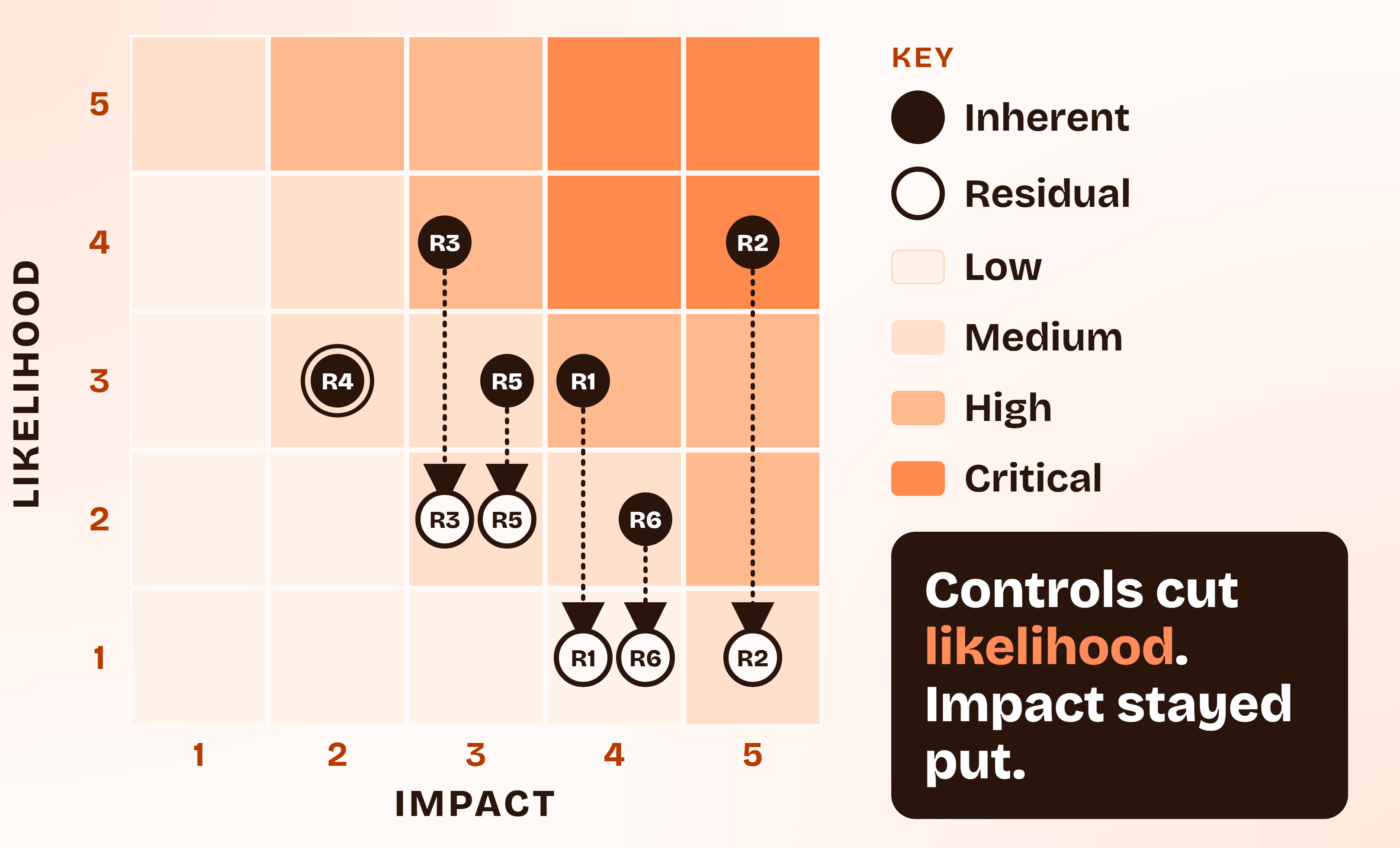
| R1 | Ticket text sent to the vendor is retained or used for training, exposing customers' end-user data | 3 x 4 = 12, High | Mitigate: use API terms that disable training and limit retention, sign a data processing agreement, strip emails and phone numbers before sending | 1 x 4 = 4, Low | CTO |
| R2 | Ticket content carries instructions that steer the model (prompt injection), so a draft reveals another customer's data | 4 x 5 = 20, Critical | Mitigate: enforce a per-customer filter in code, not in the prompt, so retrieval can only read the current customer's tickets; test injection attempts before launch | 1 x 5 = 5, Medium | Engineering lead |
| R3 | The model drafts a confident wrong answer, such as an incorrect refund or security instruction, and the agent sends it | 4 x 3 = 12, High | Mitigate: drafts must cite a help-center article, agents approve every reply, a lead reviews a weekly sample | 2 x 3 = 6, Medium | Support lead |
| R4 | The vendor changes the model or has an outage, so draft quality drops or the copilot is unavailable | 3 x 2 = 6, Medium | Accept: agents work the queue manually during outages; vendor change notes are checked monthly | 3 x 2 = 6, Medium | CTO |
| R5 | Agents over-trust drafts and approve without reading, so the errors in R3 reach customers | 3 x 3 = 9, Medium | Mitigate: a lead reviews a random sample of sent replies and tracks how often agents edit drafts | 2 x 3 = 6, Medium | Support lead |
| R6 | Agents paste tickets into a personal AI account when the copilot is slow, sending customer data to an unapproved tool | 2 x 4 = 8, Medium | Mitigate: publish an acceptable-use rule, restrict personal AI sites on company laptops where feasible, make the copilot's speed a tracked metric | 1 x 4 = 4, Low | Engineering lead |
What the Example Shows About Scoring Decisions
Four things are worth taking from it.
The score that blocked launch was not the one a team usually worries about first. Data going to the vendor (R1) is the familiar fear. The prompt-injection path (R2) scored 20 because the model reads untrusted text and the impact is another customer's data. Under Northwind's criteria, the copilot could not ship until the per-customer filter was in code.
Controls moved likelihood, not impact. In all five treated rows, the impact score stayed where it started, while likelihood fell. That is my read of how most controls behave: they make the bad outcome less probable, they rarely make it less damaging. If a residual score is still too high, the lever is usually to avoid or redesign, not to stack another control.
One risk was knowingly accepted. R4 stays at 6 with a fallback, a named acceptor and a review date, which is what acceptance should look like.
The same system needs an impact assessment too. A short one for the copilot would name customers' end users as the affected parties, list the two harms (exposure of their data and wrong guidance), and cite the human-review control. It reuses R1 to R3 rather than starting from scratch.
ComplyJet customers
How a small AI team got compliance moving fast
Nitin Pande, CTO at Vink AI, an AI go-to-market platform, says "as a small team, we needed a partner who could move quickly and handle the heavy lifting." Read how they earned SOC 2 Type 1 in under a month.
Which AI Risk Assessment Framework to Follow
You can run the seven steps without choosing an AI risk assessment framework. The framework you will be asked about decides how you label the output and where you store it. Each one lines up with the same flow of scope, identify, analyze, evaluate, treat and monitor.
ISO 42001 Risk Assessment: Clauses 6.1.2, 6.1.3, 6.1.4 and 8.2
An ISO 42001 risk assessment is the one framework requirement you can be audited against. Here is how each step maps.
| Step | ISO 42001 clause | What the clause asks for |
|---|---|---|
| Scope and criteria | 6.1.2 | A defined AI risk assessment process with risk criteria |
| Identify and score | 6.1.2 | Risks across the AI system lifecycle, including foreseeable misuse, with likelihood and consequences for the organization, individuals and society |
| Evaluate and treat | 6.1.3 | Treatment options, a comparison with Annex A controls and a Statement of Applicability |
| Impact assessment | 6.1.4, 8.4, Annex A.5 | An assessment of consequences for individuals, groups and society |
| Run and repeat | 8.2, 8.3 | Assessments at planned intervals or on significant change, with documented results, and implementation of the treatment plan |
The standard does not prescribe a scoring method, so the scales in Step 4 are yours to set. What is ISO 42001 explains the standard's structure, and ISO 42001 vs ISO 27001 shows what carries over if you already run an ISMS.
Note
ISO/IEC 23894:2023 is guidance on AI risk management written to be used with ISO 31000. It is not certifiable. ISO/IEC 42005:2025, published in May 2025, is the matching guidance for the impact assessment. Neither replaces ISO 42001's own requirements.
NIST AI RMF, ISO 23894 and the EU AI Act: How They Line Up
| Framework | Status | How it lines up with the seven steps |
|---|---|---|
| NIST AI RMF 1.0 (January 2023) and the Generative AI Profile (NIST AI 600-1, July 2024) | Voluntary | Map covers scope, inventory and risk identification. Measure covers scoring and testing. Manage covers treatment and monitoring. Govern sets the criteria and owners. |
| ISO/IEC 23894:2023 | Guidance | The same flow of scope, identify, analyze, evaluate, treat and monitor, built on ISO 31000 |
| EU AI Act Article 9 | Law, for providers of high-risk systems | A documented, continuous, iterative risk management system across the lifecycle: identify known and foreseeable risks, estimate them for intended use and foreseeable misuse, and adopt targeted measures. Testing uses predefined metrics. |
| EU AI Act Article 27 | Law, for certain deployers | A fundamental rights impact assessment before deploying certain high-risk systems, for public bodies, private entities providing public services, and deployers of credit-scoring and insurance-pricing systems |
NIST describes the AI RMF as intended for voluntary use, and the full text of Article 9 is short enough to read in one sitting. For the four functions in depth, see our NIST AI RMF guide, and for the tiers, the EU AI Act risk classification guide.
Here is how to choose:
- Choose ISO 42001 if a customer or investor will ask for a certificate.
- Use the NIST language if you want a shared vocabulary with US customers and no audit.
- Treat Article 9 as mandatory if you provide a high-risk AI system on the EU market, and Article 27 if you deploy one as a public body, a public-service provider, or for credit scoring or insurance pricing.
- Otherwise, run the seven steps now and relabel the output when someone asks for a framework.
Mistakes That Make an AI Risk Assessment Worthless
Each of these shows up as a weak answer to a customer or an auditor. All of them are easy to fix early.
- Assessing "AI" instead of a use case. A register entry reading "AI risk: data leakage" cannot be scored, owned or tested.
- Skipping bought-in and embedded AI. The assistant a vendor added to a tool you already use can read the same data as one you built.
- Scoring after deciding. If the criteria are written after the numbers, the numbers will happen to support the launch.
- Marking everything High. A register where every row is red tells the reader nothing about what to fix first.
- No named owner or acceptor. A risk assigned to "engineering" is assigned to no one, and an accepted risk with no acceptor is just an unmanaged one.
- Assessing once. A model update or a new permission can undo the result within weeks.
- Producing paperwork nobody reads. Skeptics already expect this outcome. One Hacker News commenter, replying to an ISO 42001 thread in November 2025, predicted companies would "stash the thousand page documents in a drawer with no one reading it." A short register that gets updated beats a long one that does not.
Quick take
The test of a good AI risk assessment is not its length. It is whether a new colleague could open the register, find the three highest risks, see who owns each, and know when they were last reviewed.
AI Risk Assessment Checklist Before You Ship
Use this AI risk assessment checklist as a final gate. A "no" on any line means the assessment is not finished.
- Is the use case named, with its boundary, intended use and foreseeable misuse written down?
- Did you write the criteria (launch-blocking score, treatment threshold, who may accept) before scoring?
- Does the system card list the model, vendor, data in, data out, permissions and vendor terms?
- Did you walk all six risk sources rather than brainstorm?
- Does every risk have a cause, an event and a consequence in one sentence?
- Are inherent and residual scores recorded separately, using anchored scales?
- Is every residual score backed by evidence that the control exists?
- Does every row have a named owner, and every accepted risk a named acceptor?
- Is there a next review date, and a list of events that would bring it forward?
- If people outside the company can be affected, has an impact assessment been done or scheduled?
FAQs
What Is an AI Risk Assessment?
It is a structured review of one AI system that identifies what could go wrong, scores each risk for likelihood and impact, decides on a treatment, and records everything in a risk register. It covers AI you build, buy or embed, and it is repeated when the system or its context changes.
How Do You Conduct an AI Risk Assessment?
In seven steps: scope it around one use case, inventory the system and its data flows, identify risks from six sources, score likelihood and impact on anchored scales, evaluate and choose a treatment, document everything in a register, and monitor with reassessment triggers. For one system, the first pass takes about a day.
What Is the Difference Between an AI Risk Assessment and an AI Impact Assessment?
The risk assessment looks inward at what could go wrong for your organization. The impact assessment looks outward at what the system could do to individuals, groups and society. ISO 42001 requires both, in clauses 6.1.2 and 6.1.4, and the impact assessment can inform how you score consequences.
Does ISO 42001 Require an AI Risk Assessment?
Yes, for organizations that certify to it. Clause 6.1.2 requires a defined AI risk assessment process, and clause 8.2 requires you to perform assessments at planned intervals or when significant changes occur. The standard does not prescribe a scoring method.
Is an AI Risk Assessment the Same as a DPIA?
No. A DPIA is a GDPR Article 35 assessment of processing that is likely to be high risk to people's personal data rights. An AI risk assessment covers many more risks, including security, model behavior and vendor dependence. They overlap where an AI system processes personal data, and one can reference the other.
How Often Should You Reassess AI Risk?
At planned intervals and whenever something significant changes. I recommend a quarterly floor for Standard systems, plus event triggers: a model or vendor change, new data or permissions, an incident, or a new rule. ISO 42001 clause 8.2 asks for both clocks.
Who Should Run an AI Risk Assessment?
The owner of the AI system should lead it, with security and legal or privacy input. At a small company that is often the CTO or engineering lead, with the head of security or an outside adviser reviewing. Avoid having the person who built the system be the only reviewer.
Do You Need to Assess AI Features Inside Tools You Already Buy?
Yes. A vendor's AI feature can read the same data as one you built, and the vendor's terms on retention and training still apply. Start with the tools that touch customer data, and use a Light screen for the rest.
How Long Does an AI Risk Assessment Take?
My estimate is about a day for the first pass on one Standard-depth system, plus the time to build whatever controls you decide on. A Light screen takes under an hour, and a Deep assessment with a written impact assessment takes several days.
Book a demo
Put your AI systems into a living risk register
Talk through your AI systems, how their risks would be scored, assigned to owners and reviewed on a schedule, and whether ISO 42001 makes sense for a team your size.
Related Reading
- What is ISO 42001: the certifiable standard that requires an AI risk assessment
- ISO 42001 checklist: all 38 Annex A controls, for the treatment step
- AI governance framework: the program the assessment runs inside, including risk tiers
- AI governance policy: the policy document that requires an assessment before launch
- EU AI Act risk classification: how to assign a system to an EU risk tier
- NIST AI Risk Management Framework: the four functions behind Map, Measure and Manage
- Does SOC 2 cover AI?: where your SOC 2 report stops on AI risk
- ISO 42001 vs ISO 27001: what carries over if you already have an ISMS