.svg)

A prospect's security questionnaire lands in your inbox with one line highlighted: "What is your patch management policy and SLA?" Your honest answer is that laptops update themselves, someone rebuilds the cloud images now and then, and you fix the scary ones when you hear about them.
That answer will not survive a Type II audit, and it will not close the deal. You need a patch management policy template you can turn into a real document this week.
A patch management policy is a written rule set that says what gets patched, how fast it must happen by severity, who tests and approves it, how emergencies and unpatchable systems are handled, and what records prove it happened. A good patch management policy template covers all of that and maps to SOC 2 (CC7.1 and CC8.1), ISO 27001 Annex A 8.8, PCI DSS 4.0.1 Requirement 6.3.3, and HIPAA.
Quick answer
A patch management policy has seven parts: purpose and scope, roles, patch classification and SLAs, testing and deployment, emergency handling, exceptions, and evidence with review. Only one framework sets a number: PCI DSS requires critical or high-security patches within one month of release. SOC 2, ISO 27001, and HIPAA set none, so the number you write down is the number you are audited against.
By the end of this guide, you will have a free, ungated template with real sample clauses, SLA defaults you can defend, and the evidence list auditors actually sample.
Here's what I'll cover:
- What a patch management policy is, and where it stops and your vulnerability policy starts
- What a patch management policy template must include, section by section
- Patching SLAs by severity, when the clock starts, and what counts as patched
- Emergency patching rules for actively exploited vulnerabilities
- What SOC 2, ISO 27001, PCI DSS, and HIPAA actually require
- How to patch laptops, cloud workloads, and dependencies at a startup
- A free downloadable template, an exception process, and the audit evidence to keep
What Is a Patch Management Policy Template, and What Does It Not Cover?
A patch management policy template is a ready-to-adapt document that defines how your organization identifies, tests, approves, deploys, and verifies software updates. The policy sets the rules and the timelines. It does not tell an engineer which button to click, because that belongs in your runbook.
The distinction matters in an audit. The policy says critical patches go out within seven days and names who owns that. The runbook and the tickets show it happening.
Patch Management vs Vulnerability Management: Where This Template Stops
ComplyJet's vulnerability management policy guide covers the full lifecycle: finding vulnerabilities, scanning, risk rating, and tracking fixes. It treats patching as one remediation action inside that lifecycle.
This article is the dedicated patch deployment policy: testing, approval, rollback, emergency handling, and exceptions. If you need the scanning cadence and risk-rating rules, go to the vulnerability guide. If you need the rules for getting a fix into production and proving it, you are in the right place.
| Vulnerability management | Patch management | |
|---|---|---|
| The question it answers | What is wrong, and how bad is it? | How does the fix get into production safely, and how fast? |
| Typical contents | Scanning cadence, risk rating, tracking | Testing, approval, deployment windows, rollback, emergency lane |
| Core number | Remediation SLA by severity | Deployment SLA by severity, plus the clock rules |
| What an auditor samples | Scan reports, finding tickets | Change records, deploy dates, verification |
Note
The two documents use the same severity tiers and should reference each other. Patches also flow through your change management policy, which defines who approves a change and how emergency changes are recorded. Adopt all three so an auditor can follow one thread from a finding to a deployed fix.
Why You Need a Patch Management Policy Template Before Your Next Audit
The window between a flaw becoming public and attackers using it keeps shrinking. VulnCheck's State of Exploitation report for the first half of 2025 found that 32.1% of known exploited vulnerabilities had exploitation evidence on or before the day the CVE was issued, up from 23.6% in 2024. "We patch eventually" is a plan that attackers have already priced in.
Three groups ask for the written policy:
- Auditors. SOC 2 and ISO 27001 reviewers expect a documented approach, then sample your records against it.
- Customers. Security questionnaires ask for the policy and the SLA by name.
- Whoever inherits the job. People leave and tools change. A written policy is what lets a new IT lead pick up patching without rebuilding it.
Watch out
SOC 2 and ISO 27001 set no patching deadline, so the SLA you publish becomes the standard you are tested against. A policy that promises 48 hours and delivers 12 days is worse than a policy that promises 7 days and delivers 6.
SOC 2
Preparing for SOC 2?
Auditors sample your patching SLA, your tickets, and your exceptions. See how ComplyJet takes a startup from first policy to SOC 2 audit.
What a Patch Management Policy Template Must Include
A working patch management policy template has seven sections. Each answers a question an auditor or a new engineer will eventually ask, and the fastest route is to start from a patch management policy example and cut it to fit.
| Section | What it should say |
|---|---|
| Purpose and scope | What the policy covers and which assets are in or out |
| Roles | Who owns the policy, who approves patches, who deploys, who checks |
| Patch classification and SLAs | Severity tiers, what triggers each, and the deadline for each |
| Testing and deployment | Test steps, maintenance windows, rollout order, rollback |
| Emergency handling | When the fast lane applies, who invokes it, how it is recorded |
| Exceptions | How to request one, who approves it, compensating controls, expiry |
| Evidence and review | Which records are kept, how reporting works, review cadence |
Patch Management Policy Template Scope: What Gets Patched
Scope is where policies quietly fail. A document that says "all systems" and means "the Windows servers" leaves laptops, containers, and open-source libraries unowned.
List the asset classes explicitly:
- Operating systems on laptops, servers, and virtual machines
- Applications and browsers installed on company devices
- Firmware for laptops, routers, firewalls, and other hardware
- Cloud workloads and container images, including base images
- Third-party and open-source dependencies in your own code
- Network devices such as VPN gateways and firewalls
Vendor-managed SaaS sits outside the patching rules because you cannot patch it. The policy should say so and point to your vendor review process, where you collect each vendor's audit report instead. Nothing outside your asset inventory can be inside the policy, so scope and inventory travel together.
Quick tip
HighTable's ISO 27001 template, written by a lead auditor, splits patching controls into endpoint devices and production systems. That split is worth copying: laptops and production infrastructure have different testing needs and different owners.
Four Patching Scenarios Every Patch Management Policy Template Needs
NIST SP 800-40 Rev. 4, the federal guide to enterprise patch management planning (April 2022), argues against one rule set for everything. It defines four risk-response scenarios, and each one deserves its own paragraph in your policy:
- Routine patching. The standard path for patches on a regular release cycle. Most patching lives here.
- Emergency patching. The accelerated path for a vulnerability being exploited right now.
- Emergency mitigation. A temporary fix, such as disabling a service or blocking a port, while no patch exists yet.
- Unpatchable assets. Systems that cannot take patches, handled by isolation and extra monitoring instead.
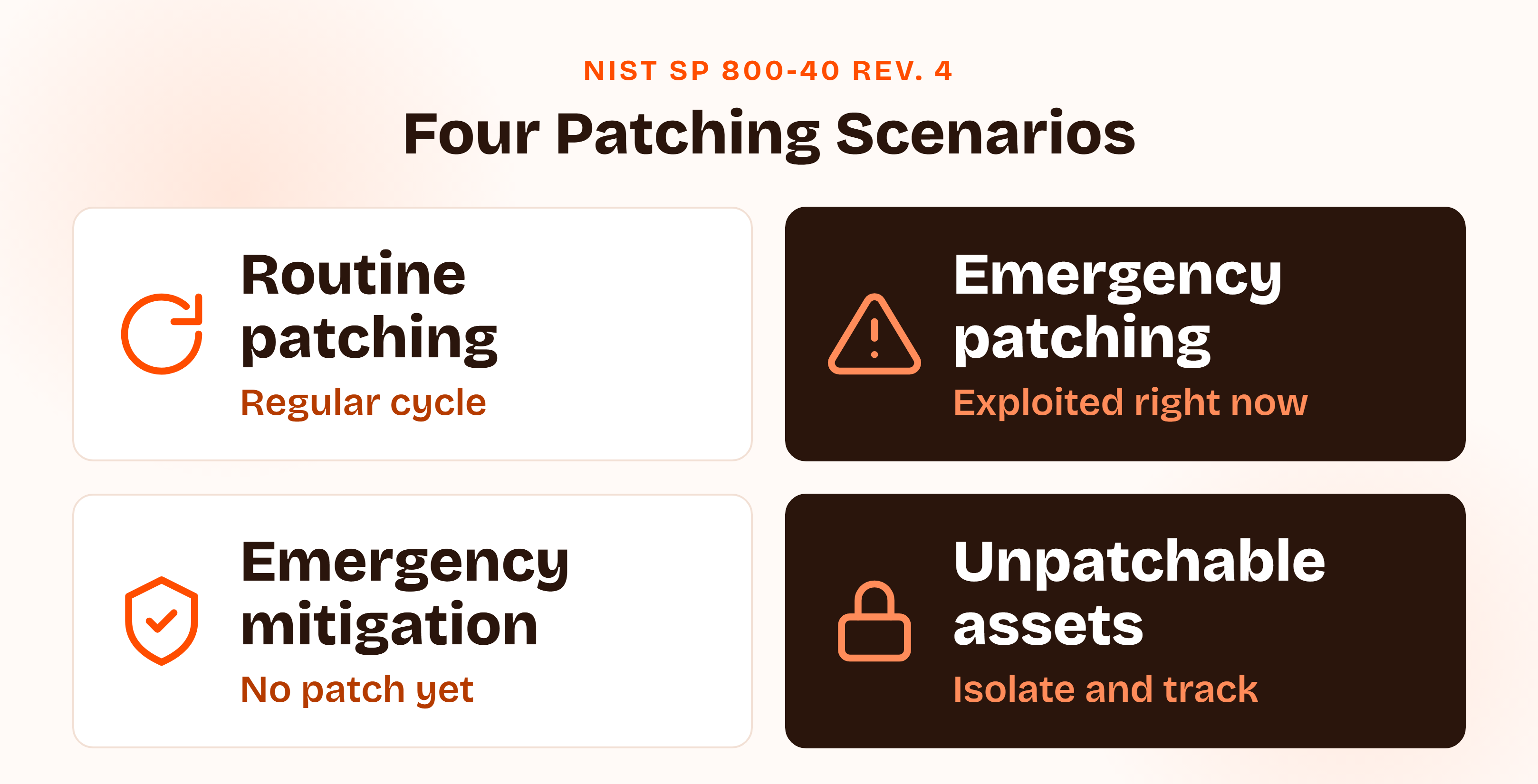
Writing the scenario names into the policy has a side benefit. An auditor can sample against them: "Show me an emergency patch" and "show me how you handled the legacy device" become questions with documented answers.
Pro tip
Give each scenario its own owner, deadline, and record. Routine patching runs on a calendar. Emergency scenarios run on a trigger. Mixing them is how an urgent fix ends up waiting for the monthly window.
Patching SLA by Severity: Setting Numbers You Can Hit
The obvious question is what SLA the framework demands. The better question is what SLA you will hit every time, with the people you actually have.
Published patching defaults run from 24 hours to 14 days for critical issues, depending on who you read. That spread is the finding: nothing standardizes it. Use these as a starting point, and treat them as our recommendation rather than a framework rule.
| Tier | What triggers it | Deploy within |
|---|---|---|
| Emergency | Evidence of active exploitation on an in-scope system | 72 hours |
| Critical | CVSS 9.0 to 10.0, or CVSS 7.0 or higher on an internet-facing system | 7 calendar days |
| High | CVSS 7.0 to 8.9 on an internal system | 30 calendar days |
| Medium | CVSS 4.0 to 6.9 | 90 calendar days |
| Low | CVSS below 4.0 | Next scheduled cycle, 180 days at most |
These tiers match the 7, 30, and 90 day figures in our vulnerability management guide, so your two policies never contradict each other. The extra row is the emergency tier, which exists for flaws that are being exploited whatever their score.
Try this yourself
Pull your last 20 critical and high findings and count how many you closed inside the SLA you are about to write. If the answer is 11, write a deadline you can hit, then tighten it as your process improves. An auditor will sample the same tickets.
Patch Management SLA: When the Clock Starts and What "Patched" Means
Three decisions turn a patch management SLA from a promise into something you can measure:
- When the clock starts. Options are vendor release, detection in your environment, or evidence of exploitation. Our default is detection for routine tiers and exploitation evidence for the emergency tier. PCI DSS measures from release, so use the release date for systems in PCI scope.
- Which days count. Calendar days are simpler to defend than business days, and attackers do not take weekends off.
- What "patched" means. Deployed to every affected asset and verified by a re-scan or version check. A patch queued in a console is not a patched system.
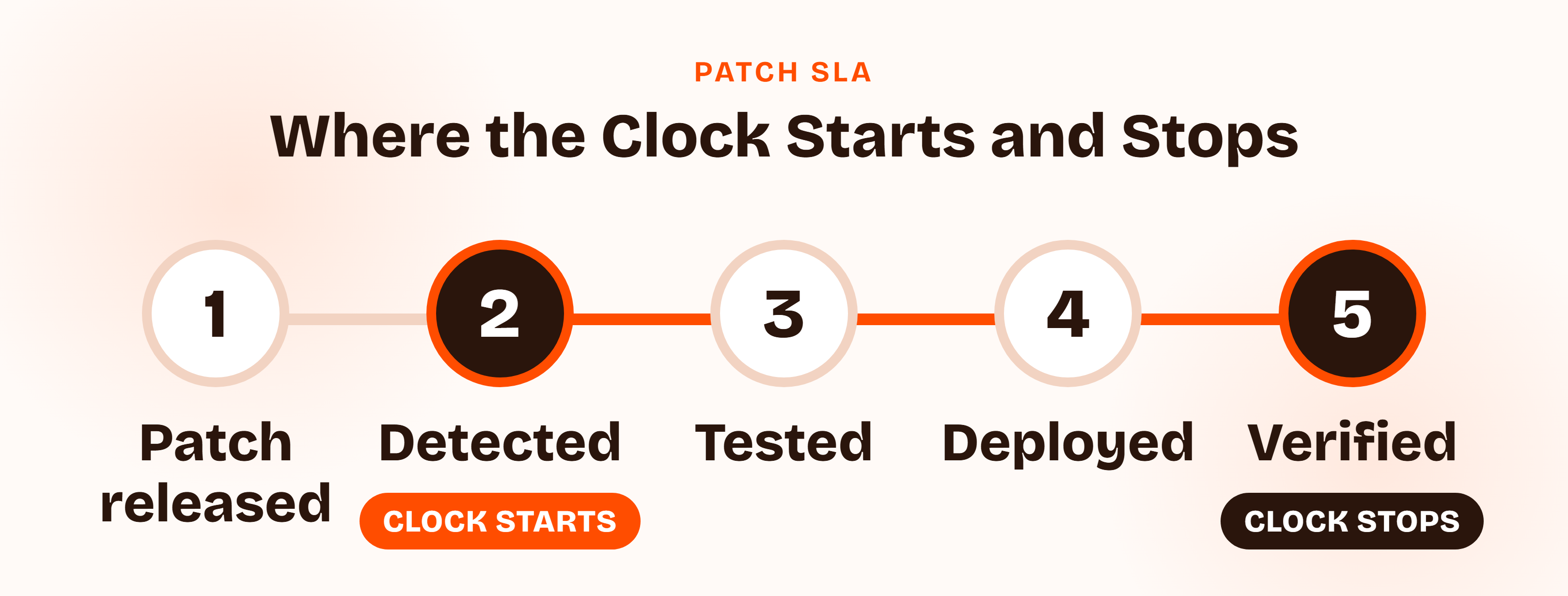
State all three in the policy. Without them, two people can read the same SLA and report different compliance numbers for the same month.
Emergency Patching: Rules for Actively Exploited Vulnerabilities
The emergency lane is for a vulnerability someone is already using. Define the trigger in writing: evidence of exploitation, a listing on CISA's Known Exploited Vulnerabilities (KEV) catalog, or a vendor advisory that names active attacks.
Then set the rules for the fast path:
- Who can invoke it. One named role, with a deputy.
- What testing is acceptable. A smoke test on a representative pilot group, not the full cycle.
- What gets recorded. An emergency change record, completed within [48 hours] of deployment, which matches the retrospective window in our change management guide.
- What happens if no patch exists. The emergency mitigation scenario applies: disable the feature, block the port, tighten access, and watch.
A note on KEV timelines, because the rules changed. CISA's BOD 22-01, which set a flat two-week deadline for most KEV entries, was revoked on June 10, 2026 and replaced by BOD 26-04.
The new directive ranks each vulnerability on four variables (asset exposure, KEV status, exploit automation, technical impact) and assigns timelines from 3 days, with forensic triage, up to fixing on a system upgrade. It binds federal civilian agencies only. Your company has no obligation under it, but the four variables are a sound model for deciding which tier a finding belongs in.
Watch out
An emergency lane with no paper trail becomes the route every patch takes to skip the policy. Require the record every time, and review the count quarterly. A rising number of emergencies is a signal about your routine process.
Patch Management Policy Requirements by Framework: SOC 2, ISO 27001, PCI DSS, and HIPAA
Each framework touches patching from a different angle, and only one of them gives you a number to write down.
| Framework | Where it lives | What it says about timing | How it is tested |
|---|---|---|---|
| SOC 2 | CC7.1 (vulnerabilities) and CC8.1 (change management) | No number set | Your SLA against your tickets and change records |
| ISO 27001:2022 | Annex A 8.8, Management of technical vulnerabilities | No number set | Policy, evidence of timely action, Statement of Applicability |
| PCI DSS 4.0.1 | Requirement 6.3.3 | Critical or high-security patches within one month of release | Risk ranking and install dates for in-scope systems |
| HIPAA | 45 CFR 164.308(a)(1) and (a)(5) | No number set | Risk analysis and risk management records |
| CIS Controls v8 | Safeguard 7.3 | Automated OS patching monthly or more often | Patch tool configuration and reports |
Patch Management Policy SOC 2: CC7.1 and CC8.1
No SOC 2 criterion names a patch management policy. CC7.1 covers detecting and monitoring for newly discovered vulnerabilities, and CC8.1 covers authorizing, testing, approving, and implementing changes. Patching shows up as evidence under both.
In a Type II audit, the reviewer reads your SLA, then samples tickets to see whether you met it. For a first-time SOC 2 company, the written SLA and a month of dated tickets matter more than the specific number. Our SOC 2 compliance checklist shows where this evidence fits in the wider program.
Quick take
SOC 2 does not ask how fast you patch. It asks whether you did what your own policy says you would. A modest SLA you meet every month beats an ambitious one you miss.
Patch Management Policy ISO 27001: Annex A 8.8
Annex A control 8.8 requires you to obtain information about technical vulnerabilities in a timely way, evaluate your exposure, and take appropriate measures. It replaced two 2013 controls, A.12.6.1 and A.18.2.3. As with every Annex A control, you select it through your Statement of Applicability, and any organization running software will include it.
The companion guidance in ISO/IEC 27002:2022 is practical:
- Test first. Test updates before installing them.
- Prioritize. Give priority to high-risk and business-critical systems.
- Keep a way back. Retain the previous software version in case you need to roll back.
- Trust the source. Apply patches only from reliable sources.
- No patch yet. The guidance points to vendor advice, disabling affected services, network controls, and closer monitoring.
That last item maps neatly onto the emergency mitigation scenario above. Our ISO 27001 checklist covers the rest of the Annex A controls.
Patch Management Policy PCI DSS: Requirement 6.3.3
PCI DSS 4.0.1 Requirement 6.3.3 is the only text in this set with a number. Critical or high-security patches, identified through the risk ranking process in Requirement 6.3.1, must be installed within one month of release. All other applicable patches follow a timeframe you set based on your own risk assessment.
If you handle card data, this is your ceiling. The tiers in our SLA table sit inside it: 7 days for critical and 30 days for high. Our PCI DSS requirements guide explains the rest of the standard.
Watch out
The one-month clock runs from the vendor's release date, not from the day your scanner finds the issue. If you detect a flaw three weeks after release, you have one week left. That is why the clock-start rule above uses the release date for PCI scope.
HIPAA, NIST SP 800-40, and CIS Controls
- HIPAA. The Security Rule sets no patching timeframe. It requires a risk analysis and risk management under 45 CFR 164.308(a)(1)(ii)(A) and (B), both required, and procedures for guarding against, detecting, and reporting malicious software under 164.308(a)(5)(ii)(B), which is addressable. Unpatched software is a risk your analysis should name and your management plan should address.
- NIST SP 800-40 Rev. 4. Not a compliance requirement, but the best planning guide available. The four scenarios in this template come from it.
- CIS Controls v8. Safeguard 7.3 calls for operating system updates through automated patch management on a monthly or more frequent basis, across all three implementation groups.
Patch Management Policy for Startups: Laptops, Cloud, and Dependencies
Most templates assume a Windows server estate, an update server, and an IT department. A startup has laptops under device management, a cloud account, a container registry, and a package manifest. The policy has to speak to that.
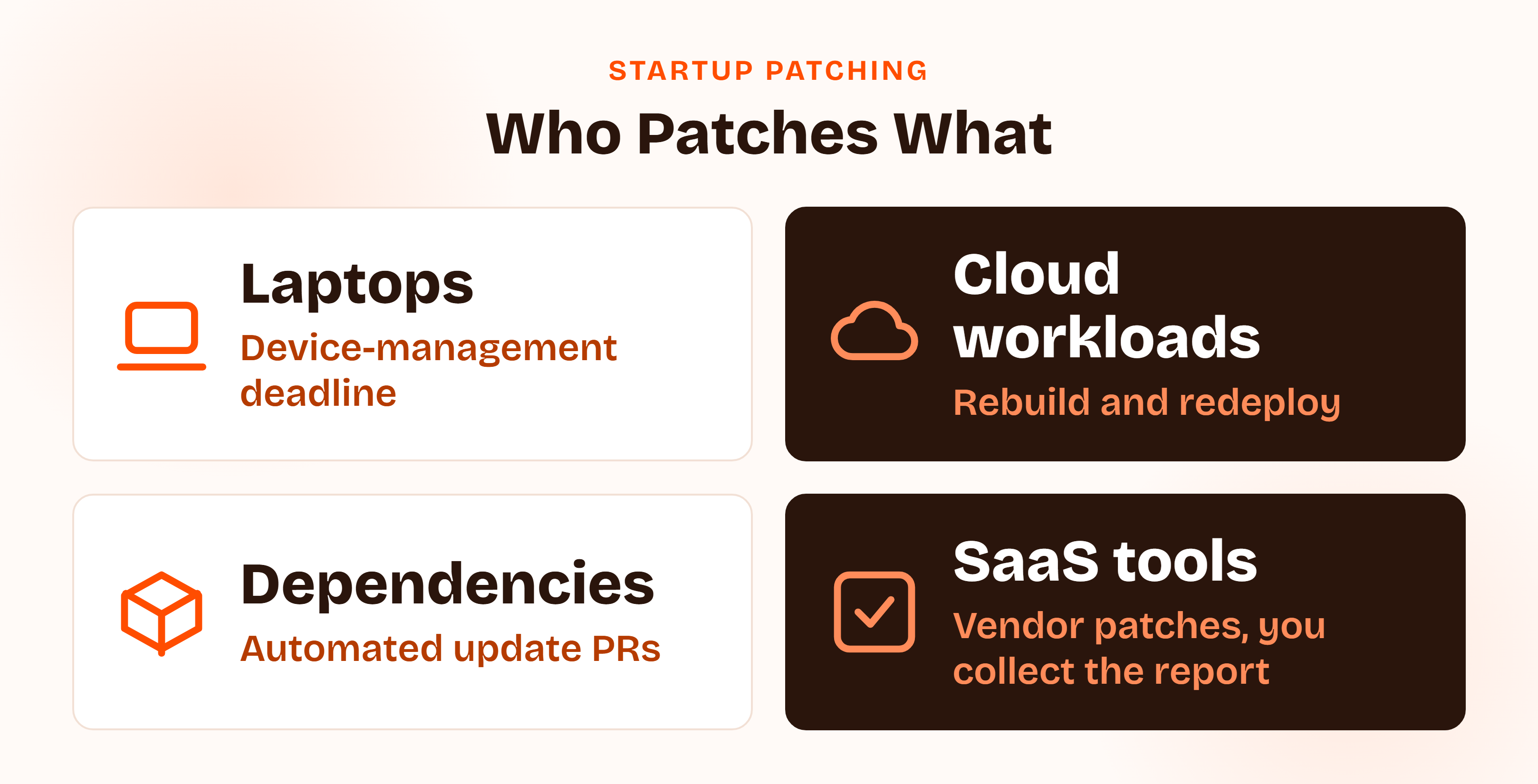
Write one rule per asset class:
- Laptops. Enforce operating system and browser update deadlines through device management, and flag any device that has not checked in for [14] days.
- Cloud virtual machines and containers. Rebuild from a patched base image and redeploy, instead of patching in place. The patch is a deployment.
- Dependencies. Use automated update pull requests, and set a merge deadline that matches the severity tier. Our secure SDLC policy guide covers how this fits into engineering practice.
- Network devices and firmware. Assign a named owner and a quarterly check, because nothing updates these on its own.
- Vendor-managed SaaS. The vendor patches. You collect their audit report each year and note any gaps.
Pro tip
For a cloud-native team, the patch is usually a redeploy. Say that in the policy and count the redeploy date as the deploy date. Otherwise an auditor sees "patched in place" rules you never follow.
Customer Story
"It made SOC 2 and ISO 27001 readiness clear and manageable with automated workflows, evidence collection, and expert support."
David Orr, COO, Romina Day
Patch Management Policy Template: A Free Example You Can Download
Here is what a patch management policy example looks like as clauses you can adapt. Brackets mark the values to set for your own company.
Patch Management Policy Example: Sample Clauses You Can Adapt
Sample clause: Scope and SLA
All operating systems, applications, firmware, cloud workloads, container images, and third-party dependencies in the asset inventory must be patched within the following deadlines, counted in calendar days from detection: Critical [7] days, High [30] days, Medium [90] days, Low at the next scheduled cycle and no later than [180] days. A patch is complete only when it is deployed to every affected asset and verified.
Sample clause: Emergency Patching
A vulnerability with evidence of active exploitation on an in-scope system is an Emergency and must be remediated or mitigated within [72] hours. The [Security Lead] or their deputy may invoke the emergency process, which permits a reduced test on a pilot group. An emergency change record must be completed within [48] hours of deployment.
Sample clause: Exceptions
An asset that cannot meet its patching deadline requires a written exception stating the owner, the reason, the compensating controls, and an expiry date of no more than [90] days. The [Security Lead] approves exceptions. Expired exceptions are escalated and reviewed before any renewal.
Free Template
Download the Free Patch Management Policy Template (PDF)
All seven sections, a patching SLA table, the four scenarios, an exception register, an evidence checklist, and framework notes for SOC 2, ISO 27001, PCI DSS, and HIPAA.
Patch Exception Process in Your Patch Management Policy Template
Some assets will miss the deadline: a legacy appliance, a vendor-certified system, an application that breaks on the update. The question is how you record that.
NIST's advice is to reduce what counts as an exception in the first place. Where a whole class of assets cannot follow the standard plan, such as a fleet of medical devices or a build server pinned to an old OS, give it its own maintenance group with its own plan. That is better than a pile of one-off exceptions that nobody reviews.
For true exceptions, require a register with these fields:
| Field | Why it matters |
|---|---|
| Asset and owner | A named person is accountable |
| Vulnerability and tier | Shows what risk is being accepted |
| Reason | Explains why the deadline cannot be met |
| Compensating controls | Isolation, access limits, extra monitoring |
| Approver and date | Proves the risk was accepted by someone with authority |
| Expiry date | Forces a re-review, [90] days at most |
Rolling Out Your Patch Management Policy Template and Proving It Works
Writing the policy is the easy half. Rollout is where the rules become defaults, the checks become routine, and the records accumulate without drama.
- Assign an owner, usually the IT or security lead, accountable for the policy and the monthly report.
- Build the inventory. You cannot patch what you have not listed.
- Set maintenance groups and windows, with a deputy for each.
- Automate where you can. Device management for laptops, update pull requests for dependencies, image rebuilds for cloud workloads.
- Publish the policy and tell people, in plain words, what changes for them.
- Report monthly on SLA performance by tier and review open exceptions.
- Review the policy annually and after any significant change to your stack.
Patch Management Policy Template Evidence: What Auditors Sample
The policy is the small part. Records turn it into evidence.
| Evidence | What it shows |
|---|---|
| Approved policy and version history | The rules exist and someone with authority signed off |
| Asset inventory | You know what is in scope |
| SLA report by tier | You measure performance against your own numbers |
| Sample tickets with dates | Detection, deployment, and verification are recorded |
| Exception register | Every miss has an owner, a reason, and an end date |
| Emergency change records | The fast lane left a trail |
| Vendor audit reports | Vendor-managed SaaS is covered by their evidence |
Quick tip
Before an audit, pick three closed tickets at random. Each one should show the detection date, the deployment date, and proof of verification. If one is missing a field, fix the template your team uses to close tickets, not just that ticket.
Answering the Customer Security Questionnaire
The question usually arrives as "What is your patch management policy and SLA?" Wolfia's security-questionnaire answer page, updated July 6, 2026, says reviewers want a severity-tiered timeline, "not a promise that you 'patch promptly.'" It lists what they expect you to attach: the policy with its SLA table, a recent scan summary showing open findings by severity and age, the relevant section of your SOC 2 report, sample remediation tickets or an SLA dashboard export, and dependency scanning evidence.
Sample answer: adapt to what is true for you
We maintain a documented patch management policy with severity-based deadlines: Critical within [7] days, High within [30], Medium within [90]. Vulnerabilities with evidence of active exploitation are treated as an Emergency with a [72]-hour deadline. Exceptions require a documented owner, compensating controls, and an expiry date. We can provide the policy, our latest SLA report, and sample tickets on request.
Measure what you promise with a few numbers that mean something: the share of findings closed inside SLA by tier, the age of your oldest open item, and the count of exceptions past expiry. NIST SP 800-40 Rev. 4 warns that a bare percentage of vulnerabilities patched is "not actionable," because it hides which ones matter.
Patch Management Policy Template Mistakes to Avoid
- SLA numbers copied from a template and never measured. The policy promises 48 hours and the tickets say 12 days.
- No definition of when the clock starts. Two people calculate compliance differently from the same data.
- "Patched" means queued. The update sits in a console for three weeks while the dashboard reads green.
- An emergency lane with no record. Every urgent fix skips the process, and nobody can say how many there were.
- Exceptions that never expire. A temporary exception for one device quietly becomes permanent.
- Scope that stops at servers. Laptops, containers, firmware, and dependencies have no owner, which is where most startup exposure lives.
How ComplyJet Helps With Patch Management Evidence
A patch management policy is quick to write and tedious to prove. The rules fit on two pages. The dated records are what take discipline.
ComplyJet's vulnerability management syncs findings from scanners such as Snyk, AWS Inspector, Dependabot, and Wiz, applies severity-based remediation deadlines, assigns each finding to an owner with reminders, and escalates overdue items into your compliance posture. It keeps an audit-ready remediation log and links findings to your SOC 2, ISO 27001, HIPAA, and PCI DSS controls.
We do not deploy patches. That stays with your device management, cloud, and CI tooling, and ComplyJet records the result and holds it to your SLA. For a wider look at the tooling, see our guide to the best vulnerability management tools.
Compliance Automation
Turn your patching SLA into audit-ready evidence
See how ComplyJet tracks findings against your deadlines and maps them to SOC 2, ISO 27001, HIPAA, and PCI DSS.
FAQs
What Should a Patch Management Policy Template Include?
Seven sections: purpose and scope, roles, patch classification and SLAs, testing and deployment, emergency handling, exceptions, and evidence with review. Add a clock-start rule and a definition of "patched" so your SLA can be measured, plus an exception register so every miss has an owner and an expiry date.
How Quickly Should Critical Patches Be Installed?
No standard sets one number. Published defaults range from 24 hours to 14 days. We recommend 7 calendar days for critical findings and 72 hours for anything under active exploitation, because those are numbers a small team can meet. PCI DSS caps critical and high-security patches at one month from release.
Is a Patch Management Policy Required for ISO 27001 or SOC 2?
In practice, yes. ISO 27001 Annex A 8.8 is selected through your Statement of Applicability, and any organization running software includes it. SOC 2 has no criterion that names patching, but CC7.1 and CC8.1 are where auditors look for it, and a written policy is the standard evidence.
Does PCI DSS Require Patching Within 30 Days?
For critical or high-security patches, yes: Requirement 6.3.3 in PCI DSS 4.0.1 says one month from release, based on your risk ranking under 6.3.1. Other applicable patches follow a timeframe you set from your own risk assessment. The one-month rule applies to system components in scope for PCI DSS.
How Do You Handle Systems That Cannot Be Patched?
Put them in their own maintenance group with a documented plan, as NIST SP 800-40 Rev. 4 recommends, instead of listing them as one-off exceptions. The plan should isolate the system, limit access, add monitoring, and name an owner and a review date. Any true exception needs an expiry of [90] days or less.
Is There a Free Patch Management Policy Template?
Yes. The PDF above is free and ungated: seven sections, sample clauses, an SLA table, an exception register, and an evidence checklist. Adapt the bracketed values to your own company and route it through your normal approval process.
Related Reading
- Vulnerability Management Policy, for scanning, risk rating, and tracking, the layer that feeds this policy.
- Change Management Policy, for how patches get approved and how emergency changes are recorded.
- Information Security Policy, the top-level policy this one sits under.
- Asset Management Policy, because you cannot patch what is not in the inventory.
- Secure SDLC Policy, for dependency updates and engineering practice.
- Best Vulnerability Management Tools, for the tooling side of the same program.
Sources: NIST SP 800-40 Rev. 4, Guide to Enterprise Patch Management Planning; CISA BOD 26-04, Prioritizing Security Updates Based on Risk; VulnCheck, State of Exploitation 1H 2025; ISMS.online on Annex A 8.8 and ISO/IEC 27002:2022 guidance; 45 CFR 164.308, HIPAA Security Rule administrative safeguards; CIS Controls v8 Safeguard 7.3; Wolfia, What is your patch management policy and SLA?; HighTable, ISO 27001 Patch Management Policy Template.