Your incident response plan was written for attackers and outages. An AI system can cause real harm while every dashboard stays green, and a wrong answer sent to a customer is an incident with no alert attached. An AI incident response plan is how you decide, before it happens, who finds out, who can switch the feature off and who has to be told by when.
An AI incident response plan is a documented procedure for detecting, containing, investigating and reporting events where an AI system causes or nearly causes harm, such as a wrong or harmful output, a data leak, a biased decision or an agent action that should not have happened, with named owners and a switch-off decision made in advance.
Quick take
Three clocks can start when an AI system misbehaves: EU AI Act serious incident reporting (for providers of high-risk systems), GDPR's 72 hours (if personal data is breached) and your customer contracts. Most SaaS AI features are covered by the second and third only. Status as of October 2026.
Note
This is the AI addendum to a base incident response plan, not a replacement for one. If you need the base document (roles, communication tree, phases, a downloadable PDF), start with the incident response plan template, then come back for what AI changes. It is also not the incident management policy (the governance document), not the GDPR breach notification guide (the general 72-hour process) and not an AI risk assessment (which scores risk before launch).
By the end, you will know what counts as an AI incident, which reporting duties actually apply to a SaaS team, how to tier severity, how to contain a failing feature and what evidence to keep.
Here's what I'll cover:
- What an AI incident response plan adds to the plan you already have
- Which reporting clocks apply, and which do not
- A four-tier severity scale and a containment ladder
- The seven steps, roles and decision rights
- A worked example, a tabletop exercise and the evidence pack
What an AI Incident Response Plan Covers, and What It Adds to the Plan You Already Have
An AI incident response plan covers the harm an AI system can do while it is running normally, which is the case a cyber incident response plan has no step for.
Model behavior is probabilistic. "The system is up" and "the system is behaving" are different facts, and the plan has to cover the second.
The top of the scale is set by law. Article 3(49) of the EU AI Act defines a "serious incident" as an incident or malfunctioning of an AI system that directly or indirectly leads to any of four outcomes:
- The death of a person, or serious harm to a person's health
- A serious and irreversible disruption of the management or operation of critical infrastructure
- The infringement of obligations under Union law intended to protect fundamental rights
- Serious harm to property or the environment
Most incidents a SaaS team sees sit below that line. The plan treats the legal definition as tier 1 and everything else as your own judgment.
AI Incident Response Plan vs the Incident Response Plan Template
Three documents sit next to each other, and teams mix them up.
| Document | What it governs | When you open it |
|---|---|---|
| Incident management policy | Governance: ownership, severity definitions, review cadence | When you set or audit the rules |
| Incident response plan template | Cyber and security incidents: roles, communication tree, phases | When an attacker, outage or breach is suspected |
| This AI incident response plan | What changes when the failure is a model's behavior | When an AI feature gives a harmful answer, leaks data or takes a wrong action |
The third document sits under the second. If you have no base plan yet, build that first. This article assumes it exists.
Six Kinds of AI Incident to Plan For
| Type | What it looks like | Example signal |
|---|---|---|
| Harmful or wrong output | A hallucinated policy, unsafe advice | A customer screenshot in a support ticket |
| Sensitive data exposure through a model | Prompt, retrieval or training data leaking | One tenant's data in another tenant's answer |
| Security exploitation | Prompt injection, tool abuse | An output that follows instructions hidden in a document |
| Agent or automation malfunction | An action nobody approved | A record deleted or an email sent by an agent |
| Biased or discriminatory outcomes | Different results for different groups | A review finding a gap in approval rates |
| Vendor or third-party model failure | A provider outage or a silent model change | Output quality shifts the day after a vendor update |
Discovering an unapproved AI tool in use is a governance finding rather than a runtime incident, so it belongs in your AI governance policy.
Why an AI Incident Response Plan Differs From a Cybersecurity Incident Response Plan
How is AI incident response different from cybersecurity incident response? Cyber plans assume a clear failure signal, a reproducible fault and an attacker or bug behind it. AI failures often give no signal, may not reproduce, and can come from drift, a vendor update or ordinary user behavior. Containment also changes: you disable a feature, a tool permission or a model version rather than isolating a host.
| Assumption in a cyber plan | What breaks for AI | What the AI plan does instead |
|---|---|---|
| There is a clear failure signal | A bad answer looks like a good one to every monitor | Adds user reports, reviewer flags and output sampling as detection sources |
| You can reproduce the fault and patch it | The same input may not give the same output twice | Preserves inputs, outputs and versions as the record, and allows rollback of a prompt or model version |
| The cause is an attacker or a bug | Also drift, data change, vendor update and user misuse | Tests cause categories in order, starting with what changed |
| Containment means isolating a host | The "host" is a behavior | Uses a containment ladder from tighter guardrails to full shutdown |
Reproducibility is the part teams underestimate. Because the same input may not produce the same output twice, the captured record of inputs, outputs and versions is the only proof of what happened.
Responders need the same caution about their own tools. A Hacker News commenter described asking an LLM to diagnose an intermittent gRPC failure from about 10,000 nginx log lines. The model cited a "smoking gun" log entry that did not exist. In their words, in a July 2025 thread: "It was entirely made up." If you use AI to speed up an investigation, check its timeline against the raw logs.
Why You Need an AI Incident Response Plan Before the First Incident
In Moffatt v. Air Canada (2024 BCCRT 149), decided by the British Columbia Civil Resolution Tribunal in February 2024, an airline's chatbot misstated the bereavement fare policy. Air Canada argued the chatbot was a separate entity. The tribunal rejected that, and held the airline had not taken reasonable care to ensure its chatbot was accurate. The point for your plan is short: the company owns what its AI says.
Agents raise the stakes further. In July 2025, Storyboard18 reported that Replit's AI agent damaged a live production database during an investor's coding experiment, after being told to freeze code changes. Replit's CEO called the incident "unacceptable" and said it should never be possible. A kill switch someone can pull is the control that would have mattered.
Buyers are also asking. Three framework expectations point the same way:
- Security questionnaires from larger customers may ask how you handle AI incidents, alongside the usual cyber question.
- ISO 42001 includes a control on communicating incidents (A.8.4, by title).
- NIST AI RMF MANAGE 2.3 asks teams to establish and regularly review treatment and response plans for incidents and negative impacts.
A plan is cheaper to write than to improvise.
Watch out
A plan that exists only as an "other incidents" line inside the cyber plan is the one that fails first, because nobody named who can switch the feature off.
AI Incident Reporting: Which Clocks Your AI Incident Response Plan Must Track (Status as of October 2026)
AI incident reporting is narrower than most guides imply. Very few rules say "report an AI incident." Most attach to a category of system or to a personal data breach, so the first question is which one you are.
| Who tells whom | Trigger | Deadline | Applies to | Status |
|---|---|---|---|---|
| Provider to the market surveillance authority where the incident happened (EU AI Act Art. 73) | Serious incident | Immediately once a causal link or reasonable likelihood is established, and within 15 days of awareness; 2 days for widespread infringement or critical infrastructure disruption; 10 days for a death | Providers of high-risk AI systems | Not yet applicable (see below) |
| Deployer to the provider, then importer or distributor and authorities (Art. 26(5)) | Serious incident, or reason to believe use creates a risk | Immediately; suspend use where there is reason to believe there is a risk | Deployers of high-risk AI systems | Not yet applicable |
| Controller to the supervisory authority (GDPR Art. 33) | Personal data breach likely to result in risk | Without undue delay and, where feasible, within 72 hours; processor tells controller without undue delay | Any organization processing EU personal data | In force |
| You to your customers | Whatever your DPA or MSA says | Whatever the contract says | Your contracts | In force |
| Communication to users (ISO 42001 A.8.4) | Your own plan | Your own plan | Voluntary, certifiable | Voluntary |
EU AI Act Serious Incident Reporting Under Article 73
Article 73 binds providers of high-risk systems. Deployers of high-risk systems are pulled in through Article 26(5), which sends their notice to the provider first. A typical SaaS chatbot or copilot is not high-risk, so check EU AI Act risk classification before assuming any of this applies.
For those who are in scope, the tiers are clear. The default is immediate reporting once a causal link or its reasonable likelihood is established, and in any event within 15 days of becoming aware. The window shrinks to 2 days for a widespread infringement or a serious incident involving critical infrastructure, and 10 days for a death. An incomplete initial report is allowed, followed by a complete one.
The provider must then investigate promptly, including a risk assessment and corrective action. It must not perform an investigation that involves altering the AI system in a way that could affect the evaluation of causes before informing the authorities. That is why evidence capture comes before rollback in the steps below.
Important
As of October 2026, Article 73 reporting for high-risk systems is not yet applicable. Regulation (EU) 2026/1744, the Digital Omnibus on AI, entered into force on 27 July 2026 and moves the Annex III high-risk obligations to 2 December 2027 and the Annex I product-embedded obligations to 2 August 2028. Build the process now. The process is the long pole, not the form.
The Commission's own page for Article 73 shows no Digital Omnibus amendment to the article text, so the deadlines above are the ones to plan around.
Who is responsible when an AI system causes harm? For reporting, the roles differ:
| Question | Provider | Deployer |
|---|---|---|
| Who tells the authority first? | The provider, under Art. 73 | Notifies the provider first, then others, under Art. 26(5) |
| Who investigates the system? | The provider, including risk assessment and corrective action | Cooperates; uses the system within the provider's instructions |
| Who can switch the system off? | The provider, through a fix, withdrawal, disablement or recall (Art. 20) | The deployer, by suspending its own use |
GDPR Breach Notification When the AI Incident Involves Personal Data
A wrong or biased answer is not by itself a personal data breach. A breach of security leading to the accidental or unlawful destruction, loss, alteration, unauthorised disclosure of or access to personal data is.
Examples that cross the line:
- The model reveals one customer's data to another customer.
- A retrieval index exposes records it should not.
- An agent emails an export to the wrong address.
If you are the controller, you notify the supervisory authority without undue delay and, where feasible, within 72 hours of becoming aware, unless the breach is unlikely to result in a risk. A late notice has to explain the delay. If you are a processor, you tell the controller without undue delay. Article 33(5) also requires the controller to document every breach, including the ones you decide not to report.
For the full process see GDPR breach notification. This section covers only when an AI failure becomes one.
What No Law Requires but Customers Will Expect
Several duties come from paper you signed, not statute:
- Contractual notice windows in DPAs and MSAs
- Security questionnaire answers you gave about incident handling
- Public status communication for a customer-facing feature
- Notice to your insurer
Action step
Pull the three customer contracts with the strictest notice terms and put their windows in the plan. Those windows are often shorter than any law.
ISO 42001
ISO 42001 expects a documented plan for communicating AI incidents
ISO 42001 includes controls for communicating incidents (A.8.4) and for letting outside parties report adverse impacts (A.8.3). ComplyJet's ISO 42001 workspace helps you keep those records and evidence in one place.
AI Incident Severity Levels: A Four-Tier Scale for Your AI Incident Response Plan
These AI incident severity levels decide who gets woken up and which clock to check, so they are keyed to harm and reversibility, not uptime.
| Tier | Trigger | Example | Who decides | First response window |
|---|---|---|---|---|
| 1 | Meets or may meet the Article 3(49) definition, or a confirmed personal data breach, or harm to a person that cannot be undone | A model exposes another tenant's records | Incident commander with legal or privacy | Immediately, any hour |
| 2 | Wrong or harmful output reaching external users at scale, or one high-stakes decision (credit, hiring, health) affected | A chatbot states the wrong refund policy to many customers | Model or feature owner | Within the hour, business hours |
| 3 | Limited wrong output, no harm confirmed, contained to a segment or to internal users | An internal copilot gives bad summaries to one team | Model or feature owner | Same working day |
| 4 | Near miss caught by a guardrail or reviewer | A filter blocks an output that would have leaked a secret | Engineering on-call | Next working day |
The response windows are your own commitments. No law sets them, so do not present them to an auditor as a standard.
When you are unsure between two tiers, take the higher one and downgrade after triage. An auditor reads a documented downgrade better than a missed escalation. If your company already uses P1 to P4 labels, map them to these tiers using the incident management policy, so the two scales map rather than compete.
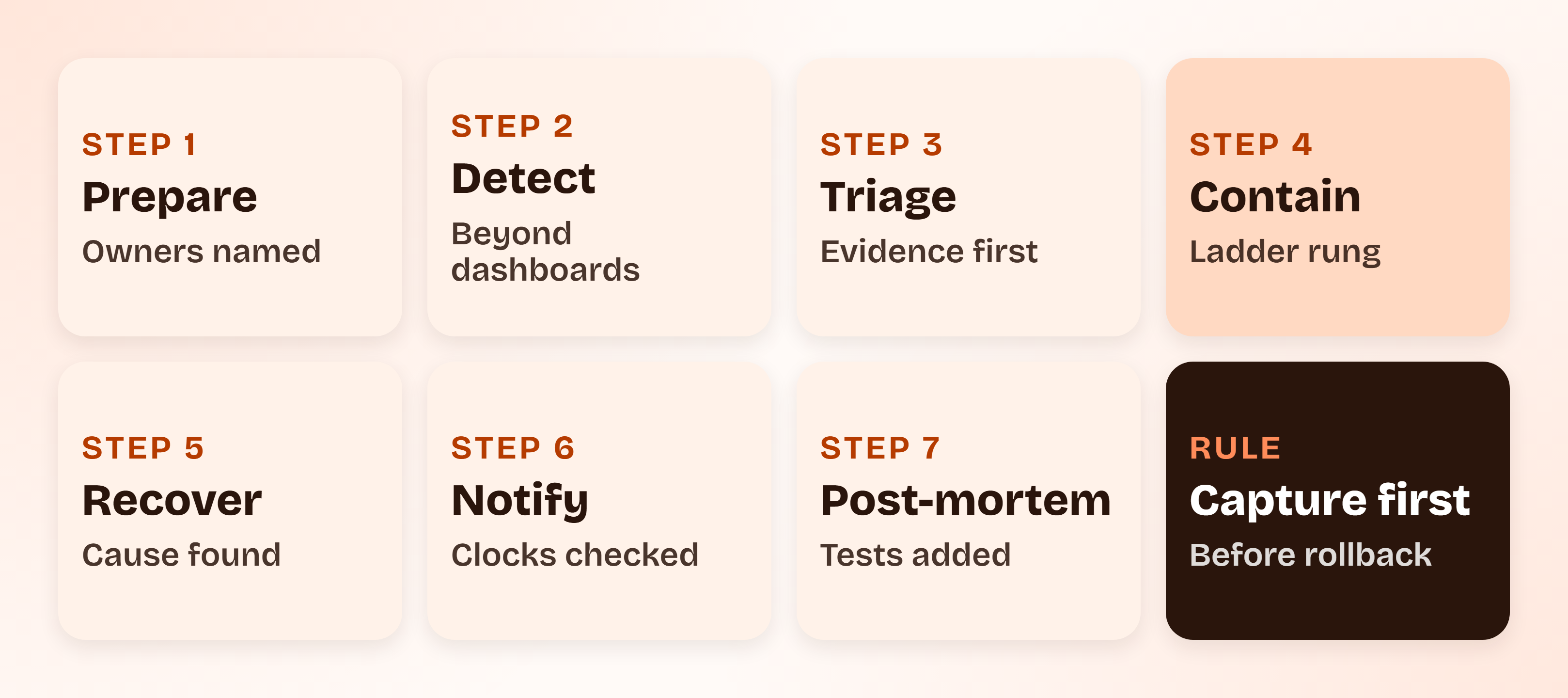
The AI Incident Response Plan Step by Step
The seven steps follow the shape every incident plan has, and each one changes when the failure is a model. The changes are what the AI plan has to spell out. NIST SP 800-61 Rev. 3 (April 2025, superseding Rev. 2) now ties incident response to the six CSF 2.0 functions rather than the older phase list. The steps here map to that without depending on it.
Step 1: Prepare the Inventory, Owners and an AI Kill Switch
An AI kill switch is a pre-agreed, tested way to stop an AI feature or one of its capabilities quickly, without a deploy, and with a named person allowed to use it. It is not a single button. It is a set of switches: a feature flag, tool permission revocation, a model version pin, vendor key revocation and a human-review fallback.
NIST AI RMF MANAGE 2.4 asks for mechanisms in place and responsibilities assigned to supersede, disengage or deactivate AI systems that show performance or outcomes inconsistent with intended use.
Keep an inventory of every AI feature: the model and vendor, the data it can reach, the tools it can call and its owner.
Try this yourself
Pick one AI feature and write down, in one line, who can switch it off at 2 a.m. and how long that takes. If you cannot, step 1 is not done.
Step 2: Detect Incidents That No Dashboard Will Flag
| Detection source | What it catches |
|---|---|
| User reports and support tickets | Wrong answers a customer noticed |
| Human reviewer flags | Outputs a reviewer rejected or corrected |
| Guardrail and policy-filter hits | Blocked outputs, which show near misses |
| Output sampling reviews | Quiet drift nobody reported |
| Changes in refusal or escalation rates | Behavior shifts after a prompt or model change |
| Vendor status and model-change notices | A provider change you did not make |
| Security alerts | Prompt injection and tool abuse attempts |
| A regulator or press enquiry | The incident you missed |
Include an external reporting channel, so users can tell you the system harmed them. ISO 42001 covers this under A.8.3 External reporting, by title.
No tool in this plan catches everything. Sampling reviews and user reports are the backstop.
Step 3: Triage, Scope and Preserve Evidence Before You Change Anything
Triage answers six questions: what happened, since when, how many outputs or people, which model and prompt version, whether personal data is involved and which tier and clocks apply.
To size the problem, pull a defined sample of outputs from the affected window and label them. "How many people" then becomes a number with a method, not a guess.
| What to capture | Why |
|---|---|
| Inputs and outputs | The only record of what the system did |
| System prompt and prompt version | Behavior changes with the prompt |
| Model name and version | A rolled-back model cannot reproduce the failure |
| Retrieved documents | Shows what the model was given |
| Tool calls and their results | Shows what an agent actually did |
| User or tenant IDs | Scopes who was affected |
| Guardrail and filter log | Shows what the controls saw |
| The time window | Bounds the sample |
Capture before rollback. A rolled-back model cannot reproduce the failure, and where Article 73 applies it bars investigations that alter the system before the authorities are informed.
Step 4: Contain With a Ladder, Not a Single Switch
| Rung | Move | When to use | Who may pull it | How to verify it worked |
|---|---|---|---|---|
| 1 | Tighten the guardrail or prompt | Narrow, known failure pattern | Feature owner | Re-run the captured failing inputs |
| 2 | Route flagged cases to human review | Failure is limited to a topic or segment | Feature owner | Flagged cases appear in the review queue |
| 3 | Restrict tools and data access for the agent | An agent acted wrongly or data may be exposed | Engineering on-call | Permission test shows the tool call is refused |
| 4 | Pin or roll back the model or prompt version | A recent change started the failure | Engineering on-call | The prior version passes the failing cases |
| 5 | Turn the feature off for affected tenants | Harm is limited to some customers | Incident commander | Affected tenants see the fallback |
| 6 | Turn it off entirely and use the manual process | Harm is ongoing and not narrowable | Incident commander | No new outputs are served |
| 7 | Revoke the vendor key or end the integration | The vendor model is the cause and cannot be pinned | Incident commander with executive sponsor | Calls to the vendor fail as intended |
If harm is ongoing, start one rung above where you would normally begin. Mitigation does not require a root cause. Roll back first, explain later.
Step 5: Investigate and Recover When the Bug Is a Bad Prediction
Test cause categories in order:
- Change: a prompt, model version, vendor update or data change
- Input: a new population of users, or an attack
- Retrieval or tool output: what the model was handed
- A missing guardrail: a control that did not exist
- The human process around the model: review that was skipped
Reproduce with the captured inputs on a copy, not on production. Recovery is done when the failing cases now pass, a regression set has been added, monitoring for recurrence is in place and the owner and a second person have signed off. Verify any AI-assisted timeline against raw logs, as the Hacker News example above shows.
Step 6: Communicate: What Your AI Incident Response Plan Tells Each Audience
| Audience | Trigger | Owner | Channel | Content |
|---|---|---|---|---|
| Internal leadership | Tier 1 or 2 | Incident commander | Chat and email | Tier, scope, containment, next update time |
| Affected customers | Any customer-visible harm | Communications lead | Email, account contact | What happened, what it affected, what you did, what they should do |
| Authorities | A clock applies | Legal or privacy lead | Required regulator channel | Facts known, allowing an incomplete first report where the rule permits |
| Users | Public-facing impact | Communications lead | Status page, in-product notice | Plain description and workaround |
| Vendor | Vendor model involved | Vendor liaison | Support channel and contract contact | Evidence and request for their root cause |
| Insurer | Policy terms require it | Executive sponsor | Policy notice address | Per the policy |
Say what happened, what it affected, what you did and what the customer should do. Do not blame the model. Draft holding statements before an incident, not during one. Reuse the communication tree from the incident response plan template, and add legal or privacy and the vendor liaison to it.
Step 7: Run the AI Incident Post-Mortem and Feed It Back
An AI incident post-mortem covers:
- A timeline built from captured evidence
- Why it was not caught earlier
- Which control failed: data, model, guardrail, review or monitoring
- The regression test that now exists
- What the risk register and AI risk assessment now say
- Whether the AI governance policy or its approved-use rules change
- Whether a customer or authority needs a follow-up report
Keep the AI incident post-mortem blameless, with one named owner per action and a date. NIST AI RMF MANAGE 4.3 frames the goal: incidents and errors are communicated to relevant AI actors, and the tracking, response and recovery processes are followed and documented.
The AI Incident Response Playbook: Roles and Decision Rights
An AI incident response team is your existing incident team plus three seats a cyber plan does not have: a model or feature owner, a legal or privacy lead and a vendor liaison. The one decision that matters most is who may switch a feature off without asking.
Mark one person Accountable (A) per row, with others Responsible (R) or Consulted (C). Name a backup for every role, so no row depends on one person in the AI incident response team.
| Decision or task | Incident commander | Model or feature owner | Engineering on-call | Legal or privacy | Communications | Vendor liaison | Executive sponsor |
|---|---|---|---|---|---|---|---|
| Declare an incident | A | C | R | I | I | I | I |
| Set the tier | C | A | R | C | I | I | I |
| Switch the feature off | A | R | R | C | I | I | C |
| Preserve evidence | C | R | A | C | I | R | I |
| Decide on regulator notice | C | C | I | A | I | I | R |
| Notify customers | C | C | I | R | A | I | C |
| Approve the post-mortem | R | R | R | C | C | C | A |
The AI incident response playbook should also carry short scenario playbooks so responders start fast. Each one is a paragraph in the plan, not a full runbook:
- Hallucinated or harmful output to customers: capture conversations, restrict the topic to human handoff, correct the source.
- Data leak through retrieval: disable the index for affected tenants, treat as tier 1, check the GDPR clock.
- Prompt injection with tool misuse: revoke the tool, rotate any exposed credential, keep the poisoned input.
- Biased decisions found in a review: pause automated decisions on the affected path and route to human review.
- A vendor model change that broke behavior: pin the previous version if the vendor allows it, otherwise fall back to the manual process.
LLM Incident Response: Prompt Injection, Hallucination and Agent Failures
How do you contain an LLM incident? Cut capability before cutting the feature. Revoke tool and data access, pin the previous prompt or model version and route outputs to human review. Widen to a full shutdown only if harm continues. LLM incident response differs by failure type, so the first move depends on what failed.
| Failure | First containment move | Evidence to keep | What to fix after |
|---|---|---|---|
| Prompt injection | Disable the affected tool and rotate any exposed credential | The poisoned input and the tool calls it triggered | Input handling, tool permissions, a regression test |
| Hallucinated output | Add a retrieval or review gate | The output and the sources it was given | Source data, grounding, a regression test |
| Agent action | Revoke the agent's permissions and snapshot state | Action log and the state before and after | Permission scope, approval step, restore path |
Provider-side model changes can alter behavior without notice. Version pinning and vendor notices belong in the plan for that reason.
A Worked Example: A Support Chatbot States the Wrong Refund Policy
This is a hypothetical, with illustrative numbers. A 30-person SaaS company runs a support chatbot that answers billing questions from a help-centre index. A help-centre update leaves an old refund rule in the index. Over two days the bot tells customers refunds are available for 90 days when the policy is 30.
| Time | Event | Plan step |
|---|---|---|
| 09:10 | A support agent flags a customer screenshot. The support lead declares an incident. | Detect, declare |
| 09:25 | The feature owner sets tier 2: external users and a financial effect. | Triage |
| 09:40 | Evidence captured: conversation logs, index version, prompt version. Then the bot is limited to a human handoff for billing questions. | Evidence, ladder rung 2 |
| 10:30 | A sample of 200 conversations from the window is labelled by two reviewers. 17 contain the wrong rule (illustrative). | Scope |
| 11:00 | The stale document is removed, the index rebuilt and a regression test added. | Recover |
| 13:00 | Affected customers get a corrected statement and a decision on honoring the wrong rule. | Communicate |
| Next day | Post-mortem with owners and actions. | Post-mortem |

Two clocks never started. No personal data was breached, so GDPR Article 33 did not apply, and a billing chatbot is not a high-risk system, so Article 73 did not either. The contract windows still needed checking. And the Air Canada lesson holds: the company owns the answer, whether or not a clock started.
ComplyJet customers
Audit-ready evidence for an AI product
Raghuram Vadapally, Managing Director and Head of Software Engineering at Synexar AI, whose platform turns doctors' dictations into structured reports, says "I honestly can't imagine going back to managing compliance without it." Read how Synexar kept its SOC 2 and HIPAA evidence in one place.
AI Incident Response Template: What to Add to Your Existing Plan
No new document is needed if the base plan has a place for these additions. Take the incident response plan template as the base and the incident management policy as the governance layer, then add the following. This is the AI incident response template in table form:
| Base plan section | What to add for AI |
|---|---|
| Scope and definitions | AI incident categories and the Article 3(49) tier |
| Roles | Model owner, legal or privacy lead, vendor liaison |
| Severity | Harm-based tiers from this article |
| Detection | External reporting channel and output sampling |
| Containment | The kill-switch ladder and who may pull each rung |
| Evidence | Inputs, outputs, versions, retrieval and tool logs |
| Notification | The clock table and customer notice windows |
| Post-incident | A regression test and a risk register update |
| Testing | An AI tabletop exercise |
AI Incident Response Checklist and the Evidence Pack
When a customer, auditor or regulator asks what you did, the evidence pack answers. This AI incident response checklist is the pack in table form.
| What they ask to see | The artifact | Where it lives |
|---|---|---|
| Which AI features exist and who owns them | AI inventory with owners | Model record |
| That a plan exists with a scale | The plan and tier definitions | Policy library |
| That you can switch features off | Kill-switch test record | Engineering runbook |
| What happened in an incident | Incident log with timeline | Incident tracker |
| Proof of what the system did | Captured inputs, outputs, versions | Evidence store |
| Why you did or did not report | Clock decision, including "no report needed" with reasons | Incident record |
| What you told customers | Customer communications | Incident record |
| What you changed afterwards | Post-mortem and regression tests | Incident record |
| That you rehearse | Tabletop records | Compliance folder |
| That the plan is current | Plan review date | Policy library |
Before you call the plan done, run this self-review:
- Every AI feature has a named owner.
- The tier scale is written down and mapped to your existing severity labels.
- Someone can switch each feature off, and you have timed it.
- Output, prompt and model versions are logged.
- A detection source exists beyond dashboards.
- The clock table names your actual contract windows.
- Holding statements are drafted.
- A tabletop is scheduled.
The plan maps onto the frameworks like this:
- NIST AI RMF: MANAGE 2.3 (response and recovery plans), 2.4 (deactivation mechanisms and responsibilities) and 4.3 (incidents communicated, tracked and documented).
- ISO 42001: A.8.3 External reporting, A.8.4 Communication of incidents and A.8.5 Information for interested parties, by title.
- GDPR: the Article 33(5) breach record.
- SOC 2: it does not test AI behavior as such, as does SOC 2 cover AI explains.
For the framework detail, see the NIST AI risk management framework, what is ISO 42001 and the ISO 42001 checklist.
How to Test an AI Incident Response Plan With a Tabletop Exercise
A tabletop is a rehearsed walk-through of the written plan, with no live systems. The incident response plan template covers the format. For AI, rehearse at least annually and after any major model, vendor or feature change. No law sets that cadence. It is your own commitment.
| Scenario | Injects | What the exercise should surface |
|---|---|---|
| A chatbot gives harmful advice | A screenshot arrives at 6 p.m. | Who can declare, and who can switch it off |
| Retrieval leaks another tenant's data | A customer reports seeing foreign records | Whether the team treats it as a GDPR breach and starts the clock |
| An agent action cannot be undone | The agent has deleted records | Whether a restore path exists |
| A vendor changes the model | Output quality shifts overnight | Whether versions were pinned and logged |
Add one live drill: flip the kill switch in a test environment and time it.
Mistakes That Break an AI Incident Response Plan
Most of these are easy to make:
- No one is named to switch the feature off. The decision waits for a meeting.
- Rolling back before capturing evidence. The failure can no longer be reproduced.
- Treating a wrong answer as "just a bug." Tiering gets skipped, and so does the clock check.
- Assuming the cyber plan covers it. It has no step for a system that is up and wrong.
- Reading Article 73 as covering every AI feature, or as already in force. It binds providers of high-risk systems and is not yet applicable as of October 2026.
- Logging outputs but not model and prompt versions. The log cannot explain anything.
- A post-mortem that ends with "retrain the model." No regression test, so the failure can return.
- No customer notice windows pulled from contracts. The strictest clock is often the one you signed.
FAQs
What Is an AI Incident Response Plan?
It is a documented procedure for detecting, containing, investigating and reporting events where an AI system causes or nearly causes harm. It names owners, sets a severity scale and decides in advance who can switch a feature off. It sits on top of your base incident response plan.
What Is an AI Incident?
An AI incident is an event where an AI system causes or nearly causes harm: a wrong or harmful output, a data leak, a biased decision or an unapproved agent action. The EU AI Act defines the most serious category as a "serious incident" in Article 3(49). Most incidents are below that line.
How Is AI Incident Response Different From Cybersecurity Incident Response?
Cyber plans assume a clear signal, a reproducible fault and an attacker or bug. AI failures can be silent, can fail to reproduce and can come from drift or a vendor change. Containment means disabling a feature, tool permission or model version instead of isolating a host.
What Counts as a Serious Incident Under the EU AI Act?
Article 3(49) covers an incident or malfunction that directly or indirectly leads to death or serious harm to health, serious and irreversible disruption of critical infrastructure, infringement of obligations under Union law protecting fundamental rights, or serious harm to property or the environment. Reporting duties attach to high-risk systems.
How Quickly Must You Report an AI Incident Under the EU AI Act?
For providers of high-risk systems, immediately once a causal link or reasonable likelihood is established, and within 15 days of awareness. It is 2 days for widespread infringement or critical infrastructure disruption, and 10 days for a death. As of October 2026 these obligations are not yet applicable for Annex III systems.
Do You Have to Report an AI Incident Under GDPR?
Only if it is a personal data breach. A wrong answer is not one by itself, but a model revealing one customer's data to another is. Then the controller notifies the supervisory authority within 72 hours where feasible, unless the breach is unlikely to result in a risk. Document every breach either way.
Who Is Responsible When an AI System Causes Harm, the Provider or the Deployer?
Under the EU AI Act, the provider carries the reporting and corrective-action duties for a high-risk system, and the deployer must notify the provider first and suspend use where there is reason to believe there is a risk. Separately, as Moffatt v. Air Canada shows, the company that operates a chatbot can be held responsible to its customers.
What Is an AI Kill Switch?
It is a pre-agreed, tested way to stop an AI feature or one of its capabilities quickly, without a deploy, with a named person allowed to use it. In practice it is a set of switches: a feature flag, tool revocation, a version pin, a vendor key revocation and a human-review fallback.
How Do You Contain an LLM Incident?
Cut capability before cutting the feature. Revoke tool and data access, pin the previous prompt or model version and route outputs to human review. Capture evidence first. Widen to a full shutdown only if harm continues.
How Often Should an AI Incident Response Plan Be Tested?
At least annually and after any major model, vendor or feature change. No law sets the cadence, so write it into the plan as your own commitment. Include one live drill that times the kill switch.
Book a demo
Know which of your AI features could start a reporting clock
Talk through which of your AI features could trigger a reporting clock, what incident evidence a customer or auditor would ask for, and how to keep it organized for a team your size.
Related Reading
- Incident response plan template: the base plan this addendum sits on
- Incident management policy: the governance document and severity definitions
- GDPR breach notification: the full 72-hour process
- AI risk assessment: scoring risk before launch
- EU AI Act compliance guide: scope and deadlines
- EU AI Act risk classification: whether a system is high-risk
- NIST AI risk management framework: the MANAGE functions cited here
- What is ISO 42001: the standard behind A.8.3 to A.8.5
- ISO 42001 checklist: a path to certification
- AI governance policy: approved-use rules and a policy you can adapt
- Does SOC 2 cover AI?: where a SOC 2 report stops