A prospect's security questionnaire lands with one line highlighted: "Do employees work outside company premises, and what security rules apply when they do?" You have a VPN, single sign-on and a team that is scattered across four cities. What you do not have is anything written down beyond "just don't use airport Wi-Fi."
That gap is what a remote work security policy closes. It turns good habits into rules people can follow and an auditor can test.
A remote work security policy is the written rulebook for how staff protect company information when they work outside the office: who may work remotely, from which places, on which devices, under which physical and data-handling rules, and what happens when something is lost or someone leaves. ISO 27001 Annex A 6.7 addresses it, and customer security questionnaires can ask about it.
One boundary up front. Our remote access policy guide covers the connection itself: the VPN or zero trust tool, the MFA method, session controls and logging. This page covers the person, the place and the paper. The connection is there, the human setting is here.
Quick answer
A remote work security policy needs eight parts: purpose and scope, eligibility and approval, approved locations, the home office baseline, devices and data handling, hybrid rules, lost-device reporting and offboarding, and acknowledgement and enforcement. It hands the technical detail to your remote access, BYOD, MDM, endpoint and acceptable use policies, so a startup's version can stay at 4 to 6 pages. That page count is our recommended default, not a threshold from any standard.
By the end of this guide you will know where this policy stops and the neighbouring ones start, what ISO 27001, SOC 2, HIPAA and NIST each expect, and how to write the rules for locations, the home office, devices and exits. You will also have full sample clauses and a free, ungated PDF to adapt.
Here's what I'll cover:
- What a remote work security policy is, and how it differs from five neighbouring policies
- What ISO 27001, SOC 2, HIPAA and NIST expect, in one mapping table
- Who may work where, and the home office baseline
- Company devices, personal devices and data handling away from the office
- Hybrid rules, lost devices and offboarding for people you cannot walk to the door
- How a startup right-sizes the policy, with sample clauses, a rollout checklist and the mistakes that fail audits
What Is a Remote Work Security Policy, and Where Does the Remote Access Policy Stop?
A remote work security policy is a short set of rules for how people handle company information away from company premises. It says who is allowed to work remotely, where, on what equipment, and what they must do to keep information safe in a home, a co-working space or a hotel room.
The office used to be the control. Locked doors, a managed network and colleagues who could see each other's screens did a lot of quiet work. Once the work moves, the policy has to carry those assumptions to the kitchen table.
It covers employees, contractors and interns who touch company information outside company premises, whether they are fully remote or on a hybrid rota. Scope also names the information (customer data, source code, internal documents) and the paper that goes home with it.
A policy states the rules. Training, acknowledgements and device checks are how they get followed, and an auditor will ask for evidence of both.
Remote Work Security Policy vs Remote Access Policy, BYOD, MDM and Acceptable Use
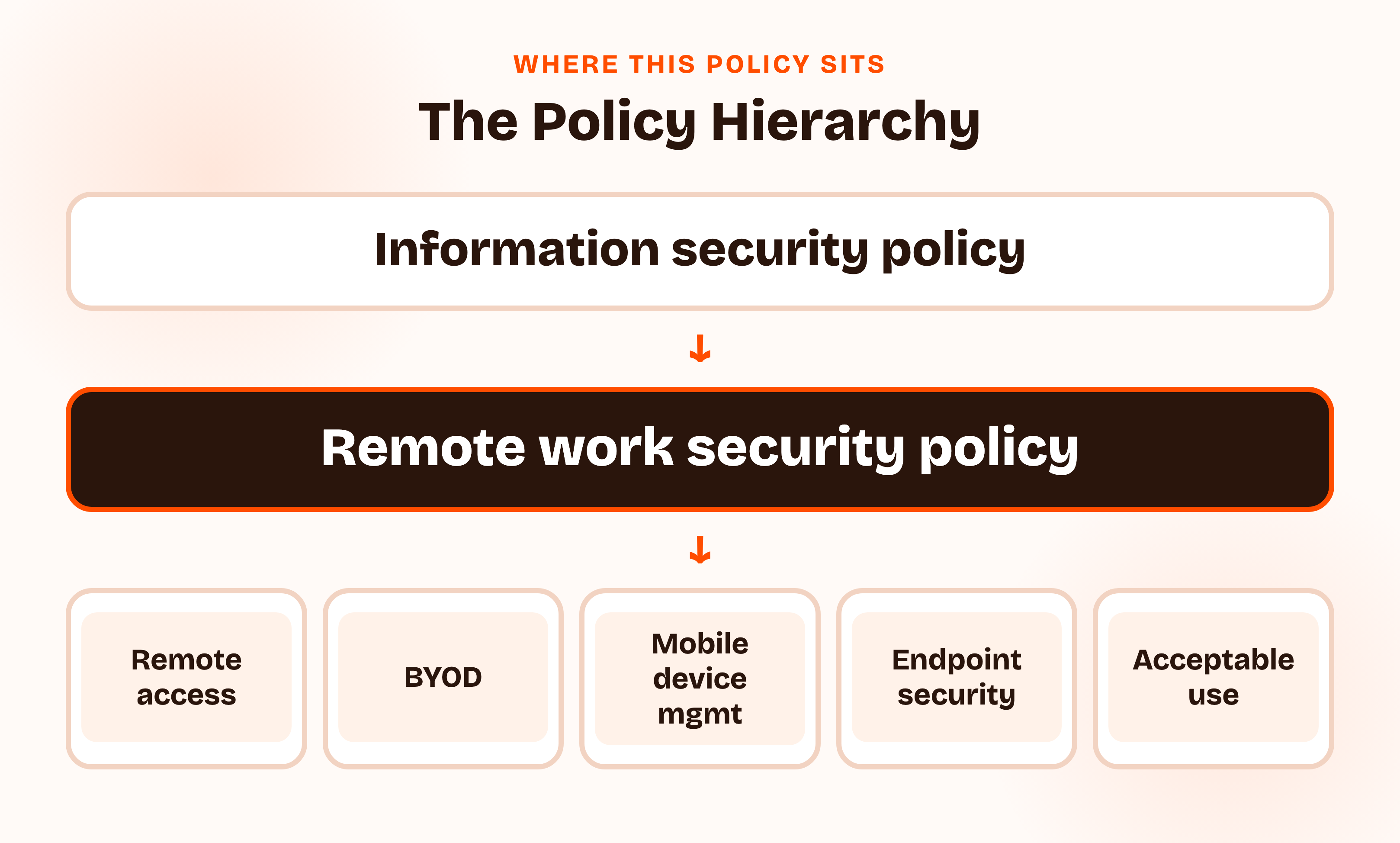
Several ComplyJet pages sit close to this one, and the nearest is the remote access policy. That policy governs how a device connects: the VPN or ZTNA tool, MFA method, session controls and logging. This one governs who works where, on what, under which physical and data-handling rules, and what happens at exit.
Use the table to find the right document for each question. The last column shows what this policy still says in one line, so the documents point at each other instead of repeating each other.
| Question | Document that answers it | What this policy says in one line |
|---|---|---|
| How do I connect, and with which MFA? | Remote access policy | Connect only through the approved method described there |
| Can I use my own phone or laptop? | BYOD policy | Company information stays on company-managed devices unless an exception is approved |
| How is a company device enrolled and wiped? | Mobile device management policy | Every company device is enrolled before it leaves the office |
| What must every device run? | Endpoint security policy | Remote devices meet the same baseline as office devices |
| What may I do on company systems? | Acceptable use policy | Acceptable use rules apply wherever the work happens |
| How are people screened, onboarded and offboarded? | HR security policy | Remote staff follow the same lifecycle, plus an equipment-return step |
Note
Keep this policy short because it points to the others. A remote work policy that restates the VPN rules goes stale in two places at once.
Remote Working Security Policy, Work From Home Security Policy and Hybrid Work Security Policy: One Document or Three?
One document with three names. ISO 27001 calls the control remote working, so a remote working security policy is what an ISO auditor looks for. HR teams and employees say work from home security policy. A hybrid work security policy adds rules for the days people spend in the office and in shared spaces.
A small company writes one policy with a hybrid section, not three files. The table shows who tends to use each term.
| Term | Who tends to use it | Needs its own document? |
|---|---|---|
| Remote working security policy | ISO 27001 auditors and consultants | No, this is the formal name |
| Work from home security policy | HR, employees, customer questionnaires | No, same content in plainer words |
| Hybrid work security policy | Companies with an office and a rota | No, one section inside the same policy |
Why a Remote Work Security Policy Matters Once the Office Stops Being the Perimeter
A VPN protects the connection and does nothing about the screen visible from the next table or the printout left in a rental car.
That is the real gap. The technical controls follow the device. The physical and human ones follow the person, and nothing enforces them unless the policy says so.
What does not having the policy cost? Usually something small and embarrassing:
- A laptop left on a train with a company session still open.
- A contractor working from another country that the company never knew about.
- A family member using the work laptop for a school task.
- A printout of a customer list in a home recycling bin.
- A leaver who keeps the company laptop for six weeks because nobody asked for it back.
Three moments usually force the question:
- An ISO 27001 or SOC 2 audit samples how remote staff are covered.
- A customer security questionnaire asks how you secure employees who work outside an office.
- A vendor or partner review of your own security program asks whether remote work rules are written and acknowledged.
Pro tip
The one question the policy must answer in a single line is "where may company information be, and who may see it there." If a reader cannot find that line in under a minute, the policy is not finished.
Which Frameworks Expect a Remote Work Security Policy: ISO 27001, SOC 2, HIPAA and NIST
ISO 27001 is the framework with a named control for this. SOC 2 and HIPAA test it through other criteria and safeguards. NIST SP 800-46 is a reference guide, not a requirement.
None of them says "you must have a document with this exact title." Each requires outcomes, and the policy is how you document and prove them.
ISO 27001 Remote Working Policy: Annex A 6.7 and the Controls Around It
An ISO 27001 remote working policy is how you satisfy Annex A 6.7, titled Remote working. In the 2022 edition it is one of the people controls, and it carries over from control A.6.2.2 (teleworking) in the 2013 edition. In plain terms, it addresses the security measures that protect information when personnel work outside the organization's premises.
ISO/IEC 27002:2022 guidance for control 6.7 covers a topic-specific policy on remote working. According to ISMS.online's summary of that guidance, the policy should consider points such as:
- physical security of the remote site and its surroundings
- rules for the physical environment, such as lockable storage, clear desk, secure transport and disposal
- the threat of unauthorised access from other people at the remote site, including family and friends
- use of home and public networks
- secure authentication and access privileges
- revocation of access rights and return of equipment when remote working ends
You can read the ISMS.online guide to ISO 27002 control 6.7 for the full list. The table below shows how those points land in ISO 27001 Annex A 6.7 and the controls that sit around it. Control titles are our short summaries, so check the exact wording in the standard.
| Control | What it covers | Where it shows up in this policy |
|---|---|---|
| A.6.7 Remote working | Security measures when personnel work remotely | The whole document |
| A.7.9 Security of assets off-premises | Protecting devices and assets used outside the office | Devices and data handling |
| A.7.7 Clear desk and clear screen | Rules for desks and screens | Home office baseline and hybrid rules |
| A.8.1 User endpoint devices | Protecting information on endpoint devices | Hand-off to the endpoint policy |
| A.5.10 Acceptable use of information and other assets | What staff may do with information and assets | Hand-off to the acceptable use policy |
| A.6.3 Awareness, education and training | Training for staff | Acknowledgement and training |
| A.5.11 Return of assets | Equipment returned when people leave or change roles | Offboarding |
| A.6.5 Responsibilities after termination or change | Duties that continue after someone leaves | Offboarding |
Our HR security policy guide covers the wider people controls, so this page does not repeat them.
ISO 27001
Need a written remote working control for ISO 27001?
ISO 27001 is the framework with a named remote working control. ComplyJet supports ISO 27001 readiness with policy drafting and evidence collection.
SOC 2 Remote Work Policy: What Auditors Sample
SOC 2 has no remote work criterion, so a SOC 2 remote work policy is something you write to support the criteria that do exist. Auditors commonly test remote staff through the common criteria on logical and physical access, and they look for a policy that is written, communicated and acknowledged.
These are the Trust Services Criteria where the policy tends to earn its keep, described in plain words:
- CC6.1 covers logical access security over information and systems.
- CC6.2 covers registering and authorizing users before access is granted, and auditors commonly sample leaver records here.
- CC6.6 covers protection against threats from outside the system boundary.
- CC6.7 covers how information is transmitted, moved and removed.
- CC6.8 covers preventing and detecting malicious software.
This is how auditors commonly test remote work, not a named requirement. Policies, acknowledgements, device inventories and offboarding records are what you hand over.
HIPAA Remote Work Policy: Workstation Use and Workstation Security
A HIPAA remote work policy matters only if you are a covered entity or a business associate that handles electronic protected health information (ePHI). If you are not, skip this section.
Two Security Rule standards in 45 CFR 164.310 apply directly to a laptop at home. Under 164.310(b), workstation use, you implement policies and procedures that specify the proper functions to be performed, the manner in which they are performed, and the physical attributes of the surroundings of a workstation that can access ePHI. Under 164.310(c), workstation security, you implement physical safeguards for all workstations that access ePHI, to restrict access to authorized users.
Read both in the eCFR text of 45 CFR 164.310. The standards refer to workstations that can access ePHI, and a laptop used at home fits that description.
NIST SP 800-46 and the Remote Work Security Policy
NIST SP 800-46 Rev. 2 is the Guide to Enterprise Telework, Remote Access, and Bring Your Own Device (BYOD) Security, published in July 2016. It is voluntary guidance. It covers security considerations for remote access solutions, recommends ways to secure telework and BYOD technologies, and offers advice on writing the related policies. See the NIST SP 800-46 Rev. 2 page.
The companion publication, NIST SP 800-114 Rev. 1, is the User's Guide to Telework and Bring Your Own Device (BYOD) Security. It is aimed at the teleworker rather than the policy owner, so it is a good thing to hand to staff alongside the policy.
The table maps the policy sections to each framework in one place.
| Policy section | ISO 27001 hook | SOC 2 evidence an auditor samples | HIPAA safeguard (if applicable) | NIST reference |
|---|---|---|---|---|
| Eligibility and approval | A.6.7 | Policy, approvals, access records commonly tested under CC6.1 and CC6.2 | Workstation use standard, 164.310(b) | SP 800-46 policy guidance |
| Approved locations | A.6.7, A.7.9 | Policy, location approvals | 164.310(b) surroundings | SP 800-46 |
| Home office baseline | A.6.7, A.7.7 | Acknowledgements and attestations | 164.310(b), 164.310(c) | SP 800-114 for the user |
| Devices and data handling | A.7.9, A.8.1, A.5.10 | Device inventory, evidence commonly tested under CC6.7 and CC6.8 | 164.310(c) | SP 800-46 BYOD guidance |
| Lost devices and offboarding | A.5.11, A.6.5 | Offboarding records commonly tested under CC6.2 | 164.310(d)(1) device and media controls | SP 800-46 |
Eligibility, Approved Locations and Approval: The Rules for Who Works Where
Start with who may work remotely and who decides. A policy that says "everyone, anywhere" is not a policy, and a policy that says "nobody without written approval" will be ignored within a month.
Set eligibility by role, not by seniority. People with access to production data or regulated data may need extra conditions. New starters can work on a trial period before full remote access. Name one approver for exceptions, and make sure no one approves their own.
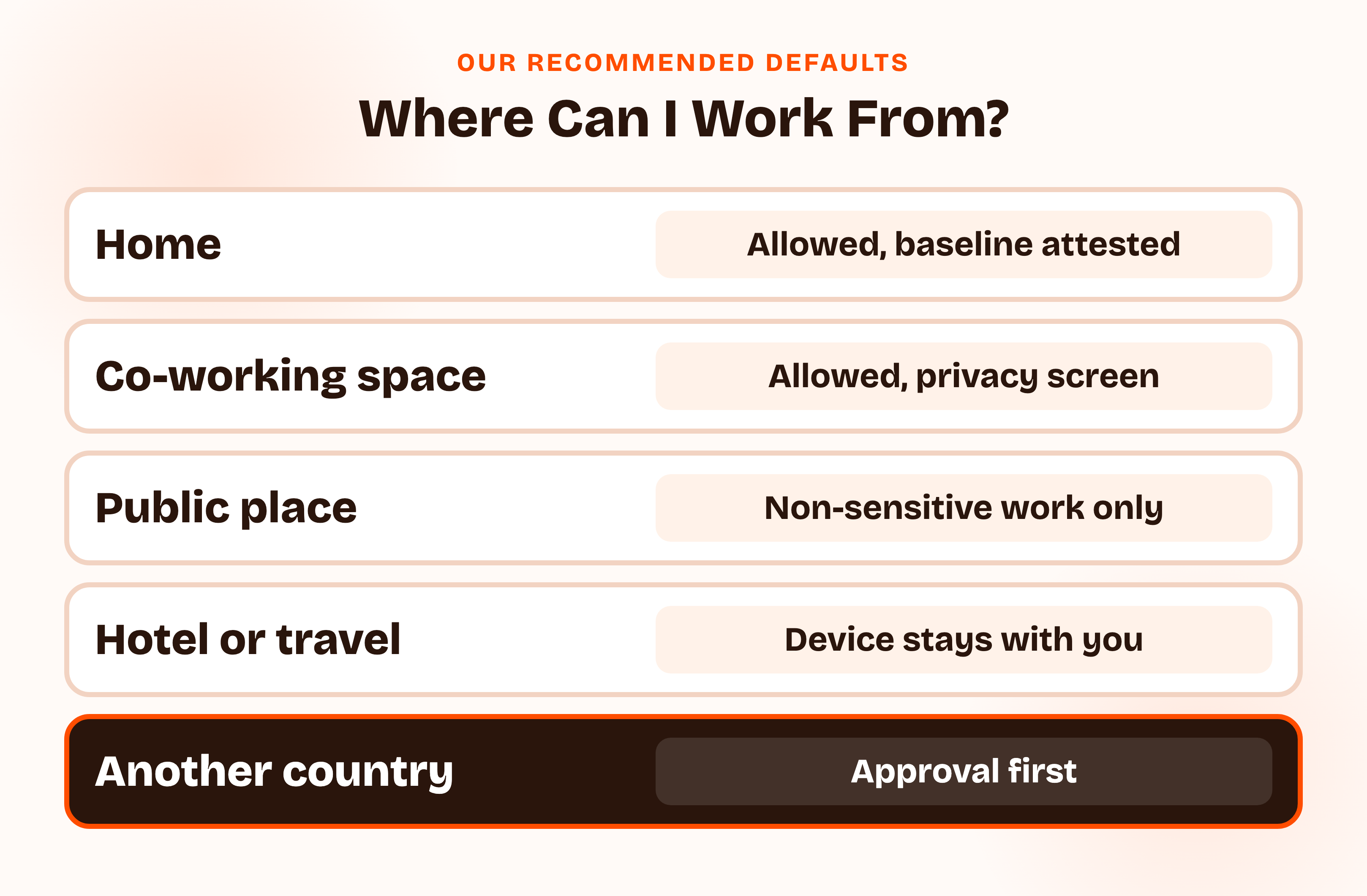
The part most policies skip is the list of places. The table below is our recommended default, not a standard.
| Location | Default rule | Extra conditions | Who approves |
|---|---|---|---|
| Home | Allowed | Home office baseline met and attested | Manager at hire |
| Co-working space | Allowed | No sensitive calls, privacy screen, device never unattended | Manager |
| Client site | Allowed | Follow the client's rules where stricter | Manager |
| Public place (cafe, train, airport) | Allowed for non-sensitive work | No sensitive calls, no unattended device, screen not visible to others | Employee judgement, within the policy |
| Hotel or travel | Allowed | Device with you in transit, never in checked luggage or left in a vehicle | Manager for extended travel |
| Another country | Approval needed first | HR and legal review before work starts | Policy approver |
Overseas work deserves its own line. Tax, employment and data protection rules can change when someone works from another country, so the policy should require approval before work starts and a check with HR and legal. This is general guidance, not legal advice.
Watch out
A cafe ban nobody follows is worse than a cafe rule people can follow. Allow public places for non-sensitive work, and write what makes them acceptable: no sensitive calls, the screen out of view and the device never unattended.
The UK government publishes a full remote working security policy from the Department for Work and Pensions as an example of how far a large organisation goes. Its scope names home, public places, hotels and work-related travel, and it requires approval for working overseas. A startup can borrow the structure without the length.
How the connection must be made from any of these places is a separate question. Our remote access policy guide answers it, and our network security policy guide covers the network rules behind it.
Home Office Security: Screens, Household Members, Paper and Wi-Fi
The work laptop is open on the kitchen table. A family member asks to borrow it for ten minutes.
That small moment is the whole policy in miniature. Home office security is about the rules that apply when the people around the device are not your colleagues.
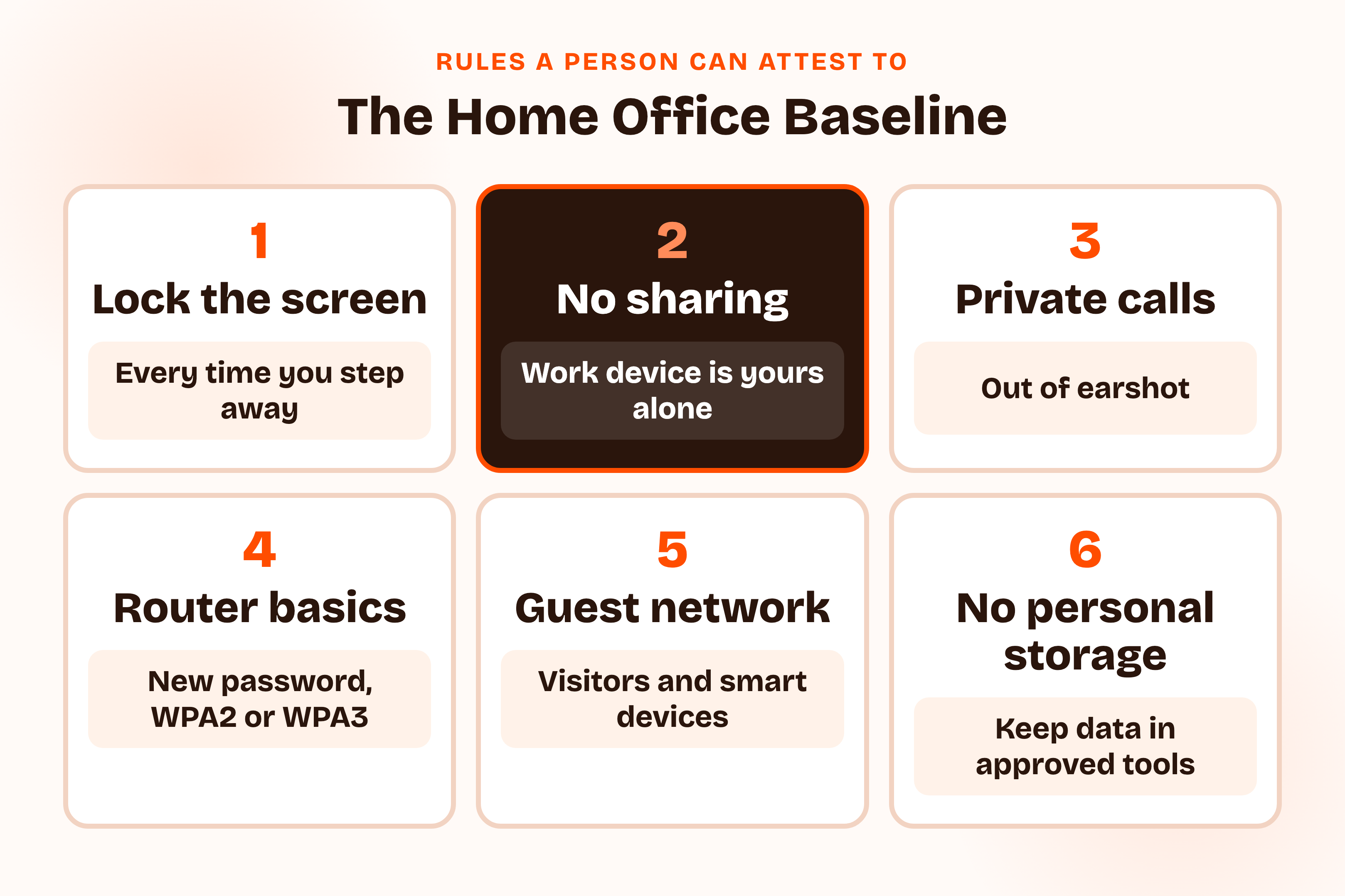
The checklist below turns remote work security best practices into policy clauses. Each item is a rule a person can follow and attest to, not a tip.
- Screen lock and privacy: lock the screen whenever you step away, and position the screen so visitors cannot read it.
- No sharing: the work device is used by the employee only, not by household members.
- Calls: take work calls where they cannot be overheard, and mute smart speakers and voice assistants for sensitive calls.
- Router: change the default router password, keep the router firmware updated, and use WPA2 or WPA3.
- Guest network: keep visitors and smart home devices off the network that carries work.
- Storage: no company data on personal cloud storage, personal email or removable media.
Paper and printing get their own rule. The default is do not print. If printing is unavoidable, the policy allows a home printer for company data only by exception, requires shredding or return of printouts, and bans leaving printouts in vehicles.
The honest limit is that a company cannot inspect a home. The policy asks staff to meet a baseline and attest to it, and it should not demand access to a home network or to personal devices. Write down what the company will not collect: personal browsing, home network traffic and personal files. Employment and privacy law on monitoring varies by country, so have counsel review this clause.
Try this yourself
Ask three colleagues to describe, in one sentence, where they work and who can see their screen there. If the answers surprise you, the baseline is not yet clear enough to attest to.
Office premises are a different problem, and our physical security policy guide covers them. Our security awareness training policy guide covers how the baseline is taught.
Company Devices, Personal Devices and Data Handling Away From the Office
The default rule is simple: company information lives on company-managed devices. Personal devices are allowed by documented exception only, under the BYOD policy.
This policy does not repeat the technical rules. Our mobile device management policy guide covers enrollment and remote wipe, and our endpoint security policy guide covers the technical baseline. What this policy still states is one line each:
- Disk encryption is on.
- The device locks automatically after inactivity.
- Nobody else uses it.
- Only approved tools are installed.
Data handling is where remote work goes wrong quietly. The table is our recommended default.
| Data type | May it leave the office? | Where it may live | What is banned |
|---|---|---|---|
| Customer data | Only through approved systems | Approved production and support tools | Personal email, personal cloud storage, messaging apps |
| Source code and secrets | Only on managed devices | Company repositories and secrets manager | Local copies on personal devices, shared drives |
| Internal documents | Yes, under the classification rules | Approved document and collaboration tools | Removable media, personal accounts |
| Regulated data (for example ePHI) | Only if the role is approved | Approved systems with the stricter controls | Anything outside approved systems |
Classification tiers belong in the data classification policy, not here.
One modern case deserves a line. An employee pasting customer data into an unapproved AI tool from a home laptop is a data handling problem, and our acceptable use policy guide is where the rule belongs.
Note
The technology rules live in the endpoint and MDM policies. This section only says which of them apply when work happens away from the office.
Hybrid Work Security Policy: Office Days, Home Days and Shared Spaces
A hybrid employee carries the same laptop through three environments in a week, and the policy has to work in all three.
A hybrid work security policy is not a different document. It is a section that covers what changes between the office, the home and the road. The table shows the rule that shifts in each place.
| Environment | What changes | Rule the policy sets |
|---|---|---|
| Office | Visitors, shared desks, meeting rooms | Clear desk and clear screen, no whiteboards left with sensitive content |
| Home | Household members, paper, home network | Home office baseline, no sharing, shredding or return of paper |
| Co-working or shared spaces | Strangers, shared Wi-Fi | Privacy screen, no sensitive calls, device never unattended |
| In transit | Loss and theft, overheard calls | Device kept with you, never in checked luggage or a vehicle |
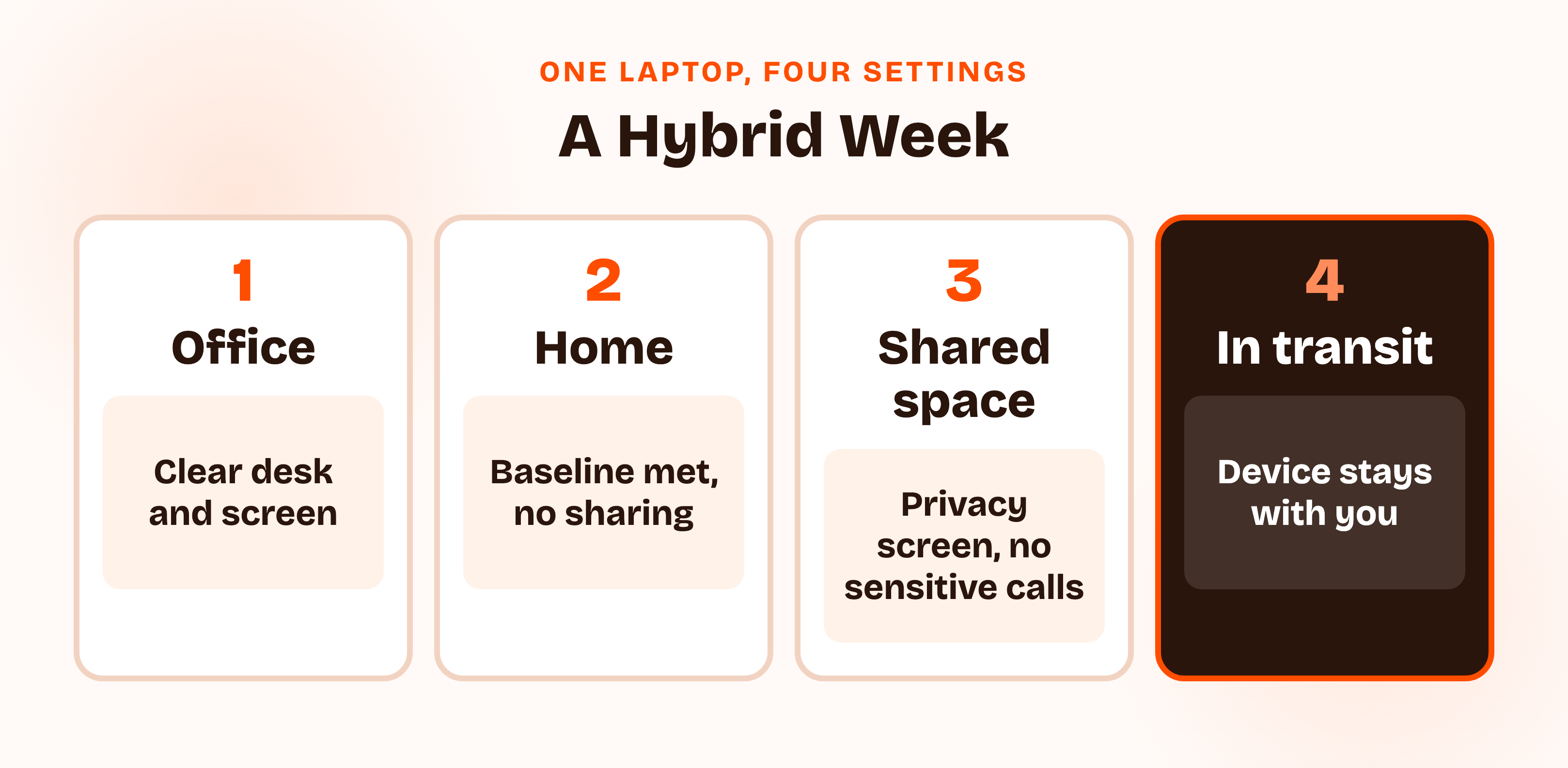
Transport is the hybrid-specific risk. People move devices and paper between places, so the policy says what may be carried and how: the device locked, in a bag, with you.
Hot-desking needs a clear desk and clear screen rule. Visitors in the office need an escort or badge rule, and our physical security policy guide covers the premises side.
Onboarding in a hybrid company also needs thought. An identity check that used to happen at the front desk now happens on a video call, so write down how it is done.
Customer Story
"It made SOC 2 and ISO 27001 readiness clear and manageable with automated workflows, evidence collection, and expert support."
David Orr, COO, Romina Day
Lost Devices, Reporting and Offboarding for Remote Staff
A lost laptop is only a small problem if someone reports it quickly. The policy has to make reporting easy and safe.
Set a window for the company to fill in, a named channel to report to, and a promise of no blame for prompt reports. People hide losses they expect to be punished for.
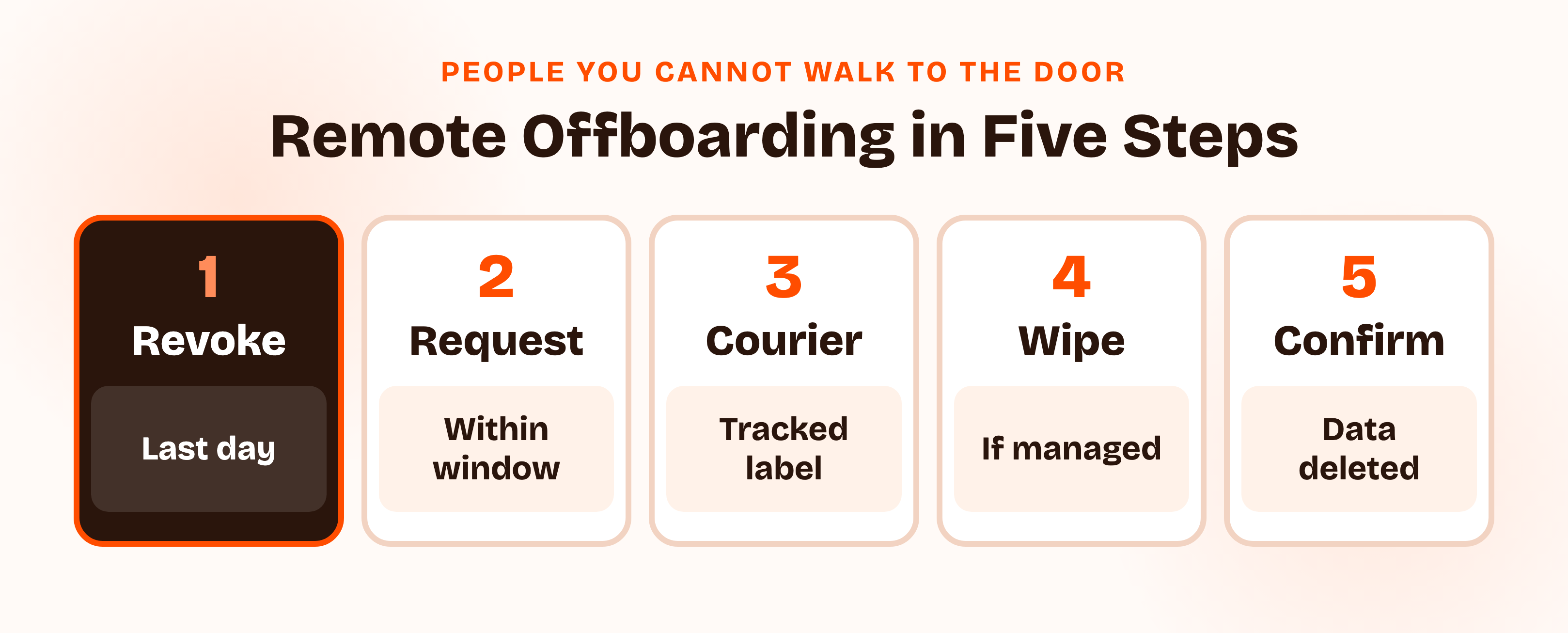
Offboarding is harder for remote staff because you cannot walk them to the door. The policy needs five steps:
- Revoke access on the last day, before or as the person leaves.
- Require equipment to be returned within a stated window.
- Send a tracked courier with a prepaid label, and record the receipt.
- Wipe remotely where the device is managed.
- Ask for confirmation that company data is deleted from any personal device used by exception.
ISO 27002's guidance lists revocation of access rights and return of equipment among the things a remote working policy should address. Our HR security policy guide covers the wider employment lifecycle.
The decision table below shows what to do when things go wrong.
| Scenario | Immediate action | Who decides | Evidence to keep |
|---|---|---|---|
| Laptop lost on a train | Report at once, lock or wipe remotely, revoke sessions | Security lead | Report, wipe record, access log review |
| Contractor engagement ends | Revoke access the same day, request return | Manager and IT lead | Offboarding checklist, return confirmation |
| Employee resigns and keeps the laptop | Disable accounts, wipe remotely, escalate return in writing | HR and IT lead | Written requests, wipe record |
| Family member used the device | Report, change credentials, review activity | Security lead | Incident record, credential reset record |
Escalate anything that looks like a data exposure through your incident management policy.
Remote Work Security Policy for Startups: Right-Sizing a Remote-First Team
The honest premise: a ten-person remote-first company with a managed laptop fleet and single sign-on is mostly writing a policy about who works where, how people confirm the home baseline and what happens at exit. It is not buying more tooling.
That is the heart of a remote work security policy for startups. A policy longer than the team will read is a policy nobody follows.
The table shows what to write and who owns it at each stage. It is our recommended default, not a requirement of any standard.
| Stage | What to write | What to automate | Owner |
|---|---|---|---|
| 1 to 15 people | One short policy with a locations table and home baseline | Device encryption and screen lock through MDM, acknowledgements collected through the policy tool | Founder or head of operations |
| 15 to 50 people | Add the hybrid section, the overseas approval step and attestation cycle | Quarterly attestation reminders, offboarding checklist | HR or IT lead, with the founder as approver |
| 50 people and above | Add role-based conditions for regulated data and a formal exception log | Device inventory and exit workflows | Named security or compliance owner |
Contractors and part-time staff follow the same policy, with a shorter acknowledgement and no personal devices unless approved.
What does a customer questionnaire actually want? Usually a two-sentence answer: staff work from approved locations on company-managed devices under a written policy they acknowledge, and access and equipment are removed on exit.
Note
A free template does not make you compliant. The work is deciding the facts that go in it: where people work, which devices they use and who approves exceptions.
Free Remote Work Security Policy Template: Sample Clauses You Can Adapt and Download
Below is a remote work security policy template written as filled sample wording, not a skeleton. Brackets appear only where a company-specific fact is genuinely needed. Each clause is tagged with the control it serves.
Remote Work Security Policy Example: Sample Clauses for Each Section
Sample clause: Purpose and scope (ISO 27001 A.6.7)
[Company] maintains this policy to protect company and customer information when personnel work outside [Company] premises. It applies to all employees, contractors and interns who access, process or store [Company] information away from company premises, whether they work remotely full time or on a hybrid schedule.
Sample clause: Eligibility and approval (ISO 27001 A.6.7, SOC 2 CC6.1)
Remote work is available to roles listed in [the remote work register]. Access to [production data and regulated data] may carry additional conditions set by the [Head of Security]. The [Policy Approver] approves exceptions. No person may approve their own exception.
Sample clause: Approved locations (ISO 27001 A.6.7, A.7.9)
Personnel may work from home, a co-working space, a client site, a public place or while travelling. In public places, personnel must not hold sensitive calls, must keep the screen out of view of others and must never leave a device unattended. Working from another country requires prior written approval from the [Policy Approver] after review by HR and [legal counsel].
Sample clause: Home office baseline (ISO 27001 A.6.7, A.7.7, HIPAA 164.310(b) where applicable)
Personnel must lock their screen when away from the device, must not allow household members or visitors to use or view company devices or information, and must take work calls where they cannot be overheard. Home routers must use a changed default password, current firmware and WPA2 or WPA3. Printing company information at home is not permitted unless the [Policy Approver] has approved it.
Sample clause: Devices and data handling (ISO 27001 A.7.9, A.8.1, A.5.10, SOC 2 CC6.7, CC6.8)
Company information may be stored and processed only on company-managed devices and approved systems. Personal devices may be used only under an exception granted under the [BYOD Policy]. Company information must not be stored in personal email, personal cloud storage, messaging applications or removable media. Technical device requirements are set out in the [Endpoint Security Policy] and [Mobile Device Management Policy].
Sample clause: Hybrid work (ISO 27001 A.6.7, A.7.7)
Personnel moving between locations must keep devices locked and with them in transit, and must not leave devices or documents in vehicles or checked luggage. When using shared desks or meeting rooms, personnel must clear desks and screens and remove sensitive material from whiteboards before leaving.
Sample clause: Lost devices and incident reporting (ISO 27001 A.6.7, SOC 2 CC6.7)
Personnel must report a lost or stolen device, or suspected exposure of company information, to [security channel] within [number] hours of discovery. Prompt reports will not result in disciplinary action for the loss itself. Reports are handled under the [Incident Management Policy].
Sample clause: Offboarding and equipment return (ISO 27001 A.5.11, A.6.5, SOC 2 CC6.2)
Access rights are revoked on the person's last working day. Personnel must return all company equipment within [number] days using the courier arrangement provided. [Company] may remotely wipe managed devices. Personnel who used a personal device by exception must confirm in writing that company information has been deleted.
Sample clause: Monitoring boundary (ISO 27001 A.6.7)
[Company] monitors company-managed devices and company systems only to the extent described in [the Acceptable Use Policy] and permitted by applicable law. [Company] does not collect personal browsing, home network traffic or personal files. [Counsel to review this clause for each country of operation.]
Sample clause: Acknowledgement, enforcement and review (ISO 27001 A.6.7, A.6.3, SOC 2 CC6.1)
All personnel acknowledge this policy in writing on joining and at least [annually]. Breaches may lead to disciplinary action in line with [Company] policy. The [Policy Owner] reviews this policy at least [annually] and after any material change to how or where personnel work.
Free Template
Download the Free Remote Work Security Policy Template (PDF)
Sample clauses for every section, an approved locations table, a home office baseline, an employee acknowledgement form and a framework mapping table. No form, no email.
Customization Checklist: Replace Every Bracket and Delete What Does Not Apply
Treat this remote work security policy example as a first draft until you put real facts into it. Gather these before you open the template:
- Headcount and the countries people work from
- Whether you are remote-first or hybrid, and whether you use a co-working space
- Which devices are company-managed and which, if any, are personal
- Whether any regulated data is in scope, such as ePHI
- Who approves exceptions and who owns the policy
- The reporting window, the equipment return window and the review cycle
Delete every clause you do not do. A policy that promises controls the company does not run is worse than a short one.
Remote Work Security Checklist: Roll Out the Policy and Prove It Works
Writing the policy is the easy half. This remote work security checklist takes it from a file to something an auditor can test.
- Decide eligibility and locations. Fill the table with the places your team actually works.
- Inventory devices and who works where. You cannot protect what you cannot list.
- Set the home office baseline. Keep it to rules a person can follow and attest to.
- Publish the policy. Put it where staff can find it, and link it from onboarding.
- Collect signed acknowledgements. One per person, dated.
- Run training. Cover public places, household members and reporting.
- Run the first attestation. Ask each person to confirm the baseline, then repeat each quarter.
- Test one offboarding. Walk through the five steps with a real or simulated leaver.
The evidence table shows what an auditor or customer would ask to see.
| Evidence | What it proves | Asked for by |
|---|---|---|
| Approved policy with version and date | The rules exist and are current | ISO auditor, SOC 2 auditor, customer |
| Signed acknowledgements | Staff have read and accepted the rules | ISO auditor, SOC 2 auditor |
| Location approvals and overseas exceptions | Who works where, and who approved it | ISO auditor, customer |
| Device inventory | Which devices hold company information | SOC 2 auditor, ISO auditor |
| Training records | Staff were taught the baseline | ISO auditor |
| Home baseline attestations | Staff confirmed the rules are followed | ISO auditor, customer |
| Offboarding and equipment-return records | Access and equipment were recovered | SOC 2 auditor, ISO auditor |
What the policy cannot do: it does not make an unmanaged home network safe. It makes responsibilities visible and repeatable.
Remote Work Security Policy Mistakes That Fail Audits and Questionnaires
These mistakes are easy to make, and most of them show up as a gap between what the policy says and what people do.
- One policy that merges remote access and remote work. The file becomes too long for anyone to follow. Keep the connection rules in the remote access policy and link to it.
- Rules that ban what the team does daily. A ban on public cafes or personal phones puts everyone in breach on day one. Write rules people can keep.
- No acknowledgements on file. A policy nobody has accepted is hard to enforce and easy for an auditor to challenge.
- Contractors and overseas staff missing from scope. They often hold the most access and have the least training.
- Offboarding that assumes the laptop comes back. Plan for the device that does not return: remote wipe, revoked access, a written request.
- Policy and practice disagree. This is the worst of the six, because it turns a gap into a misstatement.
How ComplyJet Helps You Keep Your Remote Work Security Policy Current
Your policy is only as good as the evidence behind it, and that is where we come in. ComplyJet supports AI-assisted policy drafting, policy distribution with acknowledgement tracking, and evidence collection across ISO 27001 and SOC 2.
Be clear on scope. We are not a law firm or an HR adviser, we do not certify you against any framework, and we do not manage your employees' home setups. We keep the documents, acknowledgements and evidence in one place so the program holds up when someone asks.
Compliance Automation
Turn your remote work security policy into audit-ready evidence
See how ComplyJet tracks policies, acknowledgements and evidence for ISO 27001 and SOC 2 in one place.
FAQs
What Is a Remote Work Security Policy?
A remote work security policy is the written set of rules for how people protect company information when they work outside the office. It covers who may work remotely, from which places, on which devices, the physical and data-handling rules, and what happens when a device is lost or someone leaves. It is short because it points to your remote access, BYOD, MDM and endpoint policies for the technical detail.
What Should a Remote Work Security Policy Include?
At minimum: purpose and scope, eligibility and approval, approved locations, a home office baseline, devices and data handling, hybrid rules, lost-device reporting, offboarding and equipment return, a monitoring boundary, and acknowledgement and enforcement. Add a version log and a review date.
What Is the Difference Between a Remote Access Policy and a Remote Work Security Policy?
A remote access policy governs the connection: the VPN or zero trust tool, the MFA method, session controls and logging. A remote work security policy governs the person and the place: who works where, on what, and under which physical and data-handling rules. Compliance programs usually cover both, and our remote access policy guide covers the first.
Does ISO 27001 Require a Remote Working Policy?
ISO 27001:2022 Annex A 6.7 (Remote working) addresses security measures when personnel work remotely, and ISO/IEC 27002:2022 guidance for control 6.7 covers a topic-specific policy on remote working. A written policy is the usual way to evidence the control. If you work only in an office, the control may be out of scope, and your statement of applicability should say why.
Does SOC 2 Require a Remote Work Policy?
SOC 2 has no named remote work criterion. Auditors test remote staff through the common criteria on logical and physical access, and they ask for written, communicated and acknowledged policies. A remote work policy is a practical way to document those controls, and auditors commonly test them this way.
Does HIPAA Apply to Employees Working From Home?
Yes, if your company is a covered entity or a business associate and the employee handles ePHI. The workstation use and workstation security standards in 45 CFR 164.310 apply to any workstation that can access ePHI, including a laptop at home.
Can Employees Work From Public Places or Another Country?
Public places are usually fine for non-sensitive work if the rules are clear: no sensitive calls, no unattended device and the screen out of view. Another country should need written approval first, because tax, employment and data protection rules can change. Check with HR and counsel.
Do Remote Employees Have to Use Company Devices?
The safest default is yes: company information stays on company-managed devices. Personal devices should be allowed only by documented exception under a BYOD policy, with the controls that policy sets. Our BYOD policy guide covers the details.
How Do You Secure a Home Office for Remote Work?
Remote work security best practices come down to a baseline staff can meet and attest to: lock the screen, do not let household members use the work device, take sensitive calls in private, change the default router password, keep router firmware current, use WPA2 or WPA3 and keep company data out of personal storage. A company cannot inspect a home, so the baseline relies on clear rules and attestation.
How Do You Enforce a Remote Work Security Policy?
Enforcement is mostly evidence: signed acknowledgements, training records, quarterly attestations, device inventories and offboarding checks. Where devices are managed, technical controls such as encryption and screen lock enforce part of the policy automatically. Disciplinary action should be the last step, not the first.
What Changes in a Security Policy for Hybrid Work?
The rules that change are about movement and shared spaces: transporting devices and paper, clear desk and clear screen on shared desks, visitors in the office and shared meeting rooms. A hybrid section inside one remote work security policy is usually enough. You do not need a separate document.
Related Reading
- Remote Access Policy: the connection itself, VPN or ZTNA, MFA and session controls
- BYOD Policy: personal devices used for work
- Mobile Device Management Policy: enrolling and wiping company devices
- Endpoint Security Policy Template: the technical baseline for every device
- Acceptable Use Policy: what staff may do on company systems
- HR Security Policy: screening, onboarding and offboarding
- Security Awareness Training Policy: how the home office baseline is taught
- Physical Security Policy: office premises
- Information Security Policy: the umbrella policy this one hangs from
- Incident Management Policy: where a lost device is escalated
- Zero Trust Startup Guide: access model for a team with no office
This guide and the template are for general information and are not legal advice. Have counsel review the final policy, especially where employment, privacy or cross-border rules apply.