.svg)

A customer's security questionnaire arrives with one line highlighted: "Do all endpoints run EDR, and is it enforced?" Your honest answer is "mostly." Most laptops have something installed, two were set up before anyone cared, and nobody has checked in a while.
That answer is exactly what an endpoint security policy exists to replace. It turns "mostly" into a written rule, an owner, and a report you can hand over.
An endpoint security policy is the document that sets the minimum security every device touching company data must meet: how it is configured, what protects it, who can install software or hold admin rights, what happens with USB drives, and how a compromised device is contained. It is a rulebook. The tools that enforce it are a separate decision.
Quick answer
An endpoint security policy covers ten things: purpose and scope, roles, device baseline, malware defense and EDR, admin rights and software installation, removable media, hardening, logging and monitoring, compromised-endpoint response, and exceptions with review. It maps to SOC 2 (CC6.1, CC6.7, CC6.8, CC7.2), ISO 27001 (Annex A 8.1, 8.7, 8.9), HIPAA, PCI DSS, and GDPR. No framework calls it by that name.
By the end of this guide, you will have a complete endpoint security policy template you can adapt in an afternoon, plus the reasoning behind each section so you can defend it in an audit.
Here's what I'll cover:
- What an endpoint security policy is, and how it differs from your network, MDM, and patch management policies
- The ten sections to include, from the device baseline to compromised-endpoint response
- What the policy should actually require on antivirus vs EDR, admin rights, and USB drives
- What SOC 2, ISO 27001, HIPAA, and PCI DSS expect, control by control
- What a startup should do first, and what it can safely defer
- A free downloadable template with sample clauses, and the evidence auditors sample
What Is an Endpoint Security Policy?
An endpoint security policy is a formally adopted document that defines the security requirements for every laptop, desktop, server, virtual machine, and phone that connects to company systems or handles company data. You fill in your own owners, thresholds, and tools, and leadership approves it.
It is governance, not configuration. The policy says every laptop must be encrypted and run approved malware protection that reports to a central console. The configuration is the setting your tooling actually pushes. An auditor reads the policy first, then samples devices to see whether the two match.
The set of requirements that applies to every device is your endpoint security baseline. The rest of the policy covers what happens around it: who gets exceptions, what to do when a device is compromised, and how you prove all of it.
Quick take
An endpoint security policy answers "what must be true of every device that touches our data, and who is accountable when it is not?" It is not a product comparison of CrowdStrike, SentinelOne, Defender, or any other tool.
Endpoint Security vs Network Security: Where This Policy Stops
ComplyJet's network security policy guide covers the traffic side: firewalls, segmentation, VPN, and monitoring of what crosses the wire. This article covers the device side: what is installed on a machine, how it is configured, and what it does when something goes wrong.
The two meet at remote work. A laptop on a home network is an endpoint problem first, because you do not control the network. Your policy has to assume the device protects itself.
If your question is about firewall rules or network segmentation, start with the network guide. If it is about what must run on every laptop and server, you are in the right place. Most companies end up needing both.
How This Fits With Your MDM and Patch Management Policies
Two neighboring documents are easy to confuse with this one:
- Mobile device management policy. The MDM policy guide covers the lifecycle of a company-owned device: issuing it, enrolling it, recovering it when lost, and retiring it.
- Patch management policy. The patch management policy template covers how fast updates must be deployed, by severity, and how exceptions work.
The endpoint security policy sits above both. It sets the protections that must be present on the device, and it points to those two documents for the lifecycle and the update clock rather than repeating them.
Why You Need an Endpoint Security Policy
Endpoints are where attacks land. In its 2026 Global Threat Report, CrowdStrike reported that the average eCrime breakout time, the window between initial access and movement to another system, fell to 29 minutes in 2025, with the fastest observed breakout at 27 seconds. Source: CrowdStrike 2026 Global Threat Report press release.
That is the speed at which a stolen session or a malicious download turns into a bigger problem. A policy cannot make you faster than an attacker. It can make sure every device has the detection and the response path in place before the clock starts.
For a startup, the exposure is usually ordinary rather than dramatic:
- A founder's laptop has no disk encryption because nobody turned it on.
- Antivirus was disabled six months ago to fix a build and never came back.
- Every engineer has full administrator rights, so one bad install runs with full privileges.
- A shared USB stick moves between a personal laptop and a production workstation.
None of these is an attack. All of them are audit findings.
Watch out
"We have antivirus on every laptop" is not a control unless you can show it is running, current, and reporting today, and was across the whole audit period.
A written endpoint security policy fixes the part that tends to hurt later. Auditors ask for the document and a device inventory. Customers ask the same questions in security questionnaires. Cyber insurance applications often ask about endpoint protection as well.
If you are heading into your first audit, endpoint controls are among the easiest to prepare and the hardest to reconstruct after the fact. ComplyJet's SOC 2 program walks early-stage teams through this and the rest of the control set.
SOC 2
Getting ready for your first SOC 2?
See how ComplyJet takes an early-stage team from policies like this one to a completed audit, with a team guiding you through it.
What to Include in an Endpoint Security Policy Template
A complete endpoint security policy template has ten sections. Each exists because a reviewer will check it.
| Section | What it covers | Why reviewers check it |
|---|---|---|
| Purpose and scope | Which devices, people, and data the policy covers, including contractors | Contractor and server gaps are the most common scope miss |
| Roles and ownership | Who owns the policy, the tooling, and exceptions | A control with no owner never gets reviewed |
| Device baseline | Encryption, screen lock, host firewall, supported OS | The testable core of the policy |
| Malware defense and EDR | Required protection, update, alert handling | Maps directly to SOC 2 CC6.8 and PCI DSS 5.2.1 |
| Admin rights and software | Who can install what, and how elevation works | Standing admin rights are a routine finding |
| Removable media | USB and external drives | A quiet path for data to leave |
| Hardening | Configuration baselines and unused services | Reduces what an attacker can use |
| Logging and monitoring | What endpoints report and who reviews it | Detection is useless without a reader |
| Compromised endpoint response | Isolate, revoke, collect, rebuild | The incident path has to exist before the incident |
| Exceptions and review | Written, expiring, approved exceptions | Auditors test how you handle what does not comply |
Scope: Which Endpoints Count
Scope decides everything that follows, so settle it before you write a control. Write it as a list, not a general statement:
- Laptops and desktops, company-owned or issued to contractors
- Servers and virtual machines, including cloud instances that run an operating system you manage
- Mobile phones and tablets that access company email, chat, or data
- Personal devices, only if you allow them, and then under your BYOD policy with a lighter set of requirements
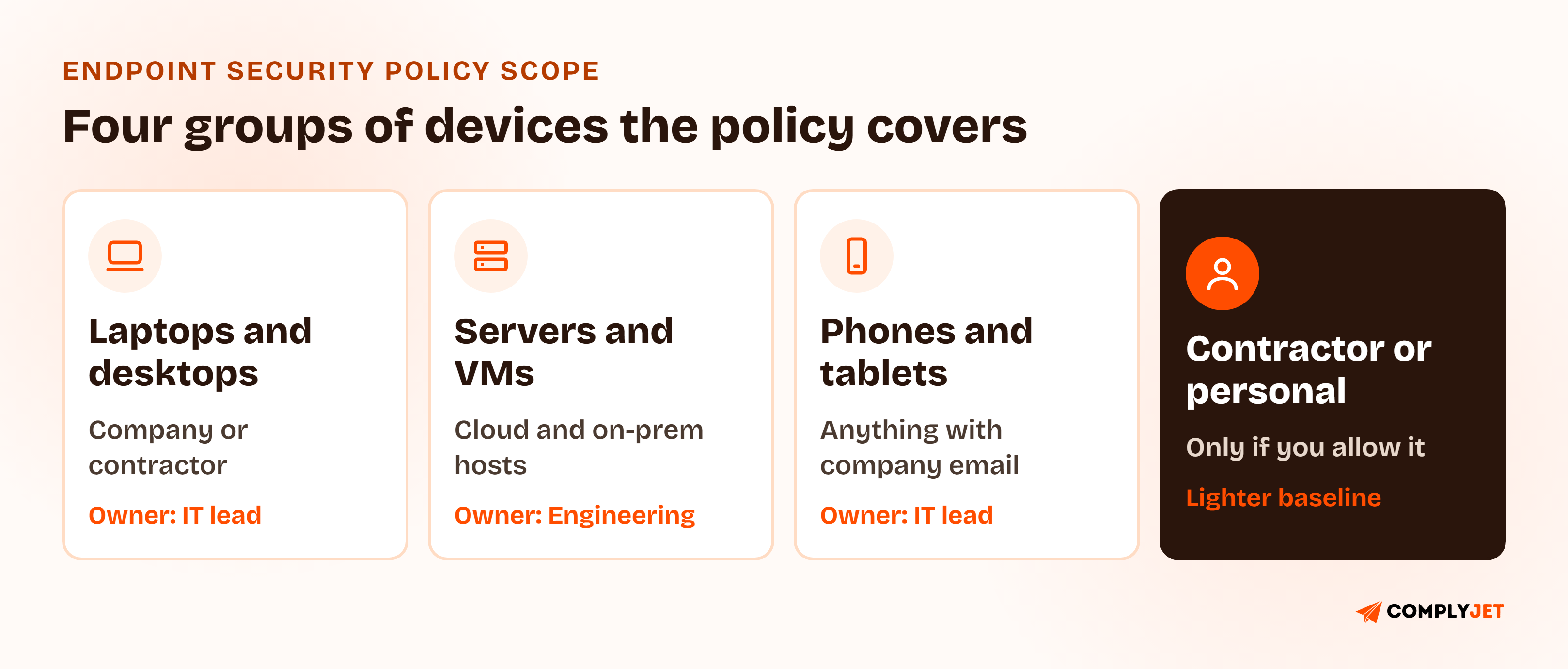
The image shows the groups most startups end up with. Each one needs a named owner and an entry in your asset inventory, because a device that is not on the list is invisible to every other control.
The Endpoint Security Baseline: Controls Every Device Needs
The baseline is the short list of settings every in-scope device must meet. Keep it short enough that every item is enforced and checkable.
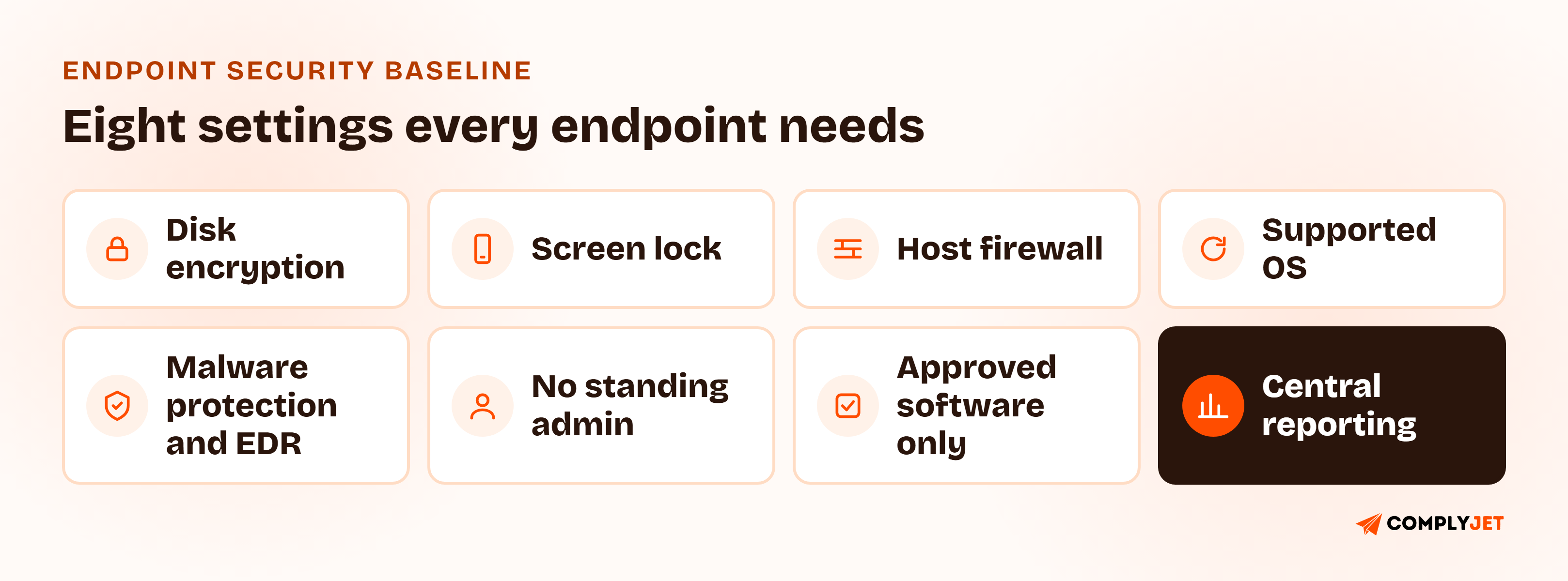
- Full-disk encryption on every laptop, desktop, and phone, matched to your data encryption policy
- Automatic screen lock after a short idle period, with a passcode that follows your access control policy
- Host firewall turned on, with inbound connections denied by default
- Supported operating system only, with updates handled under your patch policy
- Malware protection and EDR installed, running, and reporting
- No standing administrator rights for everyday work
- Approved software only, installed from sanctioned sources
- Central reporting, so a device that falls out of compliance shows up on a list
Write the thresholds as bracketed fields in the template, such as "[5] minutes" for the idle lock. Your own numbers matter less than the fact that they are written down, enforced, and the same for everyone.
Antivirus vs Endpoint Detection and Response: What the Policy Should Require
Is antivirus enough, or do you need endpoint detection and response (EDR, meaning tooling that records device activity and flags suspicious behavior, not just known malware)? The policy should answer by describing the outcome, not naming a product.
Most frameworks require malware defense, not a product class. PCI DSS 4.0.1 asks for anti-malware on in-scope system components and that it stay current through automatic updates. SOC 2 CC6.8 asks you to prevent and detect malicious software. A well-configured baseline antivirus can satisfy that wording. EDR earns its place when you need to see what happened on a device, not only that a known file was blocked.
A sound requirement has four parts:
- Installed on every in-scope endpoint where the operating system supports it.
- Running and current, with tamper protection so a user cannot switch it off.
- Reporting to a central console you can show an auditor.
- Alerts triaged within a stated window, by a named person.
Pro tip
The fourth part is the one teams skip. A console full of unreviewed alerts proves detection exists and that nobody is reading it. Name the reviewer and the window.
Practitioners disagree on how much weight EDR deserves. In a July 2024 Hacker News thread after the CrowdStrike content-update crash, one commenter argued that relying on EDR "only gives you a false sense of security." That is a fair warning about treating a tool as a program.
It also points to a policy line worth writing down: security agents are changes too. Roll agent updates out in stages, starting with a small group, so a bad update cannot take every device down at once.
Local Admin Rights and Software Installation
Local admin rights decide how far a single bad install can go. With standing administrator rights, malware or a malicious package runs with everything the user can do. Without them, it hits a wall.
The workable rule for a startup is simple: no standing admin rights, time-boxed elevation when needed. Engineers who must install tooling request elevation for a set period, the request is logged, and it expires. Developer machines are the hardest case, so the policy should say what they may do locally and what requires approval.
For software installation, pick one of two models and state it:
| Model | How it works | Best for |
|---|---|---|
| Allowlist | Only listed software may be installed | Regulated data, small fixed toolsets |
| Sanctioned sources | Any software from approved stores or a managed catalog | Engineering teams with varied tools |
Either model can pass an audit. A policy that says nothing cannot.
Action step
List who currently has admin rights on their laptop. If the answer is "everyone," your policy needs an exception process on day one, not a promise to fix it later.
Removable Media and USB Rules
Removable media is an old problem that never fully went away. A USB drive is a way to carry data out and a way to carry malware in. ISO 27001:2022 treats storage media as its own control (Annex A 7.10), and PCI DSS addresses media handling separately.
For most startups, the policy can be short: block removable storage by default, allow it only under a logged exception, and require encryption on any approved drive. If your tooling cannot block USB storage, say so honestly and restrict the use through acceptable use rules instead, then record the gap as a known exception.
Keep the acceptable use side brief and point to your acceptable use policy for the general rules.
Endpoint Hardening: Configuration Baselines and Host Protection
Endpoint hardening means removing what a device does not need so an attacker has less to work with. In policy terms, it is a configuration baseline for each operating system you support: unused services off, the host firewall on, secure boot and disk encryption enabled, default accounts removed or disabled, and automatic session lock set.
ISO 27001:2022 Annex A 8.9 expects you to define, document, and review secure configurations. CIS Controls v8 gives a ready-made starting point if you do not want to write your own.
One more commenter in a July 2024 Hacker News thread made a point worth keeping: "you don't need to trust the endpoint to harden it." Hardening works because it limits damage when a device is compromised, which is why the next section matters as much as the baseline.
Teams that go through this with ComplyJet describe the process as guided rather than left to guesswork. As Andy Brock, Director of Technology at PatientFocus, puts it: "ComplyJet helped us move much quicker than expected through SOC 2 by intuitively guiding us through what we needed."
Customer Stories
See how other early-stage teams got audit-ready
Read what founders and engineering leads say about working with the ComplyJet team through their first audit.
Compromised Endpoint Response: Isolate First
When an alert says a device is compromised, the first move is containment, not investigation. The policy should give the responder permission to isolate the device immediately, without waiting for approval.
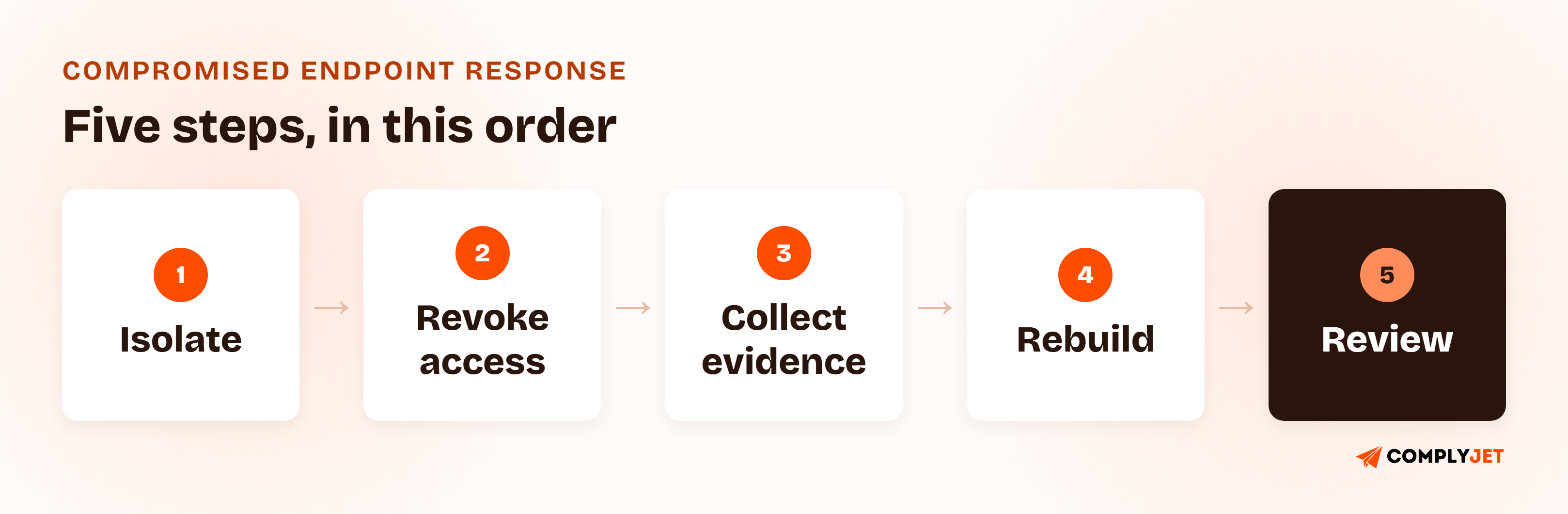
- Isolate the device from the network through your EDR or management tool, within a stated target time.
- Revoke access: sign out sessions, reset credentials, and revoke tokens for that user.
- Collect evidence before wiping: logs, the alert record, and a disk image if the incident warrants it.
- Rebuild from a known-good image instead of cleaning in place.
- Review whether data was exposed and whether the event is a reportable breach under your incident response plan.
NIST SP 800-83 Rev. 1, Guide to Malware Incident Prevention and Handling for Desktops and Laptops, is the long-standing reference for this sequence. It was published in 2013, so treat it as a framework for thinking about containment rather than a current tool guide.
Endpoint Security Policy Requirements by Framework
No framework hands you an endpoint security policy to copy. Each one sets expectations that a single well-built policy can meet, because the controls overlap.
| Framework | Where it lives | What it expects |
|---|---|---|
| SOC 2 | CC6.1, CC6.7, CC6.8, CC7.2 | Logical access controls, restricted movement of information, prevention and detection of malicious software, and monitoring for anomalies |
| ISO 27001:2022 | Annex A 8.1, 8.7, 8.9 (also 8.19, 7.7, 7.10) | Protection of user endpoint devices, malware defense, secure configuration, software installation control, clear screen, and storage media |
| HIPAA | 45 CFR 164.310(b), 164.310(c), 164.308(a)(5)(ii)(B), 164.312(a)(2)(iv) | Workstation use and security, protection from malicious software (addressable), and encryption of ePHI (addressable) |
| PCI DSS 4.0.1 | Requirements 5.2.1, 5.3.1, 1.5.1 | Anti-malware on in-scope system components, kept current through automatic updates, plus security controls on computing devices |
| GDPR | Article 32 | Appropriate technical measures to secure personal data, which in practice includes protecting the devices that hold it |
| CIS Controls v8 | Safeguards 10.1, 4.3, 3.6 | Anti-malware software, automatic session locking, encryption on end-user devices |
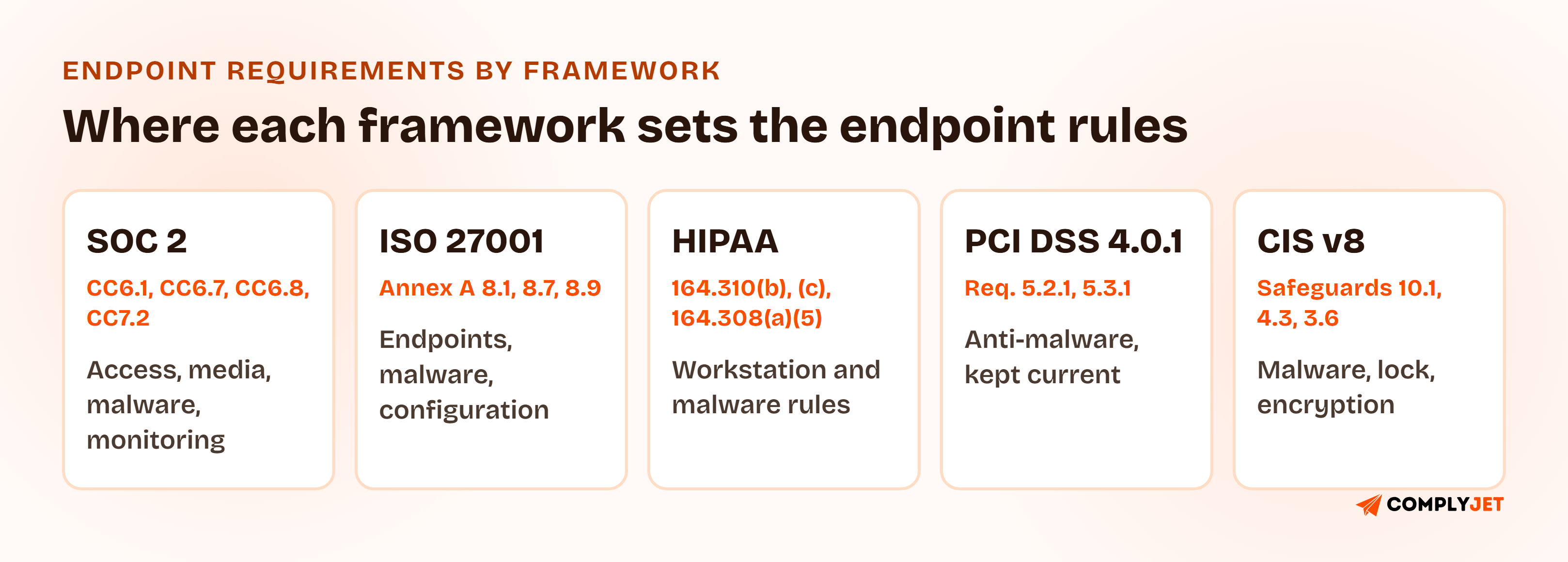
Endpoint Security Policy SOC 2: CC6.1, CC6.8, and CC7.2
SOC 2 does not contain a control called "endpoint security." Auditors test your devices against the Common Criteria. Encryption, screen lock, and removed admin rights support CC6.1, restrictions on moving data to removable media support CC6.7, working malware defense supports CC6.8, and monitoring that someone actually reads supports CC7.2.
So an endpoint security policy for SOC 2 is not a named requirement. It is the document that shows those controls are defined and repeatable. For a Type II audit, the evidence has to cover the whole period, not a single day. Our guide to the SOC 2 compliance checklist shows where device evidence sits in the wider audit.
Endpoint Security Policy ISO 27001: Annex A 8.1, 8.7, and 8.9
ISO 27001:2022 spreads endpoint expectations across several Annex A controls. A.8.1 covers user endpoint devices, A.8.7 covers protection against malware, and A.8.9 covers configuration management. Related controls cover installing software (8.19), clear screen (7.7), and storage media (7.10).
Your device baseline, malware section, and hardening section answer most of it. Control selection still comes from your own risk assessment, so the policy should state which devices and risks it addresses.
HIPAA, PCI DSS, and GDPR Endpoint Requirements
HIPAA's physical safeguards require policies for how workstations are used and how they are physically protected. Encryption of ePHI under 45 CFR 164.312(a)(2)(iv) is addressable, which means you either implement it or document an equivalent measure. Encrypting every device that touches ePHI is the easier position to defend.
PCI DSS 4.0.1 Requirement 5.2.1 asks for anti-malware on in-scope system components, with a documented evaluation under 5.2.3 for any component you treat as not at risk. Requirement 5.3.1 asks that the solution stay current through automatic updates. That evaluation is not an automatic exemption for Linux hosts or appliances.
GDPR Article 32 asks for appropriate technical measures, and a lost or compromised device with unencrypted personal data is a likely personal data breach. Encryption and a working response path are what decide whether it is reportable.
For disk encryption specifics, NIST SP 800-111, Guide to Storage Encryption Technologies for End User Devices (2007), is still the standard reference, though dated.
Companies treat endpoint controls as five separate obligations because each framework names them differently. It is one set of controls. Write the policy once, enforce it once, and every reviewer gets the same evidence. -- Upendra Varma, CTO at ComplyJet
Endpoint Security Policy for Startups: What to Do First
An endpoint security policy for startups looks different from one written for a 5,000-person enterprise. You will not run a security operations center, and you do not need to. What you need is a short list of enforced controls and honest handling of the gaps.
The realities worth writing down:
- macOS-heavy teams. Built-in disk encryption and screen lock are strong, and your policy can rely on them. Say so, and say how you verify them.
- Linux developer machines. Malware tooling may differ or be absent. Document what you use instead, such as configuration controls and log shipping, and treat the gap as a recorded exception if needed.
- Cloud development environments. If engineers work in remote workspaces, the workspace is an endpoint and belongs in scope.
- Contractors on their own laptops. Decide whether they can reach company data at all. If yes, they need a lighter baseline and a written agreement.
What to do in the first thirty days:
- Build the device inventory and assign every device to a named person.
- Turn on disk encryption and screen lock everywhere, and check them.
- Choose and deploy one malware-protection tool that reports centrally.
- Remove standing admin rights, or write an exception for each one.
- Adopt the policy and have users acknowledge it.
Note
What can wait: custom hardening scripts, a SIEM, 24/7 alert coverage. A written policy, an enforced baseline, and honest exceptions beat an ambitious program you cannot evidence.
Endpoint Security Policy Template: A Free Example You Can Download
The clearest way to see how this works is to read real language. Here are three clauses from the template written out in full.
Endpoint Security Policy Example: Three Sample Clauses
Sample clause: Malware Protection and EDR
All in-scope endpoints must run [approved endpoint protection tool] with real-time protection and tamper protection enabled. The tool must report to the central console, and a device that has not reported for [7] days is treated as non-compliant. The Policy Owner reviews alerts and triages each within [24 hours]. Users must not disable, uninstall, or bypass the tool. Agent updates are rolled out to a pilot group before the wider fleet.
Sample clause: Administrator Rights
Users do not hold standing administrator rights on company endpoints. A user who needs elevated rights for a specific task must request them from the Policy Owner, who may approve elevation for no longer than [8] hours. Every request and approval is logged. Standing administrator rights require a written exception under Section 10.
Sample clause: Removable Media
Removable storage devices are blocked on company endpoints by default. A user who needs one must obtain approval from the Policy Owner, who records the business reason and the device. Approved drives must be encrypted. Unknown media found or received from outside the company must not be connected to any company device.
Free Template
Download the Free Endpoint Security Policy Template (PDF)
All ten sections with sample clauses, a device baseline table, a compromised-endpoint checklist, an evidence list, and a framework mapping guide for SOC 2, ISO 27001, HIPAA, and PCI DSS.
Rolling Out an Endpoint Security Policy and Proving It Works
Writing the document is the easy half. A policy only works once the existing fleet is pulled into it, not just the next laptop you buy.
- Build the first inventory. List every laptop, desktop, server, and phone from purchase records and your identity provider. Someone always finds a device nobody remembered.
- Check what is actually enforced. Compare the inventory against encryption, protection, and admin-rights status. The gap is your work list.
- Fix or except. Remediate each gap, or record a written exception with an owner and an expiry date.
- Get leadership approval, so the policy is adopted and not a draft.
- Have users acknowledge it when they receive or re-receive a device.
- Set the review calendar. Review at least annually, and after any change to your tooling or device mix.
Run step two before you announce anything. Finding a dozen laptops without protection on your own is a good week. Finding them during the audit window is not.
Try this yourself
Pick three people at random and ask each to show you their disk encryption status, screen-lock setting, and whether they can install software without a prompt. If you cannot answer for all three in five minutes, an auditor sampling devices will find the same gap.
What Auditors Sample for Endpoint Security
Auditors usually sample a handful of devices and ask for proof for each control. Keep this evidence ready:
| Control | Evidence an auditor typically asks for |
|---|---|
| Device inventory | Current list of in-scope endpoints with owner and status |
| Disk encryption | Console or system report showing encryption enabled per device |
| Malware protection and EDR | Deployment report, last check-in dates, alert triage records |
| Admin rights | List of users with admin rights, plus elevation and exception records |
| Removable media | Setting or exception log for approved devices |
| Compromised endpoint response | Past incident tickets or a tabletop test record |
| Policy governance | Approved policy with version, user acknowledgments, review date |
For a Type II audit, ask for the same reports across the whole period, not a snapshot. Screenshots taken the week before fieldwork are weak evidence.
Endpoint Security Policy Mistakes That Fail Audits
- Writing the policy but never building the device inventory. The document says every endpoint is protected, and the list shows otherwise.
- Treating the tool as the policy. Settings pushed by software with no written approval, owner, or exception process are undocumented controls.
- Leaving servers and cloud workstations out of scope. The policy covers laptops while production hosts run with no protection.
- No alert owner. EDR is installed, alerts go to an unmonitored inbox, and nobody can show a triage record.
- Standing admin rights for everyone. It is faster in the short term and a finding every time.
- Exceptions with no expiry. A "temporary" exception that is two years old is a policy gap.
- Skipping the response section. The device is compromised and nobody knows who can isolate it.
How ComplyJet Supports Your Endpoint Security Program
A policy gets you through the document request. The harder part is proving it is followed, cycle after cycle, without a scramble for screenshots.
We help early-stage teams do that as part of a broader SOC 2, ISO 27001, HIPAA, or GDPR program: AI-assisted policy drafting to get the document right, integrations that pull the technical evidence an auditor asks for, and a team that guides you through the process instead of leaving you alone with the software.
On the device side specifically, the ComplyJet MDM Agent checks disk encryption, screen lock timeout, OS version, password manager use, and antivirus or EDR detection on macOS and Windows, and keeps a timestamped history for the auditor. To be clear about what it is: it reads device state and reports it. It does not push settings, install software, or wipe devices. If your policy needs enforcement, pair it with a management tool or your identity provider's device controls.
Compliance Automation
Turn your endpoint policy into audit-ready evidence
ComplyJet pairs AI-assisted policy drafting with integrations that pull the evidence auditors ask for, across SOC 2, ISO 27001, HIPAA, and GDPR.
FAQs
What Is an Endpoint Security Policy?
An endpoint security policy is a formally adopted document that sets the minimum security requirements for every device that connects to company systems or handles company data. It assigns owners, defines the controls, and describes the evidence each one leaves behind.
What Should an Endpoint Security Policy Include?
Purpose and scope, roles, a device baseline, malware defense and EDR, admin rights and software installation, removable media, hardening, logging and monitoring, compromised-endpoint response, and a written exception process. The "What to Include" section above explains each one.
Is an Endpoint Security Policy Required for SOC 2?
SOC 2 does not name an endpoint security policy. It requires controls under the Common Criteria, such as CC6.1, CC6.7, CC6.8, and CC7.2, that devices must be shown to meet. A written policy is the standard way to show a defined, repeatable process to an auditor.
Is Antivirus Enough or Do You Need EDR?
It depends on what you must show. Frameworks require malware defense, not a specific product class, so well-managed antivirus can meet the wording. EDR adds visibility into what happened on a device, which matters for investigation. Whichever you choose, it needs to be running, current, reporting, and reviewed.
What Is the Difference Between an Endpoint Security Policy and a Network Security Policy?
An endpoint security policy governs the devices: how they are configured, protected, and contained when compromised. A network security policy governs the traffic between them: firewalls, segmentation, and monitoring. Most companies need both.
Should Employees Have Local Admin Rights?
Not as a standing right. The safer default is no standing admin rights, with time-limited elevation for specific tasks and a log of each request. If engineers need admin access for their work, document that as an approved exception with compensating controls.
Does an Endpoint Security Policy Cover Personal Devices?
Only if you allow personal devices to access company data. If you do, they fall under your BYOD policy, which usually applies a lighter set of requirements built around a work profile and employee consent. The endpoint policy should state clearly which devices each document covers.
What Do Auditors Check for Endpoint Security?
They typically ask for the approved policy, a current device inventory, and then sample devices to confirm encryption, malware protection, admin rights, and updates match what the policy says. For a Type II audit, they look for the same evidence across the whole audit period.
Related Reading
- Network Security Policy, the companion for firewalls, segmentation, and traffic.
- Mobile Device Management Policy, for the lifecycle of company-owned devices.
- Patch Management Policy Template, for update SLAs and emergency patching.
- Access Control Policy, the rules behind admin rights and authentication.
- Data Encryption Policy, the encryption standard behind the baseline.
- Incident Response Plan Template, for handling a compromised endpoint that becomes a breach.
Sources: CrowdStrike 2026 Global Threat Report (press release, 2026-02-24); AICPA Trust Services Criteria, CC6.1, CC6.7, CC6.8, CC7.2; ISO 27001:2022 Annex A 8.1, 8.7, 8.9, 8.19, 7.7, 7.10; 45 CFR 164.308(a)(5)(ii)(B), 164.310(b), 164.310(c), 164.312(a)(2)(iv), HIPAA Security Rule; PCI DSS 4.0.1 Requirements 1.5.1, 5.2.1, 5.2.3, 5.3.1; GDPR Article 32; CIS Controls v8; NIST SP 800-83 Revision 1; NIST SP 800-111.