.svg)

A laptop gets left in the back of a rideshare on a Friday night. By Monday, the only question that matters is the one an auditor or a customer will ask later: was it encrypted, and can you prove it?
A mobile device management policy is the governance document that sets the rules for company-owned phones, tablets, and laptops: who gets a device, how it is enrolled, which security settings are mandatory, what happens when it is lost, and how it comes back when someone leaves. It is the rulebook. The software that enforces it is a separate decision.
Quick answer
A mobile device management policy covers ten things: purpose and scope, roles, eligibility and issuance, enrollment, security requirements, app control, acceptable use, lost or stolen devices and remote wipe, employee privacy limits, and offboarding. It maps to SOC 2 (CC6.1, CC6.7, CC6.8), ISO 27001 (Annex A 8.1), HIPAA, GDPR, and PCI DSS.
By the end of this guide, you'll have a complete mobile device management policy template you can adapt in an afternoon, plus the reasoning behind each section so you can defend it in an audit.
Here's what I'll cover:
- What a mobile device management policy is, and how it differs from MDM software and from a BYOD policy
- How to pick a device model before you write a single clause
- The ten sections to include, from enrollment and baseline controls to remote wipe and offboarding
- What SOC 2, ISO 27001, HIPAA, GDPR, and PCI DSS expect from your device program
- A free, downloadable template with real sample clauses
- How to roll it out, and the mistakes that get device programs flagged
What Is a Mobile Device Management Policy?
A mobile device management policy (often shortened to MDM policy) is a formally adopted document that defines how a company issues, configures, secures, monitors, recovers, and retires its company-owned devices. You fill in your own owners, thresholds, and systems, then leadership approves it.
It is a governance document, not a technical runbook. The policy says every company laptop must be encrypted and that a lost phone is reported within a set window. The configuration is the screen-lock timeout you actually push to the fleet. An auditor reads the policy first and then samples devices to see whether reality matches.
Quick take
A mobile device management policy answers "what must be true of every company device, and who is accountable when it is not?" It is not a product guide for Jamf, Kandji, Intune, or any other tool.
MDM Policy vs MDM Software: Which Comes First
Write the policy first. Software enforces a decision someone already made, and without the decision it enforces whatever the default happens to be.
Many early-stage teams do the opposite: they buy a tool, switch on a few settings, and call it a program. Then an auditor asks which devices are in scope, who approves exceptions, and what the lost-device deadline is, and none of it is written down. The tool becomes the evidence of enforcement. The policy remains the evidence of intent, and you need both.
How This Differs From ComplyJet's BYOD Policy Guide
ComplyJet's BYOD policy guide is the document for personal devices. It focuses on work-profile containers, written consent for any wipe, reimbursement, and the privacy boundary between an employee's own phone and company data.
This article is the company-owned-device document. The company bought the hardware, so it can set the configuration, manage the whole device, and require its return. If your team brings its own phones and laptops, start with the BYOD guide. If you hand people a laptop and a phone on day one, this is the one. Most companies with a mixed fleet end up needing both.
The ownership line matters more than it looks. As one commenter put it in a January 2018 Hacker News thread on MDM privacy, "With MDM, it's not YOD." Full management of a device you own is a normal business control. The same control on an employee's personal phone is a different conversation.
Note
The two documents share definitions but not powers. Full-device wipe, supervised enrollment, and mandatory app lists belong here. Work-profile-only wipe and consent language belong in the BYOD policy. Keep them separate so neither promises something the device model cannot deliver.
Why You Need a Mobile Device Management Policy
Company-owned devices are where much of your data now lives, and attackers know it. In Verizon's 2025 Mobile Security Index, a survey of nearly 800 professionals who buy, manage, and secure mobile devices, 85% of organizations reported a surge in mobile device attacks. Source: SecurityWeek coverage of the Verizon 2025 Mobile Security Index.
For a startup, the exposure is usually less dramatic and more ordinary. A founder's laptop has no disk encryption because nobody turned it on. A sales phone has never been updated. A contractor keeps a company tablet for three months after the contract ends. None of these is an attack. All of them are findings.
A written policy fixes the boring part of the problem:
- Auditors ask for the document and the inventory. A policy plus a current device list is a standard evidence request, followed by a sample of devices to confirm the settings are real.
- Customers ask the same thing in questionnaires. Enterprise buyers routinely want to know that company laptops are encrypted and lockable.
- Lost devices need a clock. Without a stated reporting window, the first hours after a loss are spent deciding who to call.
A mobile device security policy is simply this document viewed from the control side: encryption, screen lock, patching, and remote wipe. The two names are often used interchangeably, and one document can carry both. If your security team calls it a mobile device security policy, the content below still applies.
Watch out
"Everyone's laptop is encrypted, I checked once" is not a control. If you cannot show the setting is enforced today and was enforced across the audit period, it does not count.
If you are heading into your first audit, device controls are among the easiest to prepare and the most tedious to reconstruct afterwards. ComplyJet's SOC 2 program walks early-stage teams through this and the rest of the control set.
SOC 2
Getting ready for your first SOC 2?
See how ComplyJet takes an early-stage team from policies like this one to a completed audit, with a team guiding you through it.
Pick Your Device Model Before You Write the Policy
The device model decides how much control the policy can claim. Settle it first, because every later section depends on it. A policy for company-owned devices can claim far more control than one written for personal phones.
| Model | Who owns the device | Personal use | How much the company manages |
|---|---|---|---|
| COBO (company-owned, business only) | Company | Not allowed | Full, including supervision and app lockdown |
| COPE (company-owned, personally enabled) | Company | Allowed within limits | Full device, with limits on what is monitored |
| CYOD (choose your own device) | Company | Per COPE or COBO rules | Full, from a pre-approved device list |
| BYOD (bring your own device) | Employee | Employee's own | Work data only, usually a work profile |
Most startups are COPE or CYOD in practice: the company buys a laptop and a phone from an approved list, and people use those company devices for the odd personal task. This policy is written for those three models of company-owned devices. BYOD has its own rules and its own guide.
The reason to pick one is consistency across all your company devices. A policy that says "all devices must be fully managed" while half the team uses personal phones is a policy that fails its first sample.
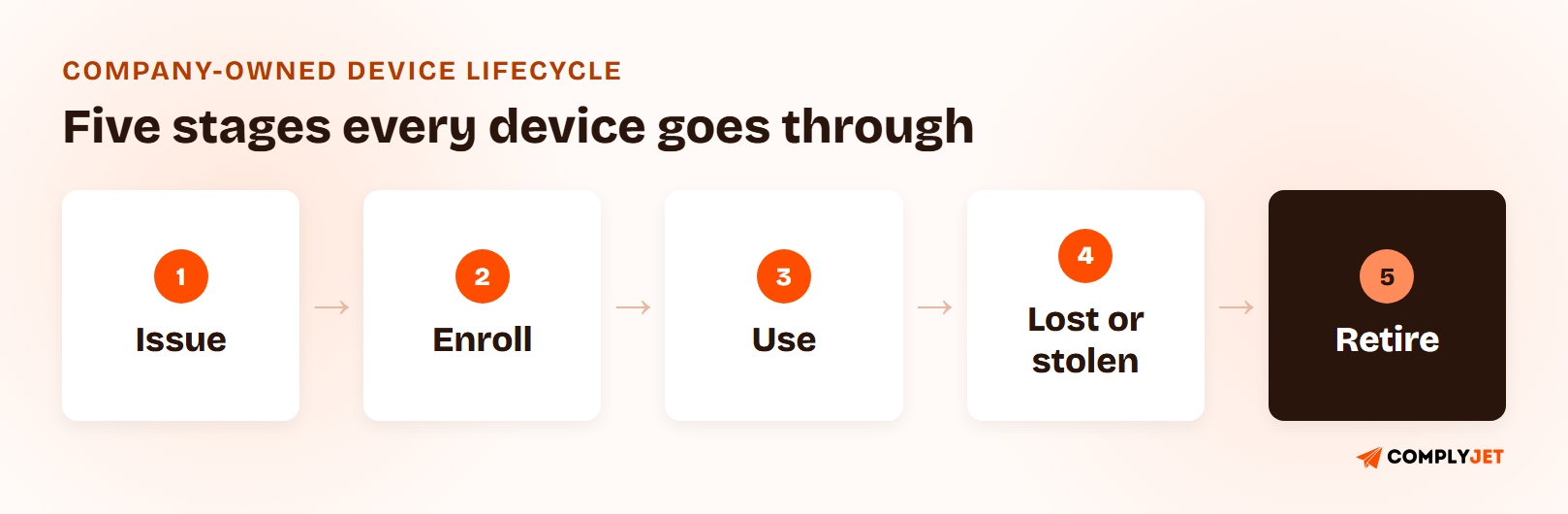
The chain above is the lifecycle your policy has to cover. Each stage gets an owner and leaves a record: an issuance log, an enrollment status, a compliance check, an incident ticket, and a wipe confirmation.
What to Include in a Mobile Device Management Policy Template
A complete mobile device management policy template has ten sections. Each one exists because a reviewer will check it.
| Section | What it covers | Why reviewers check it |
|---|---|---|
| Purpose and scope | Which devices, people, and data the policy covers, including contractors | Contractors on company hardware are a common scope gap |
| Roles and ownership | Who issues devices, who administers the tool, who approves exceptions | A device with no owner never gets reviewed |
| Eligibility and issuance | Who receives which device and how it is recorded | The asset register is the inventory auditors ask for first |
| Enrollment | Required management before first use | Unenrolled devices are invisible to every other control |
| Security requirements | Encryption, screen lock, OS updates, endpoint protection | This is the testable core of the policy |
| App management | Approved sources, blocked categories, work data rules | Unreviewed apps are a quiet path for data out |
| Acceptable use | What the device may and may not be used for | Sets the limit that discipline rests on |
| Lost, stolen, and remote wipe | Reporting window, locate, lock, wipe | The incident path has to exist before the incident |
| Employee privacy | What management can and cannot see | Trust and, in some regions, legal obligation |
| Offboarding and return | Return deadline, wipe, reassignment or disposal | The stage where data most often walks out |
Device Enrollment and Provisioning
Device enrollment is the moment a device becomes managed. The policy should say a device is not usable for company work until it is enrolled, and that enrollment happens before it is handed over, not afterwards.
For Apple devices, that usually means purchasing through a channel that supports automated enrollment, so the device configures itself on first boot and cannot be unenrolled by the user. For Android, Android Enterprise provides a comparable path. The point for the policy is the rule, not the mechanism: no device reaches an employee in an unmanaged state.
Record every device at issuance in your asset register: serial number, model, assigned person, issue date, and enrollment status. Your asset management policy is the natural home for the register itself.
Mobile Device Security Requirements: The Baseline Controls
The security section is where a policy becomes testable. Keep the list short enough that every item is enforced and checkable.
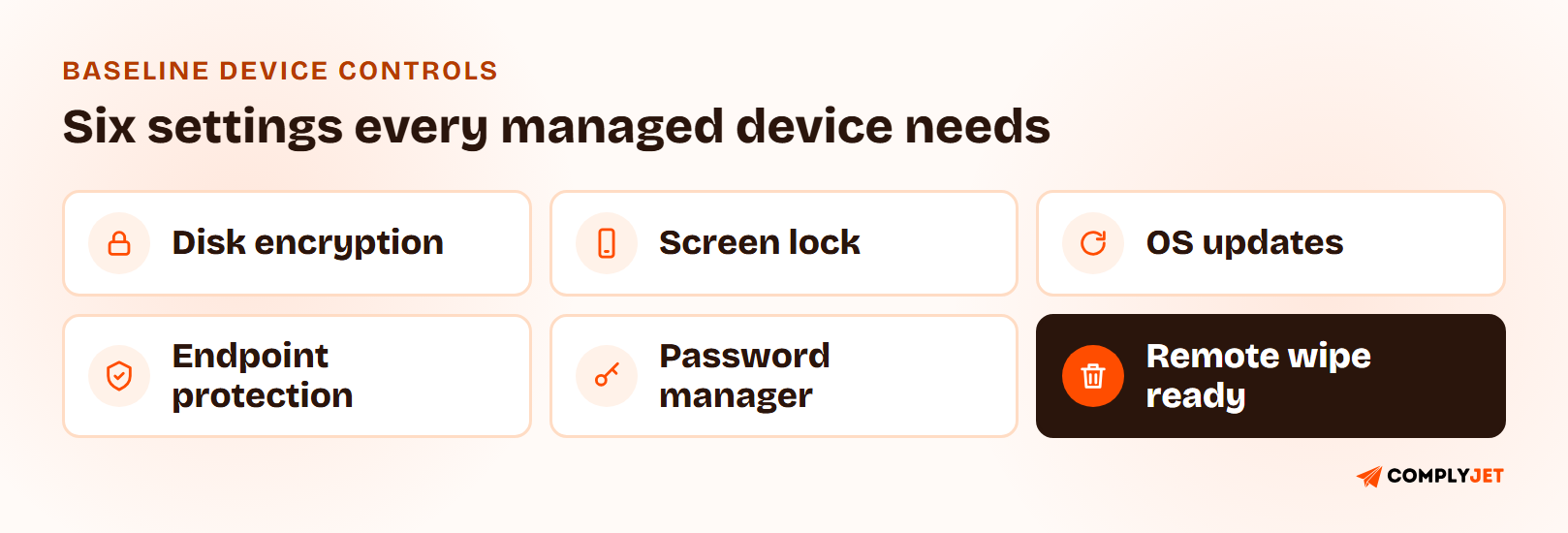
- Full-disk encryption on every laptop and phone, matched to your data encryption policy
- Screen lock after a short idle period, with a passcode that follows your password policy
- Operating system updates applied within a stated window, with older versions blocked from company systems
- Endpoint protection installed and reporting where the operating system supports it
- Password manager in use, rather than credentials saved in browsers or notes
- Remote lock and wipe capability enabled before the device ships
Write the thresholds as bracketed fields in the template, such as "[5] minutes" for the idle lock. Your own numbers matter less than the fact that they are written down, enforced, and the same for everyone.
App Management and Acceptable Use
Decide where apps may come from and what happens to company data inside them. For most startups the workable rule is: approved app stores only, a short list of blocked categories, and company data accessed through managed or approved apps.
Keep acceptable use brief and point to your acceptable use policy for the general rules. The MDM policy only needs the device-specific points: no jailbreaking or rooting, no disabling management or security software, no sharing the device with family or friends, and no storing company data in personal cloud accounts.
Lost or Stolen Device Response and Remote Wipe
This is the section that gets read in an emergency, so make it the clearest page in the document. A lost or stolen device procedure should fit in a few lines:
- Report immediately to the named contact, with a stated deadline rather than "as soon as possible."
- Lock and locate the device through the management tool while it may still be recoverable.
- Revoke access: sign out sessions, reset credentials, and revoke tokens for that user.
- Wipe if the device is not recovered within a set time, or at once if it held regulated data.
- Log the incident and assess whether it is a reportable data breach.
On wipe, the policy has to be precise about scope. A full-device wipe removes everything, while an account or corporate-data wipe removes only company data.
Google Workspace shows the split clearly: its basic mobile management can wipe only the corporate account from a device, while advanced management can wipe all data, and advanced management is available only on certain Workspace editions. Source: Google Workspace comparison of mobile management features. Know which one your tooling actually does before you promise it in writing.
Teams that go through this with ComplyJet describe the process as guided rather than left to guesswork. As Andy Brock, Director of Technology at PatientFocus, puts it: "ComplyJet helped us move much quicker than expected through SOC 2 by intuitively guiding us through what we needed."
Customer Stories
See how other early-stage teams got audit-ready
Read what founders and engineering leads say about working with the ComplyJet team through their first audit.
Employee Privacy: What Your MDM Policy Should Not Collect
Employees read this section first, and they are right to. Management software can see more than most people assume, so the policy should state what it does and does not collect.
An MDM administrator writing in a September 2021 Hacker News thread was blunt about it: even without meaning to gather everything, "we often accidentally run into some pretty embarrassing personal stuff." That is the argument for a written limit, not against the tool.
A reasonable privacy section commits to the following:
- Collect device state (model, OS version, encryption, lock status, app inventory) and not message content, photos, or browsing history.
- Use location only for a lost or stolen device, and only with the incident logged.
- Tell employees plainly that personal accounts and files belong on personal devices, and that company devices can be inspected for security reasons.
- Limit administrator access to the management console and review it like any other privileged access.
Pro tip
Have employees acknowledge the privacy section when they receive the device. A signed acknowledgment turns "we can see what the tool sees" from a surprise into a documented, agreed term.
Mobile Device Offboarding and Return
Mobile device offboarding is the stage most device programs under-specify, and it is where company data most often leaves the building. A departing employee, a returned laptop, and a reused phone should follow one written sequence:
- Set a return deadline tied to the last working day, with shipping arranged for remote staff.
- Remove access to company accounts and sign the user out of all sessions on the same day.
- Wipe and unenroll the device after return, and record the date.
- Reassign or dispose of it: reissue after a clean wipe, or sanitize for disposal in line with your media disposal procedure.
- Update the asset register with the new status and keep the record for audit history.
Action step
Add device return to the same checklist that revokes accounts. If HR's exit checklist and IT's device list are separate documents, one of them will be late every time.
Mobile Device Management Policy Requirements by Framework
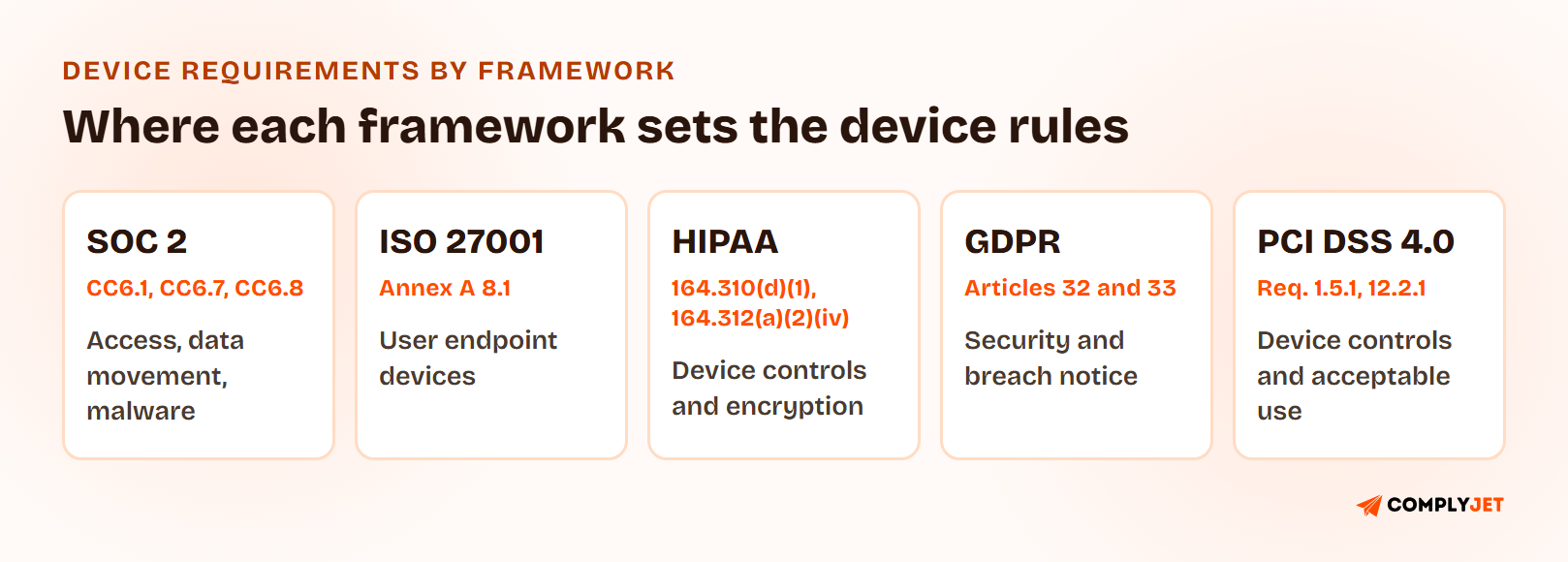
No framework hands you a mobile device policy to copy. Each one sets an expectation about devices, and a single well-built mobile device management policy can meet all of them because the controls overlap.
| Framework | Where it lives | What it expects |
|---|---|---|
| SOC 2 | CC6.1, CC6.7, CC6.8 | Logical access controls, restricted movement and removal of information, and prevention and detection of unauthorized or malicious software |
| ISO 27001:2022 | Annex A 8.1 (also 5.11, 6.7, 7.9) | Protection of information on user endpoint devices, return of assets, remote working, and security of assets off-premises |
| HIPAA | 45 CFR 164.310(d)(1), 164.312(a)(2)(iv) | Policies for hardware and media that contain ePHI entering and leaving a facility, and a mechanism to encrypt ePHI (an addressable specification) |
| GDPR | Article 32 and Article 33 | Appropriate technical security measures, and breach notification when personal data on a device is exposed |
| PCI DSS 4.0 | Requirements 1.5.1 and 12.2.1 | Security controls on computing devices, company-owned or employee-owned, that connect to the cardholder data environment, and documented acceptable use for end-user technologies |
For a deeper technical baseline, NIST publishes Special Publication 800-124 Revision 2, Guidelines for Managing the Security of Mobile Devices in the Enterprise (May 2023). It covers organization-provided and personally owned devices across the full device life cycle. Read it at NIST SP 800-124r2.
Mobile Device Management Policy for SOC 2 and ISO 27001
A mobile device management policy for SOC 2 is not a named requirement, because SOC 2 does not contain a control called "mobile device management." Auditors test devices against the Common Criteria. Screen lock and passcode enforcement support CC6.1, restrictions on moving data off devices support CC6.7, and endpoint protection that is installed and checking in supports CC6.8. What auditors want is evidence the setting is enforced on each device, not a statement that it should be.
ISO 27001:2022 consolidates the topic into Annex A 8.1, user endpoint devices. It applies to laptops, phones, and tablets, whether corporate-owned or personal. It is supported by controls on returning assets (5.11), remote working (6.7), and assets off-premises (7.9). Your enrollment, baseline controls, and offboarding sections answer most of it.
HIPAA, GDPR, and PCI DSS Device Requirements
HIPAA treats the encryption of ePHI as an addressable specification under 45 CFR 164.312(a)(2)(iv), which means you either implement it or document why an equivalent measure is reasonable. In practice, encrypting every device that touches ePHI is the easier path to defend. Device and media controls in 164.310(d)(1) cover hardware leaving and entering the facility.
Under GDPR, a lost device holding personal data can be a personal data breach, which brings Article 33 notification into play. Encryption is the control that most often decides whether a loss is reportable, which is why it leads the baseline list.
PCI DSS 4.0 Requirement 1.5.1 applies to any computing device, company-owned or employee-owned, that connects to both untrusted networks and the cardholder data environment. Requirement 12.2.1 asks for documented acceptable use of end-user technologies, including a list of approved products.
Companies treat device management as five separate obligations because each framework names it differently. It is one set of controls. Write the policy once, enforce it once, and every reviewer gets the same evidence. -- Upendra Varma, CTO at ComplyJet
Mobile Device Management Policy Template: A Free Example You Can Download
The clearest way to see how this works is to read real language. Here are two sections of the template written out in full.
MDM Policy Example: Two Sample Clauses
Sample clause: Device Enrollment
All company-owned devices must be enrolled in the company's device management solution before they are issued. An unenrolled device may not be used to access company systems or data. The IT Lead records the serial number, assigned user, issue date, and enrollment status in the Asset Register at issuance. Users must not remove management profiles, disable security software, or jailbreak or root a device.
Sample clause: Lost or Stolen Devices
A user who loses a company device, or suspects it has been stolen, must report it to the IT Lead within [one hour] of discovery. The IT Lead will lock and locate the device, revoke the user's active sessions and credentials, and record the incident. If the device is not recovered within [24 hours], or if it held regulated data, the IT Lead will perform a full remote wipe and assess whether the event is a reportable data breach under the Incident Response Plan.
Free Template
Download the Free Mobile Device Management Policy Template (PDF)
All ten sections above with sample clauses, a device register layout, a lost-device checklist, and a framework mapping table for SOC 2, ISO 27001, HIPAA, GDPR, and PCI DSS.
Rolling Out a Mobile Device Management Policy
Writing the document is the easy half. A device program only works once the existing fleet is pulled into it, not just the next laptop you buy.
- Build the first inventory. List every company laptop, phone, and tablet from your purchase records and your identity provider's device list. Someone always finds a device nobody remembered.
- Assign each device to a named person. A person, not a team.
- Check what is actually enforced. Compare the inventory against encryption, lock, and update status. The gap is your work list.
- Get the policy formally approved by leadership, so it is adopted and not a draft.
- Have users acknowledge it when they receive or re-receive a device, including the privacy section.
- Set the review calendar. Review the policy at least annually and after any change to your device model or tooling.
Run step three before you announce anything. Finding a dozen unencrypted laptops on your own is a good week. Finding them during the audit window is not.
Try this yourself
Pick three people at random and ask each to show you their device's encryption status and screen-lock setting right now. If you cannot answer for all three in five minutes, an auditor sampling devices will find the same gap.
Mobile Device Management Policy Mistakes That Fail Audits
- Writing the policy but never building the device register. The document says every device is managed, and the inventory shows otherwise.
- Treating the tool as the policy. Settings pushed by software with no written approval, owner, or exception process are undocumented controls.
- Promising a full wipe the tooling cannot perform. The policy says "remote wipe," and the configured tier only removes a corporate account.
- No lost-device deadline. "Report promptly" gives nobody a clock and gives an auditor nothing to test.
- Ignoring tablets and spare devices. The old phone in a drawer that still has company email is still in scope.
- Skipping the privacy statement. Employees assume the worst, and in some regions you owe them a clear explanation.
- Offboarding accounts but not hardware. Access is revoked on the last day and the laptop is never returned.
How ComplyJet Supports Your Device Program
A policy gets you through the document request. The harder part is proving it is followed, cycle after cycle, without a scramble for screenshots.
We help early-stage teams do that as part of a broader SOC 2, ISO 27001, HIPAA, or GDPR program: AI-assisted policy drafting to get the document right, integrations that pull the technical evidence an auditor asks for, and a team that guides you through the process instead of leaving you alone with the software.
On the device side specifically, the ComplyJet MDM Agent checks encryption, screen lock, OS version, and password manager use on macOS and Windows and keeps a history for the auditor. To be clear about what it is: it reads device state and reports it. It does not push policy or wipe devices, so if your policy requires remote wipe, pair it with a full MDM or your identity provider's device management.
Compliance Automation
Turn your device policy into audit-ready evidence
ComplyJet pairs AI-assisted policy drafting with integrations that pull the evidence auditors ask for, across SOC 2, ISO 27001, HIPAA, and GDPR.
FAQs
What Is a Mobile Device Management Policy?
A mobile device management policy is a formally adopted document that sets the rules for how a company issues, configures, secures, recovers, and retires its devices. It assigns owners and defines the evidence each stage leaves behind.
What Should a Mobile Device Management Policy Include?
Purpose and scope, roles, eligibility and issuance, enrollment, security requirements, app management, acceptable use, lost or stolen device response with remote wipe, employee privacy limits, and offboarding. The "What to Include" section above explains each one.
What Is the Difference Between an MDM Policy and a BYOD Policy?
An MDM policy governs devices the company owns, where it can manage the whole device and require its return. A BYOD policy governs personal devices, where management is usually limited to a work profile and any wipe needs the employee's consent. Many companies need both, and a mobile device management policy for SOC 2 should say which devices each one covers.
Is a Mobile Device Management Policy Required for SOC 2?
SOC 2 does not name a mobile device policy. It requires controls under the Common Criteria, such as CC6.1, CC6.7, and CC6.8, that devices must be shown to meet. A written policy is the standard way to show a defined, repeatable process to an auditor.
Can an Employer Remotely Wipe a Company Phone?
Generally yes for a device the company owns, if the policy says so and employees have acknowledged it. Check local employment and privacy law for your region, and be clear whether the wipe removes the whole device or only company data.
What Happens When a Company Device Is Lost or Stolen?
The user reports it within the policy's deadline, IT locks and locates the device, revokes sessions and credentials, and wipes it if it is not recovered or held regulated data. The incident is logged and assessed as a possible data breach.
Do You Need MDM Software to Have an MDM Policy?
No. You can adopt the policy before buying any tool, and a small fleet can be managed with the device features of your identity provider or workspace suite. The software makes enforcement and evidence easier as the fleet grows, but the policy comes first.
How Do You Offboard a Mobile Device?
Set a return deadline tied to the last working day, remove the user's access the same day, wipe and unenroll the device on return, then reassign or dispose of it and update the asset register.
Related Reading
- BYOD Policy, the companion for personal devices.
- Acceptable Use Policy, the general rules for using company systems.
- Remote Access Policy, for how devices connect from outside the office.
- Asset Management Policy, where the device register lives.
- Data Encryption Policy, the encryption standard behind the baseline controls.
- Incident Response Plan Template, for handling a lost device that becomes a breach.
Sources: Verizon 2025 Mobile Security Index; AICPA Trust Services Criteria, CC6.1, CC6.7, CC6.8; ISO 27001:2022 Annex A 8.1, 5.11, 6.7, 7.9; 45 CFR 164.310(d)(1) and 164.312(a)(2)(iv), HIPAA Security Rule; GDPR Articles 32 and 33; PCI DSS 4.0 Requirements 1.5.1 and 12.2.1; NIST SP 800-124 Revision 2.