.svg)

Your cloud provider has a regional outage at 2:10 PM. Your database is unreachable, customers are filing tickets, and someone asks the question nobody can answer: who is allowed to declare this a disaster and start the failover? That pause, not the outage itself, is usually the most expensive part.
A disaster recovery plan template is a fill-in-the-blank runbook for restoring IT systems and data after a major failure. It sets a recovery time objective (RTO) and recovery point objective (RPO) for each system, picks a failover strategy, names who declares a disaster, and lists the exact steps to fail over, verify, and fail back.
Quick answer
A usable disaster recovery plan template has five parts: recovery tiers with an RTO and RPO for every system, a failover strategy, a named team with backups, a numbered declare, fail over, verify, and fail back runbook, and a test schedule that produces evidence.
SOC 2
Getting ready for a SOC 2 audit?
Recovery testing is a named criterion in SOC 2's Availability category. See how ComplyJet takes a startup from first policy to signed report.
By the end of this guide, you'll have a complete disaster recovery plan template you can adapt in an afternoon, a worked RTO and RPO table, and a clear answer on which failover strategy fits your budget.
Here's what I'll cover:
- What a disaster recovery plan for IT is, and how it differs from a business continuity plan
- What downtime costs, with a sourced figure
- How to set RTO and RPO per system instead of one number for everything
- The four failover strategies, from backups to active/active
- Everything the plan template must include, plus the runbook steps
- What SOC 2, ISO 27001, HIPAA, and GDPR expect
- Sample clauses and a free downloadable PDF
- How to test the plan, and the mistakes that break it
What Is a Disaster Recovery Plan for IT? (Disaster Recovery Plan Template Basics)
A disaster recovery plan for IT is the document a team follows to restore systems and data after an outage, a data loss event, or the loss of a data center or cloud region. It answers four questions in writing: what gets restored first, how fast, from what data, and by whom.
A disaster recovery plan template is that document with the blanks left in. You keep the structure, fill in your own systems, targets, and names, and end up with something a responder can open and follow under pressure. Length is a fair debate: the same January 2020 Ask HN reply argues a plan "doesn't have to be crazy complicated or long." We agree on brevity, but a short plan still needs every section below filled in.
Quick take
The plan is the runbook. The policy sets the rules behind it: retention, backup frequency, ownership. Auditors want to see both, and they test the runbook.
Disaster Recovery Plan vs Business Continuity Plan: How This Disaster Recovery Plan Template Differs
We already publish a business continuity and disaster recovery plan guide, and the two overlap on purpose, so here is the line between them. A business continuity plan keeps the whole business running: business impact analysis, workforce relocation, customer communication, and manual workarounds. A disaster recovery plan is the technical subset that gets systems and data back.
This article stays on the second one. It goes deeper on the mechanics of systems recovery: per-system recovery tiers, failover strategy choice, the runbook, and the test types. If you need the business-wide document, or want a single combined plan, start with that guide.
Two neighbors are worth knowing. Our backup and recovery policy covers the rules for backup frequency, retention, and restore testing. Our incident response plan template covers the security-incident runbook. A disaster recovery plan runs when systems are down for any reason, malicious or not.
Why Every Company Needs a Disaster Recovery Plan Template
Downtime is expensive, and the number keeps climbing. ITIC's 2024 Hourly Cost of Downtime Survey, which polled over 1,000 firms worldwide, found that a single hour of downtime now exceeds $300,000 for over 90% of mid-size and large enterprises. Forty-one percent put the figure between $1 million and more than $5 million per hour. Those are enterprise numbers, and they exclude litigation and penalties.
Your startup's number is smaller. But your largest customers are the enterprises with those numbers, and they will ask what happens to their data when your provider goes down. In a January 2020 Ask HN thread on writing a SaaS disaster recovery plan, one reply describes the document, from the buyer's side, as "a checkbox type item they must check off" for larger companies. The checkbox is real, which is why an answer backed by tested numbers stands out.
Watch out
"We run on a major cloud provider, so we're covered" is a common wrong answer in security questionnaires. Your provider restores its infrastructure. Restoring your application, your data, and your configuration is your job.
A written plan also changes how the first hour goes. With named roles and a declared trigger, the team spends that hour restoring. Without them, it spends the hour deciding who decides.
RTO and RPO in a Disaster Recovery Plan Template
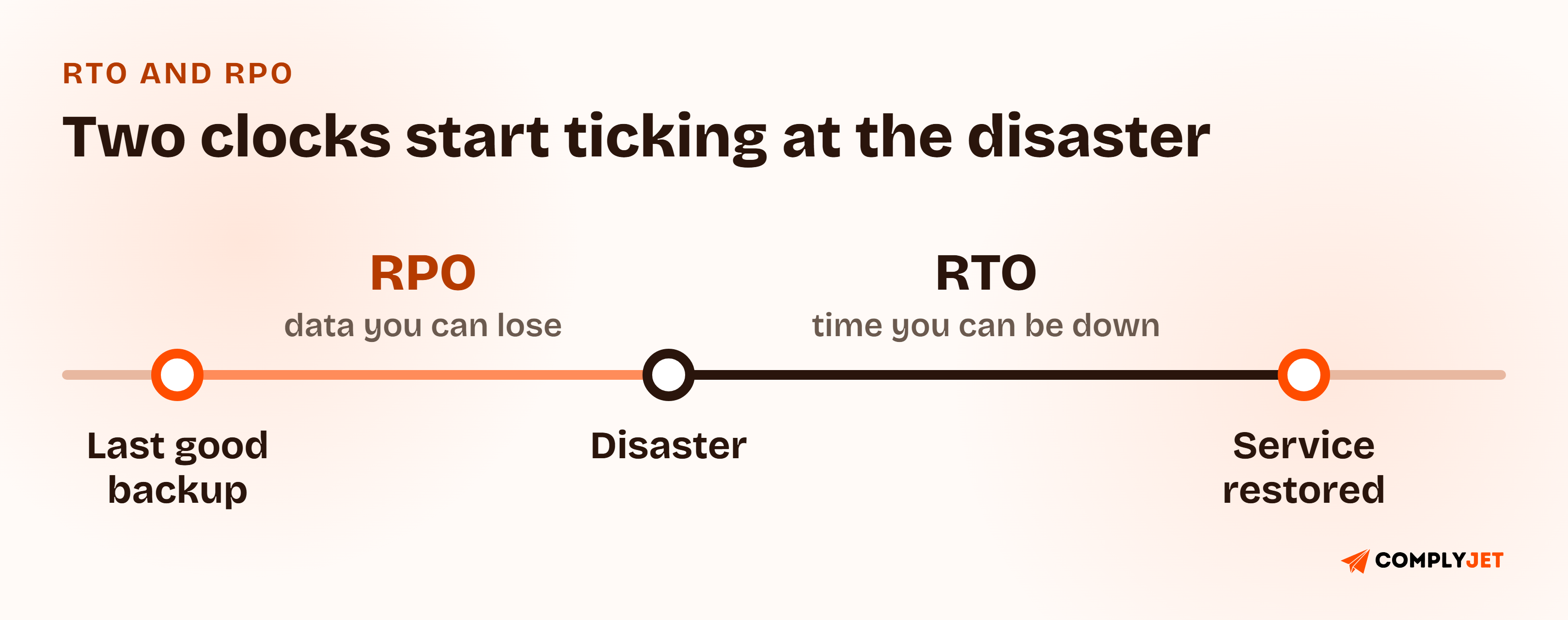
RTO (recovery time objective) is the maximum time a system can be down before the damage becomes unacceptable. RPO (recovery point objective) is the maximum amount of data, measured in time, you can afford to lose. An RTO of four hours means you must be back within four hours. An RPO of one hour means your last good copy of the data can be no more than an hour old.
The two set different costs. RTO drives how much standby infrastructure you pay for. RPO drives how often you back up or replicate.
The mistake is picking one RTO and RPO for the entire company. Set them per system, in tiers, so the plan spends effort where the business actually hurts. The values below are illustrative starting points to replace with your own, not benchmarks.
| Tier | Example systems | Example RTO | Example RPO | What it implies |
|---|---|---|---|---|
| Tier 1: Critical | Production app, primary database, authentication | 1 hour | 5 minutes | Continuous replication and a warm or active secondary |
| Tier 2: Important | Internal admin tools, background job queues, billing sync | 4 hours | 1 hour | Frequent snapshots and a scripted rebuild |
| Tier 3: Standard | Analytics, internal wiki, ticketing | 24 hours | 24 hours | Daily backups, restored on demand |
| Tier 4: Low | Dev sandboxes, archived reports | 72 hours | 1 week | Rebuild from code, minimal backup |
Two habits keep the table honest. First, measure what a restore actually takes today and write that number down, then set the target. Second, get the owner of each system to sign off on its tier, because engineering alone will rarely pick the same priorities as the person who runs support.
Watch out
A target nobody has measured is a wish. If your RTO is one hour and your last restore took five, the plan is wrong, not optimistic.
Cloud Disaster Recovery Plan Template: Choosing a Failover Strategy
Once you have tiers, you choose how each one recovers. For a cloud disaster recovery plan, AWS's Disaster Recovery of Workloads whitepaper lays out four strategies with progressively higher cost and complexity, and lower recovery times. The same logic applies on other clouds and to physical disaster recovery site failover.
| Strategy | How it works | Recovery speed | Relative cost |
|---|---|---|---|
| Backup and restore | Back up data and configuration, rebuild from backup after a disaster | Slowest (hours or more) | Lowest |
| Pilot light | Core pieces such as the database run in standby; the rest is switched on during a disaster | Faster | Low to moderate |
| Warm standby | A scaled-down but complete copy runs with live data replicated to it | Fast | Moderate to high |
| Multi-site active/active | A full second production environment serves traffic at all times | Near-instant, minimal data loss | Highest |
AWS's guidance is that if your definition of disaster stops at losing one data center, backup and restore may be enough. If it extends to losing a whole region, or regulation requires it, look at pilot light, warm standby, or active/active.
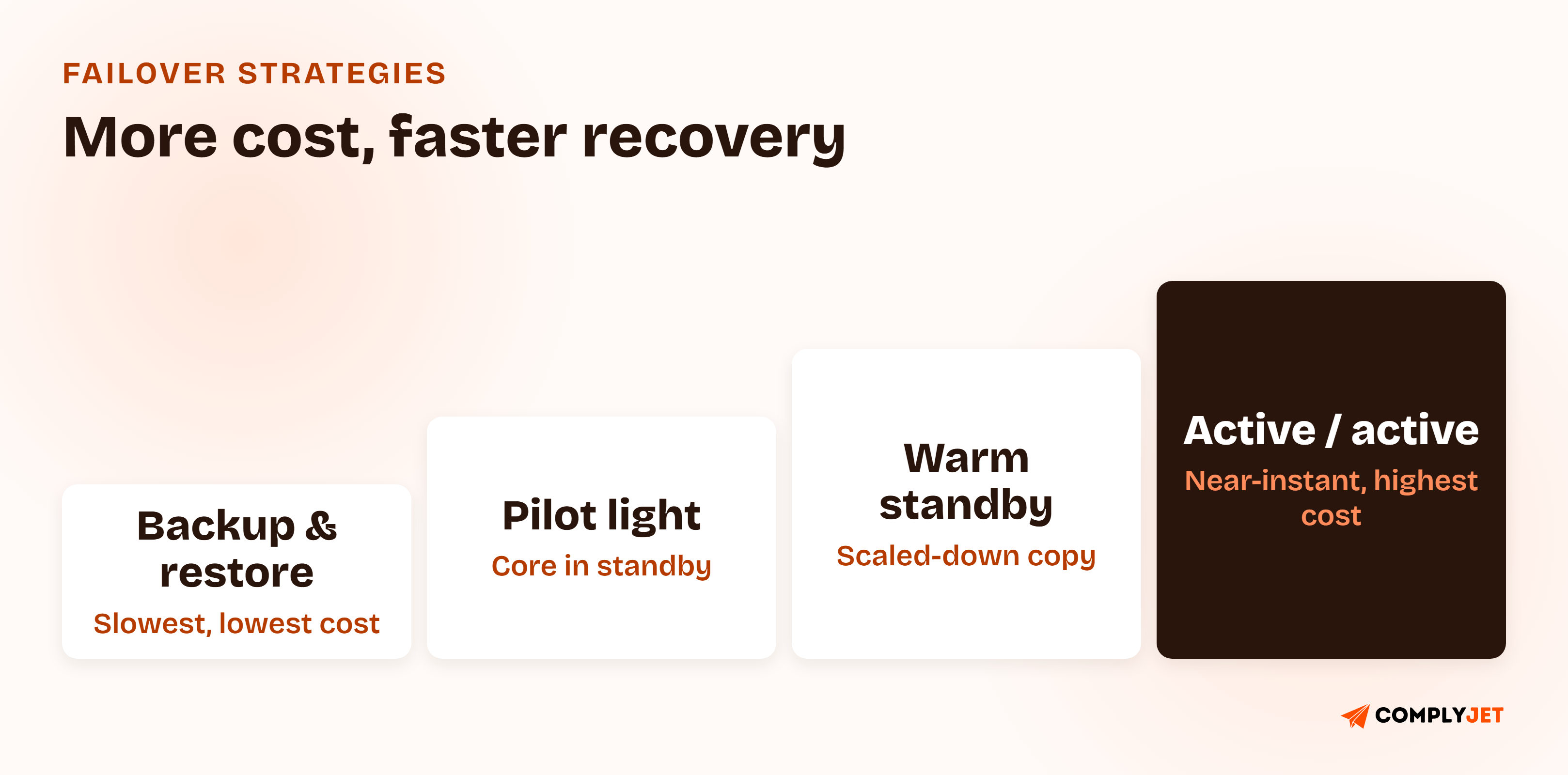
For most early-stage SaaS companies, the sensible mix is backup and restore for Tiers 3 and 4, and pilot light or warm standby for the one or two systems in Tier 1. Paying for active/active disaster recovery site failover across the board is rarely the smart choice at 30 people.
Customer Story
"ComplyJet was instrumental in helping us feel secure and prepared for our SOC 2 audit."
Chuck Feerick, CEO, Latitude Health
Once the strategy is chosen, the rest of the plan is the document that ties it together.
What to Include in a Disaster Recovery Plan Template
A complete disaster recovery plan template has nine core components. Here is what each covers and why it matters once systems are actually down.
| Section | What it covers | Why it matters during a disaster |
|---|---|---|
| Scope and system inventory | Every in-scope system, its owner, and its dependencies | You cannot restore what you never listed |
| Recovery tiers, RTO, and RPO | The table above, signed off by system owners | Sets the order and the pace of recovery |
| Failover strategy per tier | Which of the four strategies each tier uses | Turns a target into an actual mechanism |
| Roles and activation authority | Who declares a disaster, plus named backups | Removes the "who decides" delay |
| Declaration criteria | The concrete conditions that trigger the plan | Stops teams waiting for certainty that never arrives |
| Communication plan | Who tells staff, customers, and your status page, and when | Keeps technical responders out of drafting emails |
| Recovery runbook | Ordered, numbered steps with owners and verification checks | The part people actually follow |
| Backup and restore evidence | Locations, retention, and last successful restore test | The first thing an auditor asks to see |
| Testing and review triggers | Test types, cadence, and what forces an update | Keeps the plan from going stale |
Disaster Recovery Plan Steps: Declare, Fail Over, Verify, Fail Back
The runbook is where most templates go vague. Write it as a numbered list with an owner and a time box on each step, so no one has to interpret it while stressed.
- Assess and declare. The on-call engineer confirms the outage matches a declaration criterion and the activation authority formally declares a disaster. Log the time.
- Assemble the team. Notify the recovery team and their backups using the contact list, and open a dedicated incident channel.
- Communicate. The communications lead posts the first status update internally and to customers, then follows the update cadence in the plan.
- Fail over in tier order. Restore Tier 1 first, then Tier 2, and so on, following the strategy defined for each tier.
- Verify. Run the documented health checks: data integrity against the expected RPO, core user journeys, authentication, and integrations.
- Run in recovery mode. Monitor closely, and hold any risky deploys until the primary environment is healthy again.
- Fail back. When the primary is ready, move traffic back in a planned window, with data reconciled first.
- Review. Hold a post-recovery review within a set number of days and update the plan with what broke.
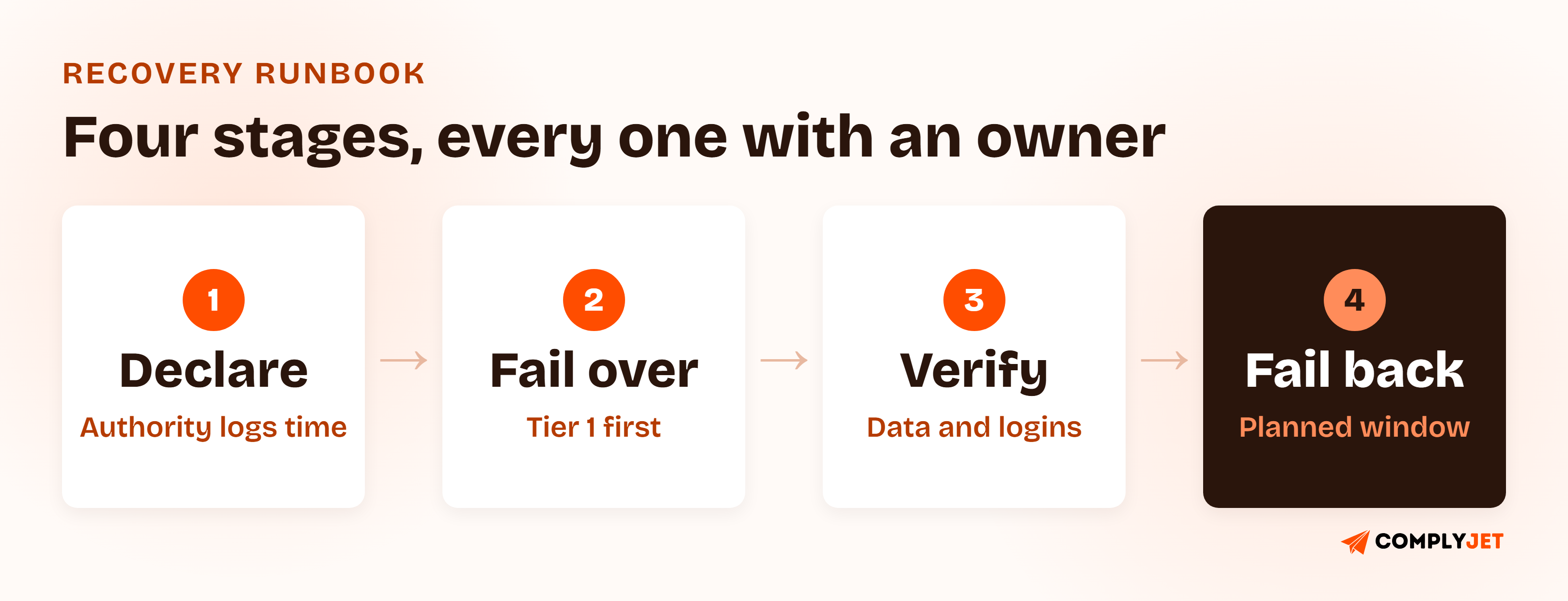
Of all the disaster recovery plan steps, step 8 is the one teams drop, and it is the one that makes the next recovery faster.
Action step
Keep a copy of the plan and the contact list somewhere that does not depend on the systems being recovered. A runbook stored only in the environment that just went down is not a runbook.
Disaster Recovery Plan for SOC 2, ISO 27001, HIPAA, and GDPR
Whichever framework you are pursuing, the plan has to show more than good intentions. A disaster recovery plan for SOC 2 is judged on whether recovery is designed and tested. The table maps each framework to the part of the plan it actually inspects.
| Framework | Where it lives | What it expects |
|---|---|---|
| SOC 2 | Availability category, criteria A1.2 and A1.3 | Backup processes and recovery infrastructure are in place (A1.2), and the entity tests its recovery plan procedures (A1.3). The Availability category applies when it is in your audit scope. |
| ISO 27001:2022 | Annex A 5.30 (ICT readiness for business continuity), with 8.13 (information backup) and 8.14 (redundancy) | ICT continuity is planned, implemented, maintained, and tested against business continuity objectives, with recovery times and recovery points defined for prioritized resources. |
| HIPAA | Security Rule, 45 CFR 164.308(a)(7), Contingency Plan | A data backup plan, a disaster recovery plan, and an emergency mode operation plan are required. Testing and revision procedures, and an applications and data criticality analysis, are addressable. |
| GDPR | Article 32(1)(c), Security of processing | The ability to restore availability of and access to personal data in a timely manner after a physical or technical incident. |
If you also want a formal reference model, NIST SP 800-34 Rev. 1, the Contingency Planning Guide for Federal Information Systems (May 2010), defines a seven-step contingency planning process that many auditors and enterprise reviewers recognize.
Teams treat disaster recovery as four separate paperwork exercises. It is one plan with one set of tested numbers, mapped once to whichever framework the next auditor cares about. Upendra Varma, CTO at ComplyJet
Disaster Recovery Plan Example: Sample Clauses and Free Download
Here is a disaster recovery plan example: two sample clauses from the template, written in full so you can see the level of detail an auditor expects.
Sample clause: Recovery Objectives
Every in-scope system is assigned to a recovery tier by its system owner. Tier 1 systems have a recovery time objective of [1 hour] and a recovery point objective of [5 minutes]. Tier assignments and objectives are reviewed annually and after any major architecture change. The most recent measured restore time for each Tier 1 system is recorded in the recovery register.
Sample clause: Declaring a Disaster
[Role, e.g. CTO] is the activation authority, with [named backup] as alternate. A disaster is declared when a Tier 1 system is expected to be unavailable for longer than [30 minutes] or when data loss beyond the stated recovery point is confirmed. The declaring party logs the time of declaration and notifies the recovery team within 15 minutes.
Free Template
Download the Free Disaster Recovery Plan Template (PDF)
All nine sections above, with a recovery-tier table, a failover strategy selector, the numbered runbook, a test log, and framework notes for SOC 2, ISO 27001, HIPAA, and GDPR.
Disaster Recovery Testing for Your Disaster Recovery Plan Template
An untested plan is a document, not a capability. SOC 2's A1.3 exists for exactly this reason: the criterion is that the entity tests recovery plan procedures, not that it has written them. Disaster recovery testing comes in three forms, and each catches a different kind of failure.
| Test type | What you do | What it catches | Suggested cadence |
|---|---|---|---|
| Tabletop walkthrough | Talk through a simulated disaster using the written plan, no live systems touched | Unclear roles, missing contacts, gaps in declaration criteria | At least annually, and after team changes |
| Backup restore test | Restore real data from backup into a clean environment and verify it | Corrupt or incomplete backups, stale credentials, undocumented steps | Quarterly for Tier 1, at least annually for the rest |
| Failover test | Move traffic or workloads to the secondary environment and back | Broken replication, capacity limits, DNS and config surprises | At least annually for Tier 1 systems |
The cadences above are our recommendation, not a number the frameworks prescribe. SOC 2 and ISO 27001 ask that you test and that testing is regular and evidenced, and you choose a cadence you can defend.
Whatever you run, capture the same four things: the date, the scenario, the measured recovery time against your RTO, and the fixes that came out of it. That record is what turns a test into audit evidence. A restore that took five hours against a one-hour target is a useful result if you log it and act on it.
Practitioners keep pointing at the same gap. In a March 2013 Hacker News comment, a commenter said they were shocked that some large financial institutions run "untested but expensive disaster recovery plans."
Not everyone sets the bar at full restores: a February 2017 Hacker News comment in a "Check Your Backups Work" Day thread says "an untested backup to the same disk is better than what most people have," while warning that recovering from a backup nobody has tested can cost far more in time and labor.
Common Disaster Recovery Plan Template Mistakes
- One RTO and RPO for the whole company. Everything becomes equally urgent, which means nothing is prioritized.
- Backups that have never been restored. A backup you cannot restore is a hope. Restore tests are the only proof.
- No named activation authority or backup. The plan stalls waiting for the one person who can say "go."
- Runbook steps that assume the original environment exists. If the steps depend on a tool that is itself down, they fail exactly when needed.
- Ignoring dependencies. The app comes back, but authentication, DNS, or a third-party API does not, so users still cannot log in.
- No fail-back plan. Teams plan the move to the secondary site and improvise the return, which is where data gets overwritten.
- Treating the plan as a one-time audit deliverable. Systems change every sprint, and a plan that describes last year's architecture is not a plan.
How ComplyJet Supports Your Disaster Recovery Plan Template
A written plan is the starting point. The harder part is proving it works: keeping the policy current, collecting restore-test evidence, and showing an auditor a clean trail. We help teams do that as part of a broader SOC 2, ISO 27001, HIPAA, or GDPR program, with AI-assisted policy drafting, 350+ integrations that pull evidence from your cloud and tooling, and a team that guides you through the process rather than leaving you alone with the software.
Compliance Automation
Turn your disaster recovery plan into audit-ready evidence
See how ComplyJet connects your policies, integrations, and test records across SOC 2, ISO 27001, HIPAA, and GDPR.
FAQs
What Is a Disaster Recovery Plan?
The documented procedure a team follows to restore IT systems and data after a major disruption such as an outage, data loss, or the loss of a data center or cloud region. It sets recovery targets, roles, and step-by-step recovery actions.
What Should Be in a Disaster Recovery Plan?
A system inventory, recovery tiers with an RTO and RPO for each, a failover strategy, named roles with backups, declaration criteria, a communication plan, a numbered runbook, backup and restore evidence, and a testing schedule. The "What to Include" table above covers each one.
What Is the Difference Between RTO and RPO?
RTO is how long a system can be down. RPO is how much data you can lose, measured in time. RTO drives your standby infrastructure, and RPO drives your backup or replication frequency.
What Are the Steps in a Disaster Recovery Plan?
Assess and declare, assemble the team, communicate, fail over in tier order, verify, run in recovery mode, fail back, and review. The runbook section above puts an owner and a time box on each.
Is a Disaster Recovery Plan Required for SOC 2?
If the Availability category is in your audit scope, yes in practice. Criterion A1.2 expects backup and recovery infrastructure, and A1.3 expects you to test recovery plan procedures. Enterprise customers often ask for the plan regardless of scope.
How Often Should a Disaster Recovery Plan Be Tested?
At least annually, and after major architecture or team changes. We suggest quarterly restore tests for your most critical systems. The frameworks require regular, evidenced testing without fixing a single interval.
What Is the Difference Between a Disaster Recovery Plan and a Business Continuity Plan?
In a disaster recovery plan vs business continuity plan comparison, the disaster recovery plan restores IT systems and data. A business continuity plan keeps the entire business operating, including people, processes, and customer communication. Our business continuity and disaster recovery plan guide covers the combined document.
Is There a Free Disaster Recovery Plan Template PDF?
Yes. This article includes a downloadable disaster recovery plan template PDF with a recovery-tier table, a failover strategy selector, the runbook, a test log, and framework notes for SOC 2, ISO 27001, HIPAA, and GDPR.
Related Reading
- Business Continuity and Disaster Recovery Plan, the combined business-wide guide, including business impact analysis.
- Backup and Recovery Policy, the rules for backup frequency, retention, and restore testing.
- Incident Response Plan Template, the runbook for security incidents.
- Incident Management Policy, the governance layer above incident response.
- ISO 22301 Guide, for teams pursuing a formal business continuity standard.
- Risk Management Policy, where the risks that drive your recovery tiers get assessed.
Sources: ITIC 2024 Hourly Cost of Downtime Survey; AWS, Disaster Recovery of Workloads on AWS: Disaster recovery options in the cloud; AICPA Trust Services Criteria, Availability A1.2 and A1.3; ISO/IEC 27001:2022, Annex A 5.30, 8.13, 8.14; 45 CFR 164.308(a)(7), HIPAA Security Rule Contingency Plan; GDPR Article 32; NIST SP 800-34 Rev. 1.