.svg)

As a compliance startup, we've seen companies fail their ISO 27001 audits not because they had weak firewalls or bad passwords. They failed because they couldn't answer a simple question: ‘What assets do you have?’
Imagine a SaaS company that had 47 cloud services running. Their IT team knew about 23. Finance was paying for 31. Security was monitoring 19. Nobody in the company had the complete picture.
This isn't rare.
Asset management is where most ISO 27001 implementations fall apart. Not because it's technically hard, but because ISO 27001 asset management is misunderstood as a checklist instead of a risk management practice.
If you're interested in personal guidance on how to implement ISO 27001 asset management, have a chat with the founders; they are experts in the security domain with over a decade of experience.
Let’s dive in to learn about ISO 27001 asset management.
TL;DR: ISO 27001 Asset Management (Founders Edition)
ISO 27001 asset management is not about counting hardware and inventory.
It is about being aware of the information assets, their owners, their location and the manner in which the risk is managed throughout the various stages of their life cycle.
The majority of audit failures occur because:
- Businesses do not have a full asset inventory
- Assets have no clear owner
- SaaS, cloud services, and access by contractors are overlooked
- There is a paper-based classification, but with no modification of controls
According to ISO 27001:2022, asset management entails:
- Continuously updated asset inventory
- Named owners for every asset
- Obvious classification based on handling, access and disposal
- Procedural return and decommissioning
- Risk-based risk review cycles
Unless you are certain about the answer to the question “What assets do we have and who is accountable,” your ISMS is exposed, no matter how good your technical controls may be.
What is ISO 27001 Asset Management?
ISO/IEC 27000 official definition of Asset is “Anything that has a value to the organisation.”
Although only the 2005 version mentioned it explicitly, the later editions(2013, 2018, 2022) followed the same standard definition.
It's about knowing what information assets you have, where they live, who's responsible for them, and what happens if they're compromised.
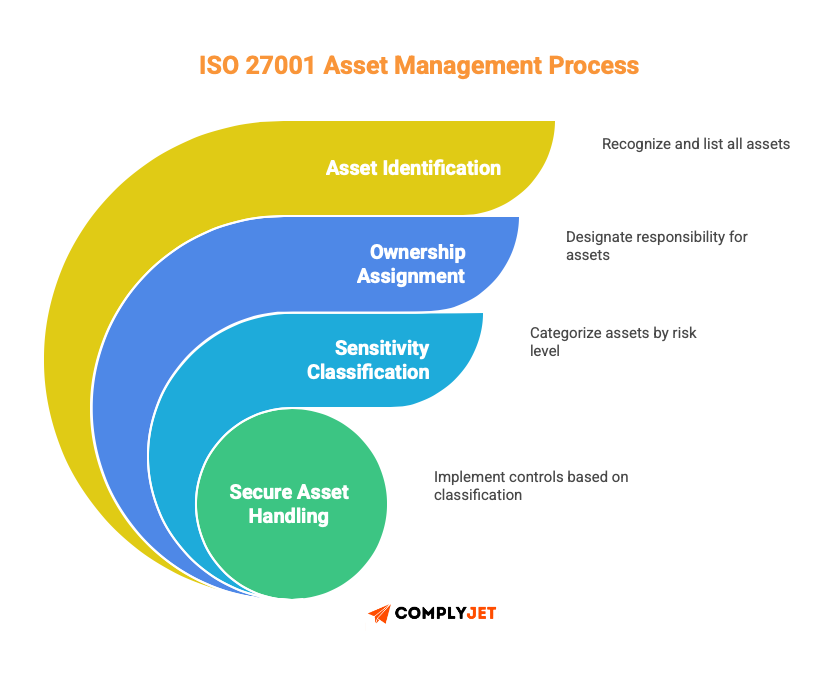
Think of it this way: You can't protect what you don't know exists.
ISO 27001 Asset management gives you three things:
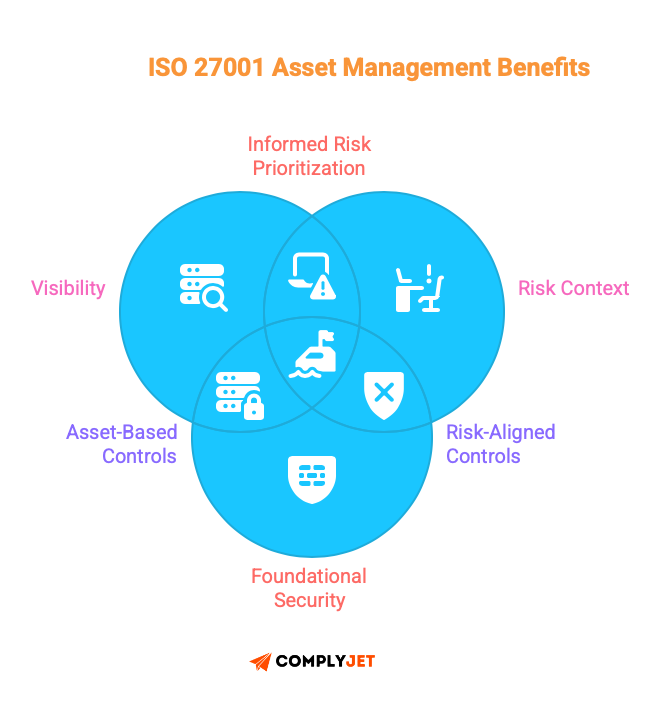
- Visibility into what needs protection
- Context for risk decisions (not all assets are equal)
- A foundation for every other security control
Without it, you're building security controls on quicksand. This isn’t unique to ISO 27001. Poor asset inventory is one of the most common root causes of audit findings in SOC 2, HIPAA, and HITRUST assessments as well.
What Are the Types of Assets?
ISO 27001 Asset Management breaks assets into categories that actually matter for security decisions.
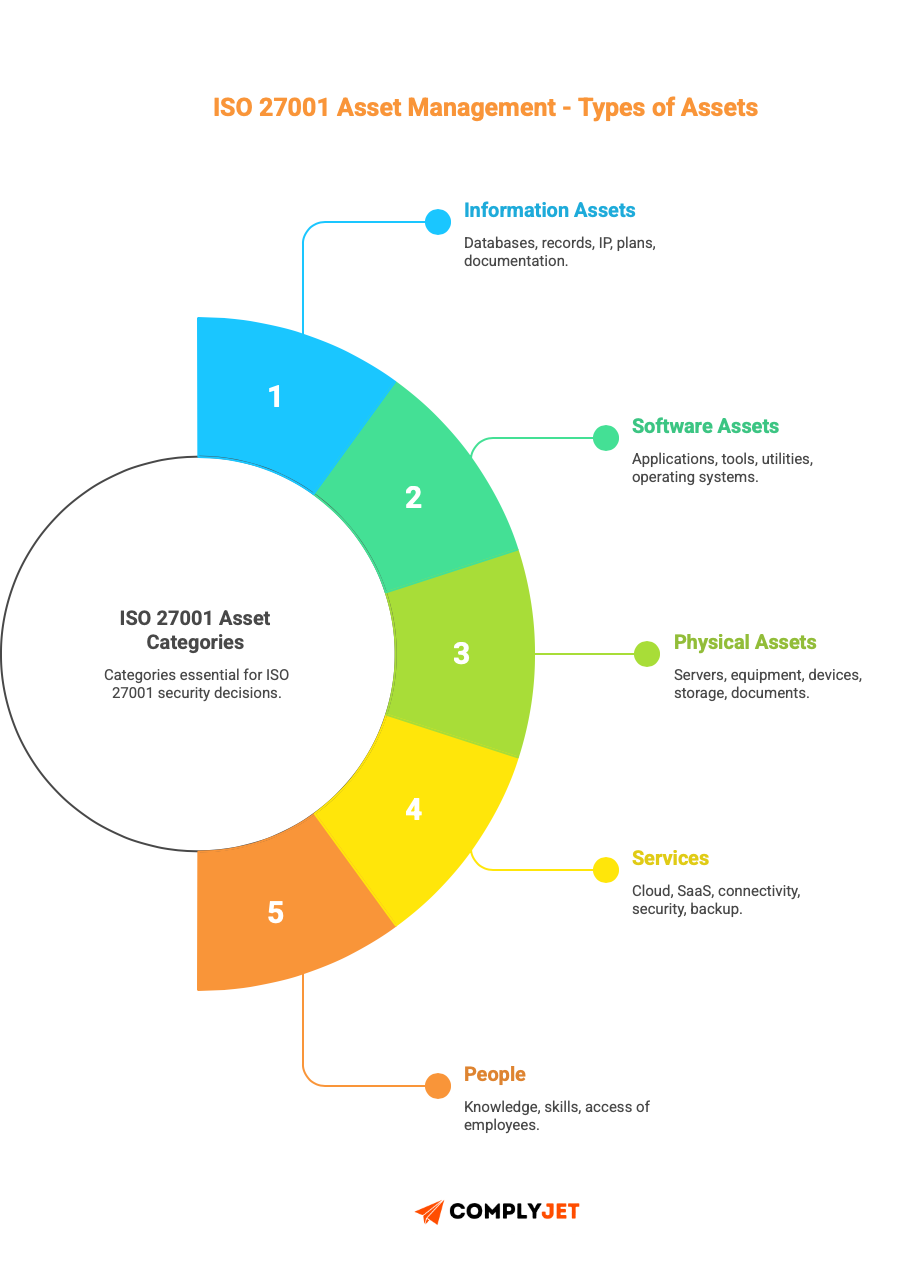
Information assets include databases, customer records, intellectual property, business plans, contracts, and system documentation.
Software assets cover everything that runs your company, applications (both commercial and custom-built), development tools, system utilities, and the operating systems running your infrastructure.
Physical assets go beyond data centres. It includes servers, networking equipment, laptops, mobile devices, storage media, and even paper documents if you still use them.
Services are often overlooked, but they’re critical: cloud hosting, SaaS applications, internet connectivity, managed security services, and backup services.
Employees count as assets too. The knowledge, skills, and access that specific employees have represent a security consideration.
Here's what most guides won't tell you: The real distinction isn't the asset type. It's information sensitivity.
A laptop is just hardware. But a laptop with unencrypted customer payment data?
That's a different conversation entirely.
A Slack workspace is just another SaaS tool until you realize your engineering team shares API keys and database credentials in private channels.
ISO 27001 Annex A Control List: Asset Management Controls Explained.
In this section, we’ll break down the ISO 27001 Annex A control list related to asset management across both the 2013 and 2022 editions.
The controls that were once categorised as Annex A.8: Asset management in the 2013 version underwent a major restructure, renumbered and moved to a different section in the 2022 version.
ISO 27001:2013 Annex A.8 Under Asset Management: A.8.1: Inventory of Assets, A.8.2: Information classification, A.8.3: Media Handling
ISO 27001:2022 Annex A.5 Under Organisational Controls: A.5.9: Inventory of Information and Other Assets, A.5.10: Acceptable use of Information Assets, A.5.11: Return of Assets
ISO 27001:2013 Annex A Control List A.8: Asset Management
The 2013 version organized asset management into three main control areas with 10 sub-controls.

A.8.1: Responsibility for Assets
This control set focuses on identifying assets and assigning clear ownership.
A.8.1.1 - Inventory of Assets
Objective: Identify organizational assets and create a maintained register.
Every information asset needs to be identified and documented in an asset inventory under ISO 27001.
Your asset inventory ISO 27001 should include:
- Information assets: Databases, files, contracts, policies, documentation.
- Application packages: Development software and operating systems.
- Hardware: Servers, laptops, network equipment, storage media.
- Services: Cloud computing, SaaS, managed service.
- People: Knowledge and capability resources.
Documentation must be made about each asset stating: asset name, description, owner, location, classification, and value to the organization.
Creating the Asset inventory ISO 27001 isn't a one-time project. Assets change daily. New servers get provisioned. New cloud services are purchased. Employees bring their own devices. Your inventory process needs to capture these continuously.
A.8.1.2 - Ownership of Assets
Objective: Assign an owner to every asset in your inventory.
Asset ownership means accountability. One person is responsible for that asset's security throughout its lifecycle, from creation through disposal.
The owner decides:
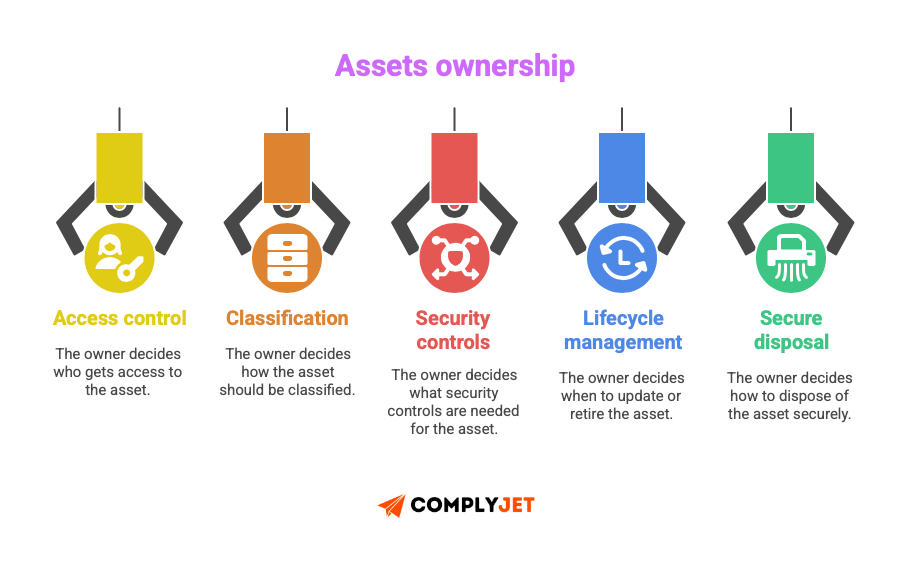
A common question to be asked is: “Who should take ownership of ISO 27001 asset management?”
Your CTO doesn't own every server just because they run the IT department. Ownership should match business function.
Customer Data Assets: Your Head of Customer Success or VP of Sales owns these. They will decide retention policies, access requirements, and acceptable uses.
Your database administrator maintains the database, but the higher stakeholders own the risk decisions.
Product/development assets: Your Head of Engineering or Product owns source code, development tools, and product documentation.
They decide who needs access and what security controls make sense without breaking development velocity.
Financial Assets: For an SMB CFO or Controller, financial systems, records, and reports. They determine who can view financial data and how long to retain it.
Infrastructure Assets: Here's where IT or Security owns it. Servers, networks, security tools-these are operational assets that IT manages and owns.
HR/employee Assets: Your Head of HR owns employee records, performance reviews, and personal information.
We’ve seen companies where Security owns every asset. Sounds logical - Security cares about protection, right? But Security doesn't know whether the sales team needs to retain customer emails for three years or seven.
They don't know which engineers need production access to troubleshoot customer issues. Business context matters.
The best model: Business owners for information assets, IT/Security owners for infrastructure assets.
Ownership can transfer during an asset's lifecycle, but someone must always be accountable.
A.8.1.3 - Acceptable Use of Assets
Objective: Define and document rules for the proper use of asset information.
An acceptable use policy tells employees what they can and cannot do with company assets.
The following are the rules that apply:
- Uses of company equipment permitted
- Forbidden activities (private business, illicit content, unauthorized software)
- Email and internet usage expectations
- Mobile device policies
- BYOD Rule & Policy Handbook
- Data Handling Requirements
- Penalties for an offence
The meaning is simple: a policy will succeed if it is simple, understandable, accessible to all people, and vigorously enforced.
A document that exists only on paper does not protect data."Don't do bad things" isn't sufficient. "Don't store customer data on personal devices, personal cloud storage, or removable media without IT approval and encryption" is specific.
A.8.1.4 - Return of Assets
Objective: Ensure all organizational assets are returned when employment, contract, or agreement ends.
When someone leaves your organization, they need to return everything:
- Laptops, mobile devices, tablets
- Security tokens, access cards, keys
- USB drives and other storage media
- Company documents (physical and electronic)
- Any company data on personal devices
This is a process that should be documented with a checklist. The individual leaving and their manager sign off that everything was returned.
What many companies overlook: Contractor access.
A contractor working on software development completed their project eight months ago. Yet they still have VPN access, GitHub repository access, and Slack workspace membership.
Their contract ended, but access to the organizational assets did not.
Document non-returns count as security incidents, unless there is a valid approved reason.
A.8.2: Information Classification
This ISO 27001 asset management core control ensures that information receives protection according to its value, sensitivity, significance, and legal requirements.
A.8.2.1 - Classification of Information
Objective: Categorize information to match the level of protection measures.
The majority of classification models are based on 3 or 4 levels of categorisation:
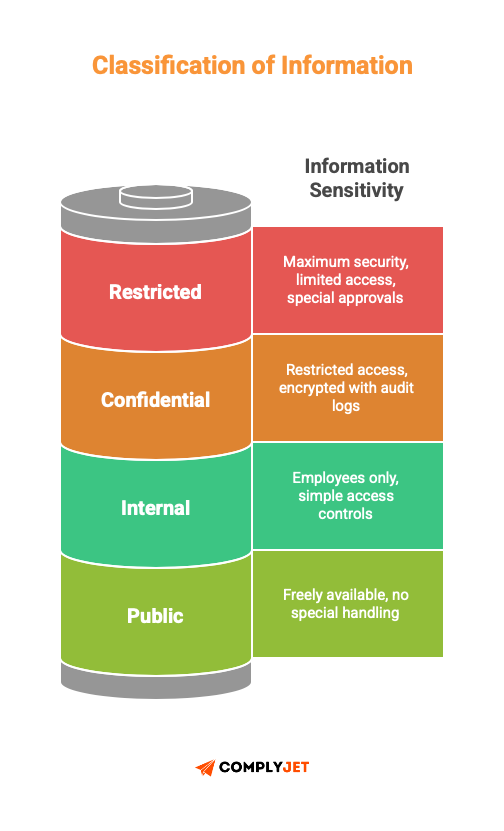
Public: The information can be taken by anybody. Advertisements, articles. Nothing special to handle.
Internal: Employees only. Intranet communications, project plans and unsensitive product information. Simple access controls are required.
Confidential: Business strategies, customer information, financial documentation, plans, code. Access to it should be highly restricted and encrypted with audit logs.
Restricted: Highly sensitive information. Payment card data, authentication credentials, and M&A documents. Maximum security controls, limited access, special approvals needed.
Classification drives everything else: who can access it, how it's stored, how it's transmitted, how long you keep it, and how you dispose of it.
A.8.2.2 - Labelling of Information
Objective: Label information according to the classification model.
After classification, information labelling is a crucial part of ISO 27001 asset management as it will:
- Easily recognizable
- Consistently applied
- Documented in procedures
- Accessible to all staff
Physical Documents: Classification level headers, footers, or watermarks. "CONFIDENTIAL" stamped across printed contracts.
Electronic information: Metadata tags, file naming conventions, and email subject line identifiers. Some organizations, by default, classify all CRM data as "Confidential" unless marked otherwise.
A.8.2.3 - Handling of Assets
Objective: Formulate an information asset handling procedure based on your classification.
Processing procedures are used to deal with the entire information lifecycle:
Processing: Who has the ability to create, edit, or destroy information on each classification level?
For example, a support agent will be able to update customer contact information (Confidential), but not the payment methods (Restricted).
Storing: Where do each of the classifications go?
- Public data can be anywhere.
- Only approved systems are encrypted with confidential data.
- Limited information can only be found in highly secured areas that are approved.
Communicating: How are each of the classifications to be transmitted?
- Public data via any method.
- Confidential data only through encrypted channels.
- Restricted data requires end-to-end encryption plus recipient verification.
Destruction: How is each classification disposed of?
- Public data can go into recycling.
- Confidential data needs secure deletion or cross-cut shredding.
- Restricted data requires cryptographic erasure or physical destruction with certificates.
A.8.3: Media Handling
This control prevents unauthorized disclosure, modification, removal, or destruction of information in the media.
A.8.3.1 - Management of Removable Media
Objective: Implement procedures for removable media according to the classification model.
Removable media includes USB drives, external hard drives, CDs, DVDs, backup tapes, and anything that stores data and can be physically removed.
Procedures should cover:
- Authorization requirements
- Registration of all removable media
- Restrictions on what can be stored on removable media
- Encryption requirements for sensitive data
- Scanning for malware before and after use
- Secure storage when not in use
- Logging of media use and movement
A.8.3.2 - Disposal of Media
Objective: When it is not necessary, safely dispose of the media.
Media disposal is also important so as to avoid illegal access to information.
In the cases of electronic media such as hard drives, SSDs, and USB drives:
Confidential data: Secure wiping techniques should be used, utilizing NIST 800-88 standards, with a minimum of 3-pass overwrite.
Limited information: Use physical forms of destruction like shredding or crushing.
In the case of physical media such as paper documents and printouts:
Confidential information: Cross-cut shredding.
Limited information: Take into account crushing or burning.
Record all the disposal incidents: What was disposed of, when it was disposed of, who did it, and how. Also, remember to retain disposal certificates where services of a third party were used.
A.8.3.3 - Physical Media Transfer Objective:
Make sure that the media is safeguarded during transportation.
It is important to ensure that media transporting sensitive data, such as backup tapes to off-site locations, laptops to distant offices or documents delivered through courier, is safe.
Here are the requirements:
- Reliable couriers that are bonded and vetted should be used.
- Use protective packaging to prevent physical damage.
- Make use of tamper-evident seals.
- Record transfers with content sent, time sent, recipient of same, destination, and courier.
- Keep records of the chain of custody.
- Encrypt electronic media of data of a Confidential or Restricted nature.
ISO 27001:2022 Annex A Control list A.5: Asset Management
The 2022 version consolidated and reorganized asset management under “Organisational Controls” (A.5). The three main controls are simpler in structure but expanded in scope.
A.5.9: Inventory of Information and Other Associated Assets
Objective: Create and maintain an inventory of information and associated assets.
This consolidates what used to be A.8.1.1 and A.8.1.2 in the 2013 version.
The asset inventory must include:
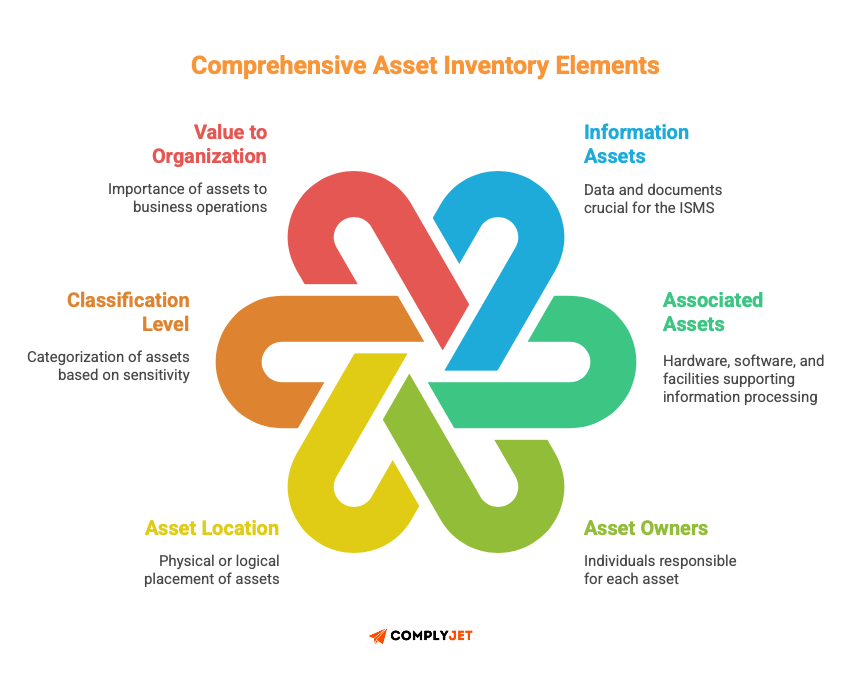
- All information assets relevant to the ISMS
- Associated assets (hardware, software, facilities that process or store information)
- Asset owners assigned to each item
- Asset location (physical or logical)
- Classification level
- Value to the organization
Annex A.5.9 is not a traditional method of basic counting of the asset inventory of your company. It is an internal standard for an Information Security Management System(ISMS) by ISO/IEC.
Key expansion from 2013: The 2022 version prescribes more detailed documentation for each asset:
- Clearly identified ownership, not just "IT Department", but names of specific individuals
- Location specified: Which data centre, which cloud region, which office
- Asset value record: Replacement cost, business impact if compromised
- Level of sensitivity: Directly related to risk assessment
Key addition: The inventory should be updated periodically. The 2013 version stated that it needed to be kept up, but provided no specific timeframes for this.
The 2022 version emphasizes continuous updating during asset change, new acquisitions, disposals, or status changes.
A.5.10: Acceptable Use of Information and Other Associated Assets
Objective: Identify, document, and implement rules for acceptable use of information and assets.
This combines and expands A.8.1.3 (Acceptable Use) and A.8.2.3 (Handling of Assets) from the 2013 version.
The acceptable use rules must cover:
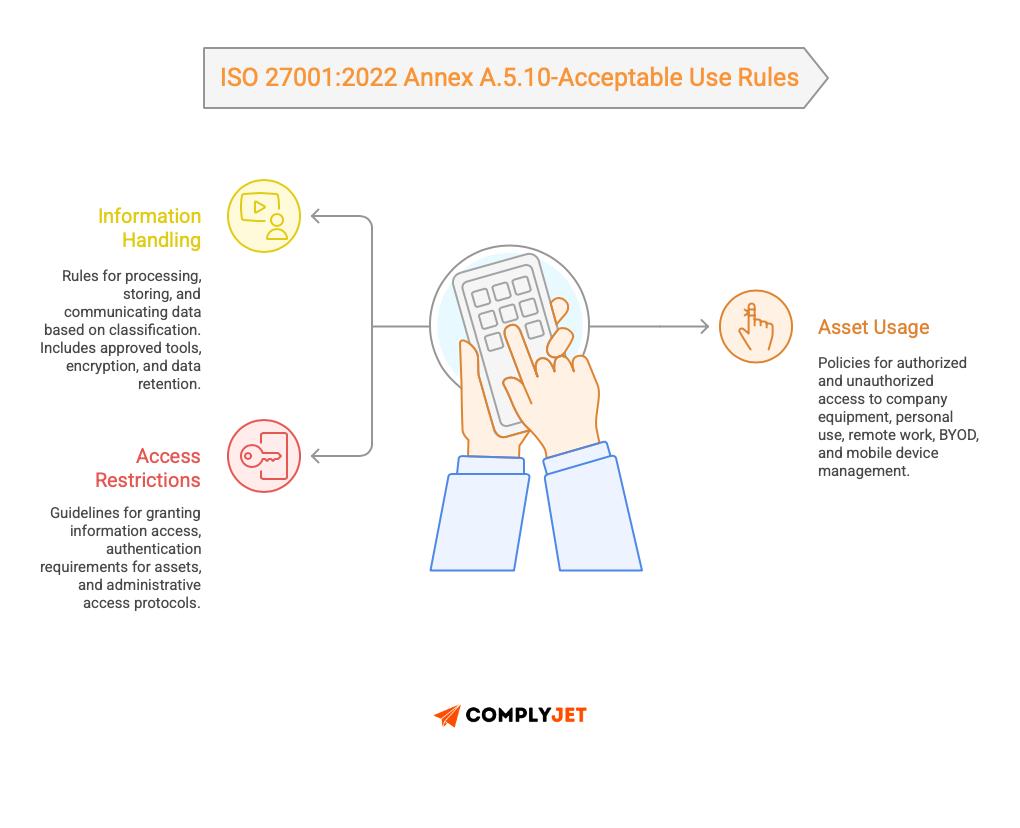
Information handling:
- How different classifications can be processed, stored, and communicated
- Which tools and systems are approved for each classification
- Encryption requirements for data at rest and in transit
- Data retention and deletion requirements
Asset usage:
- Authorized and unauthorized access to the company equipment.
- Personal use (if permitted) policies.
- Requirements of remote work equipment.
- Rules and restrictions of BYOD.
- Mobile device management (MDM) requirements.
Access restrictions:
- To whom can you give the information you need?
- Requirements for the authentication of various assets.
- Administrative access.
Key addition in 2022: Greater attention to remote work and the cloud environment. The 2013 edition was authored when remote work and cloud computing were not common.
The 2022 update acknowledges the fact that assets have been updated to incorporate SaaS applications, cloud storage services, personal devices used to work, and collaboration tools.
Regular review requirement: The 2022 version needs regular review of acceptable use policies to allow them to be kept up-to-date as technology, business needs, and threats change.
A.5.11: Return of Assets
Objective: Ensure all assets are returned upon termination of employment, contract, or agreement.
This is essentially A.8.1.4 from the 2013 version, but with significantly more specific guidance on what must be returned.
The 2022 version explicitly lists asset types that must be returned:
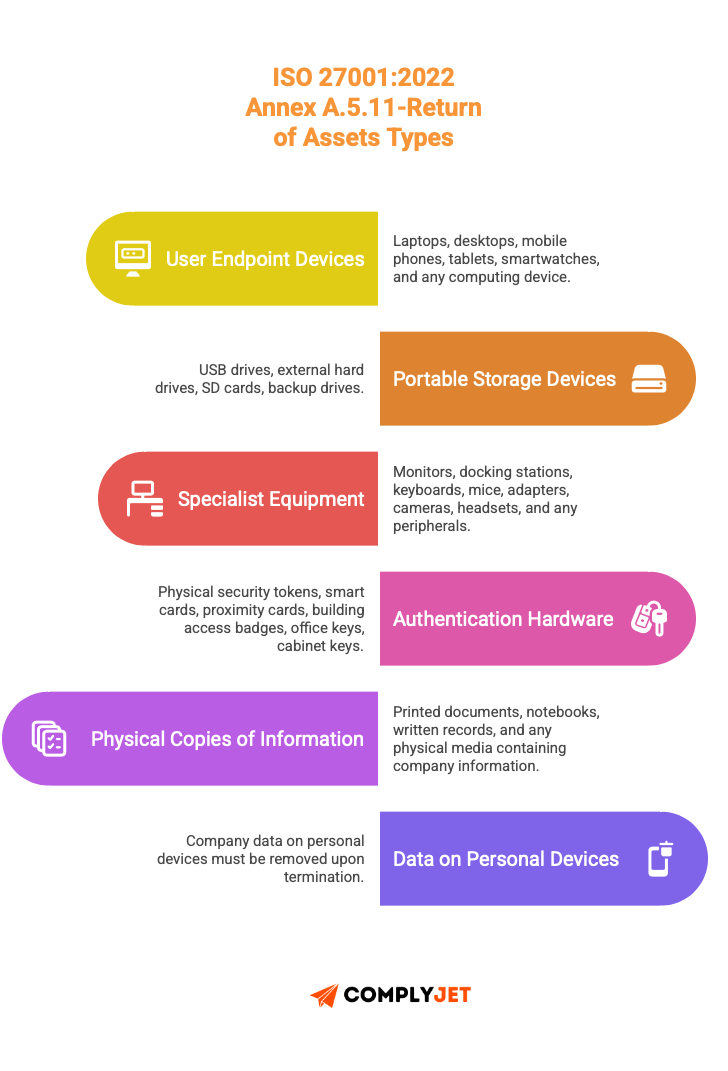
Documented process requirement:
The organizations need to have a formal, written process of returning, which contains:
- List of everything to be returned on the checklist.
- Confirmation of the receipt of every item.
- Both the departing and the receiver have a signature.
- Debriefing of inventory to include the disposed assets off the register.
- Non-returned items incident reporting process.
Combination with other controls:
A.5.11 explicitly references:
- A.6.5 (Responsibilities after termination): HR must coordinate asset return as part of offboarding
- A.6.6 (Confidentiality agreements): Return obligations must be included in employment agreements
- A.5.20 (Addressing information security in supplier agreements): Asset return applies to vendors and contractors, too
What happens with non-returns?
If an asset isn’t returned, it must be:
- Documented as a security incident
- Investigated for potential data compromise
- Remote wiped if it has remote management capability
- Access credentials changed if the asset could access other systems
- Reported to management and potentially law enforcement if high value
What This ISO 27001:2022 Asset Management Means for Your Organization
If you’re certified to ISO 27001:2013, you have until October 31, 2025, to transition to ISO 27001:2022. Otherwise, your certification becomes invalid.
Key transition steps:
- Map your existing A.8 controls to the new structure
- Your A.8.1.1 and A.8.1.2 documentation becomes A.5.9
- Your A.8.1.3 and A.8.2.3 documentation becomes A.5.10
- Your A.8.1.4 documentation becomes A.5.11
- Your A.8.2.1 and A.8.2.2 get renumbered to A.5.12 and A.5.13
- Your A.8.3 controls move to A.7 (Physical Controls)
- Improve your asset inventory documentation
- Include the names of the owners (not only departments)
- Document asset locations
- Record asset values
- Connect every asset and corresponding risks
- Introduce a quarterly review procedure
- Revise your policy on acceptable use
- Add cloud services guidance
- Add remote work specifications
- Cover personal device usage
- Setting rules for SaaS applications
- Solve the collaboration platform security
- Increase your checklist of return of assets
- Record all particular forms of assets as per A.5.11.
- Incorporate the personal device information deletion
- Add signature requirements
- Connection to the incident reporting process
- Revise your Statement of Applicability
- Renumber all controls to the 2022 structure
- Add justification for the 11 new controls
- Review applicability decisions based on new control descriptions
The substance of what you need to do hasn’t changed dramatically. The structure is cleaner, the requirements are more specific, and modern technology is explicitly addressed.
If your asset management was solid under 2013, updating to 2022 is primarily a documentation and process refinement exercise.
How to Build an Asset Inventory for ISO 27001.
An Asset Inventory under ISO 27001 is not a static list; it scales with your systems and assets.
Start with a small list. Attempt not to list everything now. Build the inventory gradually.
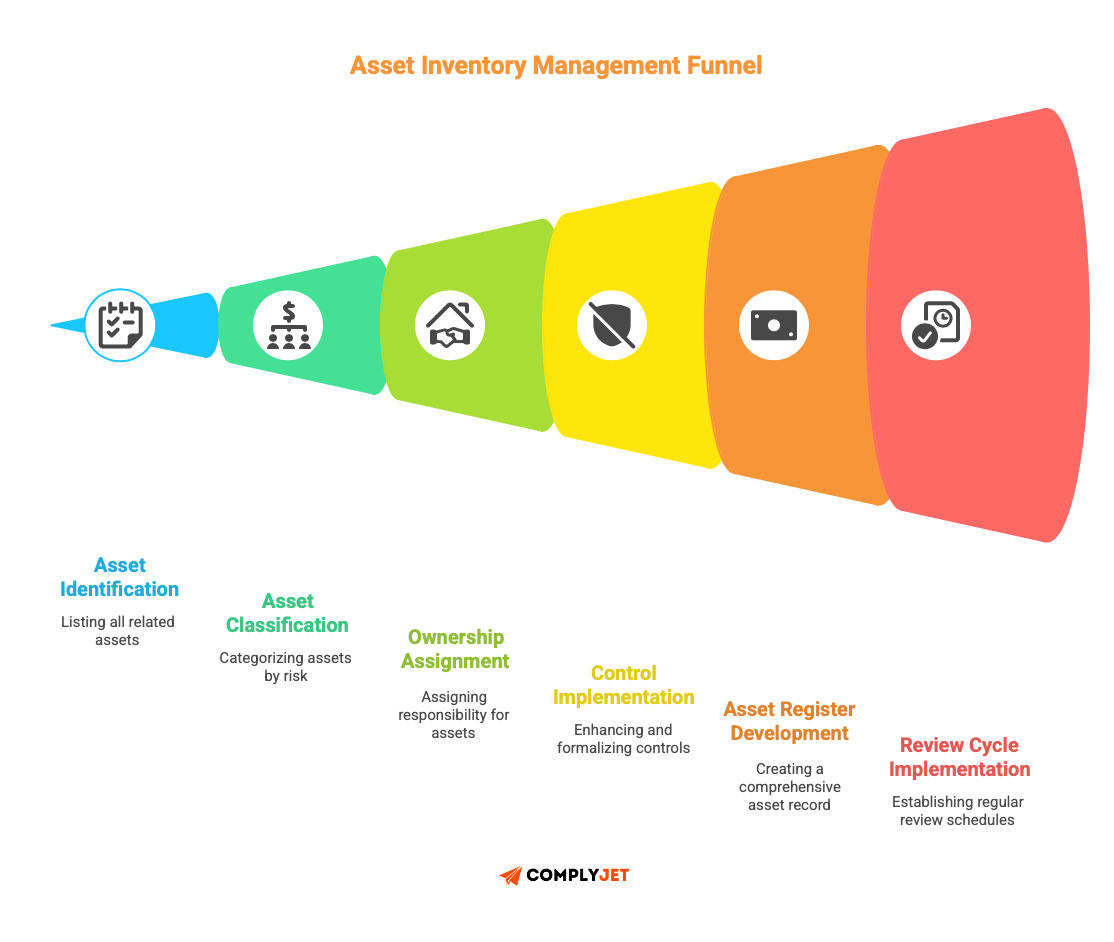
Step 1: Select a system of critical importance.
Select a high-impact but confined system-production database, core SaaS application, or customer data warehouse, where value is apparent in a brief time.
Step 2: Determine all the related assets.
Report all the things that are in favour of the system: databases, servers, backups, credentials, configs, documentation, logs, and monitoring tools. Increased assets than assumed.
Step 3: Classify each asset
Use your categorization scheme. In case of doubt, it should be classified as Restricted. Adjust later if needed.
Step 4: Assign ownership
Appoint a certain owner. They are responsible for access, retention, patching decisions, and not day-to-day operations (to decommission).
Step 5: Document handling requirements.
Specify controls by category (e.g, encryption, logging, access reviews). Keep it concise.
Step 6: Implement controls
Enhance and formalize the necessary controls. Most may already exist.
Step 7: Develop the asset register.
Name of asset record, description, classification, owner, location, related systems, controls and most recent time of review.
Step 8: Implementing review cycles.
Review of high-risk assets every quarter; rest once per year.
Step 9: Expand to other systems
Work through the process system by system. Don’t rush coverage.
Automate the asset management, and see the controls working in real-time here. Explore ComplyJet at your own pace. You can see what a living asset inventory looks like; no commitment, no sales pressure.
Common Pitfalls in ISO 27001 Asset Management
Treating asset management as a one-time project
You create an asset inventory, check the box, and move on. Six months later, it's completely outdated.
ISO 27001 asset management is continuous. New assets get created daily in most tech companies. Developers spin up test environments. Marketing subscribes to new tools. Sales starts using a new CRM add-on.
Set up a process where asset creation requires registration. Use automation where possible: cloud asset discovery tools, network scanners, and SaaS management platforms. But don’t rely solely on automation. Some assets won’t be discovered automatically.
Monthly spot checks help. Compare your asset register with the contents of your cloud bills. Review your DNS records. Annual check against the authentication logs of unknown services.
Creating Classifications Nobody Understands
Some companies implement a seven-level or higher information classification scheme. Where nobody reads it, as it lacks fundamental clarity and engagement. The assets are categorized randomly since people will not know the criteria.
Keep classifications simple. Use clear examples. “Confidential means data we’d be required to report if it were breached-customer PII, payment information, health records.” That's understandable.
Train people on classification when they join. Make it part of onboarding. Repeat it in quarterly refreshers.
No clear ownership
Assets assigned to “IT” or “Engineering” have no real owner. When something needs to make a decision, who does it?
Each asset must have a name appended to it. Yes, this takes more work at the beginning. Yes, people will push back. Do it anyway.
The assets become orphaned when no one owns them. Nobody maintains them. Nobody reviews access. No one ever decommissioned them after they were no longer required.
You are left with the ghost infrastructure, which will be a security liability.
Classification without controls
You classify everything beautifully. Restricted, Confidential, Internal, Public - all perfectly labelled. But you don’t actually enforce different controls based on classification.
Classification is worthless if it doesn’t change how you handle assets.
Map each classification level to specific, measurable controls. Document them. Enforce them. Audit them for ISO 27001 certification.
Ignoring SaaS and cloud
Imagine your asset register has every laptop, every server, every database. But it’s missing the 40 SaaS applications your teams use daily.
- That Slack workspace contains restricted information.
- Google Drive has confidential customer contracts.
- That Notion database stores internal product plans.
- Those GitHub repos contain your entire codebase.
SaaS assets need the same classification, ownership, and controls as on-premise assets. Often, they need more scrutiny because you have less control over security.
ISO 27001 Asset Management with ComplyJet: Turn Audit Headache into Risk Control
Most traditional platforms treat ISO 27001 asset management as a compliance checklist: list assets, assign owners, pass the audit.
ComplyJet takes a different approach. What makes it unique is how it turns asset inventory into a living risk-control system, not a static spreadsheet.
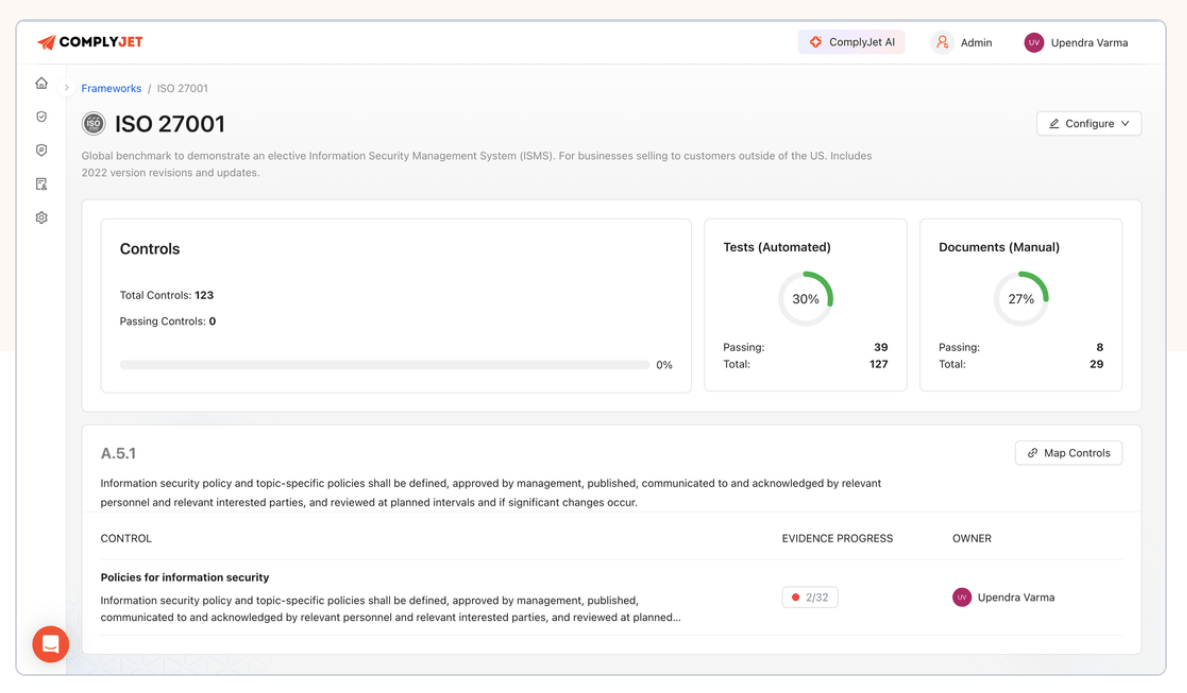
Assets are directly mapped to ISO 27001:2022 controls, risk levels, owners, and review cycles. This means every asset exists for a reason, and every control is traceable.
The same asset inventory structure also supports SOC 2 and HITRUST readiness, reducing duplicate documentation across audits.
Beginning with critical systems and extending. This is reflective of the functioning of real organizations, and this is reflective of the manner in which auditors actually evaluate maturity.
- Ownership is explicit
- classifications are evoked.
- Managing requirements is embedded in workflows, not in documentation.
The actual benefit gets realized in the long run. As systems evolve, people get left behind, or access is increased, ComplyJet notifies gaps before they serve as an audit finding or security breach.
Quarterly reviews, access checks, and control validations are part of the process, not an afterthought.
With ComplyJet, asset management stops being a one-time inventory task and becomes a strategic layer of your ISMS; one that reduces risk, shortens audits, and strengthens day-to-day security decisions.
FAQs
Do I need to track every single asset in my organization?
No. ISO 27001 requires you to identify and track assets that are relevant to information security. A random desk chair isn't an information asset. Focus on anything that stores, processes, or transmits information.
That said, if your company is small (under 100 people), tracking everything isn't much harder than tracking some things. The marginal cost is low, and you avoid arguments about what counts.
How often should I review my asset inventory?
- High-risk assets (Confidential and Restricted) should be reviewed quarterly.
- Medium-risk assets (Internal) can be reviewed semi-annually.
- Low-risk assets (Public) can be reviewed annually.
But you should update the register in real-time when assets are created or disposed of. Reviews are for catching drift, not for initial documentation.
Can I use automated discovery tools instead of manual inventory?
Use both. Automated tools are excellent for discovering infrastructure, cloud resources, and network-connected devices. They’ll catch things you missed.
But they won’t capture everything. They won’t classify assets. They won’t assign ownership. They won’t tell you what data lives where.
Automation handles the “what exists” question. Humans handle the “who owns it and how should we protect it” questions.
What if an asset has multiple classifications?
A database might contain Public marketing data and Restricted customer payment data. In this case, classify the asset at the highest level. The entire database is restricted.
This can be unintuitive - you’re applying Restricted controls to Public data. But it’s safer and simpler than trying to implement different controls for different data within the same system.
Better approach: Separate assets by classification. Put Public and Restricted data in different databases if possible.
How detailed should asset descriptions be?
Detailed enough to be useful, concise enough to maintain.
“Database” is too vague.
For example, “Customer Database - Production - PostgreSQL 14.2 - Contains customer PII, purchase history, and payment methods - Hosted on AWS RDS in us-east-1” is useful.
You need enough detail that someone unfamiliar with the asset can understand what it is, where it lives, and what it contains.
Conclusion
ISO 27001 Asset management isn’t glamorous. It’s not the exciting part of security. It is a general fact that mostly nobody gets promoted for maintaining an asset inventory.
But it’s fundamental. Every other security control depends on it.
Start small. Pick one critical system. Document it thoroughly. Assign ownership. Implement controls. Then expand.
In six months, you’ll have visibility into your most important assets and a process for managing new ones. In a year, you’ll have a complete asset management program that supports your ISO 27001 certification and actually improves your security posture.
The goal isn’t perfection. The goal is knowing what you have, who’s responsible for it, and what happens if it’s compromised.
Start a free trial and see what a living asset inventory feels like in practice!