.svg)

If you're searching for a Vanta review, you’re likely already exploring SOC 2 or HIPAA compliance. You’ve seen the name, read the promises, maybe even signed up for a demo. But is Vanta the right fit for your team in 2025?
Let’s cut through the usual sales talk.
This blog breaks down Vanta’s real strengths and its weak spots, based on hundreds of reviews from G2, Reddit, Capterra, and Gartner Peer Insights. We also include insights from actual users who went through audits, renewals, and in some cases, Vanta’s 2025 security incident.
If you're a startup founder, security lead, or procurement manager evaluating whether Vanta is worth the cost, how its features perform in real workflows, and where the Vanta pricing model can add hidden costs, this review covers everything you need to know.
Why trust this Vanta Review?
We’re a compliance automation platform ourselves. We’ve helped startups switch to and from Vanta. So, this isn’t a surface-level take. It’s based on real user journeys, audit outcomes, contract traps, and product usage data from 2024–2025.
So, let’s start by understanding what Vanta really does and what makes it stand out in the crowded GRC (Governance, Risk, and Compliance) software space.
What is Vanta Known for?
Vanta is one of the most recognised names in compliance automation. If your team needs to meet SOC 2, HIPAA, ISO 27001, or GDPR standards, Vanta connects to your tools and helps you prove you're secure.
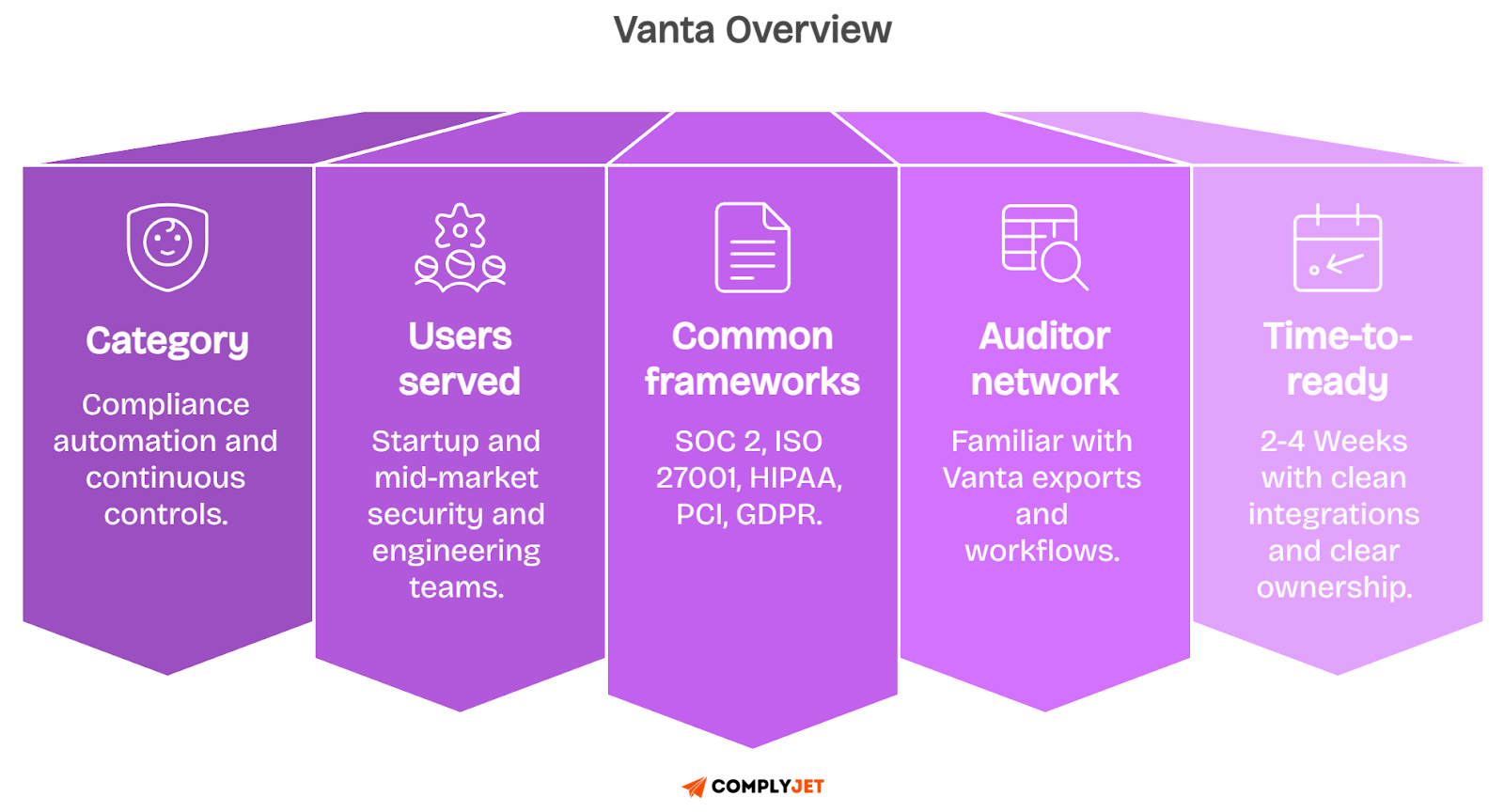
Here’s how it works: Vanta links with your cloud accounts, devices, and identity systems like AWS, Google Workspace, GitHub, and Okta. It watches for risks in real time, collects audit-ready proof, and keeps your security controls active and visible.
It also gives you a Trust Center, a public webpage showing your certifications, policies, and system uptime. Buyers and prospects can view your security posture without endless back-and-forth emails.
Quick Vanta Backstory
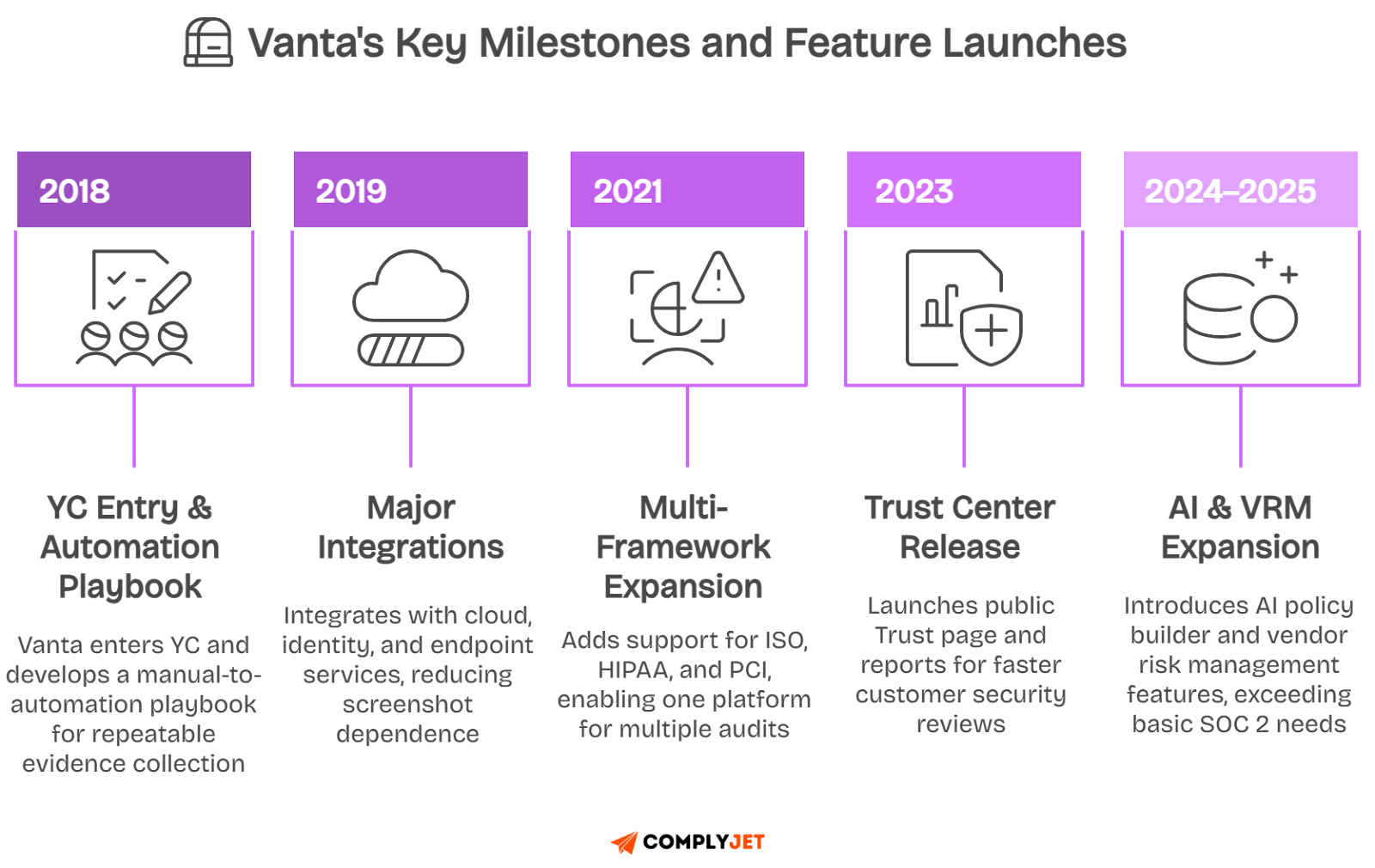
Vanta was founded in 2018 and quickly joined Y Combinator, a well-known startup accelerator. Many early-stage startups needed SOC 2 compliance, so Vanta built integrations and templates to speed up audits.
By 2022, Vanta expanded into vendor risk management by acquiring Trustpage. In 2023, it crossed the $1.6 billion valuation mark after major funding from Craft Ventures and Sequoia Capital.
In 2025, Vanta faced a security breach that affected a small set of customers. We’ll explain that incident in detail later in this review, including how Vanta responded and what controls were added since.
Who Uses Vanta?
Today, Vanta supports over 5,000 businesses that are mostly startups and mid-sized SaaS companies that need to sell to regulated industries like healthcare, fintech, and enterprise software.
In real user reviews across G2, Reddit, and Gartner Peer Insights, the top reasons companies pick Vanta are:
- Faster audit prep, especially for first-time SOC 2 teams
- Cleaner evidence exports that auditors already recognise
- Strong integrations with popular tools like AWS and Okta
- Less manual work thanks to automation and policy templates
But as you’ll see in this Vanta review, the platform comes with pricing traps, usage caps, and support trade-offs. Especially during renewals or growth phases.
Now, we’ll unpack Vanta’s core features, which are the tools teams use daily to stay compliant, shorten security reviews, and avoid last-minute audit panic.
Core features of Vanta that Buyers Actually Rely on
If you're looking for a simple and clear Vanta Review, start with the features most users depend on.
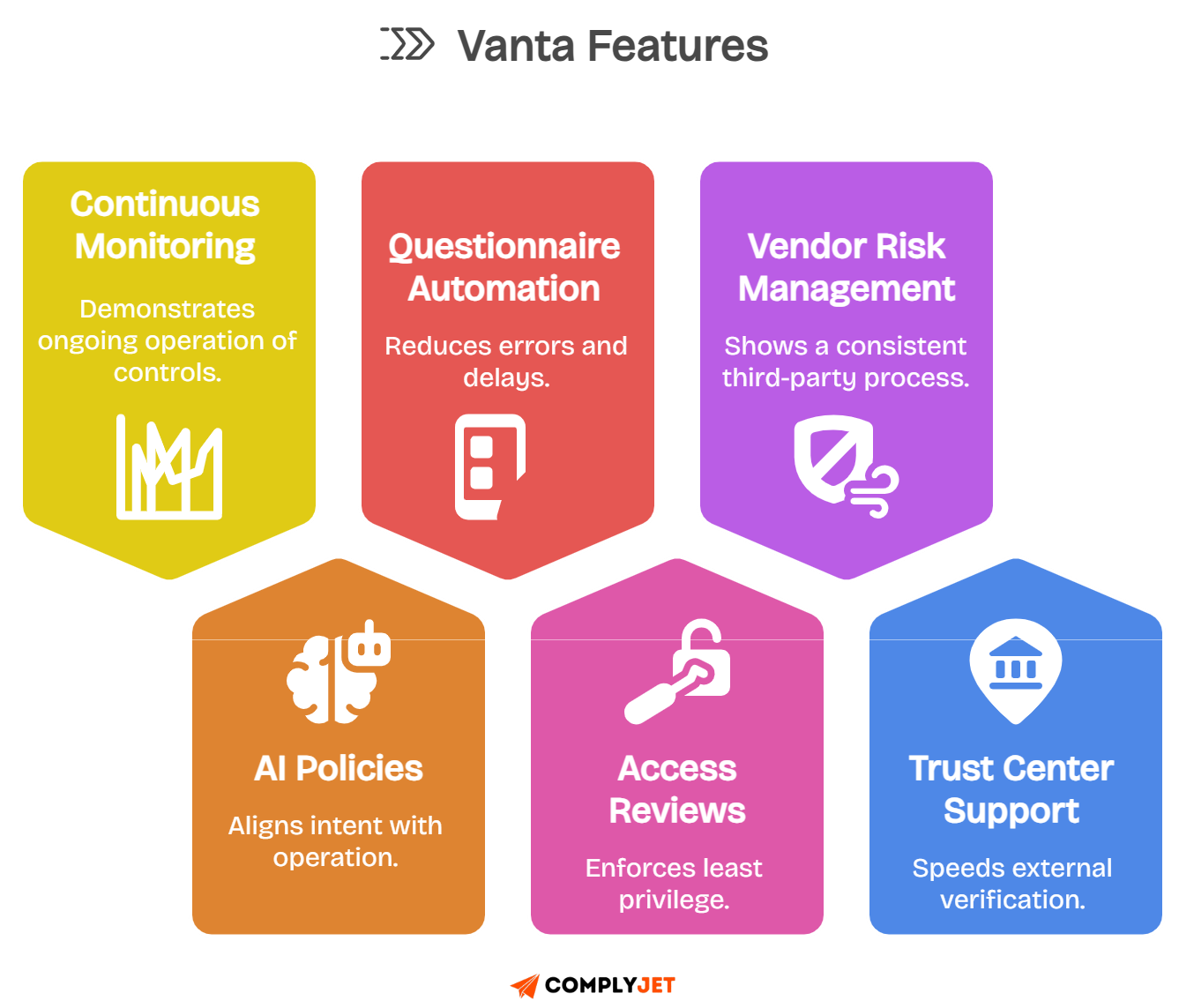
Vanta says it's a full compliance automation tool, but in real workflows, teams rely on just a few core tools. These tools help monitor systems, create policies, and prepare for audits. They save time, protect customer data, and speed up sales.
1. Continuous monitoring and automated evidence collection
Vanta’s best-known feature is its live continuous monitoring. It connects to cloud tools like AWS, Okta, and GitHub.
Every day, it checks if security settings are correct. If something looks off, like an unlocked device or risky access, Vanta sends alerts right away.
A fintech team shared that Vanta cut their audit prep time in half. That’s because the system collects and stores proof automatically, with clear dates and logs. Auditors can trust the data without asking for screenshots.
Still, users on G2 and Reddit warn that sync issues can happen, especially with complex setups, as highlighted by this verified user on G2 reviews.
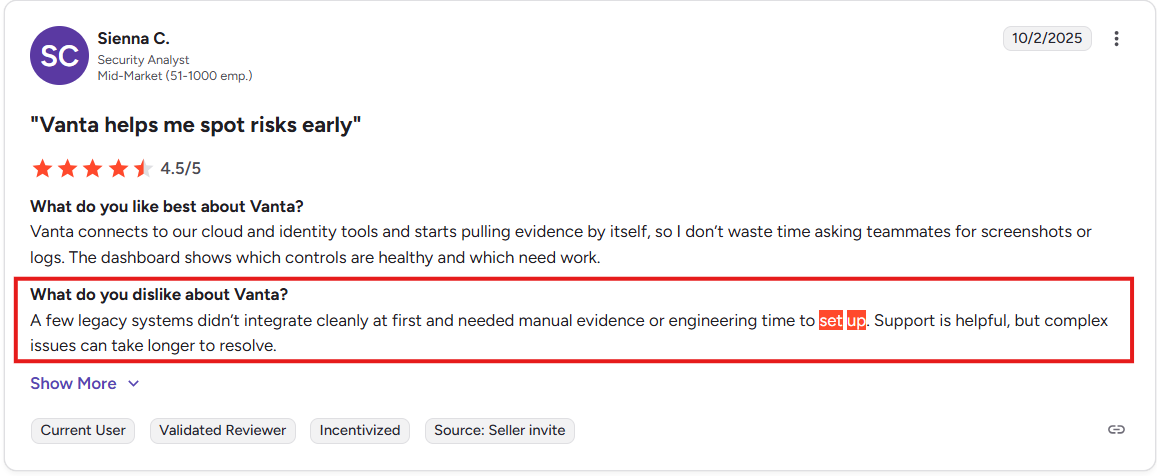
Doing manual checks before the audit helps avoid last-minute problems.
2. AI policy builder and control mapping
Writing compliance policies can be boring and hard. Vanta’s AI gives you ready-made templates for frameworks like SOC 2, HIPAA, and ISO 27001.
You pick the one you need, tweak the text, and it links each policy to a control. That way, auditors can easily see how your rules match your actions.
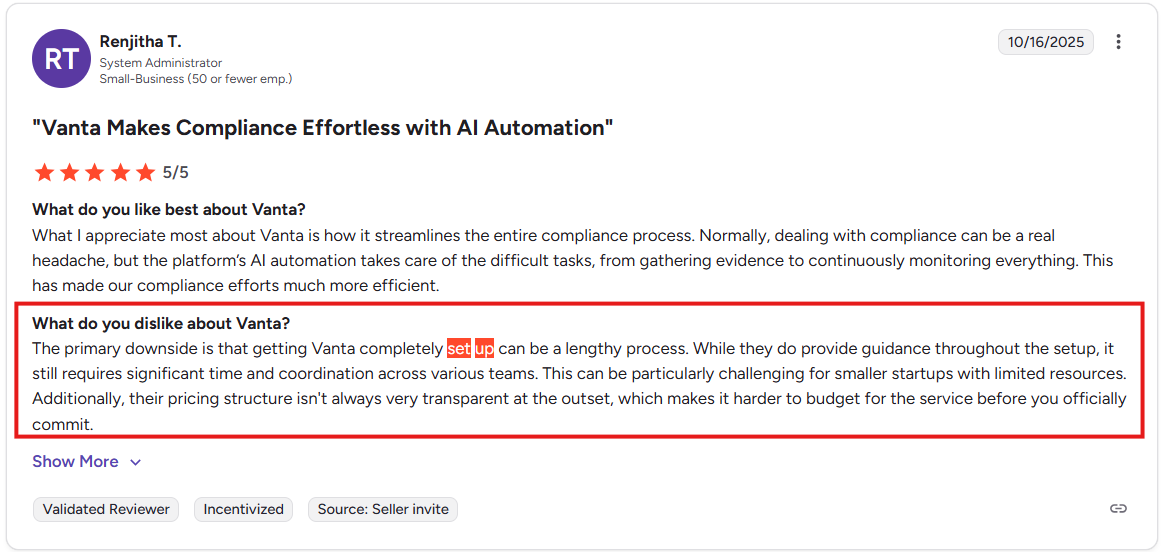
A health-tech startup used Vanta to make 30 policies in just two days. They saved time, cut back on legal work, and were ready for their audit faster. But the whole setup process takes a while, as stated by this Vanta user.
Still, don’t skip edits. Auditors may reject policies that sound too general.
3. Security questionnaire automation and exports
Sales teams often deal with security forms called questionnaires. These forms slow down deals. Vanta helps by saving answers, tagging them by topic, and filling out new forms like SIG or CAIQ automatically.
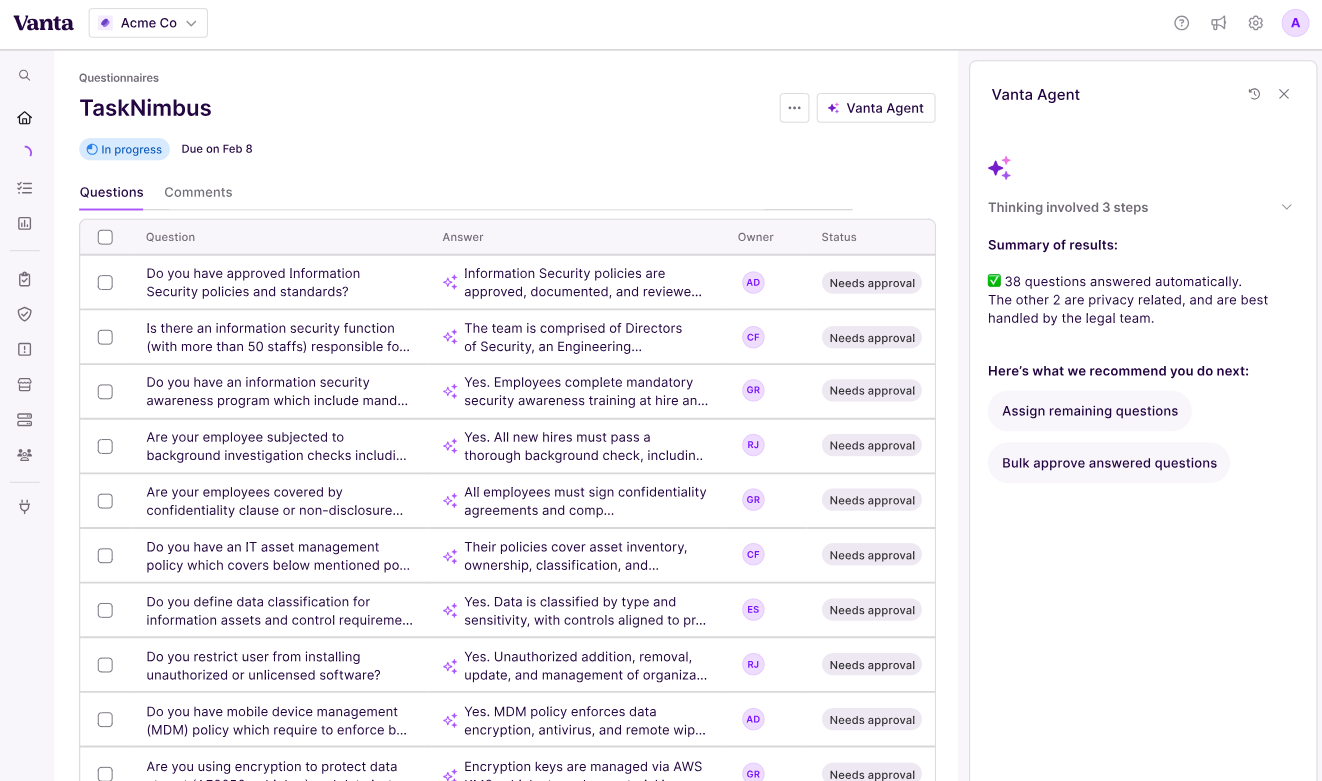
On Capterra, one user said Vanta cut their response time by 40%. But there’s a catch: if you pass a set number of questionnaires, Vanta bumps you to a higher (and more expensive) tier.
4. Access reviews and periodic certifications
Auditors want to see who can access your systems and why. Vanta shows a full list of users, their roles, and who approved their access. It also keeps a record with dates and notes.
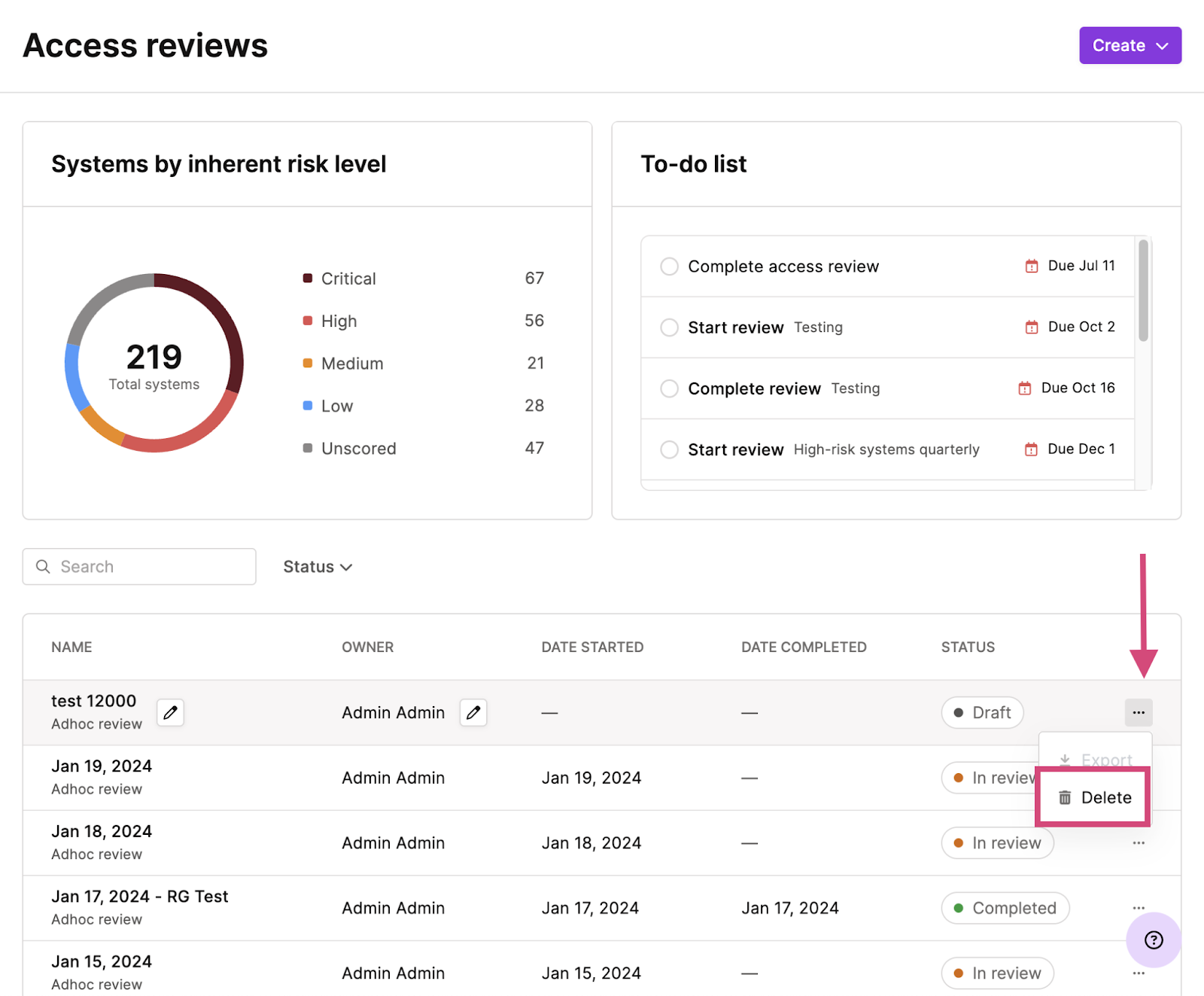
Several early-stage startups said this feature helped them pass SOC 2 access checks without spreadsheets. But make sure someone owns the task. If no one approves or removes users, reviews get stuck. Set a regular schedule. Once per quarter works well.
5. Vendor Risk Management overview and common use cases
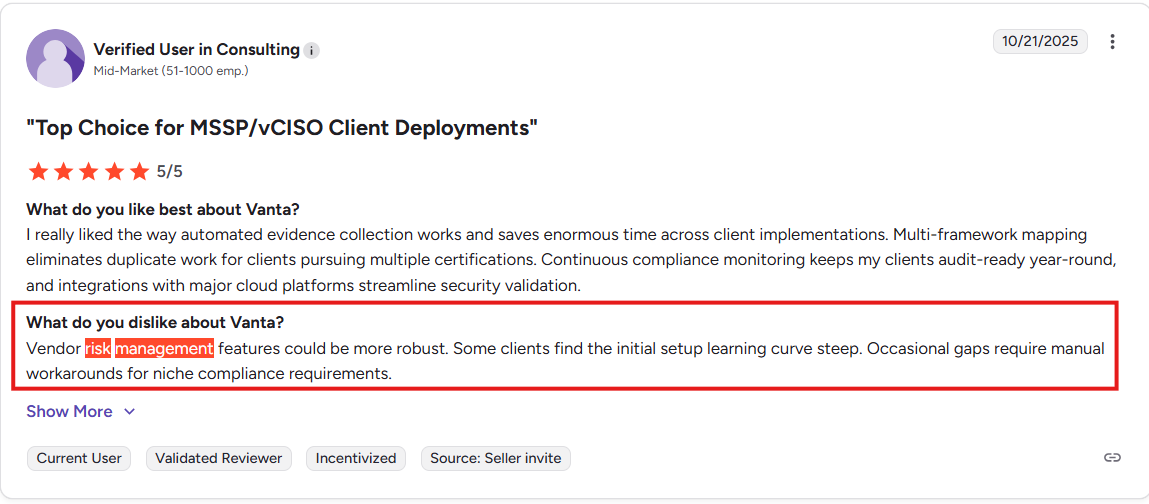
You need to track third-party tools, like HR platforms or email systems, that touch your data. Vanta’s vendor risk tool lets you tag vendors, send them forms, score their risk level, and assign follow-ups.
Use cases include:
- Classify vendors by data sensitivity and criticality.
- Trigger remediation tasks for high-risk answers.
- Schedule re-assessments on a cadence you can defend.
One SaaS company with 40+ vendors said they cut their review time in half using Vanta’s dashboard. But again, costs can rise. Each new vendor adds to your count, and going over the limit raises your price at renewal.
6. Trust Center and RFP support
The Trust Centre is a public webpage that shows your security status, like certifications, policies, and uptime. It’s easy to link in emails and RFPs. Buyers can verify your info fast, without long security calls.
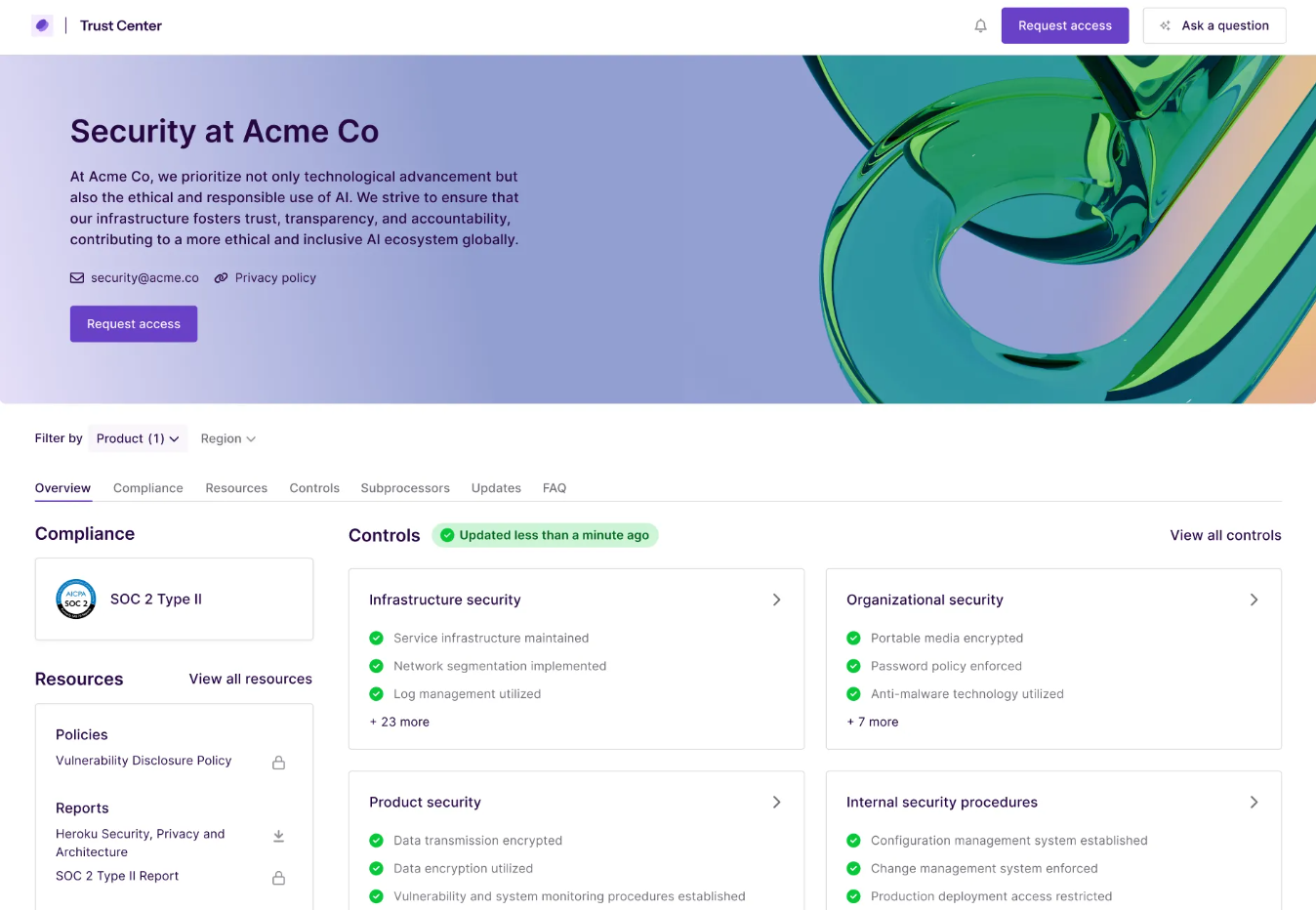
Vanta says companies with Trust Centres close deals 30% faster. But if the page is outdated, it can hurt your image. Be sure someone owns updates, especially before a new sales push.
Vanta Features in a Nutshell:
Next, you need clear pricing expectations. Understanding how usage maps to tiers will help you budget and avoid surprise upgrades.
How much does Vanta cost?
Vanta pricing starts from $10,000 and grows with your team and scope. Headcount triggers tier jumps. Adding frameworks like ISO or HIPAA increases coverage. Heavy questionnaire or vendor volumes can push you into higher modules.
Plan for growth you expect over the term. If hiring will double, model that. If questionnaires surge during enterprise sales, model that too. Accurate inputs protect your budget and prevent mid-term changes.
Typical tier ranges and common add-ons
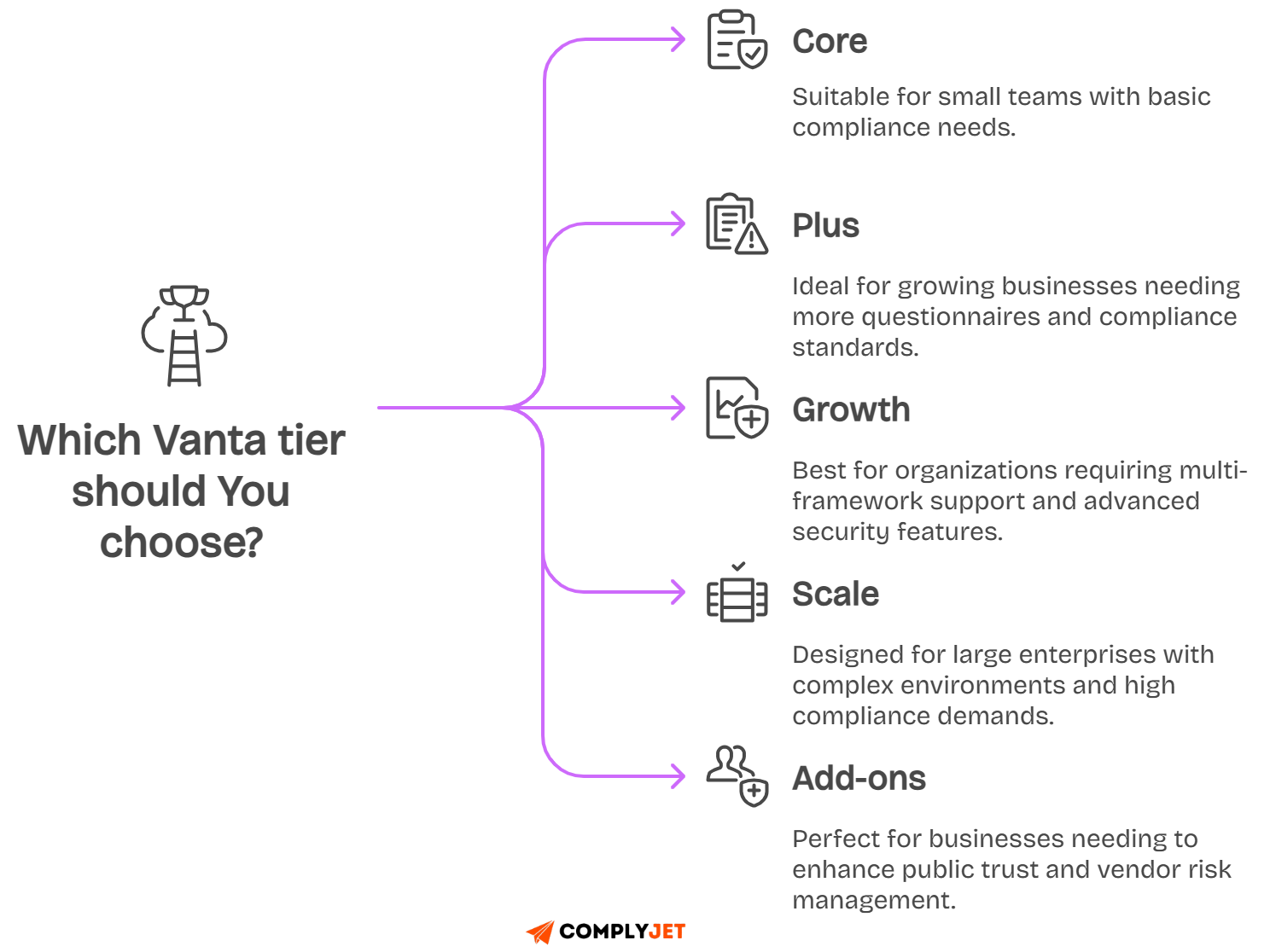
Entry tiers cover one framework and baseline monitoring. Mid tiers increase questionnaire limits, unlock access reviews, and add better role controls. Upper tiers support multiple workspaces and complex reporting.
To compare exact Prices by tiers, read: Vanta Pricing Guide 2025: Real Costs, ROI, and Hidden Fees
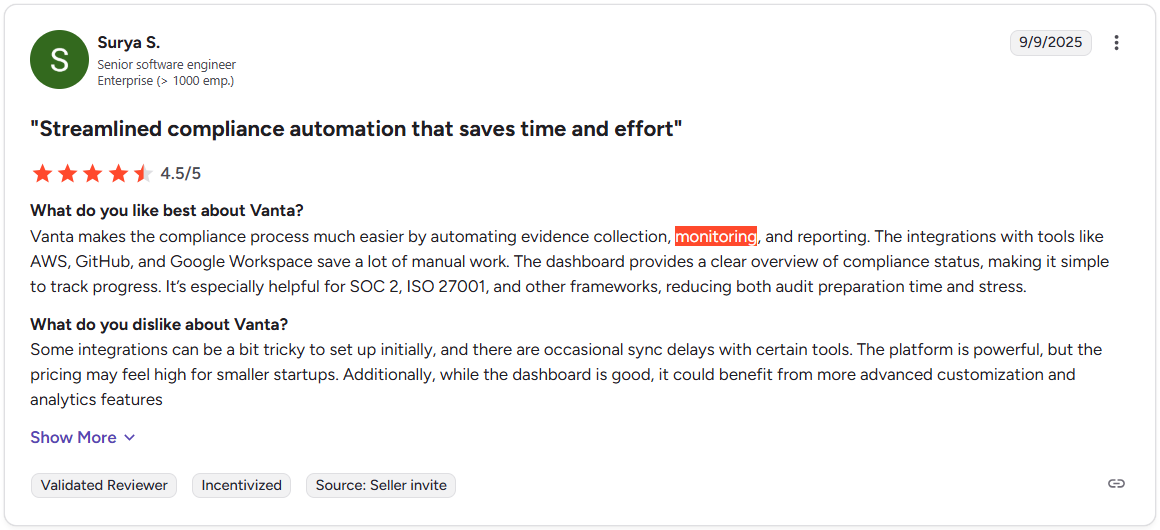
Here’s one of many verified user reviews from G2 reviews stating that Vanta is expensive.
Add-ons often drive total cost. Trust Center and vendor risk are common upgrades because buyers ask for them. If those are must-haves, include them in your first quote and compare bundles accordingly.
What is not included: audits and services
Subscription fees do not include third-party audits or penetration testing. Complex onboarding and custom integrations may need services. These items can be meaningful, so add them to your total cost model.
Ask each auditor for a scoped estimate. Align dates and deliverables with your internal plan. A realistic view prevents last-minute spending and keeps your executive team aligned on true program costs.
Simpler bundles and preferred auditor network
If you want predictable bundles with a vetted auditor network, ComplyJet keeps choices simple. You choose a scope, get white-glove help, and move to audit with fewer add-ons and fewer contracts to juggle.
As you compare, lock down renewal terms and usage limits. The next section on billing traps shows the clauses and caps that protect your budget over the full term.
The billing traps to watch and how to negotiate
You plan a Vanta GRC rollout to speed audits, then renewal language, usage caps, and hidden fees stretch the budget. Predictable compliance costs keep leadership calm, protect the runway, and avoid mid-term scope cuts that slow delivery.
Seeing the patterns early helps you compare apples to apples. You can weigh Vanta vendor risk management and questionnaire volume against tier limits, include auditor costs in totals, and keep negotiations focused on value, not surprise penalties.
Renewal notice periods and uplifts
Renewals hinge on notice windows. Many teams discover a 30-day clause too late, then auto-renew at higher list prices. Calendar reminders, legal reviews, and explicit non-auto-renewal terms prevent lock-ins that outlive your needs.
Uplifts can range sharply year over year. If your scope is stable, a rising fee erodes ROI. Seek written caps tied to a percent ceiling, align uplift timing with budgeting cycles, and request multi-year pricing that honors growth assumptions.
Usage-based caps for questionnaires and vendors
Questionnaire automation saves time until you cross the included limit. Sales spikes create a backlog, and you face a tier jump. Model your average and peak volumes, then price the buffer directly into your first-year quote.
Vendor counts rise with each integration and partner. Vanta vendor risk management adds value when scaled, yet per-vendor or tier thresholds shift cost. Classify vendors by sensitivity, decide who enters the system, and keep costs tied to impact.
Steps to estimate demand:
- Forecast peak questionnaire months by pipeline stage.
- Tally in-scope vendors by data sensitivity.
- Revisit totals quarterly against plan.
Marketplace or financing fees that inflate TCO
TCO means total cost of ownership, the full amount you pay over time. Look at subscription, setup, support, and any extra fees that show up later.
Marketplaces are cloud app stores like AWS or Azure. They feel easy and can use up your prepaid cloud credits, but their fees raise the total price. That extra cost is the premium, a convenience markup.
Make the convenience earn its keep. Compare a direct quote from the vendor to the marketplace total, which includes all fees. Choose the channel that gives you the best all-in price.
Financing platforms let you pay over time. This smooths cash flow, the timing of money in and money out, but added fees change the real price across the term.
Ask Finance to model both options. Weigh the cash benefit of easier payments against the fee load, every fee added up. Pick it only if the accounting gain is worth the higher lifetime cost.
Support tier differences that affect response times
Response times change outcomes during audits. If evidence syncing breaks during fieldwork, a slow queue risks deadlines. Match support SLAs to your risk tolerance, especially near audit windows and major releases.
Classify needs before purchase:
- Routine questions and bug fixes.
- Time-sensitive audit issues.
- Critical outages affecting exports.
Map each class to the SLA in writing, confirm escalation paths, and ensure named contacts exist when it matters.
8 negotiation points to include before signature:
With cost risks mapped, the next section explains the Vanta 2025 data breach in plain language, so you can assess Vanta's security posture with facts rather than headlines.
Vanta 2025 data breach: timeline, scope and remediation
In May 2025, a code update in Vanta’s system removed a safety filter that keeps customer data separated. This made it possible for limited data from one account to be seen by another. The issue was found quickly and rolled back within a day.
Vanta’s engineers investigated the cause, checked the impact, and restored safeguards. They also added new tests to make sure this type of mistake could not happen again. The company shared clear updates and guided affected customers through recovery steps.
Vanta handled the incident step by step. The error began with a faulty deployment and ended with a public report that explained everything openly. The table below shows the full timeline of what happened.
Timeline with deploy, detection, rollback and disclosure:
What data categories were affected, and what was not
Fewer than four percent of customers were impacted. The data that was exposed included usernames, role details, and MFA configuration types. No passwords, personal data, or API tokens were exposed.
Audit logs and user identifiers stayed secure. Even so, Vanta suggested rotating keys and checking access policies, since small pieces of metadata can sometimes help attackers if combined with other information.
Affected versus not affected data:
Remediation actions and new guardrails
After the rollback, Vanta improved its system to prevent similar issues. They added tests that block any code without tenant filters, and staging environments now simulate risky access patterns to catch them early.
Monitoring alerts were adjusted to detect strange data access within minutes. Incident playbooks were updated to include faster customer communication and guidance on secret rotation.
Guardrails added after the incident:
Buyer diligence checklist and questions for your rep
You want confidence that isolation and monitoring will hold under change. Ask how tenant filters are enforced, how tests gate deploys, and how long it takes to detect and roll back production defects during busy release periods.
Request evidence that new controls are working:
- Recent test results for tenant isolation.
- Alert audit showing time from detection to rollback.
- Sample customer notifications and rotation guidance.
- Confirmation that secrets in your integrations were refreshed.
If you are already a customer, rotate these secrets and confirm these tests:
With the incident context clear and Vanta security guardrails explained, you can weigh benefits against risk with real information.
Next, let’s move into real Vanta reviews from Reddit, G2, and Capterra to see how these controls feel in daily use.
Real Vanta reviews: Reddit, G2, Capterra, Gartner Peer Insights
Across recent Vanta reviews, teams highlight time saved, cleaner exports, and integrations that align with real auditor requests. Deals move with fewer engineering interruptions, and onboarding feels predictable when AWS, identity, and device checks light up quickly.
Vanta is rated a 4.6 out of 5 on G2 reviews. Most users report ease of use, but the main issue is pricing. Users find Vanta expensive and expect improvements in the integrations.
Here’s a verified review from G2 that states that Vanta’s integrations are not quite up to the standard as the rest:

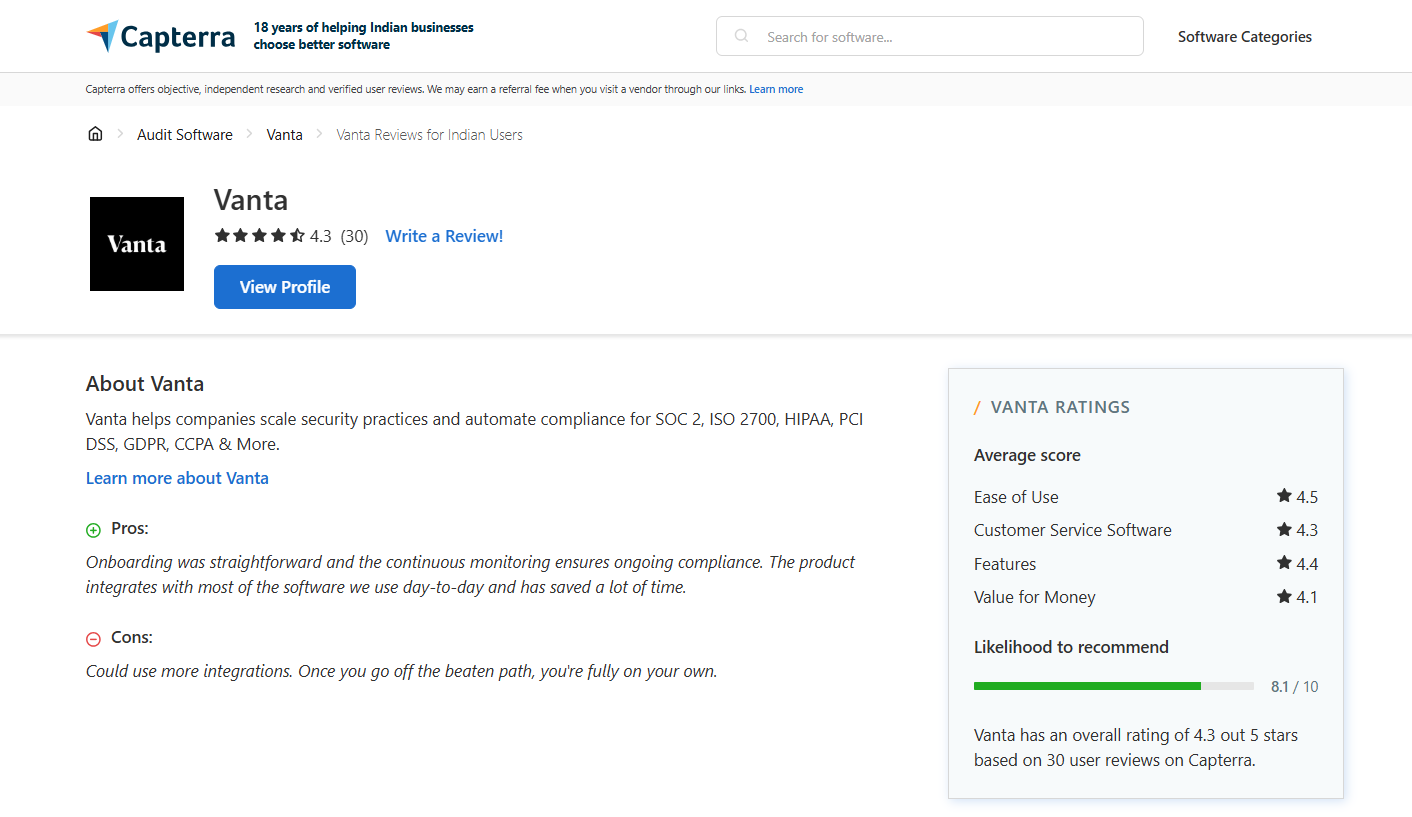
Capterra rates Vanta 4.3 out of 5 and mentions the same issues regarding integrations and pricing caps.
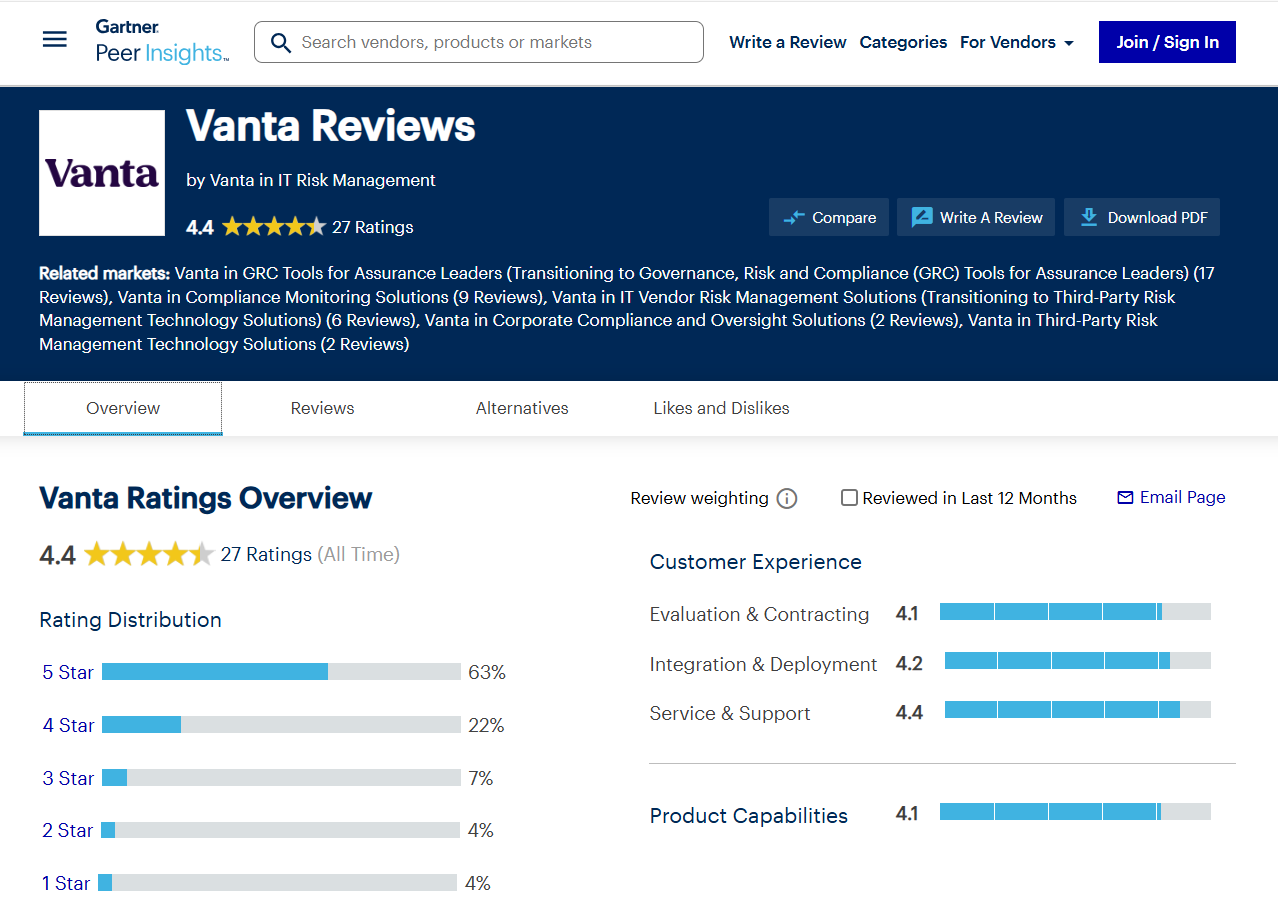
Gartner rates Vanta a 4.4 out of 5. Users appreciate how Vanta simplifies compliance, but at the same time, they feel the need to switch due to its cost and limited customer support.
What users consistently dislike or warn about
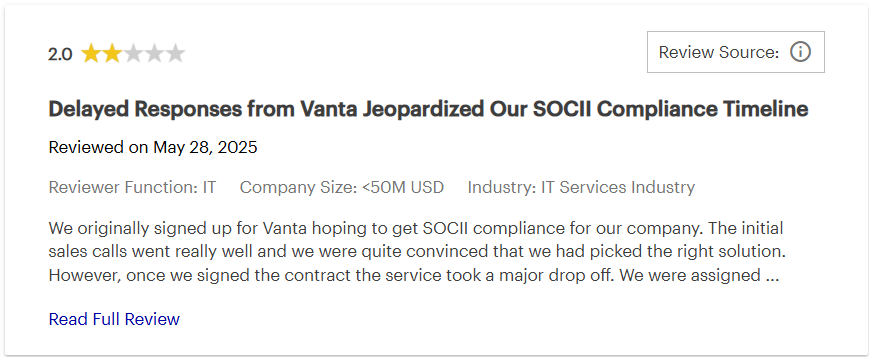
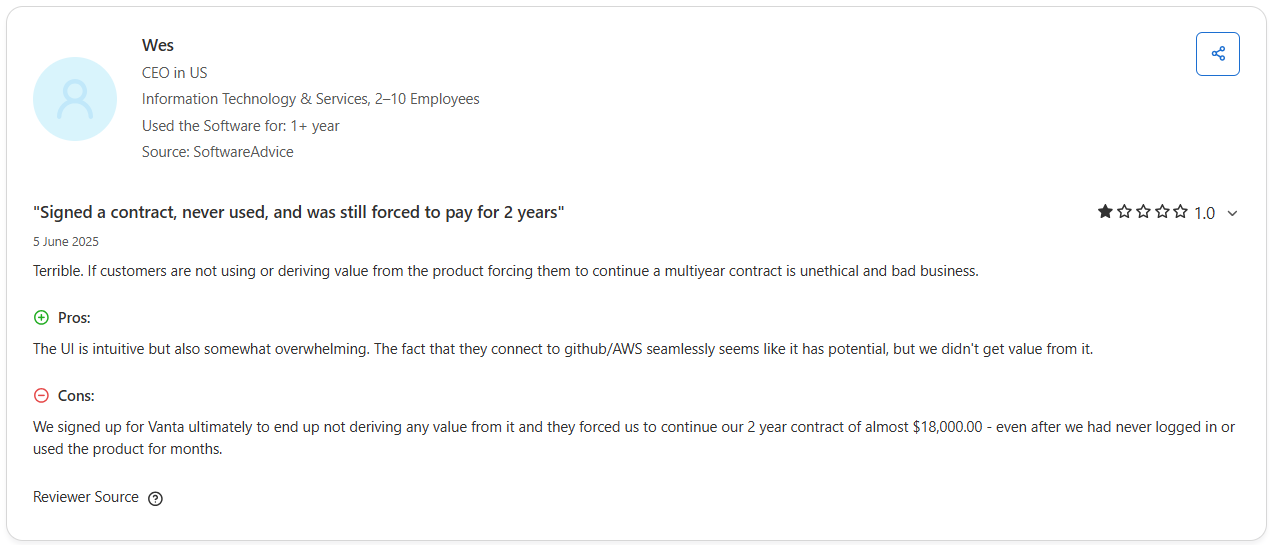
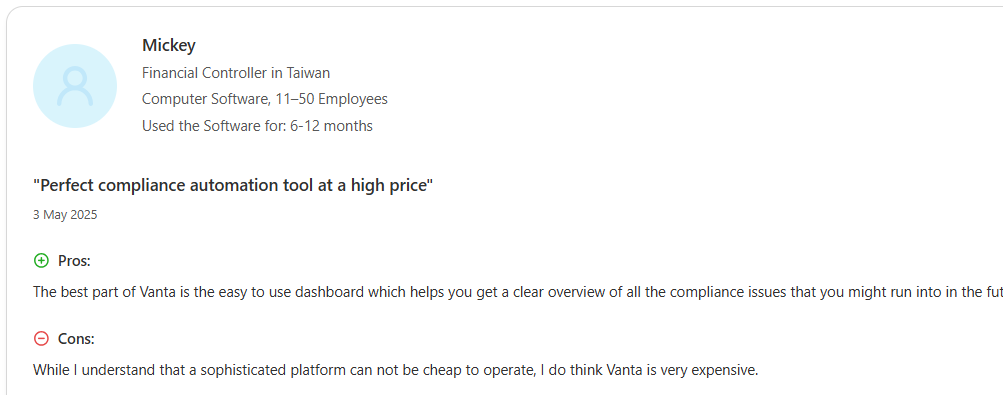
Recurring pain points appear across Vanta G2, Capterra, Gartner, and Reddit threads. Renewals surprise teams, questionnaire caps trigger upgrades, vendor thresholds raise cost, and strict evidence formats or sync delays create friction during audits.
Here are a few Vanta reviews by real Vanta users that highlights the common issues faced by the customers:

Patterns by company size and framework mix
Smaller teams praise speed to a first SOC 2, since the stack is simple and vendor lists are short. But mostly, they receive less support and struggle with the renewal processes as Vanta now tends to enterprises more.

Mid-market programs see value in multi-framework coverage, yet they collide with questionnaire and vendor thresholds earlier in the contract. Most enterprises don’t see value for the high price, as highlighted by this verified Vanta user.
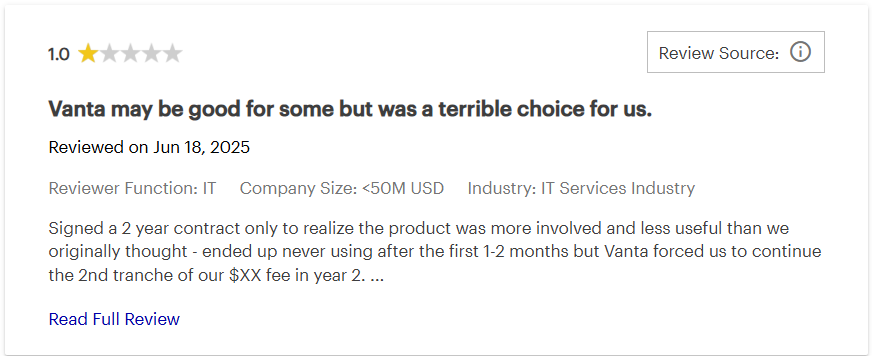
Major Vanta review pain point and alternatives:
With platform-specific screenshots queued to each theme, you can distill the story into a clear pros and cons view that ties benefits to outcomes and costs to concrete limits.
Vanta Pros and Cons Analysis: Is It Worth It?
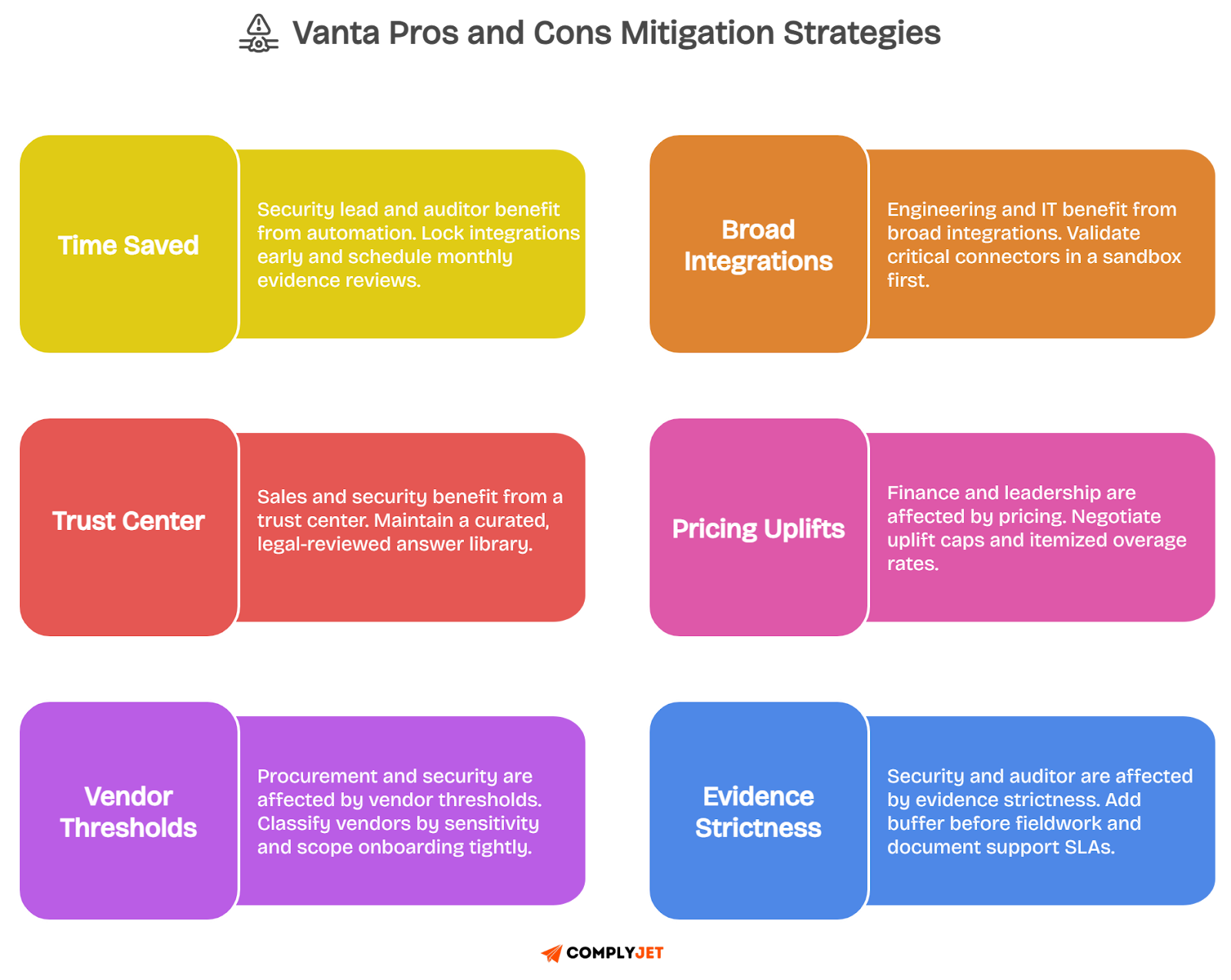
You care about outcomes you can measure, so here is how the core pieces perform in real teams like yours. The upsides explain why buyers shortlist Vanta, and the watchouts explain the threats that become costs if ignored.
Automation and continuous monitoring
You gain steady control over operations, fewer screenshot hunts, and evidence that stays current between audits. Fieldwork starts on time, engineers keep building product, and you stop firefighting compliance every quarter.
You will still tune alerts and ownership. If checks are noisy or shallow in edge systems, teams ignore them and drift returns. Monthly hygiene reviews and clear thresholds keep automation helpful rather than distracting.
Integrations and coverage
Breadth is a real strength. Connectors across AWS, identity, code, and devices mirror auditor questions, so your control tests reflect how your stack actually works, which reduces glue work and internal status meetings.
Depth varies by connector and by custom setups. Validate critical fields in a sandbox, document any manual bridges, and revisit coverage when new tools enter scope. This keeps surprises from landing during fieldwork.
Policy builder and control mapping
The AI policy builder gets you moving. Drafts map to controls, version history stays clean, and walkthroughs become simpler because intent and operation line up in one view that auditors can follow without confusion.
Drafts need your voice and your systems. If you never edit, language feels generic, and auditors notice. Add system specifics, tie policies to real workflows, and set a review cadence that reflects how you change.
Access reviews and periodic certifications
Access reviews shine when scoped by system and role. You produce dated attestations with approvers and reasons, dormant accounts disappear, and least privilege becomes something you can prove in minutes.
The pain shows up when ownership is fuzzy. Tickets stall, evidence fragments across tools, and cycle time drifts upward. Assign owners per system, automate deprovisioning where possible, and dry run exports before fieldwork.
Security questionnaires and exports
Answer reuse cuts hours from every RFP cycle, exports match what buyers expect, and your legal-reviewed library keeps tone consistent, which prevents back and forth that slows deals at the finish line.
Volume caps matter during busy quarters. Enterprise pushes can exhaust included questionnaires and trigger tier jumps. Track quarterly counts, keep a prioritized answer set, and budget a buffer for seasonal spikes.
Vendor Risk Management
Centralizing vendor reviews next to first-party controls is powerful. You tell one story with ratings, questionnaires, and remediation tasks, and auditors see a coherent process rather than scattered spreadsheets.
Cost scales with vendor count and sensitivity. If every supplier enters the system, budgets drift. Classify vendors by data risk, onboard only the ones that touch sensitive data, and re-assess on a sensible cadence.
Trust Center and buyer experience
A solid Trust Center shortens security reviews. Prospects self-serve certifications, uptime notes, and selected policies, which build confidence before procurement books a call and keeps sales momentum intact.
Stale or vague artifacts create doubt. Show dates, scope, and links to real documents, assign owners for updates, and align the page with your contract promises so the story your buyer sees matches reality.
Pricing, scalability, and total cost
Pricing aligns with headcount, frameworks, questionnaires, and vendors, which can be fair when modeled honestly. Multi-year caps and itemized add-ons keep total cost predictable and defensible in budget meetings.
Surprises happen when growth outpaces assumptions. Vendor sprawl, questionnaire spikes, or new frameworks cause mid-term upgrades. Model peaks, cap uplifts in writing, and confirm overage rates before signature.
Support, onboarding, and reliability
Clear SLAs and named contacts matter during audits. When integrations hiccup, fast triage preserves timelines, and onboarding feels smooth when responsibilities are explicit and success criteria are visible on a simple checklist.
Inconsistent response times create stress. If tickets linger during fieldwork, confidence drops. Map issue severities to SLAs, rehearse a dry run two weeks pre-audit, and track time to first response to keep expectations grounded.
Main pros and cons at a glance:
You now have a crisp view of where Vanta delivers value and where costs or limits appear. Next, we can look at some Vanta alternatives to choose from that will suit your team better.
You now have a clear view of where Vanta delivers and where costs or limits appear. Next, we break down access reviews, questionnaire automation, and vendor risk workflows, so you can see how these choices play out on a day-to-day basis.
Vanta vs alternatives: Drata, Secureframe, ComplyJet
If you want broad automation across many frameworks with a familiar auditor workflow, Vanta fits well.
If you prefer developer-first workflows and sleek UI, Vanta vs Drata often comes down to taste and specific integrations rather than outcomes.
If you need GRC-wide governance and privacy tooling, Vanta vs OneTrust tilts toward OneTrust for breadth.
If you need straightforward onboarding and services-heavy help, Vanta vs Secureframe can favor Secureframe for guided hand-holding.
For lean budgets and speed, many Vanta alternatives include ComplyJet.
Auditor network and evidence handling differences
Auditor familiarity reduces friction. Vanta and Drata exports are widely recognized, which helps during fieldwork. Evidence handling is similar in structure, yet mapping depth and policy links vary, so sample exports before you commit.
OneTrust brings stronger governance templates, but it can feel heavier for the first SOC 2. Secureframe leans into services, which helps thin teams. ComplyJet pairs automation with a preferred auditor network, which compresses scheduling and shortens engagement cycles for first-time programs.
Why founder-led teams often pick ComplyJet for their first SOC 2
Founder-led teams want clean scope, fast progress, and predictable cost. ComplyJet bundles audit-ready workflows with white-glove support and vetted auditors, which avoids multi-vendor coordination and keeps your calendar focused on product and deals.
When time-to-logo matters more than framework count, a simpler path wins. You connect core systems, follow a short working plan, and move to audit in weeks. This is why early-stage teams often shortlist ComplyJet.
Also Read: Top 15 Vanta Competitors & Alternatives in 2025: Complete Comparison Guide (With Pricing & Features)
With fit by use case, budget, and evidence handling in view, you can shortlist with confidence and proceed to pricing details and renewal terms without unwanted surprises.
When Vanta is worth it, and when to pick ComplyJet
You want a clear split that you can defend in a meeting. This part of the Vanta review shows when Vanta fits, and when founders pick ComplyJet for speed, simpler pricing, and a tighter audit runway.
Clear triggers that justify Vanta
Choose Vanta when you run multiple frameworks, expect heavy questionnaire volume, and need broad integrations with internal GRC oversight. Large vendor populations, multi-workspace orgs, and an in-house security team align with what Vanta reviews describe as Vanta’s sweet spot.
It also fits when executives want a branded Trust Center, questionnaire reuse at scale, and deep exports that auditors already recognize. If you plan to expand frameworks over the next year, the platform’s automation justifies the modular price.
Clear triggers that favor ComplyJet for speed and predictability
Pick ComplyJet when your priority is a first SOC 2, a lean team, and a short road to buyer confidence. Predictable bundles, a preferred auditor network, and white-glove help compress scheduling, keep scope tight, and reduce coordination risk.
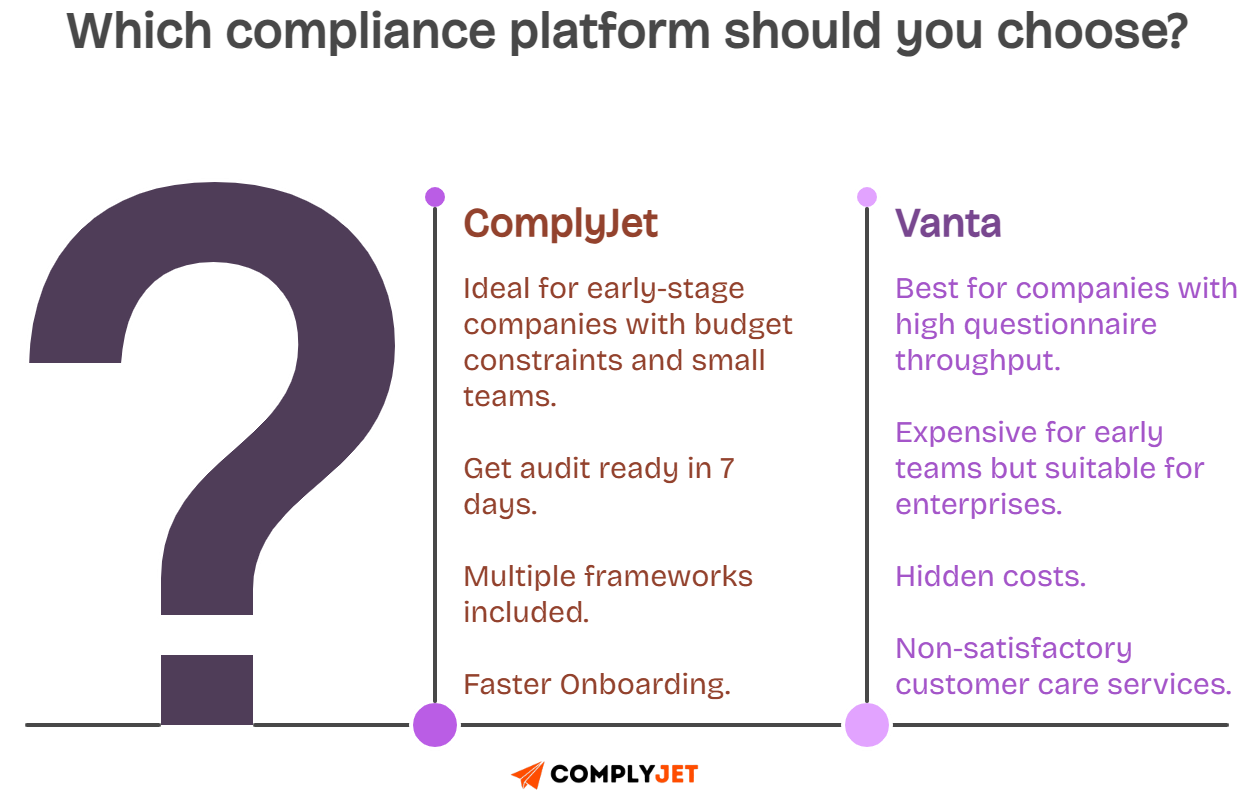
ComplyJet also suits founders who want fewer add-ons, budget certainty with hands-on sessions that turn controls into checklists you can close in days.
If time to revenue matters more, ComplyJet is the faster lane.
The next step is locking in terms you can live with for a year. The buyer’s checklist below turns those signals into contract, security, and implementation items you can verify.
Buyer’s checklist
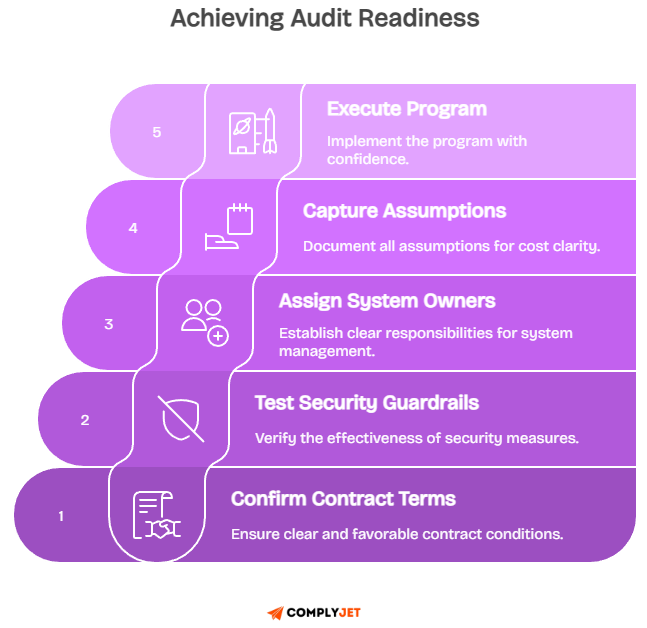
You want a decision you can defend to your finance and your auditor. Use this checklist to confirm contract terms, test security guardrails, and assign owners, then capture assumptions in a simple worksheet for total cost clarity.
Contract and renewal terms to confirm
Confirm a written renewal notice window of at least sixty days, an annual uplift cap, and itemized overage rates for questionnaires and vendors. Lock support SLAs by severity, list marketplace or financing fees, and document exit assistance for data export.
Capture limits on modules and workspaces, define when tier thresholds apply, and align contract dates to your audit calendar. Clear terms reduce mid-term surprises and protect the budget when hiring or sales spikes change usage.
Security diligence items post-breach
Ask for evidence of tenant-isolation tests, staging chaos checks, and alert thresholds that flag cross-tenant reads in minutes. Review the time from detection to rollback in recent incidents, and sample customer notices to confirm practical guidance and rotation steps.
Verify that your integrations can rotate secrets quickly, that admin MFA is enforced and attested, and that access reviews catch role drift. These controls prove the platform’s guardrails work when code or configuration changes.
Implementation plan and ownership map
Assign system owners for identity, cloud, code, devices, and vendors. Set a weekly evidence review rhythm, a monthly hygiene window for failed controls, and a quarterly access review cycle with approvers and exception timers that expire.
Define who drafts policies, who signs questionnaires, and who manages the Trust Center. Run a dry-run export two weeks before fieldwork, confirm auditor format expectations, and keep one shared log of decisions, tickets, and dates.
With owners named and numbers clear, you can execute the program without budget shocks or audit surprises.
FAQs
Is Vanta a full GRC platform or focused on compliance automation?
Vanta is focused on compliance automation. You get continuous control checks, evidence collection, policies, access reviews, questionnaires, and basic vendor risk. It is lighter than enterprise GRC suites that manage broad governance, risk, and privacy programs.
If you need deep enterprise workflows like policy attestations across thousands, regulatory change management, and complex risk registers, compare Vanta with larger GRC platforms. Many teams pair Vanta automation with simple governance in Jira or Notion.
Does Vanta include the auditor or penetration testing in its price?
Vanta subscriptions usually exclude the external auditor and penetration testing. Those are separate services with their own statements of work and timelines, which is why the total program cost is higher than the software fee.
You can source auditors through the vendor’s partner network or use your own. Include audit and pentest quotes in your budget so finance sees the full picture and your Vanta review reflects the real total cost.
How do periodic access reviews differ from continuous monitoring?
Continuous monitoring watches for drift every day. It flags missing MFA, risky roles, or unmanaged devices. It keeps your environment honest between audits while engineers continue shipping features without constant checklist work.
Periodic access reviews are scheduled certifications where system owners approve or remove access with reasons. Auditors look for dated attestations and completed removals. You need both to prove least privilege in practice and on paper.
Periodic vs continuous checks:
What is the difference between the Vanta Trust Page and the Trust Report for prospects?
The Vanta Trust Page is a public portal that shares certifications, uptime notes, and selected policies. It helps buyers verify basics during early security reviews without long email threads or meetings.
The Vanta Trust Report is deeper. It maps controls, shows evidence freshness, and can include scoped documents under NDA. Prospects use it late in the cycle to close security questions and align on audit scope.
Can Vanta automate access reviews across Okta, Google Workspace, AWS, and GitHub reliably?
Yes, if integrations are healthy and owners are assigned. The tool pulls rosters from Okta and Google Workspace, maps AWS roles and GitHub teams, and presents a clean list for attestations with keep or remove decisions.
Edge cases appear with service accounts and legacy groups. Maintain clear ownership, document exceptions with expiry dates, and sample high-risk roles more often. That combination satisfies auditors and keeps reviews quick.
Which integrations matter most for HIPAA, and how to align Jira workflows?
For HIPAA, identity, device encryption, backups, logging, and incident response matter. Integrations with Okta or Google Workspace, your MDM, cloud logs, and ticketing provide the evidence auditors expect under the Security Rule.
Align Jira by using simple project templates:
- Incident tickets with severity and timestamps.
- Change tickets with approvals and rollbacks.
- Risk tickets with owner and review date.
This keeps HIPAA artifacts traceable and easy to export.
Where is Vanta based?
The company is headquartered in San Francisco and hires across multiple regions. Addresses and office details can change, and hiring footprints expand with growth, so always confirm the current information on the official site.
For due diligence, review the public company page and careers listings. You will see location mix, open roles, and signals about support coverage hours, which matter during audit windows.
How do questionnaire limits compare to enterprise RFP volumes?
Plans include capped annual questionnaire responses. Enterprise RFP cycles often exceed those allowances during quarter ends, especially with SIG, CAIQ, and custom addenda, which is when teams consider higher tiers or pre-negotiated overage rates.
Track your average and peak volumes, then match them to plan limits. If your pipeline is spiky, secure written overage pricing to avoid tier jumps that land mid-term and disrupt budgets.
Throughput planning:
Best Vanta alternatives for startups under 50 employees?
Shortlist ComplyJet, Drata, and Secureframe. ComplyJet focuses on fast first SOC 2 with predictable bundles and a preferred auditor network. Drata leans developer-friendly. Secureframe pairs software with services if you want extra handholding.
Pick by budget, timeline, and team capacity. If speed to revenue matters, tighter bundles and live working sessions help. If you want to standardize across multiple frameworks early, test automation depth first.
How does Vanta relate to the Gartner Magic Quadrant for GRC tools?
Gartner’s Magic Quadrant typically evaluates enterprise risk and GRC platforms. Vanta is a compliance automation platform focused on controls, evidence, access reviews, questionnaires, and light vendor risk, which is a different slice of the market.
When you compare, use Gartner Peer Insights for hands-on feedback and treat your Vanta reviews as a separate lens. Many teams pair a light governance process with Vanta rather than deploying a full GRC suite on day one.
Conclusion
You came here for a clear Vanta review, and the story is consistent across real Vanta reviews. Automation and broad integrations can lift the heavy parts of compliance, but pricing levers, renewal terms, and usage caps decide your true experience.
If your world includes multiple frameworks, constant questionnaires, and a large vendor footprint, Vanta will likely fit, especially with tuned alerts and a strong Trust Center.
If you need a fast first SOC 2 with a lean team and a fixed budget, ComplyJet’s predictable bundle and preferred auditor network keep momentum without contract puzzles.
The 2025 incident reinforces one habit. Verify tenant isolation tests, alert audits, and key rotation steps, then align evidence exports with what your auditor expects. Good diligence turns headlines into concrete guardrails you can trust.
Your plan should be simple. Lock renewal caps, itemize add-ons, model questionnaire, and vendor peaks. Assign owners for identity, cloud, code, devices, and vendor risk, then run a monthly hygiene review so fieldwork starts clean.
Pick the tool that matches your stage, your framework count, and your tolerance for variable cost. Choose the path that gets you to signed deals faster while keeping security real for your customers and simple for your team.
Start ComplyJet’s free trial to witness how efficient it can be for your team!